
1. Introducción
This manual provides detailed instructions for the setup, operation, maintenance, and troubleshooting of your new Acer Nitro KG241Y Sbiip 23.8-inch Full HD VA Gaming Monitor and PNY CS900 500GB 3D NAND 2.5" SATA III Internal Solid State Drive. Please read this manual thoroughly before using the products to ensure proper installation and optimal performance.
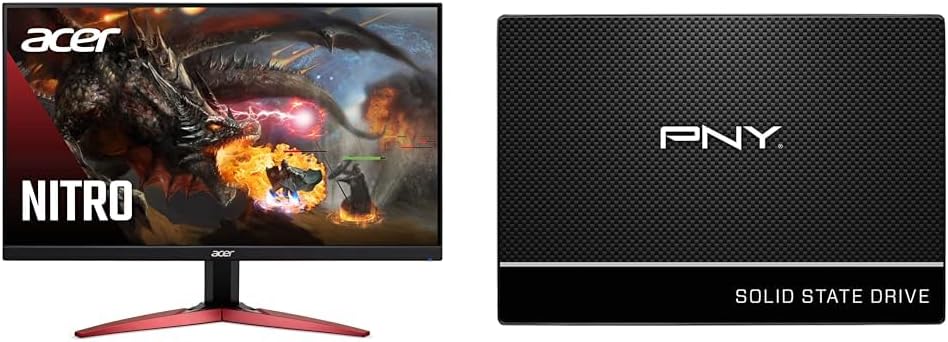
Image 1.1: The Acer Nitro KG241Y Gaming Monitor and PNY CS900 Solid State Drive.
2. Componentes del producto
2.1 Acer Nitro KG241Y Gaming Monitor
The monitor package typically includes the following items:
- Acer Nitro KG241Y Monitor Display Panel
- Soporte para monitor (base y mástil)
- Cable de alimentación
- Cable DisplayPort
- Cable HDMI (puede variar según la región)
- Manual de usuario (este documento)
- Tarjeta de garantía

Image 2.1: The Acer Nitro KG241Y Gaming Monitor with its distinctive stand.
2.2 PNY CS900 500GB SSD
The SSD package typically includes:
- PNY CS900 500GB 2.5" SATA III Solid State Drive
- Quick Start Guide (often digital or minimal physical copy)
Note: SATA data and power cables are typically not included with the SSD and must be purchased separately or sourced from your computer's existing components.

Image 2.2: The PNY CS900 500GB Solid State Drive.
3. Instrucciones de configuración
3.1 Acer Nitro KG241Y Monitor Setup
- Desembalaje: Carefully remove all components from the packaging. Retain the packaging for future transport or service.
- Montar el soporte:
- Attach the monitor neck to the display panel.
- Secure the base to the neck using the provided screw.
- Conectar cables:
- Connect one end of the DisplayPort or HDMI cable to the corresponding port on the monitor and the other end to your computer's graphics card. The monitor supports 1 x DisplayPort 1.2 and 2 x HDMI 2.0 inputs.
- Conecte el cable de alimentación a la entrada de energía del monitor, luego conecte el otro extremo a una toma eléctrica con conexión a tierra.
- Encendido: Press the power button on the monitor. Power on your computer. The monitor should automatically detect the input signal.
- Configuracion inicial:
- Ensure your computer's display resolution is set to 1920 x 1080 for optimal clarity.
- Verify the refresh rate is set to 165Hz in your operating system's display settings for the smoothest gaming experience.
- If your graphics card supports AMD FreeSync Premium, ensure it is enabled in your graphics card control panel for tear-free gaming.
3.2 PNY CS900 SSD Installation
Before installation, ensure your system has a compatible 2.5-inch drive bay and available SATA data and power connectors.
- Prepare su sistema: Apague la computadora y desconecte todos los cables. Abra la carcasa.
- Localizar bahía de unidad: Identify an available 2.5-inch drive bay. For laptops, this is typically where the existing hard drive is located.
- Instalar SSD: Slide the PNY CS900 SSD into the drive bay. Secure it with screws if necessary.
- Conectar cables:
- Connect a SATA data cable from the SSD to an available SATA port on your motherboard.
- Connect a SATA power cable from your power supply unit to the SSD.
- Cerrar la caja y encender: Cierre la carcasa del ordenador y vuelva a conectar todos los cables. Encienda el ordenador.
- Inicializar y formatear (nueva instalación):
- For Windows: Go to Disk Management, find the new SSD, initialize it (GPT for modern systems), and create a new simple volume.
- For macOS: Use Disk Utility to erase and format the drive.
- Operating System Migration (Optional): If you intend to replace your existing boot drive, you will need to clone your operating system to the SSD or perform a fresh installation. Refer to your operating system's documentation or PNY's support resources for detailed migration guides.

Image 3.1: The PNY CS900 SSD, ready for installation.
4. Instrucciones de funcionamiento
4.1 Acer Nitro KG241Y Monitor Operation
The monitor features an On-Screen Display (OSD) menu for adjusting various settings. The control buttons are typically located on the back or bottom right of the monitor.
- Navegación OSD: Use the joystick or dedicated buttons to navigate through the OSD menu.
- Configuración de imagen: Adjust brightness, contrast, gamma, color temperature, and various picture modes (e.g., Standard, Graphics, Movie, Game).
- Selección de entrada: Manually switch between DisplayPort and HDMI inputs if the auto-detection does not select the correct source.
- Características del juego:
- Premium de AMD FreeSync: Ensures smooth, tear-free gaming by synchronizing the monitor's refresh rate with your graphics card's frame rate. Enable this in both the monitor's OSD and your graphics card's control panel.
- Mejora de la respuesta visual (VRB): Reduces motion blur by rapidly turning the backlight on and off. This feature may reduce overall brightness.
- Frecuencia de actualización: The monitor supports up to 165Hz refresh rate for fluid motion.

Image 4.1: AMD FreeSync Premium technology provides smooth, tear-free gaming.

Image 4.2: The monitor's 165Hz refresh rate enhances gaming fluidity.
4.2 PNY CS900 SSD Operation
Once installed and formatted, the PNY CS900 SSD operates like any other storage drive. Its primary advantage is significantly faster data access speeds compared to traditional hard disk drives.
- Uso general: Use the SSD for your operating system, frequently accessed applications, and games to benefit from faster boot times and quicker loading.
- Actuación: The CS900 offers sequential read speeds up to 550MB/s and sequential write speeds up to 500MB/s. Actual performance may vary based on system configuration and workload.
- Comando TRIM: Modern operating systems automatically manage the TRIM command, which helps maintain the SSD's performance over time by optimizing data deletion.
5. Mantenimiento
5.1 Acer Nitro KG241Y Monitor Maintenance
- Limpieza de la pantalla:
- Apague el monitor y desenchufe el cable de alimentación.
- Gently wipe the screen with a soft, lint-free cloth. For stubborn marks, use a screen-specific cleaning solution applied to the cloth (never directly to the screen).
- Evite utilizar productos químicos agresivos, limpiadores abrasivos o soluciones a base de alcohol.
- Limpieza de la Casing: Utilice un paño suave y seco.amp cloth to wipe the monitor casing.
- Ventilación: Asegúrese de que las aberturas de ventilación del monitor no estén bloqueadas para evitar el sobrecalentamiento.
5.2 PNY CS900 SSD Maintenance
- Evitar la desfragmentación: Unlike HDDs, SSDs do not benefit from defragmentation. In fact, it can reduce the lifespan of the drive. Modern operating systems automatically optimize for SSDs.
- Mantener espacio libre: It is recommended to keep at least 10-15% of the SSD's capacity free to allow for optimal performance and wear leveling.
- Actualizaciones de firmware: Periodically check the PNY website for any available firmware updates for your CS900 SSD. Firmware updates can improve performance, stability, and compatibility.
6. Solución de problemas
6.1 Acer Nitro KG241Y Monitor Troubleshooting
| Problema | Posible causa | Solución |
|---|---|---|
| No hay imagen en la pantalla | Cable de alimentación desconectado; Cable de vídeo desconectado; Entrada incorrecta seleccionada. | Check power and video cable connections. Press the input select button on the monitor to cycle through inputs. |
| La imagen está borrosa o distorsionada. | Resolución incorrecta; Problema con el cable. | Set display resolution to 1920 x 1080. Ensure video cable is securely connected. Try a different cable. |
| Parpadeo o desgarro durante el juego | AMD FreeSync Premium not enabled or configured. | Ensure FreeSync is enabled in the monitor OSD and your graphics card control panel. Update graphics drivers. |
| No sound (if external speakers connected to PC) | Audio output not selected correctly on PC. | Ensure your PC's audio output is set to your speakers or headphones, not the monitor (as this monitor does not have built-in speakers). |
6.2 PNY CS900 SSD Troubleshooting
| Problema | Posible causa | Solución |
|---|---|---|
| SSD no detectado por el sistema | Loose cables; Incorrect BIOS/UEFI settings; Drive not initialized. | Check SATA data and power cable connections. Verify SATA port is enabled in BIOS/UEFI. Initialize the drive in Disk Management (Windows) or Disk Utility (macOS). |
| Rendimiento lento | TRIM not enabled; Drive nearly full; SATA port speed mismatch. | Ensure OS is managing TRIM. Keep sufficient free space. Verify SSD is connected to a SATA III (6Gb/s) port. Update SATA drivers. |
| Operating system fails to boot from SSD | Boot order incorrect; OS not properly installed/cloned. | Check boot order in BIOS/UEFI. Re-install or re-clone the operating system. |
7. Especificaciones
7.1 Acer Nitro KG241Y Monitor Specifications
- Tamaño de pantalla: 23.8 pulgadas
- Tipo de panel: VA
- Resolución: Full HD (1920 x 1080)
- Frecuencia de actualización: 165 Hz
- Tiempo de respuesta: 1 ms (VRB)
- Relación de aspecto: 16:9
- Saturación de color: NTSC 72%
- Entradas de video: 1 DisplayPort 1.2, 2 HDMI 2.0
- Tecnología Adaptive Sync: AMD FreeSync Premium
- Diseño: Diseño ZeroFrame
- Montaje: VESA Compatible (100 x 100mm)
- Ergonomía: Inclinación (-5° a 15°)
7.2 PNY CS900 500GB SSD Specifications
- Capacidad: 500 GB
- Factor de forma: 2.5 pulgadas
- Interfaz: SATA III (6 Gb/s)
- NAND Type: Memoria NAND 3D
- Velocidad de lectura secuencial: Hasta 550 MB/s
- Velocidad de escritura secuencial: Hasta 500 MB/s
- Durabilidad: No moving parts, highly durable
8. Garantía y soporte
8.1 Acer Product Warranty
Acer products typically come with a limited warranty. Please refer to the warranty card included with your monitor or visit the official Acer website for detailed warranty terms and conditions specific to your region and model (UM.QX1AA.S01).
Soporte de Acer: Para obtener asistencia técnica, descargas de controladores o consultas de servicio, visite el soporte oficial de Acer. websitio o póngase en contacto con su servicio de atención al cliente.
https://www.acer.com/us-en/support
8.2 PNY Product Warranty
The PNY CS900 SSD typically comes with a 3-year limited warranty. For specific warranty details and terms, please refer to the documentation included with your SSD or visit the official PNY websitio.
PNY Support: For technical support, product registration, or warranty claims, please visit the official PNY support websitio.