
GOXAWEE G5225-EE. UU.
Manual del usuario del kit de herramientas rotativas inalámbricas mini GOXAWEE
Model: G5225-US | Brand: GOXAWEE
1. Introducción
Thank you for choosing the GOXAWEE Mini Cordless Rotary Tool Kit. This versatile and portable tool is designed to assist you with a wide range of art, craft, and DIY projects, offering precision and convenience. This manual provides essential information for the safe and effective operation, maintenance, and troubleshooting of your new rotary tool. Please read it thoroughly before first use and keep it for future reference.
2. Información de seguridad
Priorice siempre la seguridad al utilizar cualquier herramienta eléctrica. No seguir estas instrucciones puede provocar descargas eléctricas, incendios o lesiones graves.
- Protección ocular: Utilice siempre gafas de seguridad o anteojos de seguridad con protectores laterales al utilizar la herramienta.
- Área de trabajo: Mantenga su área de trabajo limpia y bien iluminada. Las áreas desordenadas u oscuras invitan a los accidentes.
- Seguridad eléctrica: No exponga la herramienta a la lluvia ni a condiciones de humedad. Si entra agua en una herramienta eléctrica, aumentará el riesgo de descarga eléctrica.
- Seguridad personal: Manténgase alerta, preste atención a lo que hace y use el sentido común al operar una herramienta eléctrica. No la utilice si está cansado o bajo los efectos de drogas, alcohol o medicamentos.
- Uso y cuidado de herramientas: No fuerce la herramienta eléctrica. Utilice la herramienta eléctrica correcta para su aplicación. La herramienta eléctrica correcta hará el trabajo mejor y de manera más segura a la velocidad para la que fue diseñada.
- Compatibilidad de accesorios: Utilice únicamente accesorios diseñados específicamente para esta herramienta rotativa. Asegúrese de que los accesorios estén correctamente instalados y fijados antes de usarla.
- Cuidado de la batería: Charge the battery only with the specified charger. Do not disassemble, open, or shred battery pack or cells.
3. Contenido del paquete
Your GOXAWEE Mini Cordless Rotary Tool Kit includes the following items:
- 1 x GOXAWEE Mini Cordless Rotary Tool (Yellow)
- 1 x cable de carga USB
- 1 x Accessory Storage Box
- 105 x Various Accessories (including sanding drums, sanding paper discs, felt wheels, felt wheel pointed, mandrels, mini HSS cutting discs, resin cutting discs, abrasive stones, HSS twist drills, diamond burr bits, collets)

Figure 3.1: Complete GOXAWEE Mini Cordless Rotary Tool Kit with 105 accessories and USB charging cable.
4. Producto terminadoview
Familiarize yourself with the components and features of your rotary tool:
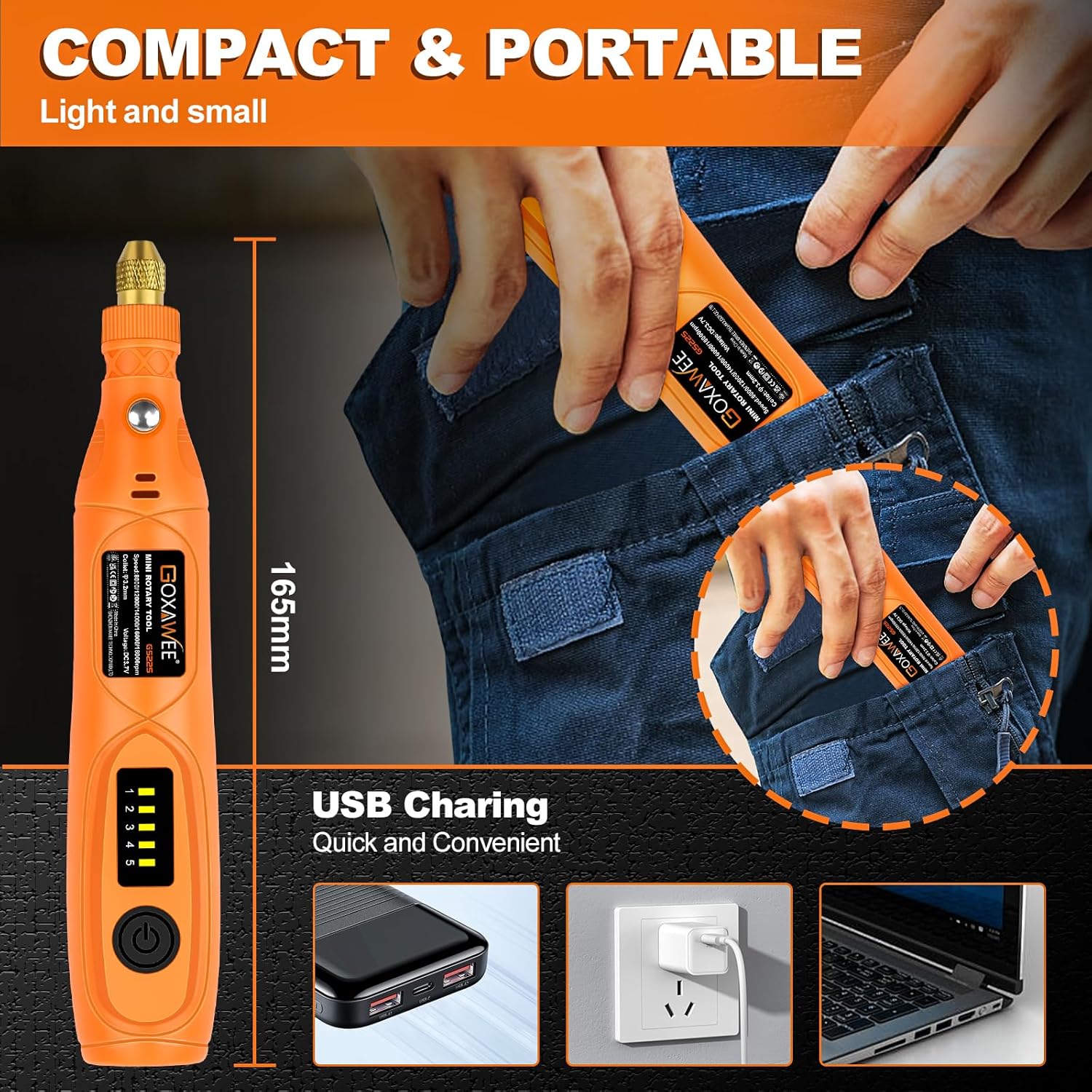
Figure 4.1: Key features of the GOXAWEE Mini Cordless Rotary Tool, including the chuck, spindle lock button, heat dissipation holes, speed control button, and Type-C charging port.
- Chuck (Range 2.35mm-3.2mm): Sujeta de forma segura diversos accesorios.
- Botón de bloqueo del eje: Used to lock the spindle for easy accessory changes. Do not press when the tool is operating.
- Orificios de disipación de calor: Designed to dissipate heat generated during motor operation, preventing damage.
- Botón de control de velocidad: Adjusts the rotational speed of the tool.
- Speed Indicator (1-5): Displays the current speed setting (5000-18000 RPM).
- Puerto de carga tipo C: For convenient USB charging.
5. Configuración
5.1 Carga de la herramienta
The GOXAWEE Mini Cordless Rotary Tool is powered by a 3.7V Li-ion battery and can be charged via USB.
- Localice el puerto de carga tipo C en la herramienta.
- Connect the provided USB charging cable to the tool and to a compatible USB power source (e.g., computer, wall adapter, power bank).
- The speed indicator lights will illuminate during charging and turn off when fully charged.

Figure 5.1: The rotary tool connected to a laptop for USB charging, illustrating the convenience of its Type-C port.
5.2 Colocación/cambio de accesorios
To ensure safe and effective operation, always properly install accessories.
- Asegúrese de que la herramienta esté apagada.
- Press and hold the Spindle Lock Button to prevent the spindle from rotating.
- Unscrew the chuck collar counter-clockwise until it is loose enough to insert or remove an accessory.
- Insert the shaft of the desired accessory fully into the chuck.
- While still holding the Spindle Lock Button, tighten the chuck collar clockwise until the accessory is securely fastened. Do not overtighten.
- Suelte el botón de bloqueo del eje.
Video 5.1: A user demonstrating the rotary tool's engraving capabilities on wood and a metal cup, showcasing its versatility for personalized projects.
6. Instrucciones de funcionamiento
6.1 Encendido/apagado y ajuste de velocidad
- To turn on the tool, press the Speed Control Button once. The tool will start at the lowest speed setting (Level 1).
- To increase the speed, press the Speed Control Button repeatedly. Each press will cycle through the 5 speed levels (5000 RPM to 18000 RPM).
- To turn off the tool, continue pressing the Speed Control Button until all speed indicator lights are off.

Figure 6.1: Illustration of the 5-speed settings on the GOXAWEE Mini Cordless Rotary Tool, ranging from 5000 RPM to 18000 RPM.
6.2 Uso ExampLos
The GOXAWEE Mini Cordless Rotary Tool is suitable for a variety of tasks. Always select the appropriate accessory and speed for your material and application.
- Grabado: Use diamond burr bits for intricate designs on wood, plastic, glass, or soft metals.
- Lijado: Attach sanding drums or discs for smoothing rough edges or preparing surfaces.
- Corte: Utilize cutting discs for precise cuts on various materials.
- Pulido: Use felt wheels with polishing compound to bring a shine to surfaces.
- Perforación: Employ HSS twist drills for small holes in wood, plastic, or soft metals.
- Molienda: Use abrasive stones for shaping or deburring.

Figura 6.2: Examples of the rotary tool in action: grinding, cutting, sanding, and polishing, demonstrating its multi-purpose capabilities.
7. Mantenimiento
Un mantenimiento adecuado garantiza la longevidad y el rendimiento óptimo de su herramienta rotativa.
- Limpieza: After each use, wipe down the tool with a clean, dry cloth to remove dust and debris. Use a small brush to clean the chuck and ventilation openings.
- Almacenamiento de accesorios: Store all accessories in the provided accessory box to keep them organized and protected.
- Almacenamiento de herramientas: Store the rotary tool in a dry, safe place away from direct sunlight and extreme temperatures.
- Cuidado de la batería: For long-term storage, ensure the battery is partially charged (around 50%). Recharge periodically if not used for extended periods to maintain battery health.
8. Solución de problemas
| Problema | Posible causa | Solución |
|---|---|---|
| La herramienta no se enciende. | La batería está agotada. | Charge the tool using the USB charging cable. |
| El accesorio está suelto o se cae. | El mandril no está bien apretado. | Ensure the spindle lock button is pressed, then tighten the chuck collar securely. |
| La herramienta se detiene durante el funcionamiento. | Protección contra sobrecarga activada. | Reduce pressure on the tool or use a lower speed setting. Allow the tool to cool down. |
| Rendimiento reducido. | Batería baja o accesorio desgastado. | Recharge the battery. Replace worn-out accessories. |
9. Especificaciones
- Marca: GOXAWEE
- Modelo: G5225-EE. UU.
- Volumentage: 3.7 voltios
- Fuente de energía: Battery Powered (1 x 12V Li-ion battery included)
- Velocidad máxima de rotación: 18000 RPM
- Velocidad mínima: 5000 RPM
- Control de velocidad: 5-Speed Variable
- Rango de mandril: 2.35 mm-3.2 mm
- Peso del artículo: 10.8 onzas
- Dimensiones del producto: 7.79 x 5.16 x 1.26 pulgadas
- Material: ABS, Metal
- Características especiales: Lightweight, Lock Button, Variable Speed, Cordless, Multi Use
- Código postal: 860011020721
10. Garantía y soporte
For warranty information, technical support, or any questions regarding your GOXAWEE Mini Cordless Rotary Tool Kit, please contact GOXAWEE customer service through the retailer's platform or visit the official GOXAWEE webSitio web. Conserve su comprobante de compra para reclamaciones de garantía.
Ask a question about this manual
Ask about setup, troubleshooting, compatibility, parts, safety, or missing instructions. Manuals+ will review the question and use this page’s manual context to help answer it.