
1. Introducción
This user manual provides essential information for the safe and efficient operation of your PowerSmart 42V 2A Battery Charger. This charger is specifically designed to provide reliable power for 36V Li-ion batteries, compatible with various Leader Fox electric bicycle models including Lotus, Holand, E-Grass, E-Cody, Inductor, and E-State. Please read this manual thoroughly before using the product.

Figure 1: PowerSmart 42V 2A Battery Charger
The image displays the PowerSmart 42V 2A battery charger, a rectangular black power brick with attached AC input and DC output cables. The AC cable has a European two-pin plug, and the DC cable terminates in a barrel connector.
2. Instrucciones de seguridad
Always adhere to the following safety guidelines to prevent injury or damage to the charger or battery:
- Do not short circuit the charger: Esto podria causar choques electrico o fuego.
- Do not disassemble the charger: There are no user-serviceable parts inside. Disassembly voids the warranty and poses a risk of electric shock.
- Do not throw, knock, shake, or strike the charger: Rough handling can damage internal components.
- Use in dry locations only: This charger is not waterproof. Avoid exposure to moisture, rain, or damp entornos.
- Cable de alimentación eléctrica: Refer to this instruction manual for proper selection and use of the power supply cord. Ensure the cord is undamaged and correctly connected.
- Cumplimiento de la FCC: Este dispositivo cumple con la Parte 15 de las Normas de la FCC. Su funcionamiento está sujeto a las dos condiciones siguientes: (1) este dispositivo no puede causar interferencias perjudiciales y (2) este dispositivo debe aceptar cualquier interferencia que reciba, incluidas las interferencias que puedan causar un funcionamiento no deseado.
- Ventilación: Ensure adequate ventilation around the charger during use. Do not cover the charger.
- Niños y mascotas: Mantenga el cargador fuera del alcance de los niños y las mascotas.

Figure 2: Product Label with Warnings and Specifications
This image shows the product label on the charger, detailing the model number (CPF080L1002), input (100V-240V~ 50-60Hz 2.5A), output (42.0V 2.0A), and compatibility with 37V Li-ion rechargeable batteries. It also lists critical safety warnings regarding short-circuiting, disassembly, physical impact, and dry location use.
3. Componentes del producto
The PowerSmart 42V 2A Battery Charger consists of the following main components:
- Unidad de carga: The main power brick that converts AC to DC power.
- Cable de entrada de CA: Connects the charger to a wall outlet.
- DC Output Cable with Plug: Connects the charger to the battery. This charger uses a DC plug with dimensions of 5.5mm outer diameter and 2.1mm inner diameter.
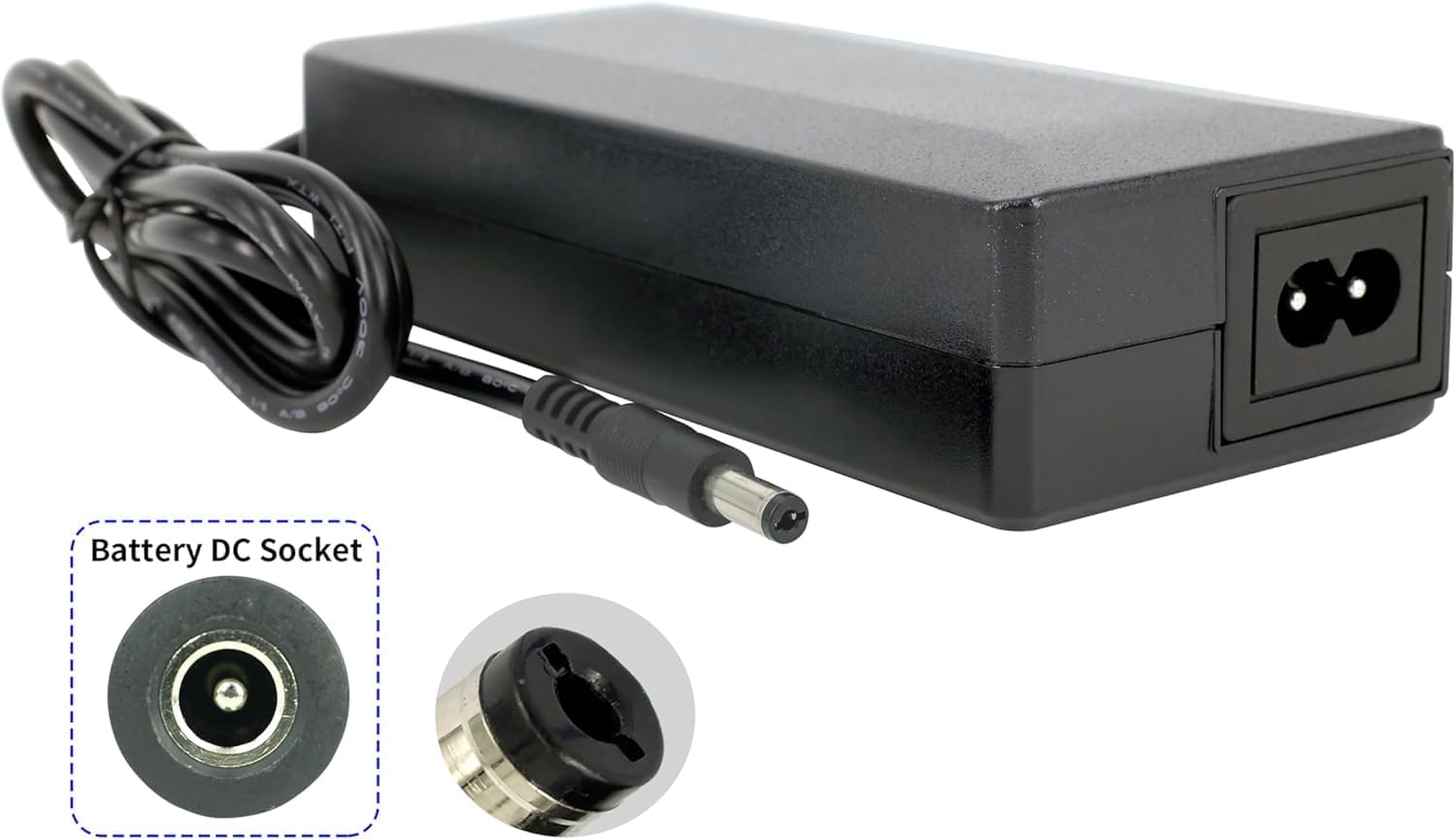
Figure 3: DC Plug and Socket Detail
Esta imagen proporciona un primer plano view of the charger's DC output plug and an illustration of a compatible battery DC socket, highlighting the barrel connector type.

Figure 4: DC Plug Dimensions
The image shows the charger unit with an overlay illustrating the precise dimensions of the DC output plug: 5.5mm outer diameter and 2.1mm inner diameter, crucial for ensuring compatibility with your battery's charging port.
4. Configuración
Follow these steps to set up your PowerSmart battery charger:
- Deshacer: Retire con cuidado el cargador de su embalaje.
- Inspeccionar: Revise el cargador y los cables para detectar cualquier daño visible. No los use si están dañados.
- Conectar a la batería: Ensure your 36V Li-ion battery is clean and dry. Insert the DC output plug (5.5mm/2.1mm) firmly into the charging port of your battery.
- Conectar a la toma de corriente: Plug the AC input cable into a standard 100V-240V wall outlet.
5. Instrucciones de funcionamiento
Once connected, the charger will begin the charging process. The charging status is typically indicated by an LED light on the charger (refer to your specific charger's LED indicator for details, as this manual does not specify LED behavior).
- Cargando: The charger will automatically detect the battery's charge level and begin charging.
- Carga completa: El cargador está diseñado para detener la carga automáticamente una vez que la batería alcanza su capacidad máxima para evitar la sobrecarga.
- Desconectando: Once charging is complete, first unplug the AC input cable from the wall outlet, then disconnect the DC output plug from the battery.
Nota: Los tiempos de carga varían según la capacidad de la batería y su nivel de carga actual.
6. Mantenimiento
Un mantenimiento adecuado garantiza la longevidad y el rendimiento de su cargador:
- Limpieza: Disconnect the charger from both the power outlet and the battery before cleaning. Use a soft, dry cloth to wipe the exterior. Do not use liquid cleaners or solvents.
- Almacenamiento: Guarde el cargador en un lugar fresco y seco, alejado de la luz solar directa y de temperaturas extremas. Manténgalo alejado de la humedad y de materiales corrosivos.
- Cuidado de cables: Evite doblar o engarzar excesivamente los cables. No coloque objetos pesados sobre ellos.
- Inspección: Periodically inspect the charger, cables, and plugs for any signs of wear, damage, or fraying. If any damage is found, discontinue use immediately and contact support.
7. Solución de problemas
If you encounter issues with your charger, try the following basic troubleshooting steps:
- El cargador no se enciende:
- Ensure the AC input cable is securely plugged into a working wall outlet.
- Check if the wall outlet has power by plugging in another device.
- Inspect the AC cable and DC cable for any damage.
- La batería no se carga:
- Verify that the DC output plug is fully inserted into the battery's charging port.
- Confirm that the battery is a 36V Li-ion type and compatible with a 5.5mm/2.1mm DC plug.
- Ensure the battery itself is not faulty.
- Ruidos o olores inusuales:
- Immediately unplug the charger from the wall and the battery.
- Do not attempt to use the charger again. Contact customer support.
Si el problema persiste después de intentar estos pasos, comuníquese con el servicio de atención al cliente.
8. Especificaciones
| Parámetro | Valor |
|---|---|
| Modelo | CPF080L1002 |
| Vol de entradatage | 100V-240V ~ |
| Frecuencia de entrada | 50-60 Hz |
| Corriente de entrada | 2.5A |
| Vol de salidatage | 42.0 V |
| Corriente de salida | 2.0A |
| Potencia de salida | 80 W |
| Peso | 0.47 kilogramos |
| Dimensiones (L x An x Al) | 141.40 x 60.60 x 34.20 mm |
| Tipo de batería compatible | Baterías recargables de iones de litio de 37 V |
| DC Plug Dimensions | 5.5mm (Outer) / 2.1mm (Inner) |
| Fabricante | PowerSmart |
| Importador | Silver Centre GmbH, Immanuelkirchstr. 11, 12621 Berlin, Germany |
| País natal | Hecho en china |
9. Garantía y soporte
For warranty information and customer support, please refer to the documentation provided with your purchase or contact your retailer. For direct inquiries, you may reach out to the importer:
Silver Centre GmbH
Immanuelkirchstr. 11
12621 Berlín, Alemania
Please have your model number (CPF080L1002) and purchase details ready when contacting support.