
Introducción
This manual provides comprehensive instructions for the installation, operation, maintenance, and troubleshooting of your Swann 8 Channel DVR Security Recorder, model SRDVR-84580G. Please read this manual thoroughly before using the product to ensure proper setup and functionality.
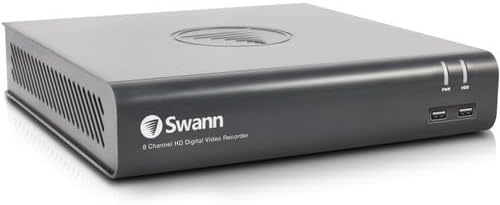
Imagen: Frente view of the Swann 8 Channel DVR Security Recorder. The device is a compact, dark grey rectangular unit with the "Swann 8 Channel HD Digital Video Recorder" logo on the front. It features two USB ports and indicator lights on the right side of the front panel.
Contenido del paquete
Verifique que todos los artículos enumerados a continuación estén incluidos en su paquete:
- DVR 4575 8 Channel DVR with 1TB Hard Drive
- Cable Ethernet
- Cable HDMI
- Adaptador de corriente y divisor
- Ratón
- Tornillos y tapones de montaje
- Guía de inicio rápido
- Etiquetas engomadas del disuasivo del robo
Configuración
1. Conexión del DVR
- Conectar cámaras: Attach your security cameras to the BNC video input ports on the back of the DVR. The DVR supports up to 8 channels.
- Conectar a la pantalla: Use the provided HDMI cable to connect the DVR's HDMI output port to your monitor or TV. Alternatively, use a VGA cable for VGA output.
- Conectar red: Connect an Ethernet cable from the DVR's RJ45 port to your router or network switch for internet access and remote viewEn.
- Conecte dispositivos USB: Plug the included mouse into one of the USB 2.0 ports. Additional USB devices, such as a USB flash drive for backup, can be connected to the USB 2.0 or USB 3.0 ports.
- Encendido: Conecte el adaptador de corriente a la entrada de alimentación del DVR y luego a una toma de corriente. El DVR se encenderá automáticamente.
2. Configuración inicial
Al encenderlo por primera vez, el DVR le guiará a través de un asistente de configuración inicial. Este suele incluir:
- Setting up a secure password.
- Configurar ajustes de fecha y hora.
- Network settings (DHCP is usually recommended for automatic IP assignment).
- Hard drive formatting (if prompted).
Refer to the included Quick Start Guide for detailed steps on the initial setup wizard.
Instrucciones de funcionamiento
Operación local
Navigate the DVR's on-screen menu using the connected mouse. Key functions include:
- Vivir View: Muestra transmisiones de video en tiempo real de todas las cámaras conectadas.
- Reproducción: Acceder a foo grabadotage stored on the 1TB hard drive. You can search by date, time, and event.
- Configuración de grabación: Configure continuous recording, motion-detection recording, or scheduled recording. The DVR supports recording resolution up to 3MP.
- Configuración de alarma: Set up alerts for motion detection, video loss, or other events. The DVR features controllable motion-activated red & blue flashing lights, spotlights & sirens for deterrence.
- Backup: Export recorded footage a una unidad flash USB.
Remote Operation (Swann Security App)
The Swann Security App allows for remote viewing and control of your DVR system from compatible smartphones and tablets (iOS, Android, 4G/5G). The app is also compatible with HomeSafe View y View 24/7.
- Descargar aplicación: Download the "Swann Security App" from your device's app store.
- Creación de cuenta: Create a Swann Security account and log in.
- Agregar dispositivo: Siga las instrucciones de la aplicación para agregar su DVR escaneando el código QR o ingresando manualmente el ID del dispositivo.
- Remoto Viewen: Una vez conectado, puede view live feeds, play back recordings, and receive push notifications for events.
Mantenimiento
- Administración del disco duro: The 1TB hard drive can store up to 1 year of recording. Ensure the hard drive is not full. The DVR typically overwrites the oldest footage cuando la unidad está llena.
- Actualizaciones de firmware: Revise periódicamente el Swann websitio o la configuración del sistema del DVR para obtener actualizaciones de firmware disponibles para garantizar un rendimiento y una seguridad óptimos.
- Limpieza: Keep the DVR unit clean and free from dust. Use a soft, dry cloth. Do not use liquid cleaners. Ensure ventilation openings are not blocked.
- Condiciones ambientales: Operate the DVR within recommended temperature and humidity ranges to prevent damage.
Solución de problemas
| Problema | Posible causa | Solución |
|---|---|---|
| No hay salida de video en el monitor. | Loose HDMI/VGA cable; incorrect input selected on monitor; DVR not powered on. | Check cable connections; ensure monitor is set to correct input (HDMI/VGA); verify DVR power indicator is on. |
| Cannot connect to DVR remotely. | No internet connection; incorrect network settings; app not configured correctly. | Verify DVR has internet access; check network settings (DHCP/Static IP); re-add device in Swann Security App. |
| Sin grabación. | Hard drive full or faulty; recording schedule not set; camera not connected. | Check hard drive status and format if necessary; configure recording schedule; ensure cameras are properly connected. |
| Mala calidad de vídeo. | Camera resolution settings; cable issues; lighting conditions. | Adjust camera resolution settings (up to 1080p display resolution, 3MP recording resolution); check cable integrity; ensure adequate lighting. |
Presupuesto
| Característica | Detalle |
|---|---|
| Número de modelo | SRDVR-84580G |
| Entrada de vídeo | 8 canales |
| Salida de vídeo | VGA, HDMI |
| Resolución de pantalla | Hasta 1080p |
| Entrada de audio | RCA x 1 |
| Salida de audio | RCA x 1 |
| Resolución de grabación | Hasta 3MP |
| Tamaño del disco duro incluido | 1 TB (1000 GB) |
| Interfaz de red | RJ45 x 1 |
| Interfaz USB | USB 2.0 x 2, USB 3.0 x 1 |
| Computer Operating System Support | Sistema operativo Windows y Mac |
| Aplicación de teléfono inteligente | Swann Security App (also HomeSafe View, View 24/7) |
| Handheld Device Support | iOS, Android, teléfonos inteligentes y tabletas 4G/5G |
| Dimensiones del producto (L x An x Al) | 9.05" x 8.3" x 1.9" (230 mm x 210 mm x 47 mm) |
| Tecnología de conectividad | Ethernet, HDMI, USB, VGA |
| Fabricante | Swann Communications USA |
| Fecha de primera disponibilidad | 25 de septiembre de 2023 |
Garantía y soporte
Información de garantía
Este producto viene con un Garantía de 12 meses A partir de la fecha de compra. Conserve el comprobante de compra para reclamaciones de garantía. La garantía cubre defectos de materiales y mano de obra en condiciones normales de uso.
Atención al cliente
For technical assistance, troubleshooting, or warranty inquiries, please visit the official Swann support websitio o contacte con su servicio de atención al cliente. Puede encontrar más información y recursos en Swann Store on Amazon.