
Introducción
This manual provides comprehensive instructions for the setup, operation, and maintenance of your surmen G1000 Backlit Full Size Office Keyboard. Designed for both office and gaming use, this keyboard features a durable metal panel, silent membrane keys, and vibrant blue backlighting. Please read this manual thoroughly to ensure optimal performance and longevity of your device.
¿Qué hay en la caja?
- surmen G1000 Keyboard
- Extractor de teclas
Configuración
The surmen G1000 keyboard is designed for simple plug-and-play functionality, requiring no additional drivers for most operating systems.
- Conectar el teclado: Locate an available USB-A port on your computer (PC or Laptop). Insert the USB connector of the keyboard firmly into the USB port.
- Reconocimiento del sistema: Your operating system (Windows 2000 / 10/8/7 / ME / XP / VISTA, MAC) should automatically detect and install the necessary drivers. This process may take a few moments.
- Listo para usar: Once the installation is complete, the keyboard will be ready for immediate use.

Figure 1: Surmen G1000 keyboard connected via USB.
Instrucciones de funcionamiento
Características principales
- 104 Keys Full-Size Layout: Includes a dedicated number pad for enhanced productivity.
- Interruptores de membrana silenciosos: Designed for quieter typing with a better tactile response.
- Panel Metálico: Durable aluminum alloy panel for enhanced longevity.
- 26 teclas anti-efecto fantasma: Ensures accurate response even when multiple keys are pressed simultaneously during gaming.
- Función de bloqueo de Windows: Evita pulsaciones accidentales de la tecla Windows durante sesiones de juego intensas.

Figure 2: Silent membrane switches provide a quiet and responsive typing experience.
Control de retroiluminación
The G1000 keyboard features stunning blue backlighting with adjustable modes.
- Encender/apagar la luz de fondo: Prensa FN+SL (Bloq Despl) para activar o desactivar la luz de fondo.
- Ajustar el brillo: The backlight has multiple brightness levels. Use the dedicated function keys (if available, or cycle through modes with FN+SL) to adjust.
- Modos de retroiluminación: The keyboard supports static and breathing backlight modes. Refer to the keyboard's specific key combinations for cycling through these modes (often FN + Page Up/Page Down or similar).

Figure 3: Toggle backlighting with FN + SL.
Teclas de acceso directo multimedia
The keyboard includes 12 media hotkeys accessible via the Function (FN) key, allowing quick access to various functions without interrupting your workflow or game.
| Combinación de teclas | Función |
|---|---|
| FN + F1 | Reproductor de música |
| FN + F2 | Bajar volumen |
| FN + F3 | Aumentar el volumen |
| FN + F4 | Silenciar |
| FN + F5 | Detener reproducción |
| FN + F6 | Pista anterior |
| FN + F7 | Reproducir/Pausa |
| FN + F8 | Pista siguiente |
| FN + F9 | Open Email |
| FN + F10 | Abrir página de inicio |
| FN + F11 | Abrir mi PC |
| FN + F12 | Calculadora abierta |

Figure 4: Multimedia hotkeys for quick access to common functions.
Luces indicadoras
The keyboard features indicator lights for Caps Lock, Num Lock, and Win Lock status.
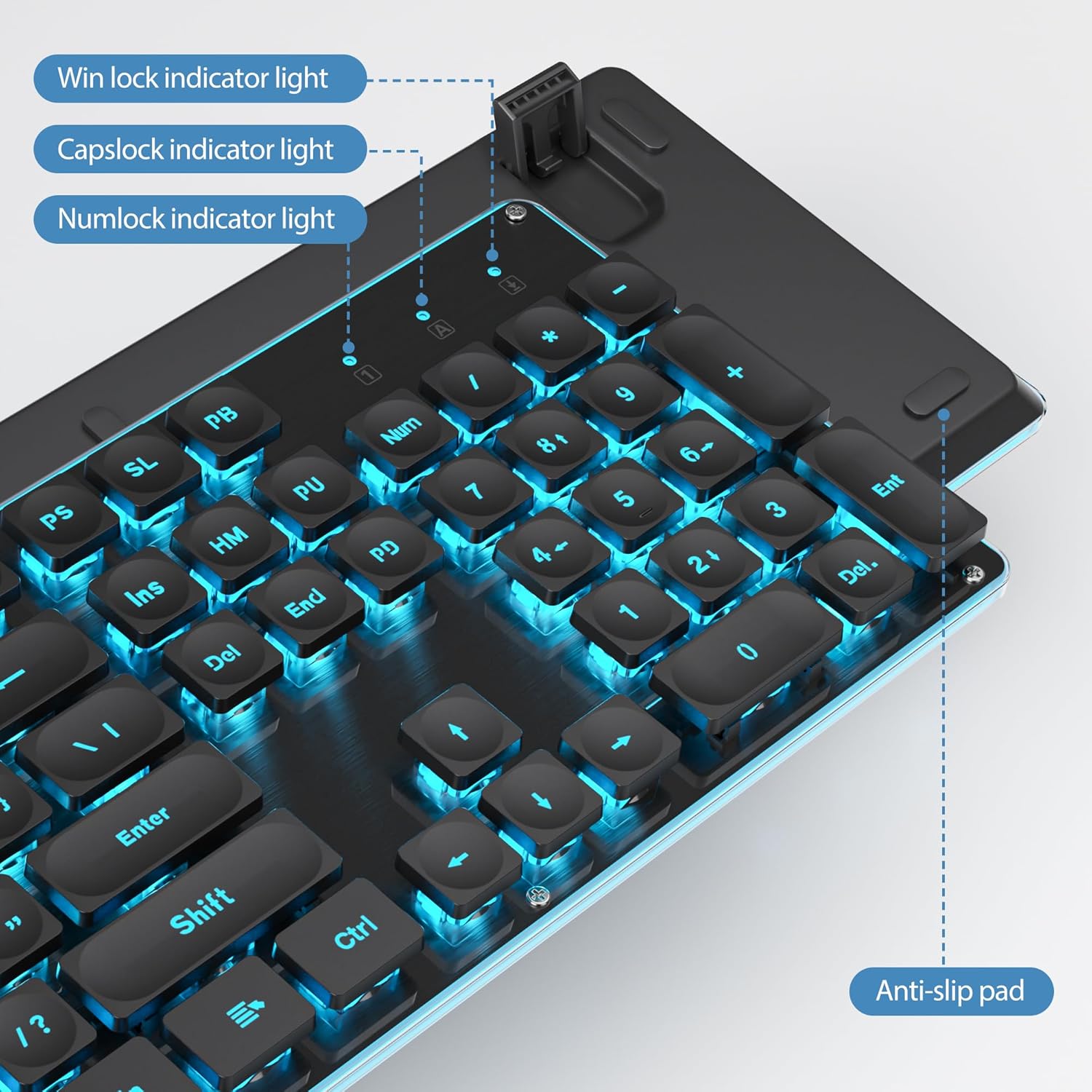
Figura 5: Luces indicadoras del estado del teclado.
Producto terminadoview Video
Vídeo 1: Un breve resumenview demonstrating the shinethrough full-size keyboard and its backlighting.
Mantenimiento
- Limpieza: To clean the keyboard, disconnect it from your computer. Use a soft, dry cloth to wipe down the keys and surface. For stubborn dirt, a slightly damp cloth can be used, ensuring no liquid enters the keyboard. The included keycap puller can be used to remove keycaps for deeper cleaning.
- Resistencia a derrames: The surmen G1000 keyboard features a water-resistant design. In case of accidental spills, quickly disconnect the keyboard, wipe off the liquid, and allow it to air dry completely before reconnecting. While water-resistant, it is not waterproof; avoid submerging the keyboard in liquid.

Figure 6: The keyboard features a water-resistant design for added durability.
Solución de problemas
| Problema | Posible causa | Solución |
|---|---|---|
| El teclado no responde. | Conexión USB suelta, puerto USB defectuoso, problema con el controlador. | Asegúrese de que el cable USB esté bien conectado. Pruebe con otro puerto USB. Reinicie el ordenador. |
| Backlight not turning on. | Backlight is off, software glitch. | Prensa FN+SL to toggle the backlight. Unplug and replug the keyboard. |
| Keys are not quiet enough. | Expectations vs. membrane switch sound profile. | While designed for quiet operation, membrane keyboards still produce some sound. This is normal for the product type. |
| Certain keys (e.g., Windows key) not working. | Win Lock enabled, manufacturing defect. | Check if Win Lock is enabled (often indicated by a light or specific key combination). If a key is physically misaligned (e.g., upside down as mentioned in a review), this indicates a manufacturing defect. Contact customer support for assistance. |
Presupuesto
| Característica | Detalle |
|---|---|
| Marca | surmen |
| Número de modelo | G1000 |
| Tipo de teclado | Full Size Office Keyboard (104 Keys) |
| Tipo de interruptor | Silent Membrane |
| Conectividad | Cable USB (USB-A) |
| Contraluz | Retroiluminación azul |
| Material del panel | Metal Panel (Aluminum alloy) |
| Anti-efecto fantasma | 26 teclas anti-efecto fantasma |
| Características especiales | Backlit, Foldable, Hotkeys and Media Keys, Lightweight, Spill Proof |
| Dispositivos compatibles | computadora portátil, computadora |
| Compatibilidad con sistemas operativos | Windows 2000 / 10/8/7 / ME / XP / VISTA, MAC |
| Dimensiones del producto | 17.1 x 5.2 x 1.2 pulgadas (17.1" de largo x 5.2" de ancho x 1.2" de alto) |
| Peso del artículo | 1.52 libras |
| Fabricante | GTSP |
| Fecha de primera disponibilidad | 30 de noviembre de 2023 |
Garantía y soporte
For warranty information or technical support, please contact the manufacturer, GTSP, or the seller from whom you purchased the product. Refer to your purchase documentation for specific warranty terms and contact details.
También puedes visitar la página oficial Tienda surmen en Amazon Para obtener más información sobre el producto y recursos de soporte.