
Producto terminadoview
The LoopTone TR-18CDBB is a versatile 10-in-1 audio system designed to play various media formats. It combines vintage aesthetics with modern functionality, offering a comprehensive solution for your audio needs.

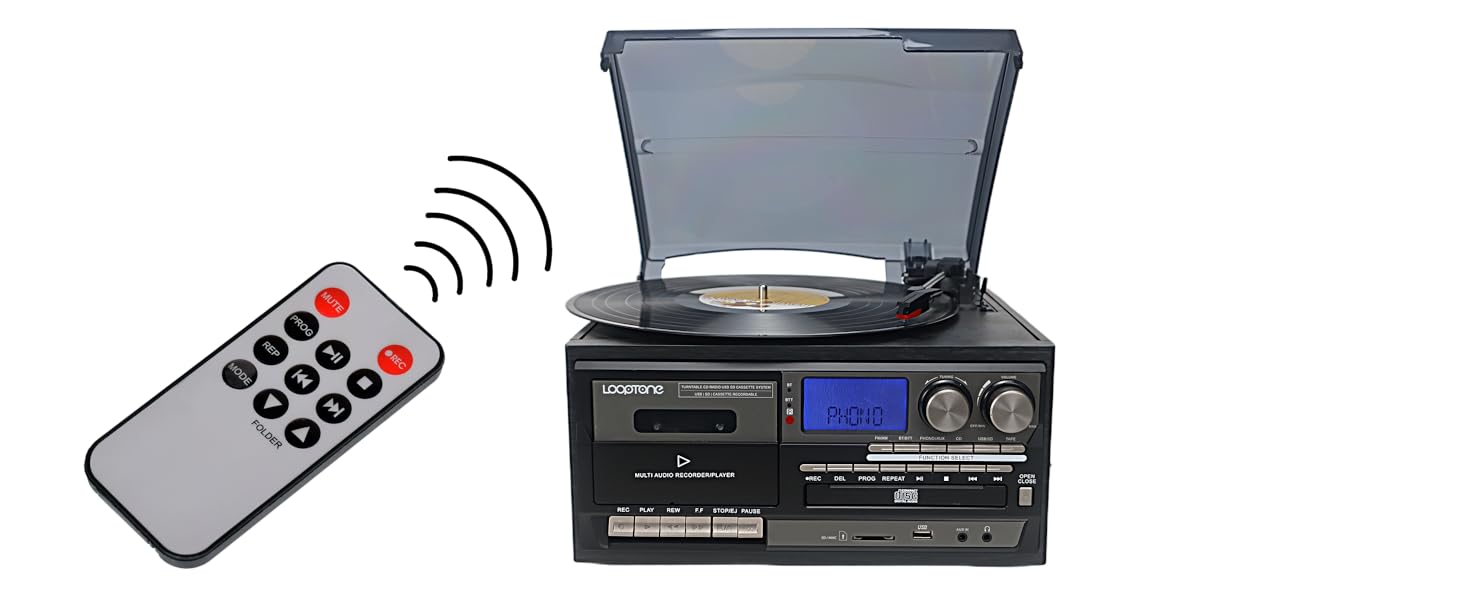
Frente view of the LoopTone 10-in-1 Vinyl Record Player, highlighting its multi-functional design.

Visual representation of the diverse playback and connectivity options available on the unit.
Características principales
- 3-Speed Vinyl Record Player: Supports 33-1/3, 45, and 78 RPM records.
- Conectividad Bluetooth: Built-in Bluetooth for streaming audio from devices and connecting to Bluetooth headphones/speakers.
- Reproductor de CD: Compatible with audio CDs.
- Reproductor de casetes: For playing your favorite cassette tapes.
- Radio AM/FM: Features a digital LCD display for tuning into radio stations.
- Grabadora USB: Record vinyl, CD, or cassette audio directly to USB in MP3 or WMA format.
- Aux-in and RCA Line-out: Connect non-Bluetooth devices via Aux-in or external audio systems via RCA line-out.
- Altavoces incorporados: Altavoces estéreo integrados para reproducción inmediata.
- Mando a distancia: Para una cómoda operación a distancia.
- Pantalla LED azul: Provides clear indication of current mode and settings.

The turntable supports various record sizes and playback speeds.
Guía de configuración
Desempaquetado
Carefully remove all components from the packaging. Ensure all items listed in the "What's in the Box" section are present. Retain packaging for future transport or storage.
Official unboxing video demonstrating the contents and initial setup of the LoopTone record player.
Conexión de energía
Connect the power cord to the DC IN port on the unit's rear panel, then plug the other end into a standard electrical outlet (AC 100-240V, 50/60Hz).
Configuración de la antena
For optimal FM/AM radio reception, extend the FM antenna located at the back of the unit. For AM reception, you may need to rotate the unit for the best signal.

Rear panel connections including RCA Line Out and FM antenna.
Instrucciones de funcionamiento
Operación general
- Encendido/apagado: Rotate the VOLUME knob clockwise to turn the unit on. Rotate counter-clockwise until it clicks to turn off.
- Selección de función: Press the "FUNCTION SELECT" button to cycle through available modes: FM/AM, BT/BTT, PHONO/AUX, CD, USB/SD, TAPE.
- Control de volumen: Adjust the VOLUME knob to increase or decrease the sound level.
Reproducción de discos de vinilo
- Abra la cubierta antipolvo.
- Coloque un disco de vinilo en el plato del tocadiscos.
- Select "PHONO/AUX" mode using the Function Select button.
- Adjust the speed selector (33-1/3, 45, or 78 RPM) to match your record.
- Levante el brazo fonocaptor utilizando la palanca de señalización.
- Manually move the tone arm to the desired position over the record.
- Gently lower the tone arm onto the record using the cueing lever. The record will begin playing.
- To stop playback, lift the tone arm using the cueing lever and return it to the tone arm rest.
The turntable allows for playback of various vinyl record speeds.
Reproducción de CD
- Presione el botón “ABRIR/CERRAR” para abrir la bandeja del CD.
- Coloque un CD con la etiqueta hacia arriba.
- Press "OPEN/CLOSE" again to close the tray.
- Select "CD" mode. The unit will read the disc and begin playback.
- Use the PLAY/PAUSE, NEXT, and PREVIOUS buttons for control.

The integrated CD player supports standard audio discs.
Reproducción de cintas de casete
- Inserte una cinta de casete en la platina de casete.
- Select "TAPE" mode.
- Use the PLAY, REW, F.F, STOP/EJ, and PAUSE buttons for control.

The cassette deck allows playback of your tape collection.
Radio AM/FM
- Select "FM/AM" mode.
- Use the TUNING knob to find your desired station.
- For FM, extend the FM antenna. For AM, rotate the unit for best reception.

Tune into your favorite AM or FM radio stations.
Conectividad Bluetooth
- Select "BT/BTT" mode. The display will show "BT" and flash, indicating pairing mode.
- On your Bluetooth device (smartphone, tablet, headphones), enable Bluetooth and search for "LoopTone".
- Select "LoopTone" to pair. Once connected, the "BT" indicator will stop flashing.
- Play audio from your device, and it will stream through the record player's speakers or connected Bluetooth headphones.

Easily connect your Bluetooth devices for wireless audio streaming.
USB/SD Playback and Recording
- Inserte una unidad USB o una tarjeta SD en la ranura correspondiente.
- Select "USB/SD" mode. The unit will read the media.
- Use the playback controls (PLAY/PAUSE, NEXT, PREVIOUS) to navigate tracks.
- Grabación: To record from Vinyl, CD, or Cassette to USB/SD, select the desired source mode (PHONO/AUX, CD, TAPE). Press the "REC" button. The unit will begin recording the audio to the inserted USB drive or SD card.
The unit features USB and SD card slots for playback and recording.

Record your favorite audio from vinyl, CD, or cassette to digital formats or another tape.
Aux-in and RCA Line-Out
- Entrada auxiliar: Connect external audio devices (MP3 player, PC, laptop) to the "AUX IN" port using a 3.5mm audio cable. Select "PHONO/AUX" mode.
- Salida de línea RCA: Connect the "RCA LINE OUT" ports to an external amplifier or home audio system using RCA cables for enhanced sound.
Connect external devices or output audio to a larger sound system.
Mantenimiento
Limpieza
- Exteriores de la unidad: Limpie la unidad con un paño suave y seco. No utilice limpiadores abrasivos ni disolventes.
- Guardapolvo: Limpiar con un paño suave.amp paño.
- Turntable Stylus: Gently clean the stylus with a soft brush, moving from back to front.
- Lente de CD: Use a specialized CD lens cleaner disc.
- Cabezal de casete: Use a cassette head cleaner.
Almacenamiento
- Cuando no esté en uso, mantenga la cubierta antipolvo cerrada para proteger el plato giratorio.
- Guarde la unidad en un lugar fresco y seco, alejado de la luz solar directa y de temperaturas extremas.
Solución de problemas
| Problema | Solución |
|---|---|
| Sin poder | Ensure the power cord is securely plugged into the unit and a working electrical outlet. Check the VOLUME knob is turned clockwise. |
| Sin sonido | Check volume level. Ensure correct function mode is selected. If using external speakers, check connections. |
| El plato giratorio no gira | Ensure the unit is powered on and in PHONO/AUX mode. Check if the tone arm is lifted from its rest. |
| Mala recepción de radio | Extend the FM antenna fully. For AM, rotate the unit for better signal. |
| Bluetooth no se conecta | Ensure the unit is in BT/BTT mode and flashing. Make sure your device's Bluetooth is on and searching. Move devices closer. |
| Problemas de grabación | Ensure USB drive/SD card is properly inserted and has sufficient free space. Check the source mode is correctly selected before pressing REC. |
For further assistance, please contact LoopTone customer support.
Presupuesto
| Característica | Detalle |
|---|---|
| Dimensiones del producto | 12.6 x 11.81 x 7.87 pulgadas |
| Peso del artículo | 9.9 libras |
| Número de modelo del artículo | TR-18CDBB |
| Marca | tono de bucle |
| Tecnología de conectividad | Bluetooth, USB |
| Velocidad máxima de rotación | 78 RPM |
| Componentes incluidos | Tocadiscos, altavoz incorporado x 2, adaptador de 45 rpm, control remoto, manual |
| Característica especial | Adjustable Speed, Built In Speaker, AUX Input, Dust Cover |
| Material | Madera, Plástico, Metal |
| Color | Negro |
| Consumo de energía en modo encendido | 22 vatios |
Detailed dimensions of the LoopTone 10-in-1 Vinyl Record Player.
Garantía y soporte
LoopTone products are backed by a one-year product quality problem solution. For customer consultation service, please contact our support team 7 days a week, 24 hours a day.
For detailed warranty information or technical support, please visit the official LoopTone websitio o consulte el embalaje del producto para obtener información de contacto.