
Introducción
This manual provides essential information for the safe and efficient use of your Epson PowerLite 770F Ultra Short Throw 3LCD Projector. Designed for dynamic environments, this projector delivers stunning HD images up to 150 inches with a virtually maintenance-free laser light source. Please read these instructions carefully before operating the device.
¿Qué hay en la caja?
- PowerLite 770F Projector
- Manual de usuario
- Control remoto del proyector
- Pilas 2x AA
- Cable de alimentación de 6 pies
- Pies de proyector
Características principales
- True-to-life colors with 3LCD, 3-chip technology.
- 4100 lumens brightness for sharp and lively visuals.
- Up to 2,500,000:1 contrast ratio.
- Connect devices via HDMI port.
- Instant image projection from PC or MacBook with USB port.
- 20,000-hour virtually maintenance-free laser light source.
- Supports 16:9, 21:9, and 16:6 aspect ratios.
- Wireless connectivity with casting capability.
- Convenient split screen functionality.
- Wake-On Sync function for quick display.
Configuración
The Epson PowerLite 770F is an ultra short throw projector, designed to project large images from a very short distance. This allows for flexible placement close to the projection surface, minimizing shadows and maximizing space.
Colocación Física
Place the projector on a stable, flat surface directly in front of your screen or wall. Ensure there is adequate ventilation around the unit. For optimal image quality, the projection surface should be smooth and uniformly colored.

Figura 1: Frente view of the Epson PowerLite 770F projector.

Figura 2: Lado view of the Epson PowerLite 770F projector, showing its compact design.
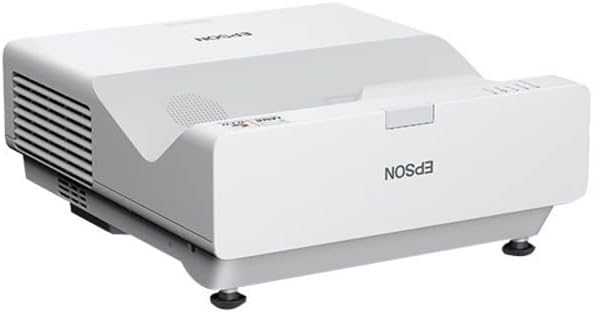
Figura 3: Otro lado view of the Epson PowerLite 770F projector.
The projector can also be mounted to a wall or ceiling using compatible mounting hardware (sold separately). Ensure the mounting is secure and allows for proper alignment with the projection surface.

Figure 4: Epson PowerLite 770F projector shown mounted on a wall, demonstrating its ultra short throw capability.
Conectar dispositivos
Connect your video sources (e.g., Blu-ray player, laptop, streaming device) to the projector using the appropriate ports. The PowerLite 770F features multiple HDMI and USB ports, as well as Ethernet for network connectivity.
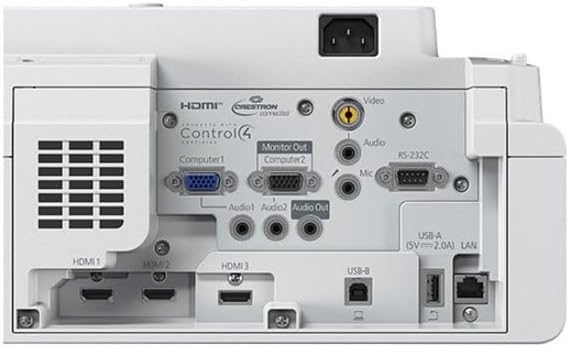
Figure 5: Rear panel of the Epson PowerLite 770F, highlighting the various input and output ports including HDMI, USB, and Ethernet.
Plug the power cord into the projector and then into a wall outlet. The projector is ready for use once the power indicator light stabilizes.
Instrucciones de funcionamiento
Encendido/apagado
Press the power button on the projector or the remote control to turn the unit on. The projector features a 'Wake-On Sync' function, allowing it to display content quickly upon detecting a signal. To turn off, press the power button again and confirm shutdown if prompted.
Selección de fuente
Use the 'Source Search' button on the remote control or the input selection buttons on the projector to cycle through available input sources (HDMI1, HDMI2, USB, LAN, etc.).
Ajuste de imagen
Adjust the image focus and keystone correction as needed using the projector's controls or the remote control. The projector supports various aspect ratios including 16:9, ultra-wide 21:9, and 16:6, which can be selected via the menu settings.
Funciones avanzadas
- Pantalla dividida: Utilize the split screen function to display content from two different sources simultaneously. Refer to the on-screen menu for detailed instructions.
- Conectividad inalámbrica: Connect to your network wirelessly for casting capabilities from compatible devices.
Mantenimiento
The Epson PowerLite 770F features a durable laser light source designed for long-term use. With an estimated lifespan of 20,000 hours, there are no lamps to purchase or replace, significantly reducing maintenance requirements.
Limpieza
- Lente: Gently wipe the projector lens with a soft, lint-free cloth. Avoid using abrasive cleaners.
- Exterior: Limpiar el exterior casing con un paño suave y seco. Para manchas difíciles, un paño ligeramente secoamp Se puede utilizar un paño y luego secarlo.
- Rejillas de ventilación: Periodically check and clean the air vents to ensure proper airflow and prevent overheating. Use a soft brush or compressed air to remove dust.
Solución de problemas
No se muestra ninguna imagen
- Asegúrese de que el proyector esté encendido y que el cable de alimentación esté conectado de forma segura.
- Verify that the correct input source is selected on the projector.
- Verifique el cable de conexión entre el proyector y el dispositivo fuente (por ejemplo, cable HDMI).
- Confirme que el dispositivo fuente esté encendido y emitiendo una señal.
Image Distortion or Blurriness
- Ajuste el anillo de enfoque del proyector hasta que la imagen sea nítida.
- Utilice la función de corrección trapezoidal para cuadrar la imagen si parece trapezoidal.
- Asegúrese de que el proyector esté colocado perpendicular a la pantalla para obtener mejores resultados.
Indicador de sobrecalentamiento
If the projector's temperature warning light illuminates, ensure that the air vents are clear and not obstructed. Turn off the projector, allow it to cool down, and then restart. If the issue persists, contact customer support.
Presupuesto
| Característica | Detalle |
|---|---|
| Dimensiones del producto | 6.5 x 14.1 x 15.6 pulgadas |
| Peso del artículo | 13 libras |
| Número de modelo del artículo | 770F |
| Marca | Epson |
| Usos recomendados | Aula, Educación |
| Característica especial | Tiro corto |
| Tecnología de conectividad | Ethernet, HDMI, USB, Wi-Fi |
| Resolución de pantalla | 1920 x 1080 (Full HD 1080p) |
Garantía y soporte
For warranty information, please refer to the documentation included with your product or visit the official Epson website. For technical support, troubleshooting assistance, or service inquiries, please contact Epson customer support directly.
Planes de protección
Optional protection plans are available for purchase to extend coverage beyond the standard manufacturer's warranty. These plans may include extended service, accidental damage protection, and other benefits. Please consult your retailer or Epson for details on available protection plans.