
1. Producto terminadoview
This manual provides instructions for the FINTIE Portfolio Case, designed to protect and enhance the functionality of your compatible Samsung Galaxy Tab device. The case features a durable exterior, soft interior, integrated S Pen holder, multiple viewing angles, and an additional back pocket.

Image 1.1: FINTIE Portfolio Case with a tablet in viewposición de ing.
2. Compatibilidad
This FINTIE Portfolio Case (Model ESBH009-C) is specifically designed for the following Samsung Galaxy Tab models:
- Samsung Galaxy Tab S10 Lite 5G 10.9 inch (Models: SM-X400, SM-X406B) - 2025 Release
- Samsung Galaxy Tab S10 FE 5G de 10.9 pulgadas (modelos: SM-X520, SM-X526B, SM-X528U) - Lanzamiento en 2025
- Samsung Galaxy Tab S9 FE 5G de 10.9 pulgadas (modelos: SM-X510, SM-X516B, SM-X518U) - Lanzamiento en 2023
- Samsung Galaxy Tab S9 de 11 pulgadas (modelos: SM-X710, SM-X716B, SM-X718U) - Lanzamiento en 2023
Importante: This case is not compatible with any other tablet models.

Image 2.1: Visual guide for identifying compatible Samsung Galaxy Tab models and finding your tablet's model number.
Cómo encontrar el número de modelo de su tableta:
- Open the "Settings" application on your tablet.
- Navigate to "About tablet".
- Locate and identify the "Model number" or "Model name".
3. Características
3.1. Built-in S Pen Holder
The case includes a dedicated slot for your S Pen, ensuring it is securely stored and easily accessible. This design supports the S Pen's magnetic attachment and wireless charging capabilities while the tablet is in the case.
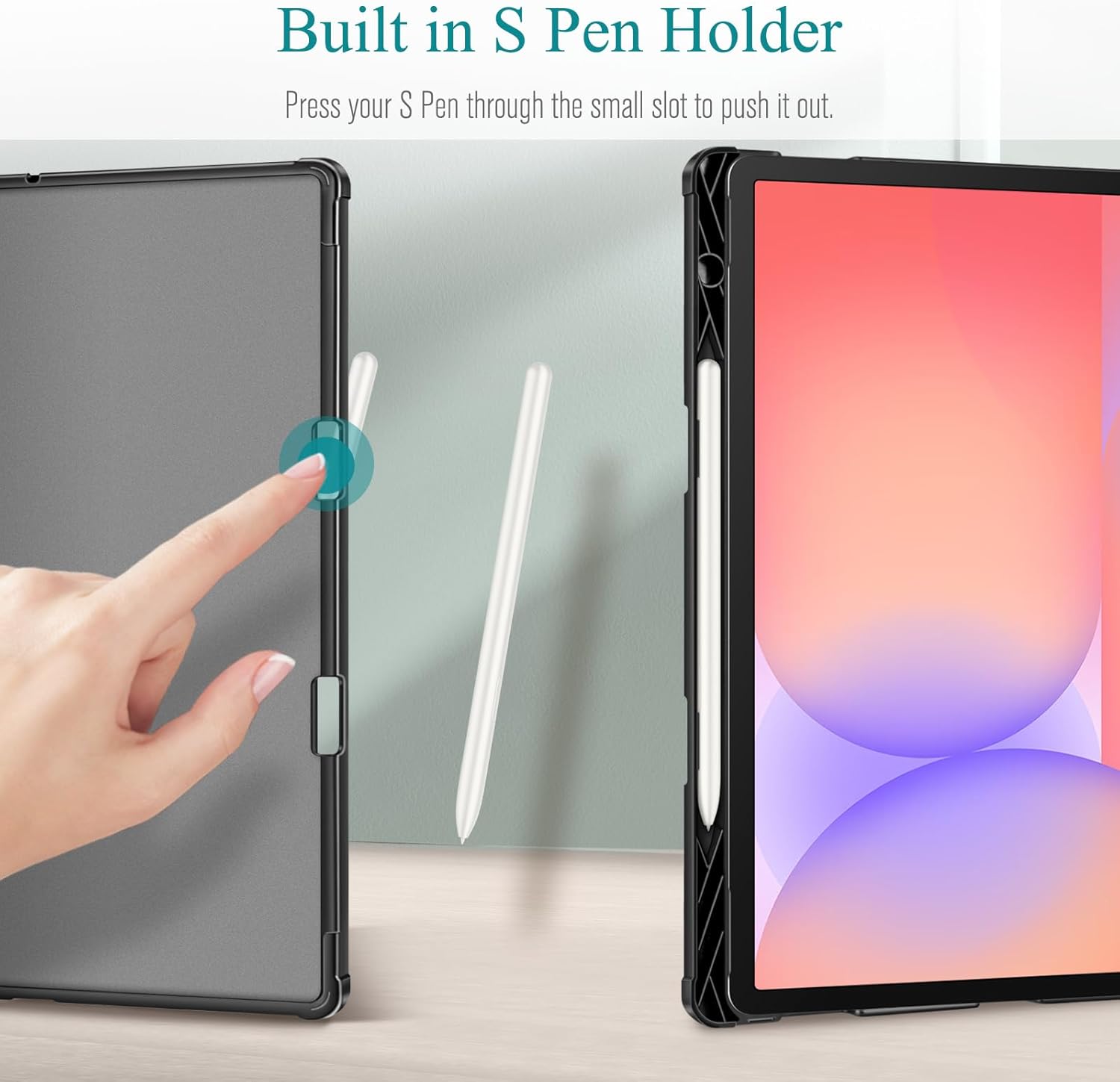
Image 3.1: Detail of the S Pen holder and ejection mechanism.
3.2. Múltiples Viewángulos de ing
Three anti-slip stripes on the interior cover allow you to adjust your tablet to various stable viewing angles, suitable for typing, watching videos, or drawing.

Image 3.2: Demonstration of multiple viewángulos de ing.
3.3. Magnetic Closure and Auto Sleep/Wake
The case features a magnetic flap that securely closes the cover, protecting your device. The built-in magnetic strip also supports the tablet's automatic sleep/wake function, conserving battery life.

Image 3.3: Magnetic closure mechanism.
3.4. Extra Back Pocket
An additional pocket on the back of the case provides convenient storage for small items such as business cards, notes, or a USB charging cable.

Image 3.4: Back pocket for storage.
3.5. Premium Material
The case is constructed from premium synthetic leather for the exterior and soft microfiber for the interior. This combination protects against fingerprints, dirt, and scratches.
4. Configuración e instalación
- Ensure your tablet is clean and free of debris.
- Align your compatible Samsung Galaxy Tab with the hard shell frame of the FINTIE case.
- Gently press the tablet into the frame until it is securely seated. Ensure all corners and edges are properly covered by the case.
- Place your S Pen into the designated holder on the side of the case.
- Close the front cover, ensuring the magnetic flap engages for secure closure.
Video 4.1: This video demonstrates the installation of the tablet into the FINTIE Portfolio Case, showcasing how to secure the tablet and store the S Pen, as well as the case's functionality with multiple viewing angles and magnetic closure.
5. Instrucciones de funcionamiento
5.1. Uso de la función de soporte
To use the stand function, open the front cover and fold it back. Position the tablet's edge into one of the three anti-slip grooves on the interior cover to achieve your desired viewángulo de ing.
5.2. S Pen Access and Charging
The S Pen can be easily removed from its holder by gently pushing it from the back of the case. When placed in the holder, the S Pen will magnetically attach and charge wirelessly, provided your tablet model supports this feature.
5.3. Función de suspensión/activación automática
Opening the front cover will automatically wake your tablet, and closing it will put your tablet to sleep. This feature helps conserve battery life.
5.4. Utilizing the Back Pocket
The back pocket is designed for convenient storage of small, flat items. Avoid overfilling the pocket to prevent damage to the case or its contents.

Image 5.1: Various usage scenarios of the FINTIE Portfolio Case.
6. Mantenimiento
To maintain the appearance and longevity of your FINTIE Portfolio Case:
- Limpie el exterior con un paño suave y seco.amp Paño para eliminar el polvo y la suciedad.
- Evite utilizar productos químicos agresivos o limpiadores abrasivos, ya que pueden dañar el material.
- Keep the case away from extreme temperatures and direct sunlight for prolonged periods.
7. Solución de problemas
7.1. Auto Sleep/Wake Function Not Working
- Ensure your tablet is fully seated within the case and the magnetic strip is properly aligned.
- Check your tablet's settings to ensure the "Smart Cover" or "Magnetic Cover" feature is enabled (exact setting name may vary by tablet model).
7.2. S Pen Not Charging
- Verify that your tablet model supports wireless charging for the S Pen.
- Ensure the S Pen is correctly positioned in its holder and making proper contact for charging.
8. Especificaciones
| Número de modelo | ESBH009-C |
| Marca | TERMINADO |
| Color | Gris |
| Material | Cuero sintético de primera calidad (exterior), microfibra suave (interior) |
| Peso del artículo | 1.01 libras (aproximadamente 458 gramos) |
| Dimensiones del paquete | 10.87 x 8.43 x 1.3 pulgadas (aproximadamente 27.6 x 21.4 x 3.3 cm) |
| Factor de forma | Caso |
| Tipo de concha | Duro |
9. Garantía y soporte
FINTIE is committed to providing quality products and customer satisfaction. For any questions regarding your purchase or FINTIE products, please contact our support team. Specific warranty details may vary; please refer to the product packaging or the official FINTIE webSitio para obtener la información de garantía más actualizada.
Para obtener más ayuda, visite el FINTIE Store on Amazon.