
Phenyx Pro PDP-2-1H1B
Manual del usuario del sistema de micrófono inalámbrico digital dual Phenyx Pro
Model: PDP-2-1H1B
Producto terminadoview
The Phenyx Pro PDP-2-1H1B is a versatile dual digital UHF wireless microphone system designed for clear and reliable audio transmission. It features a handheld dynamic microphone and a bodypack transmitter with options for a headset or lapel microphone, making it suitable for various applications from home karaoke to professional performances.
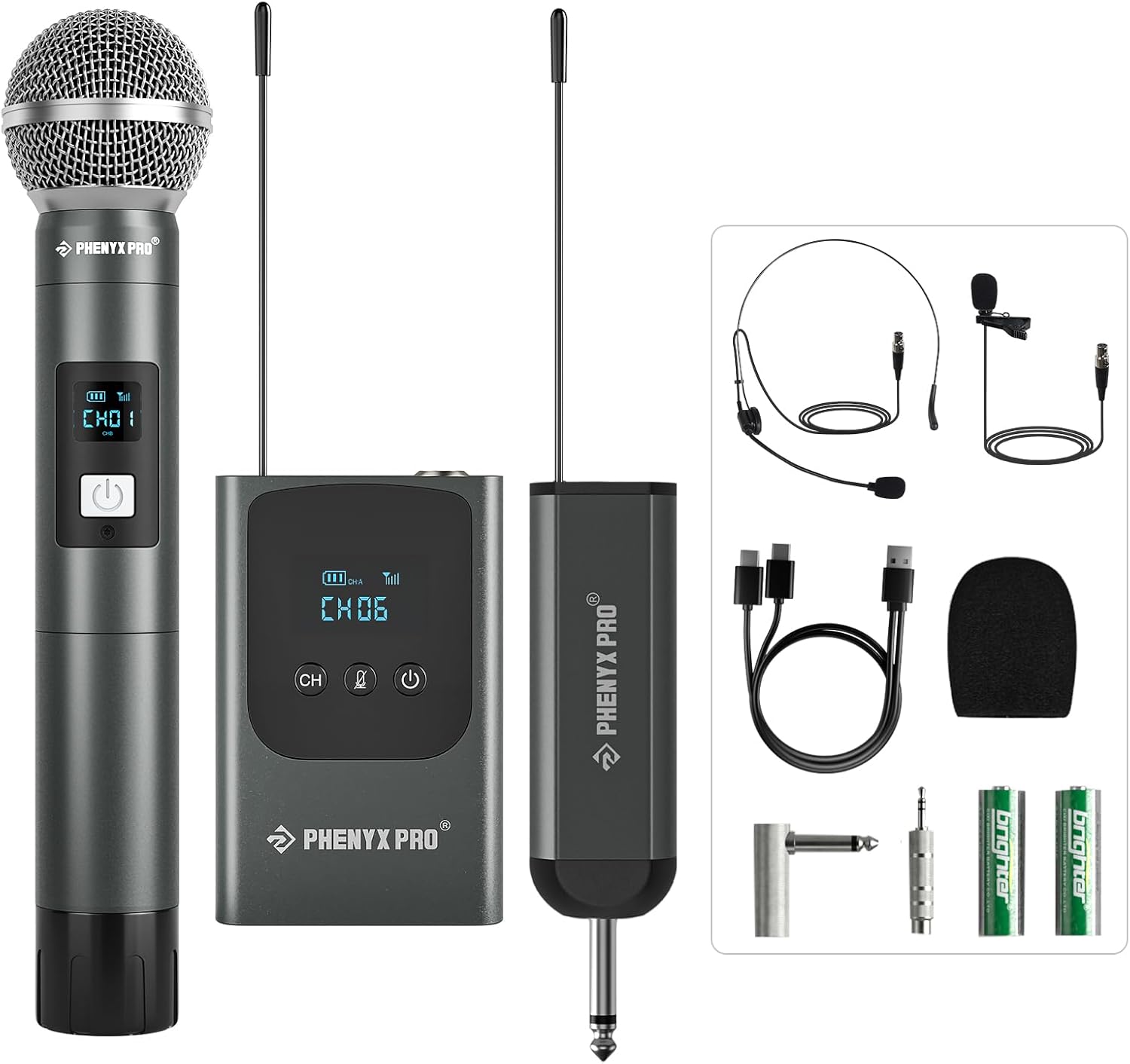
Figure 1: Complete Phenyx Pro PDP-2-1H1B Wireless Microphone System.
Qué incluye
Your Phenyx Pro PDP-2-1H1B system package contains the following items:
- 1 x Receiver with a 6.35mm plug
- 1 x Portable Wireless Handheld Microphone
- 1 x Rechargeable Bodypack Transmitter
- 1 x Micrófono para auriculares
- 1 x Lapel/Lavalier Microphone
- 1 x Handheld Foam Cover
- 2 x AA Batteries (for handheld mic)
- 1 cable de carga dual USB-C
- 1 adaptador de 6.35 mm a 3.5 mm
- 1 x Angle TS Male to 1/4'' TS Female Adapter (to keep receiver antenna upward)
- 1 x Manual del usuario

Figura 2: Contenido del paquete del producto.
Guía de configuración
- Charge the Receiver and Bodypack: Use the provided USB-C dual charging cable to fully charge the mini receiver (1500mAh battery) and the bodypack transmitter (550mAh battery). The receiver is rechargeable and offers up to 5.5 hours of working time with approximately 3 hours of fast charging.
- Install Batteries in Handheld Microphone: Open the battery compartment of the handheld microphone and insert the 2 AA batteries provided.
- Conecte el receptor al sistema de audio: Plug the 1/4" TS connector of the mini receiver into the microphone input of your karaoke machine, partybox, mixer, or audio interface. If needed, use the included angle TS male to 1/4" TS female adapter to ensure the receiver's antenna points upward for optimal signal reception.
- Connect Headset or Lapel Mic to Bodypack (Optional): If using the headset or lapel microphone, plug its 3-pin mini XLR jack into the bodypack transmitter.
- Encendido: Turn on the receiver, handheld microphone, and bodypack transmitter. The system should automatically pair.

Figure 3: Charging the mini receiver.

Figure 4: Connecting the receiver to an audio system.

Figure 5: Bodypack transmitter with headset and lapel mic options.

Figure 6: Hassle-free Hookup process.
Instrucciones de funcionamiento
Operación del micrófono de mano
- Encendido/apagado: Long press the power button on the microphone to turn it on or off.
- Función de silencio: Short press the power button to mute or unmute the microphone.
- Selección de frecuencia: The handheld microphone features a digital display showing channel number, battery life, and signal strength. Use the frequency selection button to change channels if interference occurs. The system offers 2x15 UHF tunable frequencies (902-928MHz).

Figure 7: Handheld Microphone Controls and Display.
Bodypack Transmitter Operation
- Encendido/apagado: Long press the power button on the bodypack to turn it on or off.
- Función de silencio: Short press the mute button for safe and reliable control during performances.
- Selección de frecuencia: Simply tap the CH button to select a desired frequency among the 2x15 tunable UHF frequencies. The receiver automatically switches to the new channel.

Figure 8: Bodypack Transmitter Controls.
Consejos generales de uso
- Línea de visión: For optimal performance and range (160-200ft), maintain a clear line-of-sight between the transmitters and the receiver. Avoid placing metal or glass objects directly in the signal path.
- Posición de la antena: Keep the receiver antenna pointed upward. Use the included angle adapter if necessary to achieve this orientation when plugging into rear ports.
- Manejo del micrófono: When using the handheld microphone, avoid covering the bottom of the transmitter where the signal is sent with your hands to prevent signal blockage.
- Wearing Headset/Lapel Mic: Ensure the headset or lapel microphone is positioned correctly to capture your voice clearly.

Figure 9: Wireless Microphone Usage Tips.
Mantenimiento
- Limpieza: Use a soft, dry cloth to clean the exterior of the microphones, transmitter, and receiver. Do not use liquid cleaners or solvents.
- Cuidado de la batería: For the handheld microphone, remove AA batteries if the unit will not be used for an extended period to prevent leakage. Rechargeable components (receiver, bodypack) should be charged regularly to maintain battery health.
- Almacenamiento: Guarde el sistema en un lugar fresco y seco, alejado de la luz solar directa y de temperaturas extremas.
- Manejo: Handle all components with care to avoid physical damage, especially the antennas and microphone capsules.
Solución de problemas
| Problema | Posible causa | Solución |
|---|---|---|
| Sin sonido/Sonido débil |
|
|
| Interferencia / Ruido estático |
|
|
| Ruido de zumbido |
|
|
Presupuesto
| Característica | Detalle |
|---|---|
| Número de modelo | PDP-2-1H1B |
| Factor de forma del micrófono | Sistema de micrófono |
| Rango de frecuencia | 902 - 928 MHz |
| Número de canales | 2 (2x15 UHF Frequencies) |
| Samptasa de ling | 48 kHz/24 bits |
| Relación señal a ruido | 96 dB |
| Handheld Mic Type | Dinámico, cardioide |
| Headset/Lapel Mic Type | Condenser, Omni |
| Capacidad de la batería del receptor | 1500 mAh |
| Bodypack Battery Capacity | 550 mAh |
| Interfaz de carga | USB-C |
| Tiempo de trabajo | Hasta 5.5 horas (aprox.) |
| Material | Metal (microphones) |
| Tecnología de conectividad | Auxiliary (6.35mm Jack, XLR) |
| Dispositivos compatibles | Party box, PA System, Audio Mixer, Camera, Ampmás vivaz |
Garantía y soporte
Phenyx Pro products are crafted with premium components and precision engineering, ensuring trusted quality and lasting reliability. The manufacturer stands firmly behind every product they make.
For detailed warranty information, technical support, or further assistance, please refer to the official user manual provided with your product or visit the Phenyx Pro websitio.
También puede acceder al Manual de Usuario (PDF) en línea: Phenyx Pro User Manual PDF