
Fafrees F20 PRO
Manual de usuario de la bicicleta eléctrica Fafrees F20 PRO
Modelo: F20 PRO
Introducción
Thank you for choosing the Fafrees F20 PRO Electric Bike. This manual provides essential information for the safe operation, assembly, maintenance, and troubleshooting of your new electric bicycle. Please read this manual thoroughly before your first ride to ensure proper usage and to maximize the lifespan of your bike.

Image: The Fafrees F20 PRO Electric Bike, black in color, shown from a three-quarter front view, highlighting its foldable frame, fat tires, and included storage bag.
Información de seguridad
Priorice siempre la seguridad al operar su bicicleta eléctrica. No seguir las normas de seguridad puede provocar lesiones graves o daños a la bicicleta.
- Utilice siempre un casco que cumpla con las normas de seguridad locales.
- Asegúrese de que todos los componentes estén bien fijados antes de cada viaje.
- Familiarícese con las leyes y regulaciones de tránsito locales con respecto a las bicicletas eléctricas.
- No conduzca bajo la influencia del alcohol o las drogas.
- Esté atento a su entorno y a los demás usuarios de la carretera.
- Evite conducir en condiciones climáticas adversas, como lluvia intensa o nieve, si es posible.
- Compruebe periódicamente la presión de los neumáticos, el funcionamiento de los frenos y el nivel de carga de la batería.
Contenido del paquete
Al abrir el paquete, verifique que estén incluidos todos los siguientes elementos:
- 1 x Fafrees F20 PRO Electric Bike (partially assembled)
- Cargador de batería 1 x
- 1 x Gift Box (contents may vary)
- 1 x Manual de usuario (este documento)
Configuración y montaje
The Fafrees F20 PRO Electric Bike comes partially assembled. Follow these steps to complete the assembly:
- Desplegando el marco: Despliegue con cuidado el cuadro principal de la bicicleta hasta que encaje en su lugar. Asegúrese de que el mecanismo de plegado esté bien cerrado.
- Instalación del manillar: Insert the handlebar stem into the fork tube and tighten the quick-release lever or bolts as instructed. Ensure the handlebar is aligned with the front wheel.
- Colocación de los pedales: Identify the left (L) and right (R) pedals. Screw them into the corresponding crank arms. Note that the left pedal has a reverse thread. Tighten firmly with a wrench.
- Installing the Seat Post and Saddle: Insert the seat post with the saddle attached into the seat tube. Adjust the height to a comfortable riding position and secure it with the quick-release clamp. Important: Do not install the seat tube below the safe line marked on the post.
- Montaje del faro: Attach the LED headlight to the designated mounting point on the front of the bike, usually on the fork or handlebar stem. Connect any necessary wiring.
- Instalación de la batería: The battery may come pre-installed or require insertion. If not installed, slide the battery into its compartment (often within the frame or behind the seat tube) until it clicks into place. Ensure it is locked with the key if applicable.
- Carga inicial de la batería: Antes de su primer uso, cargue completamente la batería con el cargador incluido. Conecte el cargador al puerto de carga de la bicicleta y luego a una toma de corriente. La luz indicadora del cargador mostrará el estado de carga.
- Controles previos al viaje: Before riding, check tire pressure, brake functionality (front and rear), and ensure all bolts and quick releases are tight.
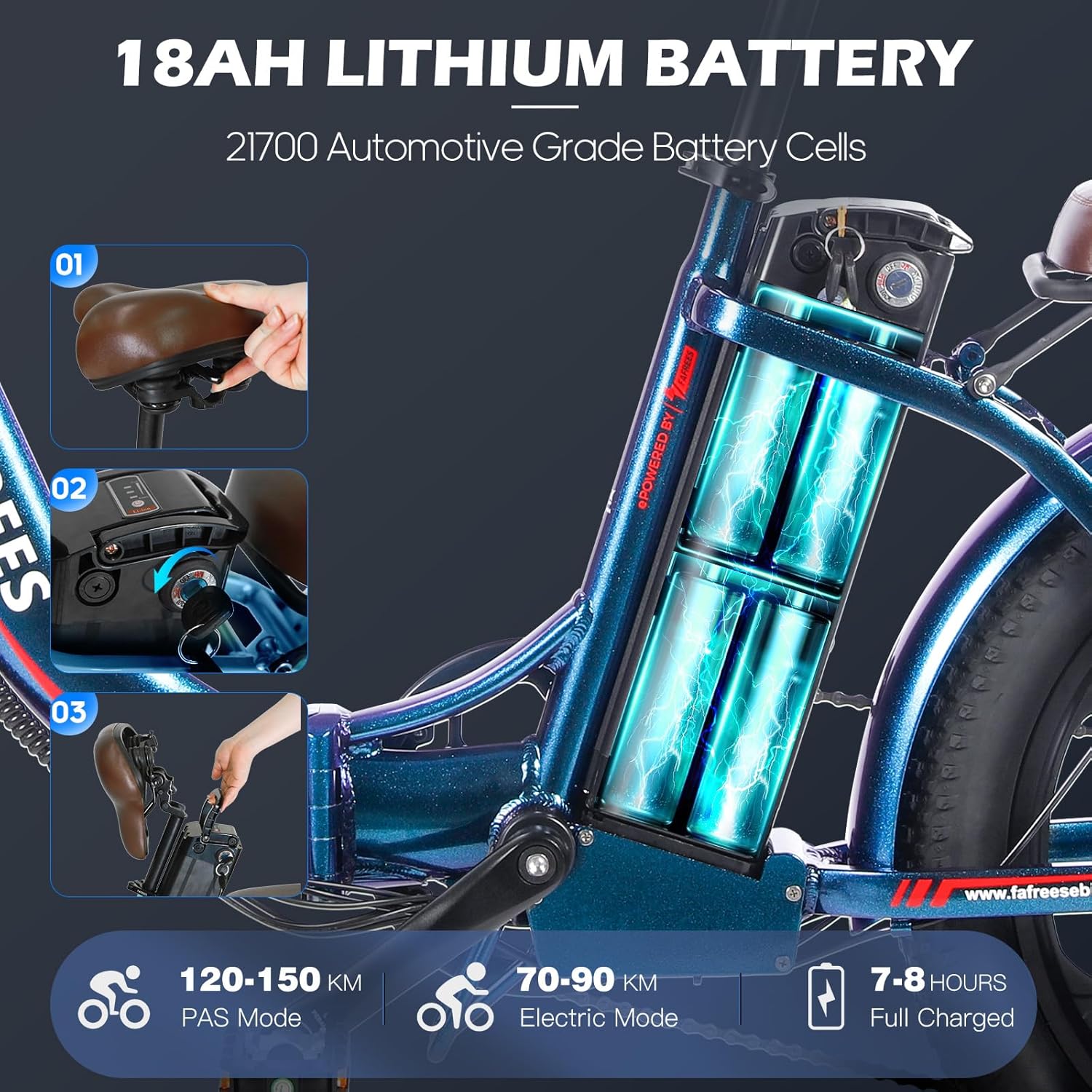
Imagen: Un primer plano view of the Fafrees F20 PRO's frame, illustrating the removable 18AH lithium battery compartment and the process of inserting and removing the battery.
Instrucciones de funcionamiento
Encendido/apagado
Para encender la bicicleta, mantenga presionado el botón de encendido en la pantalla LCD. Para apagarla, mantenga presionado el mismo botón hasta que la pantalla se apague.
Funciones de la pantalla LCD
The smart LCD display provides real-time information about your ride:
- Velocidad: Velocidad de conducción actual.
- Nivel de batería: Indica la carga restante de la batería.
- Kilometraje: Muestra la distancia recorrida o la lectura total del odómetro.
- Gear/PAS Level: Muestra el nivel actual de asistencia al pedaleo (PAS).
- Walk Assistance Mode: Activa una asistencia de baja velocidad para caminar con la bicicleta.
- Control de crucero: Mantiene una velocidad establecida sin necesidad de acelerar continuamente.

Imagen: Un detalle view of the Fafrees F20 PRO's handlebar, showcasing the smart color LCD display, bell, gear shift lever, power-off brake levers, and thumb throttle.
Modos de conducción
- Modo de asistencia al pedaleo (PAS): The motor provides assistance as you pedal. Adjust the assist level using the display controls (usually '+' and '-' buttons). Higher levels provide more assistance.
- Modo totalmente eléctrico: Use the thumb throttle to propel the bike without pedaling. This mode consumes battery faster.
- Modo manual: Conduce la bicicleta como una bicicleta tradicional sin ninguna asistencia de motor.
Engranajes y cambios
The F20 PRO is equipped with a 7-speed derailleur system. Use the gear shifter on the handlebar to change gears according to terrain and desired pedaling effort. Shift gears smoothly by easing off the pedals slightly during the shift.
Sistema de frenado
The bike features front and rear mechanical 160mm disc brakes with power-off brake levers. Squeeze both brake levers simultaneously for effective and safe stopping. The power-off feature cuts motor power when brakes are applied.

Image: A close-up of the Fafrees F20 PRO's front wheel, highlighting the mechanical disc brake system, including the rotor, caliper, and power-off brake lever, emphasizing its stopping capabilities.
Mantenimiento
Regular maintenance is crucial for the longevity and safe operation of your Fafrees F20 PRO Electric Bike.
- Limpieza: Limpie la bicicleta periódicamente con adamp paño. Evite utilizar hidrolavadoras directamente sobre componentes eléctricos.
- Lubricación: Lubricate the chain and other moving parts (e.g., derailleur pivots) periodically with bicycle-specific lubricant.
- Llantas: Check tire pressure before each ride. The recommended pressure is usually indicated on the tire sidewall. Inspect tires for wear and damage.
- Frenos: Revise regularmente el desgaste de las pastillas de freno y asegúrese de que las palancas de freno ofrezcan una frenada firme y eficaz. Ajuste los cables de freno según sea necesario.
- Cuidado de la batería:
- Charge the battery fully after each ride, especially if it's been significantly discharged.
- Guarde la batería en un lugar fresco y seco, alejado de la luz solar directa y de temperaturas extremas.
- If storing the bike for an extended period, charge the battery to 50-70% every 1-2 months.
- Sujetadores: Revise periódicamente todos los pernos, tuercas y cierres rápidos para comprobar que estén bien apretados.
Solución de problemas
This section addresses common issues you might encounter with your Fafrees F20 PRO Electric Bike.
| Problema | Posible causa | Solución |
|---|---|---|
| La bicicleta no enciende. | La batería no está cargada, la batería no está colocada correctamente, el cable de alimentación está suelto, problema con la pantalla. | Ensure battery is fully charged. Check if battery is securely inserted and locked. Inspect all cable connections. Contact support if issue persists. |
| El motor no asiste. | PAS level too low/off, battery low, brake levers engaged, motor connection issue. | Increase PAS level on display. Check battery charge. Ensure brake levers are fully released. Check motor cable connection. |
| Los frenos se sienten débiles o esponjosos. | Pastillas de freno desgastadas, cable de freno suelto, aire en el sistema hidráulico (si corresponde). | Inspect and replace worn brake pads. Adjust brake cable tension. For hydraulic brakes, bleeding may be required by a professional. |
| Los cambios de marcha no se realizan con suavidad. | Derailleur out of adjustment, bent hanger, dirty chain. | Clean and lubricate the chain. Adjust derailleur limits and cable tension. If hanger is bent, seek professional repair. |
Presupuesto
| Característica | Detalle |
|---|---|
| Modelo | F20 PRO |
| Motor | 250W Brushless Motor, 40N·M Torque |
| Velocidad máxima | 25 kilómetros por hora |
| Batería | Batería de iones de litio de 36 V y 18 Ah (extraíble) |
| Autonomía (Totalmente eléctrica) | 70-90 kilómetros |
| Alcance (Pedal asistido) | 110-130 kilómetros |
| Tiempo de carga | 7-8 Hours (Full Charge) |
| Material del marco | Aluminum Alloy (Step-Through Foldable) |
| Llantas | 20 * 3.0 Inch Fat Tires |
| Suspensión | Front Oil Suspension Fork (75mm travel) |
| Frenos | Front & Rear Mechanical 160mm Disc Brakes |
| Engranajes | Desviador de 7 velocidades |
| Mostrar | Smart Color LCD Display |
| Altura recomendada del ciclista | 160-185 centímetros |
| Capacidad de carga máxima | 150 kilogramos |
| Dimensiones del producto (desplegado) | 174 x 60 x 118 cm |
| Peso del producto | 25.5 kilogramos |

Image: An illustration of the Fafrees F20 PRO's 250W brushless rear hub motor, detailing its internal components, along with icons indicating 40 Nm motor torque, 25 km/h max speed, and 7-speed Shimano gearing.
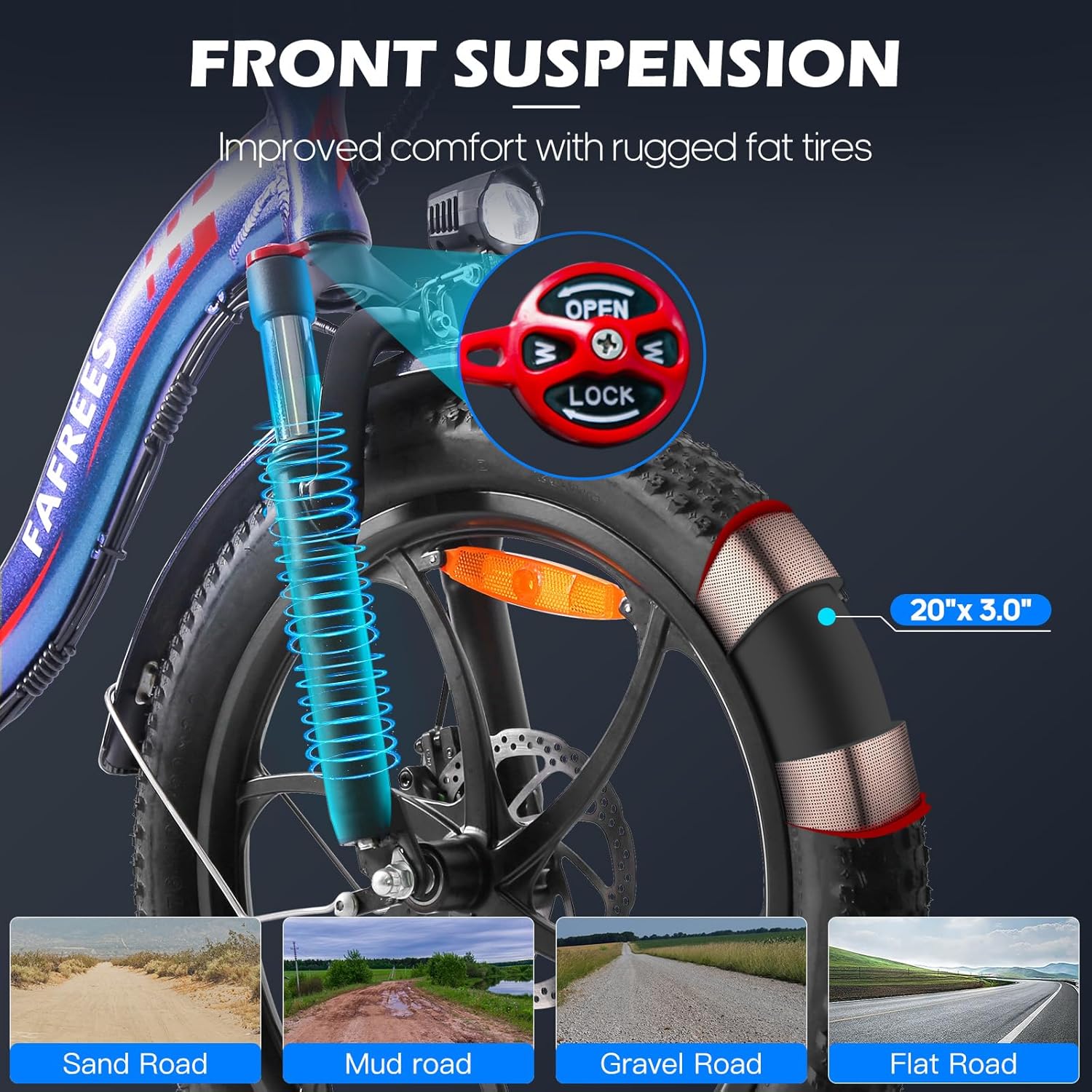
Image: A close-up of the Fafrees F20 PRO's front suspension fork and 20x3.0 inch fat tire, with an inset showing the suspension lock/open mechanism. Below are illustrations of various terrains (sand, mud, gravel, flat road) the fat tires can handle.
Garantía y soporte
Fafrees provides a limited warranty for the F20 PRO Electric Bike. Please refer to the warranty card included in your package for specific terms and conditions. For technical support, spare parts, or warranty claims, please contact the official Fafrees customer service or the authorized seller from whom you purchased the product.
Vendedor: Fafrees_Official Ebike Store
Keep your purchase receipt and the bike's serial number (usually located on the frame) readily available when contacting support.