
1. Introducción
This manual provides detailed instructions for the safe and effective operation of your Dragonhawk Wireless Tattoo Gun Machine, Model YZBTD. Please read this manual thoroughly before using the device to ensure proper setup, operation, and maintenance. This machine is designed for professional tattoo artists and beginners, offering versatility and reliable performance.
2. Información de seguridad
Always prioritize safety when operating tattoo equipment. Failure to follow these guidelines may result in injury or damage to the device.
- Sólo para uso externo: This device is intended for tattooing on skin.
- Esterilización: Ensure all needles, cartridges, and contact surfaces are properly sterilized before each use.
- Fuente de energía: Utilice únicamente el cable de carga proporcionado y los adaptadores de corriente compatibles.
- Seguridad de la batería: Do not expose batteries to extreme temperatures or puncture them. Dispose of used batteries responsibly.
- Manejo: Handle the machine with care. Avoid dropping or subjecting it to strong impacts.
- Humedad: Keep the device dry. It is water-resistant, but not waterproof. Avoid submerging it in liquids.
- Niños: Mantener fuera del alcance de los niños.
3. Producto terminadoview Y componentes
The Dragonhawk Wireless Tattoo Gun Machine YZBTD is a cordless pen-style rotary tattoo machine featuring an adjustable stroke length and a powerful coreless motor.

Figura 3.1: Sobreview of the tattoo machine's control panel and battery.
Componentes clave:
- Cuerpo de la máquina: Main housing containing the motor and drive system.
- Paquete de baterías: Detachable power source with OLED display and control buttons.
- Agarre ajustable: Rotates to adjust needle depth.
- Stroke Adjustment Knob: Allows selection of 7 stroke lengths (2.4mm - 4.2mm).
- Needle Cartridge Slot: Where tattoo needle cartridges are inserted.
- Puerto de carga tipo C: Para recargar la batería.
4. Configuración
4.1 Instalación de la batería
The machine comes with two replaceable batteries to ensure continuous operation.
- Asegúrese de que la máquina esté apagada.
- Gently twist the battery pack counter-clockwise to detach it from the machine body.
- Align a charged battery pack with the machine body and twist clockwise until securely fastened.

Figure 4.1: The machine is equipped with two replaceable batteries for extended use.
4.2 Needle Cartridge Installation
Use only compatible Dragonhawk cartridge needles for optimal performance.
- Select the desired needle cartridge.
- Insert the needle cartridge into the machine's slot, pushing firmly until it clicks into place.
- To remove, twist the cartridge slightly and pull it out.

Figure 4.2: Proper insertion of a needle cartridge into the machine.
5. Instrucciones de funcionamiento
Familiarícese con el panel de control para una operación eficiente.
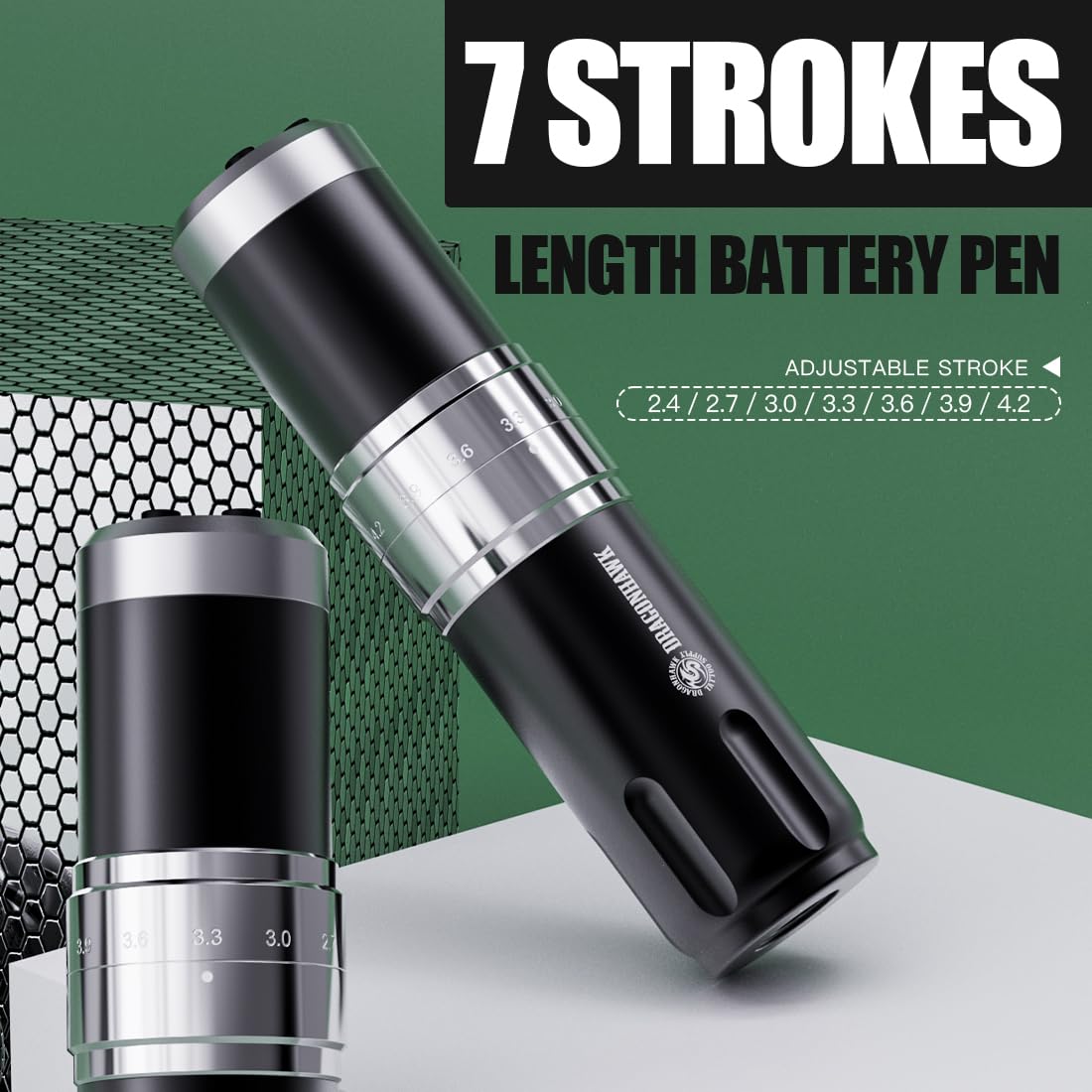
Figure 5.1: Control panel and stroke adjustment.
5.1 Encendido y apagado
- Mantenga pulsado el 'O' (Switch Button) for a few seconds to power the machine on or off.
- The OLED display will show the current voltage y nivel de batería.
5.2 Ajuste del volumentage
- Utilice el '+' (Voltage Increase Key) y '-' (Voltage Reduction Key) buttons to adjust the voltage en incrementos de 0.1 V.
- El volumen recomendadotagEl rango es 4V-12V.
5.3 Changing Mode (Liner/Shader)
- Presione el 'M' (Switch Mode) button to switch between Liner (L) and Shader (S) gears.
- The machine automatically memorizes the voltage settings for each mode.
5.4 Ajuste de la longitud de la carrera
The machine offers 7 adjustable stroke lengths from 2.4mm to 4.2mm.
- Rotate the adjustment knob located on the machine body to select the desired stroke length.
- Available lengths: 2.4mm, 2.7mm, 3.0mm, 3.3mm, 3.6mm, 3.9mm, 4.2mm.

Figure 5.2: Adjusting the stroke length by rotating the knob.
5.5 Vídeo oficial del producto
Video 5.1: An official video demonstrating the features and operation of the Dragonhawk Fold3 Wireless Tattoo Gun.
6. Mantenimiento
6.1 Limpieza
- Desconecte siempre la alimentación antes de limpiar.
- Wipe the machine body with a soft, damp cloth and a mild disinfectant.
- Do not use abrasive cleaners or submerge the machine in liquid.
- Ensure no liquid enters the motor or charging port.
6.2 Carga
La máquina está equipada con un puerto de carga tipo C.
- Connect the provided Type-C cable to the charging port on the battery pack.
- Connect the other end to a compatible USB power adapter.
- Una carga completa tarda aproximadamente 1.5 horas.
- The battery indicator on the OLED display will show charging status.
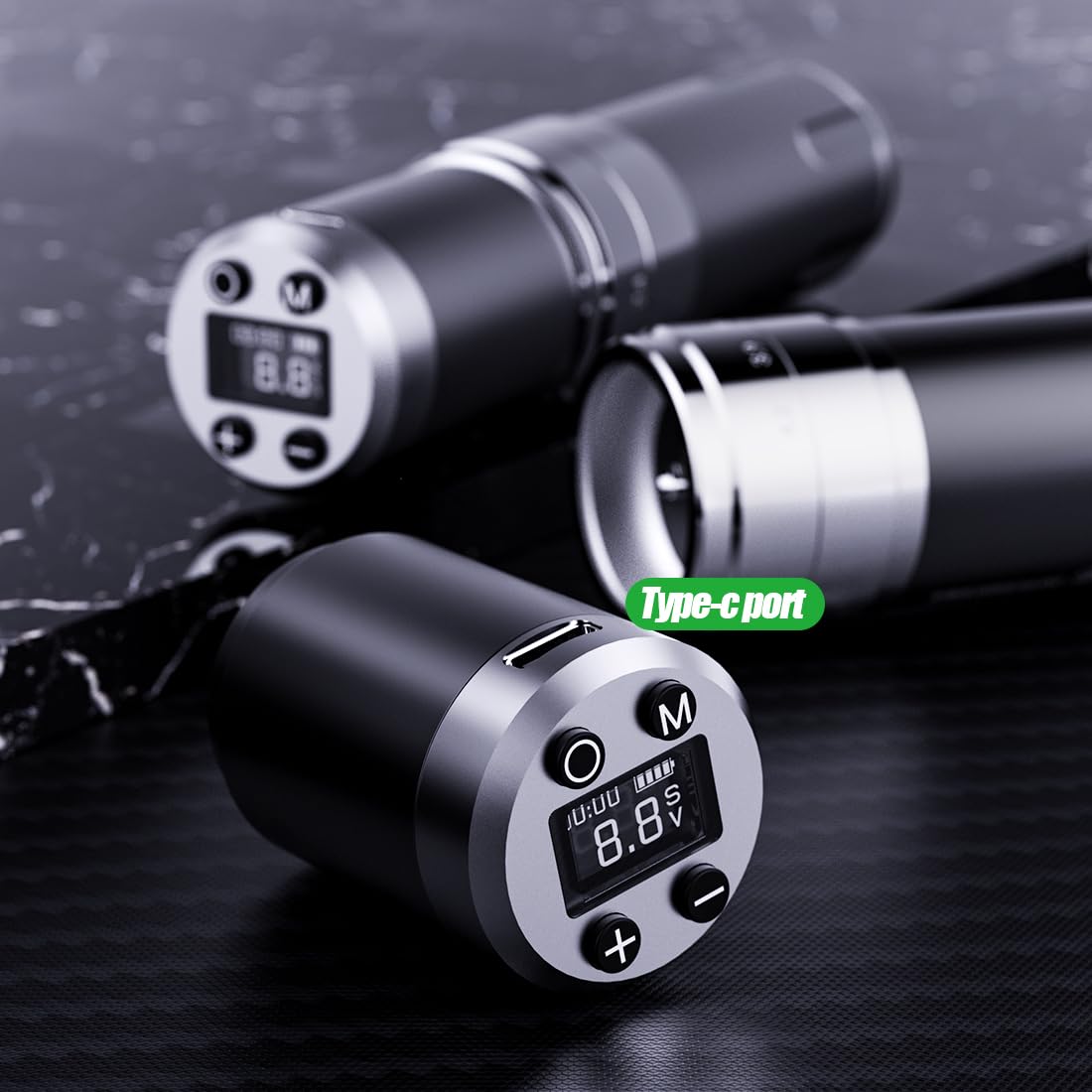
Figura 6.1: Puerto de carga tipo C en el paquete de baterías.
6.3 Cuidado de la batería
- Para prolongar la vida útil de la batería, evite descargarla por completo con frecuencia.
- Store the machine and spare batteries in a cool, dry place when not in use.
- If storing for an extended period, charge the batteries to about 50-60% capacity.
7. Solución de problemas
Consulte la siguiente tabla para conocer los problemas más comunes y sus soluciones.
| Problema | Posible causa | Solución |
|---|---|---|
| La máquina no enciende | Low battery; Battery not properly installed; Power button not pressed correctly. | Charge the battery; Reinstall the battery pack securely; Press and hold the power button firmly. |
| La aguja no se mueve. | Needle cartridge not installed correctly; Stroke length set too low; Motor issue. | Reinstall needle cartridge; Adjust stroke length; Contact support if motor issue persists. |
| Volumentage display flickering | Loose battery connection; Low battery. | Ensure battery is securely attached; Charge the battery. |
| Sobrecalentamiento de la máquina | Prolonged continuous use; High voltage ajuste. | Allow machine to cool down; Reduce voltage si es necesario. |
8. Especificaciones
Technical details of the Dragonhawk Wireless Tattoo Gun Machine YZBTD.
| Característica | Detalle |
|---|---|
| Número de modelo | YZBTD |
| Dimensiones del producto | 3.94 x 3.94 x 7.87 pulgadas |
| Peso del artículo | 10.58 onzas (300 gramos) |
| Motor | Mcore Coreless Motor |
| Longitudes de trazo | 7 adjustable (2.4mm - 4.2mm) |
| Volumentage Rango | 4 V - 12 V |
| Capacidad de la batería | 1500 mAh (por batería) |
| Duración de la batería | 6-8 horas (por batería) |
| Tiempo de carga | Aproximadamente 1.5 horas |
| Puerto de carga | Tipo C |
| Nivel de resistencia al agua | Resistente al agua |
9. Garantía y soporte
Dragonhawk is committed to providing high-quality products and excellent customer service.
- Cobertura del producto: Dragonhawk products typically include coverage for manufacturing defects. Please refer to your purchase documentation for specific warranty terms.
- Apoyo técnico: For video tutorials, setup guides, and professional tips, visit Youtube.com/@Dragonhawkofficial.
- Servicio al cliente: For any inquiries or issues with your order, please reach out through Amazon's messaging system.
- Devoluciones: Este producto tiene una política de devolución de 30 días para reembolso/reemplazo.