
1. Introducción
The JoyeAuto CarPlay Retrofit Kit Decoder (Model WJPO-3) is designed to seamlessly integrate Apple CarPlay and Android Auto functionalities into your compatible Porsche vehicle's existing infotainment system. This module allows you to enjoy navigation, music, phone calls, and other smartphone applications directly on your car's display, enhancing your driving experience with modern connectivity.
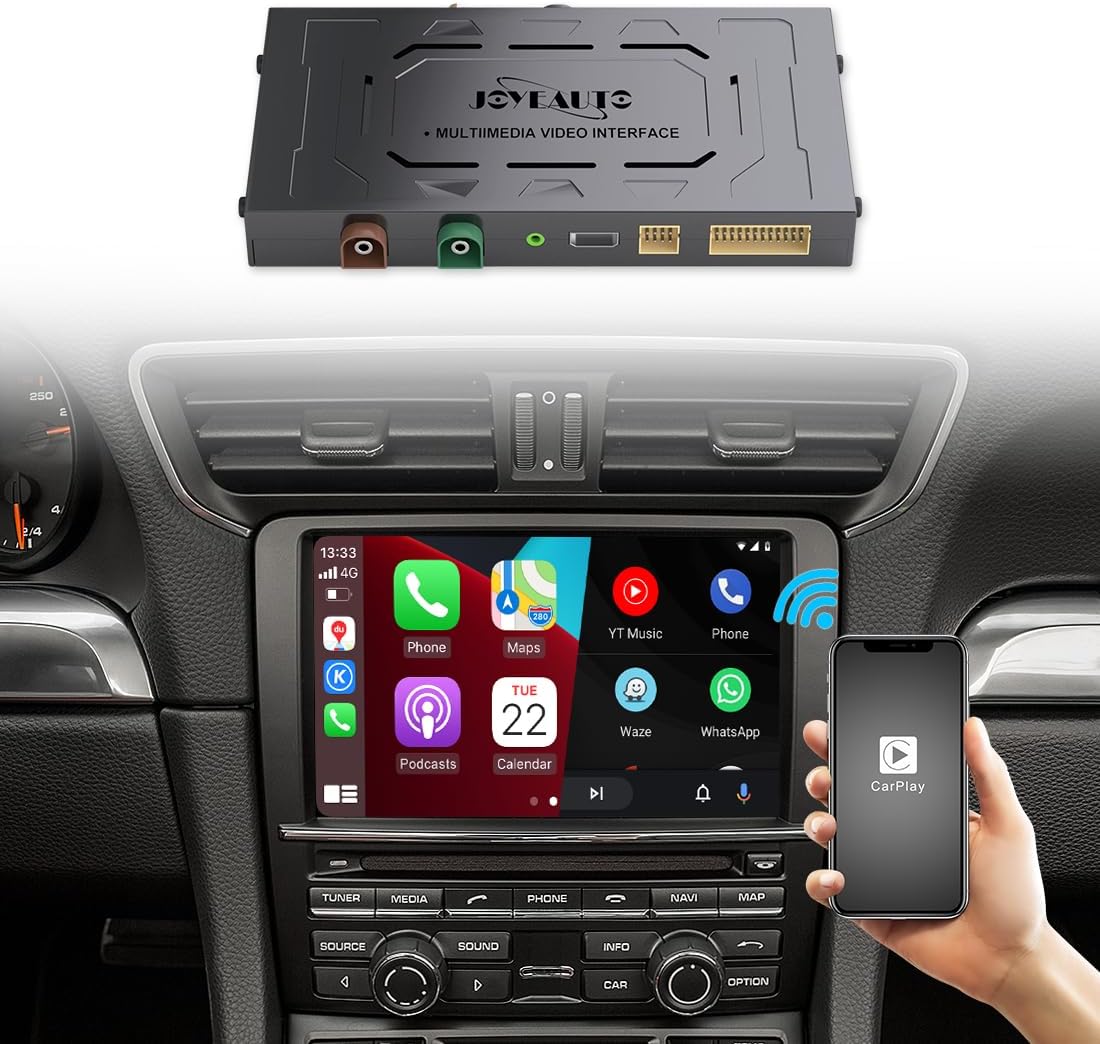
Image 1.1: The JoyeAuto CarPlay Retrofit Kit Decoder module and a Porsche car display demonstrating the integrated CarPlay interface.
2. Modelos compatibles
This JoyeAuto CarPlay Retrofit Kit Decoder is compatible with Porsche vehicles equipped with the CDR31 head unit, manufactured between 2010 and 2016. Compatible models include:
- Porsche Cayenne (2010-2016)
- Porsche Boxster (2010-2016)
- Porsche Panamera (2010-2016)
- Porsche 911 Carrera (2010-2016)
Importante: Please confirm your car's control panel has a "CD-AUX" button. This kit will not function with head units that have a "NAVI" button instead of "CD-AUX". If you are unsure about compatibility, please contact JoyeAuto support before purchase.
3. Características principales
The JoyeAuto CarPlay Retrofit Kit offers a range of features to enhance your in-car connectivity:
- Wireless & Wired Apple CarPlay: Supports full-screen Apple CarPlay functionality, allowing access to Apple Maps, navigation, phone calls, Spotify, Apple Music, and messages. Features a built-in microphone for Siri voice commands and Bluetooth calls.
- Android Auto con cable: Connect your Android phone via USB cable to use Android Auto, providing access to maps, phone calls, and online music streaming.
- Funcionalidad de enlace espejo: Allows wired mirroring of your smartphone screen (both Apple and Android) to the car's display, enabling you to view videos and use phone applications directly on the car screen.
- Factory Bluetooth Integration: Utilizes the car's factory Bluetooth sound channel for high-quality audio playback. The module includes a built-in sound processing chip to further enhance sound quality.
- Original System Upgrade: The installation is designed to be plug-and-play, seamlessly integrating with the original car system. You can continue to use existing controls such as Siri, steering wheel buttons, and the roller button to navigate CarPlay applications.

Image 3.1: The car's display showing the integration of Apple CarPlay and Android Auto, highlighting wireless capabilities.

Image 3.2: The car's display mirroring a smartphone screen, illustrating the Mirror-Linking feature.

Image 3.3: The car's display showing music playback, emphasizing the use of the factory Bluetooth for audio.
4. Contenido del paquete
Al abrir el paquete, verifique que estén incluidos todos los siguientes componentes:

Image 4.1: All components included in the JoyeAuto CarPlay Retrofit Kit package.
- Módulo de interfaz de vídeo multimedia JoyeAuto
- Antena wifi
- Cable USB
- Adaptador AUX
- Cable LVDS
- Micrófono
- Cable de alimentación
- Placa sub-PCB
- Cable auxiliar
- 48PIN Harness
5. Configuración e instalación
The installation of the JoyeAuto CarPlay Retrofit Kit is designed to be plug-and-play, integrating with your vehicle's existing wiring. However, it involves working with your car's electrical system and interior components.
Video de instalación: A detailed step-by-step installation video is available. Please scan the QR code provided on the product packaging box to access the video guide.
Recomendación: If you are not confident in performing the installation yourself, it is highly recommended to seek assistance from a qualified specialist or professional car audio installer. Improper installation can damage the original car's wiring and may void your car's warranty.
Prueba de preinstalación: Before completing the full installation and reassembling your car's interior, it is crucial to test all features of the module to ensure they are fully functional and compatible with your vehicle. Do not finalize the installation until all features have been verified.
6. Instrucciones de funcionamiento
Once the JoyeAuto CarPlay Retrofit Kit is successfully installed, operating the system is intuitive and integrates with your car's existing controls.
6.1. Switching to CarPlay/Android Auto Interface
Typically, you can switch to the CarPlay or Android Auto interface by pressing and holding a specific button on your car's head unit (e.g., the "CD-AUX" button) or by selecting an input source from the car's menu. Refer to the installation video for the exact method for your specific Porsche model.
6.2. Conexión de su teléfono inteligente
- Para CarPlay inalámbrico: Ensure your iPhone's Wi-Fi and Bluetooth are enabled. Connect to the module's Bluetooth network first, then follow the prompts on your iPhone to enable CarPlay.
- For Wired CarPlay/Android Auto/Mirror Link: Connect your smartphone to the provided USB port using a high-quality USB cable. The system should automatically detect and launch the respective interface.
6.3. Uso de controles
You can navigate the CarPlay/Android Auto interface using:
- Original Steering Wheel Buttons: Use your car's steering wheel controls for volume, track skipping, and answering/ending calls.
- Original Roller Button/Knob: The existing rotary knob on your car's console can be used to scroll through menus and select options.
- Control de voz de Siri: Press and hold the voice command button on your steering wheel (if available) or the CarPlay interface to activate Siri for hands-free commands.
7. Mantenimiento
The JoyeAuto CarPlay Retrofit Kit is designed for durability and requires minimal maintenance. Follow these general guidelines:
- Mantener seco: Ensure the module and connections remain dry. Avoid exposure to liquids.
- Limpieza: Keep the area around the module free from dust and debris.
- Integridad del cable: Periodically check all connected cables for any signs of wear or damage. Ensure they are securely plugged in.
- Actualizaciones de software: Check the JoyeAuto official websitio o comuníquese con el soporte técnico para obtener actualizaciones de firmware disponibles que puedan mejorar el rendimiento o agregar nuevas funciones.
8. Solución de problemas
If you encounter any issues with your JoyeAuto CarPlay Retrofit Kit, please refer to the following common troubleshooting steps:
- Sin pantalla/pantalla negra:
- Ensure all power and video cables (LVDS) are securely connected.
- Verify the correct input source is selected on your car's head unit.
- Check the car's fuse box for any blown fuses related to the infotainment system.
- Sin audio:
- Ensure the AUX cable is properly connected and the car's audio input is set to AUX.
- Check the volume levels on both your phone and the car's head unit.
- Verify Bluetooth connection for wireless CarPlay audio.
- CarPlay/Android Auto no se conecta:
- For wired connections, try a different USB cable. Ensure it is a data-transfer cable, not just a charging cable.
- For wireless connections, ensure Wi-Fi and Bluetooth are enabled on your phone and connected to the module. Try forgetting the Bluetooth connection and re-pairing.
- Restart your smartphone and the car's infotainment system (turn off the car, wait a few minutes, then restart).
- Los controles no responden:
- Ensure the module is fully powered and recognized by the car's system.
- Check for any loose connections to the module.
If these steps do not resolve the issue, please contact JoyeAuto customer support for further assistance. Do not attempt to disassemble the module or car's head unit beyond the installation instructions, as this may void your warranty.
9. Especificaciones
| Característica | Detalle |
|---|---|
| Marca | JOYEAUTO |
| Modelo | WJPO-3 |
| Modelos de coche compatibles | Porsche (Cayenne, Boxster, Panamera, 911 Carrera) with CDR31 headunit (2010-2016) |
| Características especiales | Android Auto, Apple CarPlay, Built-In Bluetooth, Mirror Link |
| Conectividad | Wireless (CarPlay), Wired (CarPlay, Android Auto, Mirror Link via USB) |
| Tipo de controlador | Android (para la funcionalidad de Android Auto) |
| Servicios de Internet compatibles | Spotify (via CarPlay/Android Auto) |
| Dimensiones del paquete | 21.84 x 16.51 x 9.4 cm |
| Peso del artículo | 1.22 kilogramos |
| Pilas necesarias | No |
10. Garantía y soporte
JoyeAuto provides a 1 año de garantía for the CarPlay Retrofit Kit Decoder (Model WJPO-3).
Cobertura de la garantía: The warranty covers defects in materials and workmanship under normal use. It does not cover damage caused by improper installation, misuse, accidents, unauthorized repairs, or modifications.
Atención al cliente: If you encounter any issues or have questions regarding the product, installation, or operation, please contact JoyeAuto customer support. It is recommended to reach out to the seller or manufacturer directly for the most accurate and timely assistance.
Nota importante: Please do not complete the installation before you have thoroughly tested all features and confirmed they are available and working correctly. Any issues should be addressed with support before final installation.