
1. Introducción
Thank you for choosing the TONGOU TO-Q-SY1-ZigBee 25A Smart ZigBee Switch. This device is designed to transform your conventional appliances into smart, connected devices, offering remote control, voice control, energy monitoring, and advanced timing functions. For optimal performance and safety, please read this manual thoroughly before installation and use.
2. Producto terminadoview
The TONGOU TO-Q-SY1-ZigBee Smart Switch integrates seamlessly into your smart home ecosystem, provided you have a compatible TUYA ZigBee hub. It allows for intelligent control and monitoring of connected devices.
Características principales:
- Protocolo ZigBee 3.0: Requires a TUYA ZigBee hub/gateway for connectivity.
- Universal Connected Home DIY Module: Easily convert small home appliances (lamps, fans, heaters) to smart devices in under 10 minutes.
- Control remoto de la aplicación: Control appliances via the "Smart Life" or "TUYA" APP from anywhere, anytime.
- Electricity Consumption Monitoring: Real-time and historical analysis of energy consumption, displaying current, voltage, and power, with data recording (hours, days, months, years).
- Control de voz: Compatible con Amazon Alexa y Google Assistant para operación manos libres.
- Funciones de temporización: Features timing modes to prevent energy waste and optimize device operation.
- Fácil instalación y uso: Simple wiring process with push-in terminals and screw tightening/loosening.
- Material de primera calidad: Constructed with high-quality, flame-retardant PA66 material and good conductivity copper for enhanced safety and durability.
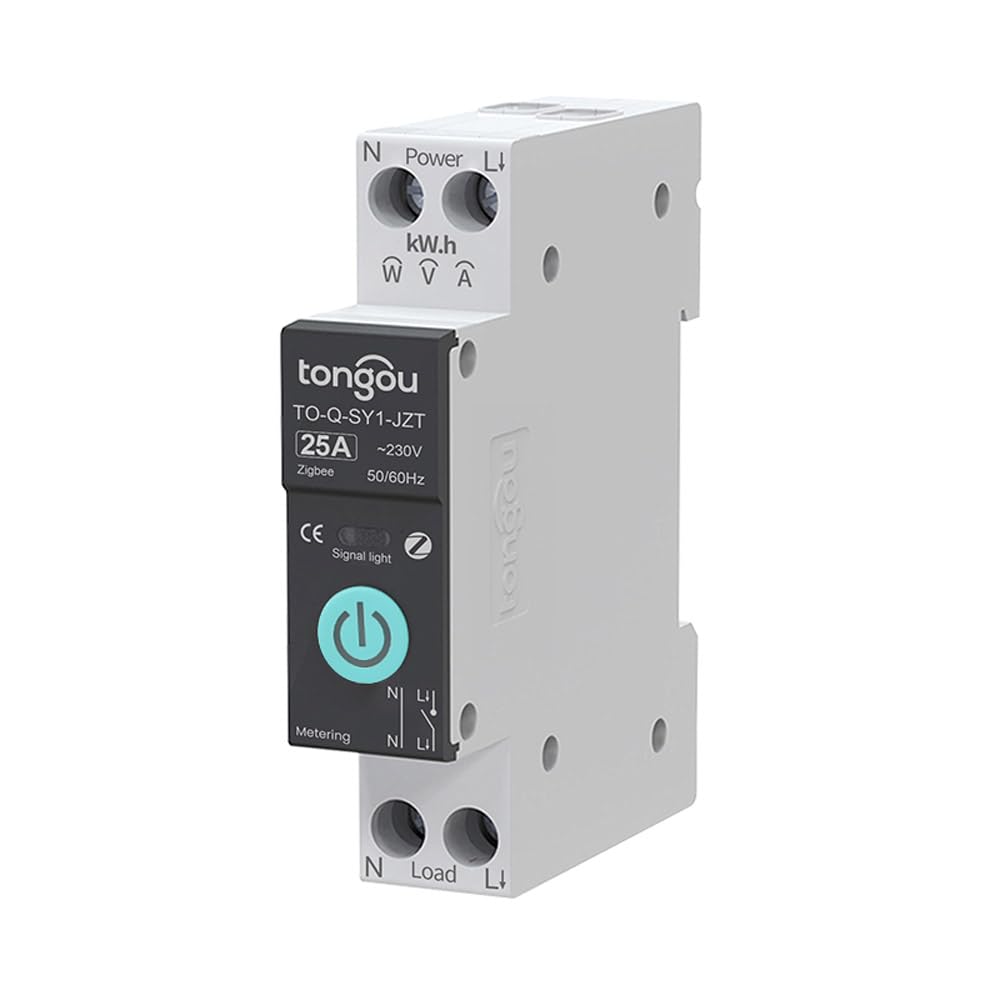
Image 2.1: TONGOU TO-Q-SY1-ZigBee Smart Switch highlighting its features like timer, countdown, circulate, and metering.
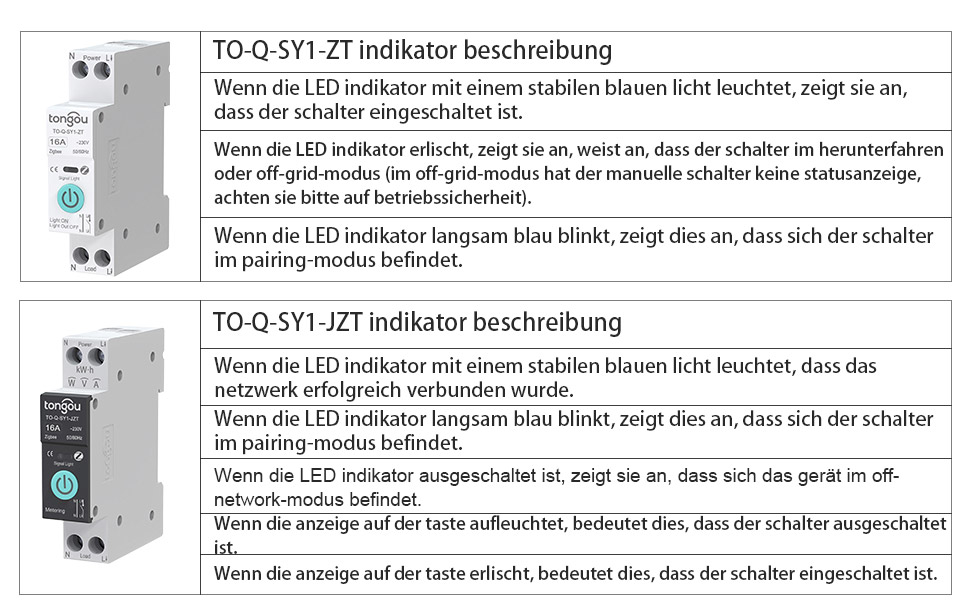
Image 2.2: Diagram illustrating the TONGOU TO-Q-SY1-ZigBee Smart Switch's connectivity and control options.
3. Información de seguridad
WARNING: Electrical shock hazard. Installation should only be performed by a qualified electrician.
- Desconecte siempre la alimentación del disyuntor antes de instalar o realizar mantenimiento al interruptor.
- Asegúrese de que el volumen del interruptortagLos valores nominales de corriente y voltaje coinciden con su sistema eléctrico.
- No opere el interruptor con las manos mojadas o enamp condiciones.
- Mantener fuera del alcance de los niños.
- No intente reparar ni modificar el dispositivo. Contacte con el servicio de atención al cliente para obtener ayuda.
4. Instalación
The TONGOU TO-Q-SY1-ZigBee Smart Switch is designed for DIN rail mounting. Follow these steps for safe and correct installation:
- Apagado: Turn off the main power supply at your circuit breaker to prevent electrical shock.
- Montaje: Securely mount the switch onto a standard 35mm DIN rail in your electrical box.
- Alambrado: Connect the live (L) and neutral (N) wires to the input terminals (Power L and Power N) of the switch. Connect the load wires to the output terminals (Load L and Load N). Ensure all connections are tight and secure. The switch supports simple push-in cable insertion and screw tightening.
- Encendido: Once all wiring is complete and secure, restore power at the circuit breaker.

Imagen 4.1: Example wiring diagram for the TONGOU TO-Q-SY1-ZigBee Smart Switch with a light bulb and a Tuya ZigBee hub.

Image 4.2: Dimensions of the TONGOU TO-Q-SY1-ZigBee DIN Rail Switch for installation planning.
5. Configuración (Emparejamiento de aplicaciones)
To enable smart features, the switch must be paired with a TUYA ZigBee 3.0 hub and the Smart Life/TUYA app.
- Descargar aplicación: Download the "Smart Life" or "TUYA" app from the App Store (iOS) or Google Play (Android).
- Agregar Hub: Open the app and add your TUYA ZigBee 3.0 hub if you haven't already.
- Ingrese al modo de emparejamiento: On the TONGOU Smart Switch, press and hold the button for 5 seconds until the indicator light blinks blue. This indicates pairing mode.
- Descubrir dispositivo: In the Smart Life/TUYA app, navigate to your ZigBee hub and select "Add sub-device" or "Buscar device." The app will discover the switch.
- Confirmar emparejamiento: Follow the on-screen prompts to confirm pairing. Once successfully paired, the indicator light on the switch will stop blinking and remain solid blue.
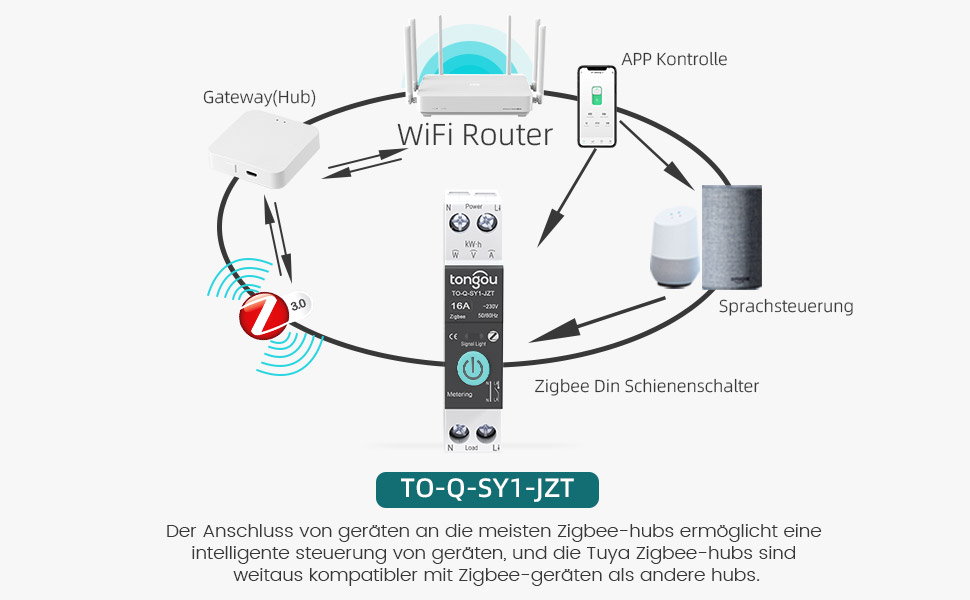
Image 5.1: Diagram showing the connection of the TONGOU TO-Q-SY1-ZigBee Smart Switch to a WiFi router via a ZigBee hub for app and voice control.
Video 5.1: This video demonstrates the pairing process of the TONGOU TO-Q-SY1-ZigBee Smart Switch with a Tuya ZigBee hub and the Smart Life app, including initial setup and basic control functions.
6. Operación
6.1. Control manual
The switch can be operated manually by pressing the physical button on the device. Press once to turn ON, press again to turn OFF.
6.2. APP control remoto
After successful pairing, open the Smart Life/TUYA app. You will see the added switch. Tap the switch icon to toggle power ON/OFF. The app also provides real-time status updates.
6.3. Electricity Consumption Monitoring
Within the app, navigate to the switch's details page. Here you can view real-time data for current, voltage, and power. Historical data for energy consumption (kWh) is also available, broken down by day, month, and year.
6.4. Control por voz
Integrate the Smart Life/TUYA app with Amazon Alexa or Google Assistant. Once linked, you can use voice commands to control your connected appliances. For example, "Alexa, turn on the living room light" or "Hey Google, turn off the fan."
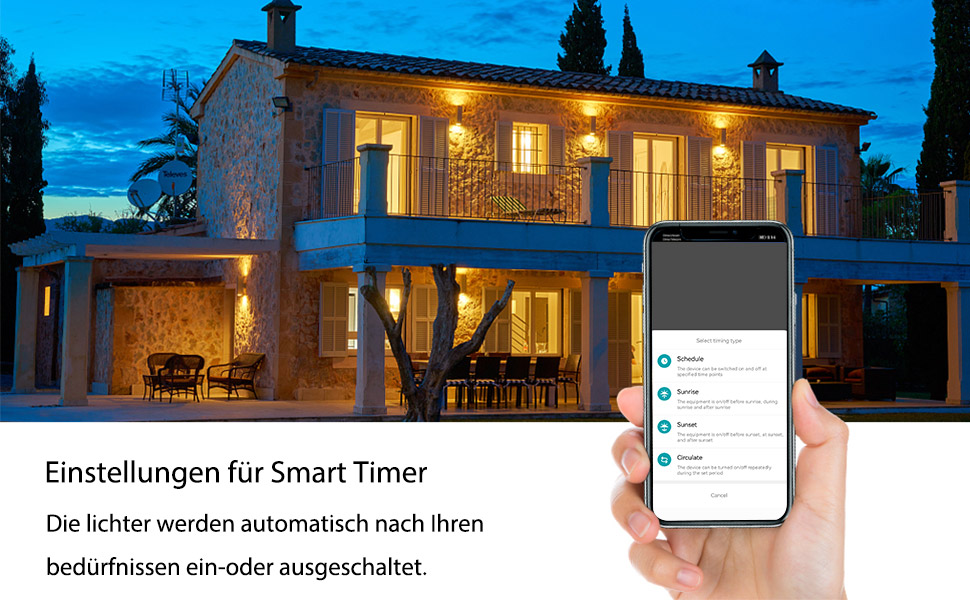
Image 6.1: Screenshot showing smart timer settings within the app, allowing users to schedule device operation.
6.5. Funciones de temporización
The app offers various timing options:
- Cronograma: Set specific ON/OFF times for your devices on selected days.
- Cuenta regresiva: Configure un temporizador para que el dispositivo se encienda o apague después de un período específico.
- Circular: Programe el dispositivo para que se encienda y apague repetidamente durante intervalos establecidos.
7. Mantenimiento
- Limpieza: Limpie el dispositivo con cuidado con un paño seco y suave. No utilice productos químicos agresivos ni limpiadores abrasivos.
- Verificación de conexión: Revise periódicamente las conexiones del cableado para asegurarse de que permanezcan seguras.
- Actualizaciones de firmware: Keep the Smart Life/TUYA app updated to receive the latest firmware for your switch, which may include performance improvements and new features.
8. Solución de problemas
- El dispositivo no se empareja:
- Ensure your TUYA ZigBee hub is powered on and connected to your network.
- Verify the switch is in pairing mode (blinking blue indicator light).
- Move the switch closer to the ZigBee hub.
- Reset the switch by holding the button for 10 seconds until the light turns off, then try pairing again.
- Sin control remoto:
- Check your internet connection and the ZigBee hub's connection.
- Ensure the Smart Life/TUYA app is up to date.
- Verify the switch is still connected to the ZigBee network in the app.
- El control de voz no funciona:
- Confirm that your Alexa or Google Assistant device is properly linked to your Smart Life/TUYA account.
- Check if the device name in the app matches the name you are using in voice commands.
- Inaccurate energy monitoring:
- Ensure the switch is correctly wired and the load is within its rated capacity.
- Póngase en contacto con el servicio de atención al cliente si el problema persiste.
9. Especificaciones
| Fabricante | TONGOU |
| Número de modelo | TO-Q-SY1-ZigBee |
| Material | With measurement 25A (PA66 flame-retardant) |
| Volumentage | 240 voltios |
| Fuerza | 6000 vatios |
| Calificación actual | 25 A |
| Tipo de interruptor | Single-phase, Touchpad |
| Tipo de montaje | Montaje en carril DIN |
| Modo de funcionamiento | ENCENDIDO APAGADO |
| Conectividad | ZigBee 3.0 (requires Tuya ZigBee Hub) |
| Certificaciones | CE |
| Dimensiones del paquete | 8.5 x 7.1 x 2.2 cm; 110 gramos |
| País natal | Porcelana |
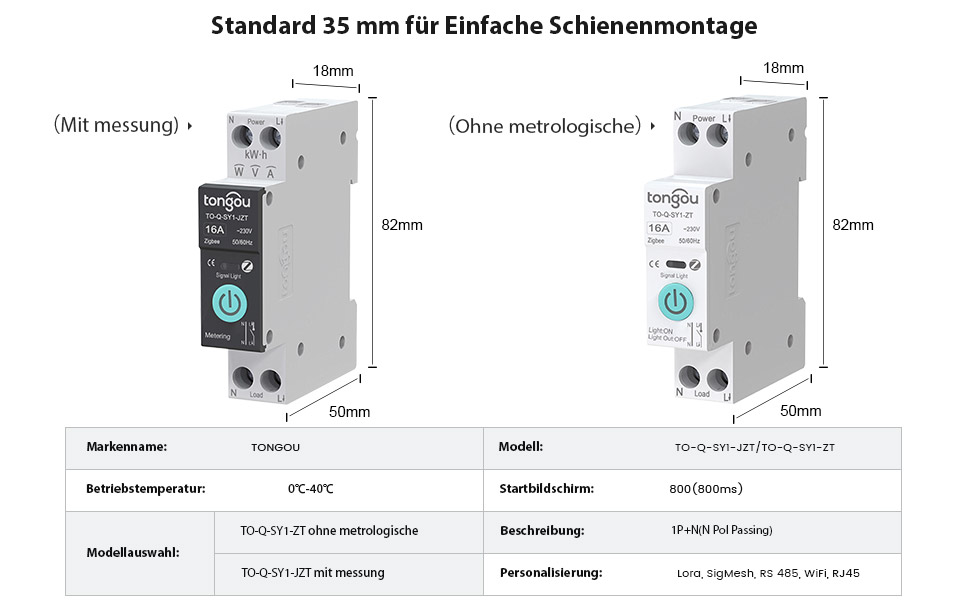
Image 9.1: Detailed product parameters for the TONGOU TO-Q-SY1-ZigBee Smart Switch.
10. Garantía y soporte
This TONGOU Smart ZigBee Switch comes with a garantía de dos años a partir de la fecha de compra. Esta garantía cubre defectos de materiales y mano de obra en condiciones normales de uso.
For technical support, warranty claims, or any questions regarding your product, please contact TONGOU customer service through your retailer or the official TONGOU website. Please have your purchase receipt and product model number (TO-Q-SY1-ZigBee) ready when contacting support.
La información sobre disponibilidad de repuestos no está disponible actualmente.