
1. Introducción
The FeiyuTech VB4 SE is a compact and foldable 3-axis smartphone gimbal stabilizer designed to capture smooth and stable video footage with your iPhone or Android device. This manual provides detailed instructions for setup, operation, and maintenance to ensure optimal performance and longevity of your device.
2. Información importante de seguridad
- No sumerja el cardán en agua ni lo exponga a la lluvia.
- Evite dejar caer o someter el cardán a impactos fuertes.
- Mantenga el cardán alejado de fuentes de calor y de la luz solar directa.
- Do not attempt to disassemble or modify the gimbal. Repairs should only be performed by authorized service personnel.
- Ensure the smartphone is securely mounted and balanced before powering on the gimbal.
- Utilice únicamente el cable de carga proporcionado y un adaptador de corriente compatible.
3. Contenido del paquete
Verifique que todos los artículos estén presentes en su paquete:
- FeiyuTech VB4 SE Gimbal (Main body)
- Bolsa portátil
- Cable de carga USB-C
- Mini trípode
- Manual de usuario

Image: FeiyuTech VB4 SE package contents. Includes the gimbal, a portable bag, a USB-C cable, and a tripod.
4. Producto terminadoview
Familiarize yourself with the components of your FeiyuTech VB4 SE gimbal.

Imagen: Primer plano view of the FeiyuTech VB4 SE gimbal showing the control panel with joystick, multifunction knob, and buttons.
Características principales:
- Estabilización de 3 ejes: Garantiza una alimentación suave y constante.tage.
- Diseño plegable: Compacto y portátil para fácil transporte.
- Varilla de extensión incorporada: Extends for wider shots and selfies.
- Perilla multifunción: Controls pan, tilt, focus, and zoom.
- Control de gestos: Start/stop recording or take photos with hand gestures.
- Seguimiento de objetos: Automatically follows a selected subject.
- One-Button Vertical Shooting: Quickly switch between horizontal and vertical modes.
- Batería de larga duración: Batería integrada de 1300 mAh para uso prolongado.

Image: Diagram illustrating the key features of the FeiyuTech VB4 SE, including its foldable design, lightweight nature, magnetic expansion, gesture control, multi-functional knob, smart AI follow, one-button portrait/landscape switch, and album control.
5. Configuración
5.1 Carga del estabilizador
Before first use, fully charge the gimbal. Connect the USB-C charging cable to the charging port located near the power button and plug the other end into a USB power adapter (not included). The indicator lights will show charging status.
5.2 Mounting the Smartphone
Extender el cl del teléfonoamp and carefully place your smartphone in it. Ensure the phone is centered and secure. The camera lens should be on the left side when facing the gimbal's front.
5.3 Equilibrio del cardán
The gimbal features an automatic balancing system. Once the phone is mounted, power on the gimbal, and it will automatically adjust to balance the phone. Manual adjustment may be needed if the phone is significantly off-center.
5.4 App Installation (Feiyu ON)
Download the Feiyu ON app from your smartphone's app store (iOS App Store or Google Play Store). The app unlocks advanced features and provides a better user experience.
5.5 Conexión Bluetooth
Turn on the gimbal and enable Bluetooth on your smartphone. Open the Feiyu ON app and search for available devices. Select "VB4 SE" to connect. Once connected, the Bluetooth indicator light on the gimbal will turn solid blue.
6. Operación
6.1 Encendido y apagado
- Encendido: Mantenga presionado el botón de encendido durante 3 segundos.
- Apagado: Mantenga presionado el botón de encendido durante 3 segundos.
Video: This video demonstrates the basic power on/off function, joystick control, stabilization, and switching between horizontal and vertical modes of the FeiyuTech VB4SE gimbal.
6.2 Controles básicos
- Palanca de mando: Controla los movimientos de panorámica e inclinación del teléfono inteligente.
- Perilla multifunción: Rotates to control focus or zoom, and can switch between three-axis rotation modes.
- Botón del obturador: Presione una vez para tomar una foto, presione y mantenga presionado para grabar un video.
- Botón de modo (M): Cycles through different operating modes (Pan Follow, Tilt Follow, FPV, Lock Mode).
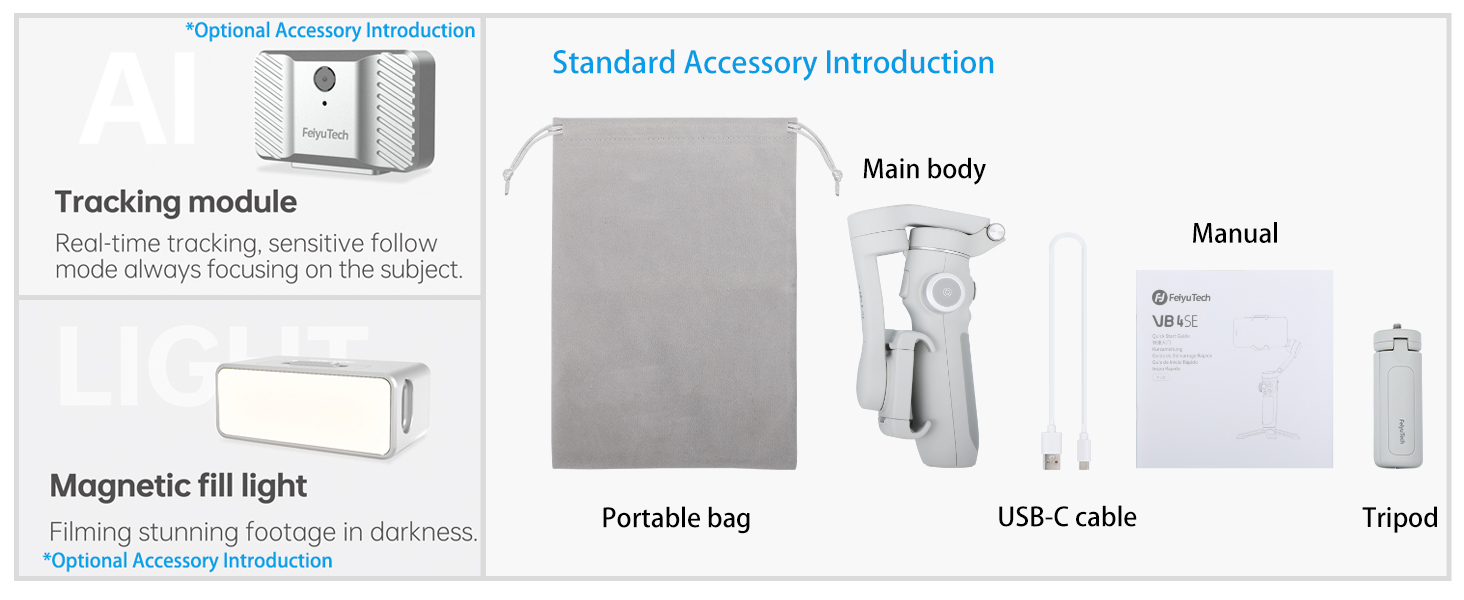
Imagen: Detallada view of the gimbal's control panel, highlighting the indicator area for battery and connection status, the button area for various functions, and the multi-functional knob for sensitive control.
Modos de funcionamiento de 6.3
Press the Mode button (M) to switch between the following modes:
- Seguimiento panorámico (PF): The camera pans left/right with your hand movements, while tilt and roll axes are locked.
- Seguimiento de inclinación (TF): The camera follows both pan and tilt movements, while the roll axis is locked.
- Modo FPV: The camera follows all three axes (pan, tilt, and roll) for a first-person view experiencia.
- Modo de bloqueo: Los tres ejes están bloqueados, manteniendo la cámara apuntando en una dirección fija.
6.4 Control de gestos
Enable gesture control in the Feiyu ON app. Use specific hand gestures to initiate actions like taking photos, starting/stopping video recording, or activating object tracking.

Image: Visual guide for gesture control, showing hand signs for taking photos, recording video, starting face tracking, zoom function (iOS only), switching to vertical mode, horizontal mode, and stopping tracking.
6.5 Object Tracking
In the Feiyu ON app, select a subject on your screen, and the gimbal will automatically track its movement, keeping it in the frame.

Image: The gimbal tracking a dog in motion, with a green box indicating the tracked subject on the smartphone screen.
6.6 Vertical/Horizontal Switching
Press the dedicated button to quickly switch your smartphone between horizontal (landscape) and vertical (portrait) shooting orientations, ideal for social media content.

Image: The gimbal rotating a smartphone from horizontal to vertical orientation, demonstrating the quick switch feature.
6.7 Scenario Modes (via Feiyu ON App)
The Feiyu ON app offers various creative shooting modes:
- Sendero de luz: Capture stunning light trails in low-light conditions.
- Exposición doble: Combine two images into one creative shot.
- Muñeca zoom: Create a dramatic cinematic effect where the background appears to zoom while the foreground remains constant.
- Time-lapse: Condense eventos largos en vídeos cortos y dinámicos.
6.8 Using the Extension Rod
The built-in extension rod can be pulled out to extend the gimbal's reach, allowing for wider angles, higher shots, and easier selfies.

Image: The FeiyuTech VB4 SE gimbal with a smartphone mounted, standing on its mini tripod with the extension rod partially extended.
7. Mantenimiento
7.1 Limpieza
Limpie el estabilizador con un paño suave y seco. No utilice limpiadores líquidos ni disolventes.
7.2 Almacenamiento
Store the gimbal in its portable bag in a cool, dry place away from direct sunlight. Avoid placing heavy objects on top of it.
7.3 Cuidado de la batería
To prolong battery life, charge the gimbal at least once every three months if not in regular use. Avoid fully discharging the battery frequently.
8. Solución de problemas
- El cardán no se enciende: Asegúrese de que la batería esté cargada. Conéctela a un cargador y vuelva a intentarlo.
- Gimbal unstable/vibrating: Check if the smartphone is properly mounted and balanced. Restart the gimbal.
- Problemas de conexión Bluetooth: Ensure Bluetooth is enabled on your phone and the gimbal. Restart both devices and try reconnecting via the Feiyu ON app.
- La aplicación no responde: Close and reopen the Feiyu ON app. Ensure your app and phone's operating system are up to date.
- Motores haciendo ruido: This can occur if the gimbal is not properly balanced or if the phone is too heavy. Re-balance the phone or check its weight compatibility.
9. Especificaciones
| Modelo | VB4 SE |
| Dimensiones del producto | 7.87 x 3.94 x 7.87 pulgadas (desplegado) |
| Tamaño plegado | Aproximadamente 6 pulgadas (largo) |
| Peso del artículo | 11.1 onzas (315 gramos) |
| Capacidad de la batería | Iones de litio 1300mAh |
| Puerto de carga | USB-C |
| Conectividad | Bluetooth |
| Dispositivos compatibles | Smartphones up to 3.5" wide and 9.2 oz in weight |
10. Garantía y soporte
FeiyuTech products come with a standard manufacturer's warranty. For detailed warranty information, please refer to the warranty card included in your package or visit the official FeiyuTech website. For technical support, product inquiries, or service requests, please contact FeiyuTech customer service through their official channels.
Conserve su comprobante de compra para reclamos de garantía.