
BULIST UD01S
Manual del usuario de la cerradura inteligente BULIST UD01S
Model: UD01S | Brand: BULIST
Introducción
This manual provides comprehensive instructions for the installation, operation, and maintenance of your BULIST UD01S Smart Lock. Please read this manual thoroughly before installation and use to ensure proper function and safety. Keep this manual for future reference.
Información importante de seguridad
- No intente desmontar ni reparar la cerradura usted mismo. Contacte con atención al cliente para obtener ayuda.
- Use only the specified battery type (4 AA Alkaline batteries). Do not mix old and new batteries or different types of batteries.
- Ensure the lock is installed correctly and securely to prevent unauthorized access.
- Regularly check battery levels and replace batteries promptly when the low voltage reminder activates.
- Keep your master code and fingerprints secure and do not share them with unauthorized individuals.
Contenido del paquete
Verifique que todos los componentes estén presentes antes de comenzar la instalación.

Imagen: Más alláview of the BULIST UD01S Smart Lock package contents, showing the exterior keypad, interior lock unit, a set of AA batteries, the Wi-Fi gateway, and branding.
- Conjunto de teclado exterior
- Unidad de bloqueo interior
- Placa de montaje
- Pestillo de cerrojo
- Placa de impacto
- Tornillos y fijaciones
- 4 x pilas alcalinas AA
- Puerta de enlace Wi-Fi
- Llaves de emergencia (2)
- Manual de usuario (este documento)
Producto terminadoview y características
The BULIST UD01S Smart Lock offers multiple convenient and secure entry methods for your home or office.
- Múltiples modos de desbloqueo: Fingerprint, Passcode, Tuya App, and Physical Key.
- Reconocimiento de huellas dactilares: Fast 0.3-second recognition with 99.9% accuracy. Stores up to 50 fingerprints.
- Teclado retroiluminado: Ensures visibility and ease of use in low-light conditions. Stores up to 50 passcodes.
- Control de la aplicación Tuya: Remote unlock/lock, temporary code generation, member management, and activity logs via Wi-Fi gateway.
- Energía de emergencia: USB Type-C port for emergency power supply if batteries are depleted.
- Batería de larga duración: Approximately 10-12 months of battery life with a low voltage recordatorio.
- Construcción duradera: Tested for keypad life, intensity, temperature resistance, and impact.
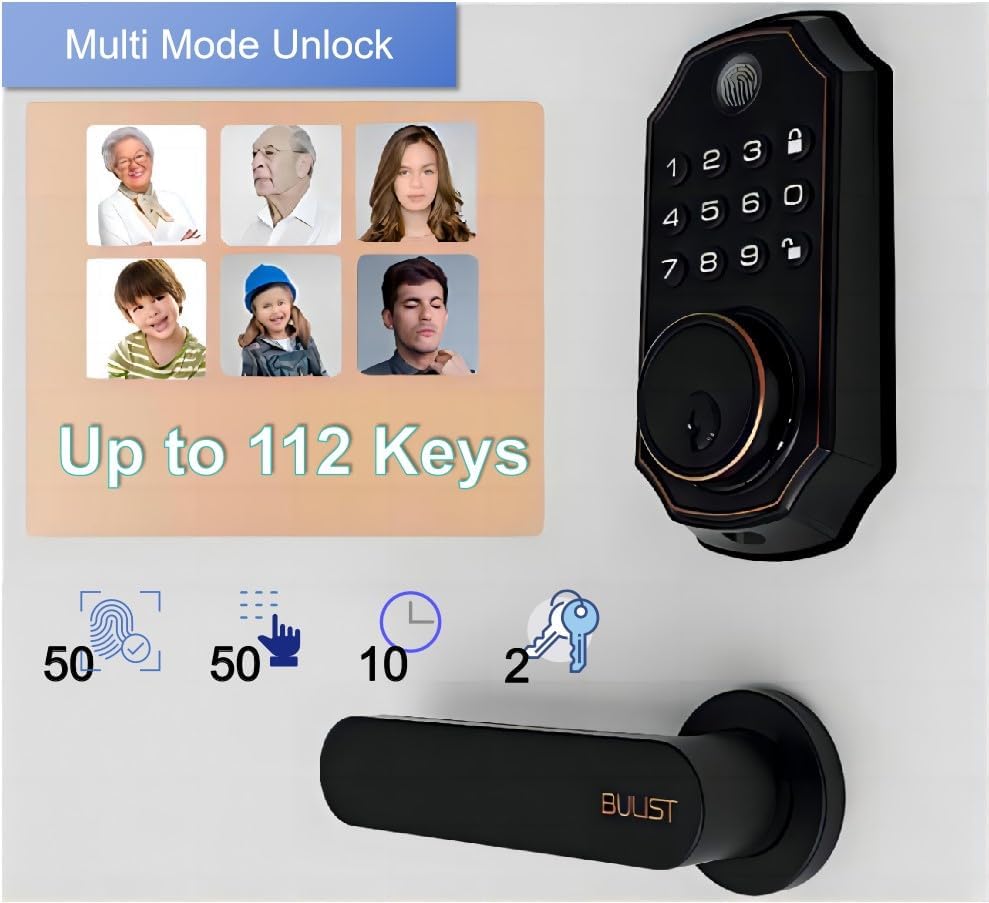
Image: The BULIST UD01S Smart Lock highlighting its multi-mode unlock capabilities, including fingerprint, keypad codes, and traditional keys. It indicates support for up to 50 fingerprints, 50 passcodes, and 2 physical keys.

Image: A child using the fingerprint sensor on the BULIST UD01S Smart Lock, illustrating the ease and speed of fingerprint recognition. Text overlays indicate a 0.3-second recognition time and 99.9% accuracy.

Imagen: Un primer plano view of the BULIST UD01S Smart Lock's backlit keypad, demonstrating its visibility and usability in low-light conditions. A finger is shown interacting with the keypad.
Configuración e instalación
Installation of the BULIST UD01S Smart Lock is designed to be straightforward. A single screwdriver is typically sufficient for the process.
Herramientas necesarias:
- Destornillador Phillips
Pasos de instalación:
- Prepara la puerta: Ensure your door is properly prepped for a standard deadbolt installation. Remove any existing deadbolt hardware.
- Instalar el pestillo de seguridad: Inserte el pestillo en el borde de la puerta. Asegúrese de que la flecha "ARRIBA" del pestillo esté orientada hacia arriba. Asegúrelo con tornillos.
- Instalación del conjunto del teclado exterior: Feed the cable from the exterior keypad through the door hole and under the deadbolt latch. Position the exterior keypad flush against the door.
- Instalar la placa de montaje: Route the cable through the mounting plate. Secure the mounting plate to the door using screws, ensuring it aligns with the exterior keypad.
- Conecte los Cables: Connect the cable from the exterior keypad to the corresponding port on the interior lock unit.
- Install the Interior Lock Unit: Align the interior lock unit with the mounting plate and the deadbolt tailpiece. Secure it with screws.
- Instale las baterías: Open the battery cover on the interior unit and insert the 4 AA alkaline batteries, observing polarity.
- Pruebe la cerradura: Manually operate the deadbolt to ensure smooth movement. Test with the physical key.
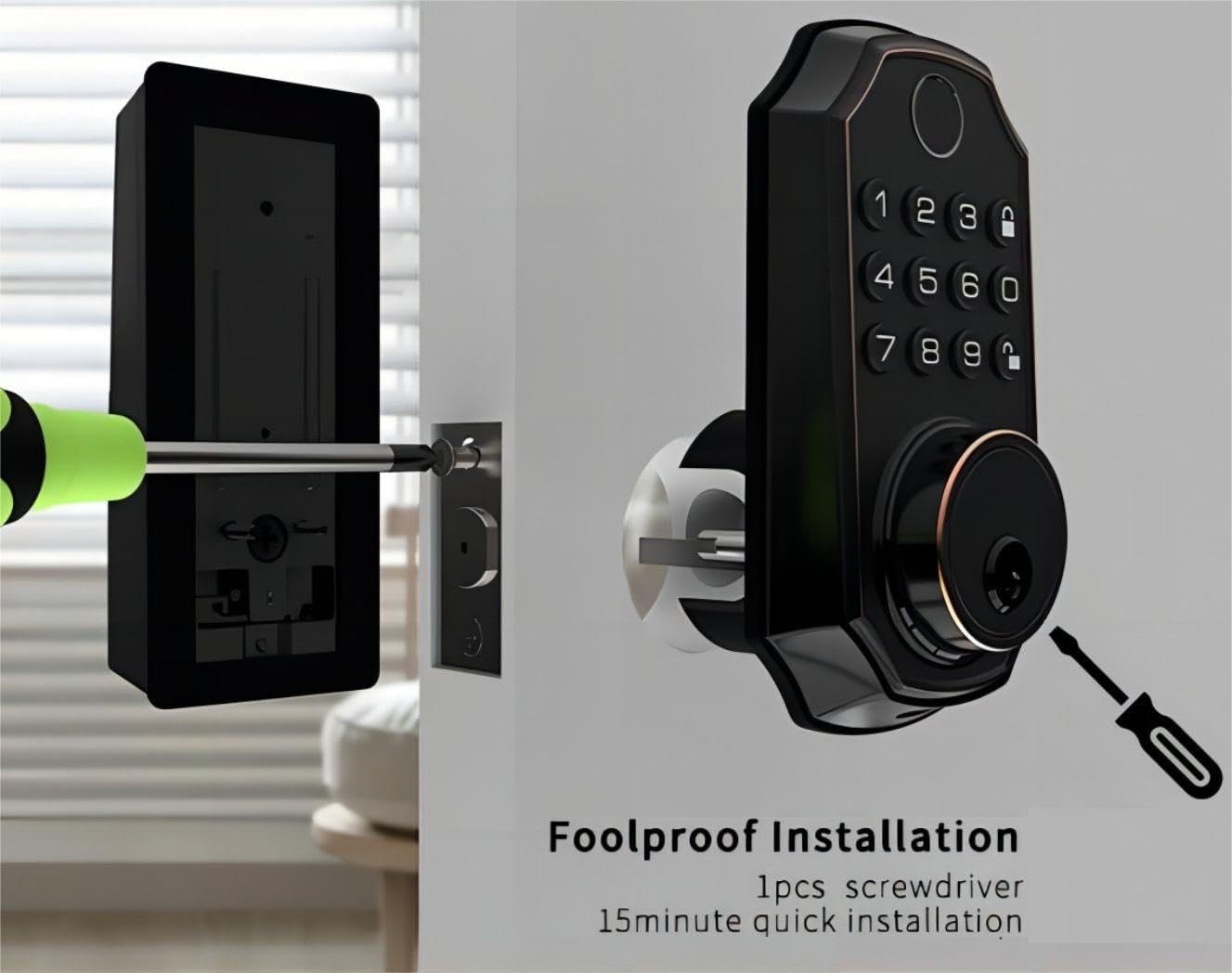
Image: An illustration of the BULIST UD01S Smart Lock installation, depicting a screwdriver being used to secure the exterior keypad assembly to the door. This highlights the "foolproof installation" claim.
Instrucciones de funcionamiento
Initial Setup and Master Code Programming:
Upon first power-up, the lock uses a default master code. It is crucial to change this immediately.
- Ingrese al modo de programación:
- Enter the default code: 123456
- Presione el Descubrir button (keypad icon).
- Presiona el numero 1.
- Presione el Descubrir button again. The lock should indicate it is in "add user mode" or similar.
- Set New Master Code:
- Introduzca el nuevo código maestro deseado (6-8 dígitos).
- Presione el Descubrir botón.
- Ingrese nuevamente su nuevo código maestro.
- Presione el Descubrir button. The lock will confirm the new master code.
Importante: Remember your new master code. It is required for all subsequent programming.
Adding User Passcodes:
You can add up to 50 user passcodes.
- Ingresa tu Código maestro.
- Presione el Descubrir botón.
- Presiona el numero 1.
- Presione el Descubrir button. The lock will indicate "add user mode".
- Enter the new user passcode (6-8 digits).
- Presione el Descubrir botón.
- Re-enter the new user passcode.
- Presione el Descubrir button. The lock will confirm the addition.
Adding User Fingerprints:
You can add up to 50 user fingerprints. This can also be done via the app (see App Integration).
- Ingresa tu Código maestro.
- Presione el Descubrir botón.
- Presiona el numero 2.
- Presione el Descubrir button. The lock will prompt for fingerprint scanning.
- Place your finger on the fingerprint sensor. Lift and repeat 5 times, rotating your finger slightly each time for better recognition.
- The lock will confirm successful fingerprint registration.
Desbloqueo de la puerta:
- Por huella dactilar: Place your registered finger on the sensor. The lock will unlock if recognized.
- Por contraseña: Enter your 6-8 digit passcode, then press the Descubrir botón.
- By Physical Key: Insert the emergency key into the keyhole and turn to unlock.
- A través de la aplicación Tuya: Use the app's remote unlock function (requires Wi-Fi gateway).
Bloquear la puerta:
- Bloqueo automático: The lock will automatically engage after a set period (configurable in the app).
- Bloqueo manual: Mantenga pulsado el Cerrar button (padlock icon) on the keypad for 2 seconds.
- A través de la aplicación Tuya: Use the app's remote lock function.
Tuya App Integration
The BULIST UD01S Smart Lock integrates with the Tuya Smart app for enhanced control and monitoring. A Wi-Fi gateway is required for remote functionality.
1. Install the Tuya Smart App:
- Download "Tuya Smart" from your smartphone's app store (iOS or Android).
- Regístrese para obtener una cuenta o inicie sesión si ya tiene una.
2. Set up the Wi-Fi Gateway:
The gateway acts as a bridge between your lock (Bluetooth) and your home Wi-Fi network.
- Plug in the Wi-Fi gateway within 20 feet (approximately 6 meters) of your smart lock.
- In the Tuya Smart app, tap "+" to add a new device.
- Select "Gateway" or "Bridge" from the device list and follow the in-app instructions to connect it to your 2.4GHz Wi-Fi network.
3. Pair the Smart Lock with the Gateway:
- On the smart lock keypad, enter your Código maestro.
- Presione el Descubrir botón.
- Presiona el numero 3.
- Presione el Descubrir button. The lock will enter Bluetooth pairing mode (e.g., "distributing network").
- In the Tuya Smart app, navigate to your connected gateway. Select "Add Device" or "Buscar Sub-devices".
- The app should discover your UD01S Smart Lock. Follow the prompts to complete pairing.

Image: A person approaching a door equipped with the BULIST UD01S Smart Lock, while a smartphone screen displays the Tuya app interface, illustrating the "App Full Control" feature for remote management.
4. Funciones de la aplicación:
- Desbloqueo/bloqueo remoto: Controla tu puerta desde cualquier lugar.
- Códigos temporales: Generate one-time or time-limited passcodes for guests or service providers. These codes are automatically deleted after use.
- Gestión de miembros: Add, edit, or delete user passcodes and fingerprints. You can also grant remote access to other users.
- Registros de actividad: View a history of lock/unlock events.
- Ajustes: Configure auto-lock duration, enable/disable remote unlock, and other preferences.

Image: A woman with groceries looking at her smartphone, which displays the Tuya app interface showing a temporary passcode "159357" for the BULIST UD01S Smart Lock. This illustrates the temporary code sharing feature.
Mantenimiento
Reemplazo de batería:
La cerradura proporcionará un volumen bajo.tage reminder when batteries are running low. Replace all four AA batteries promptly to ensure continuous operation.
- Retire la tapa de la batería de la unidad de bloqueo interior.
- Retire las baterías viejas.
- Inserte 4 pilas alcalinas AA nuevas, asegurándose de la polaridad correcta (+/-).
- Vuelva a colocar la tapa de la batería.
Nota: If batteries are completely depleted, you can use a USB Type-C power bank to temporarily power the lock via the emergency power port on the exterior unit.

Image: The BULIST UD01S Smart Lock illustrating its battery features, including 10-12 months of battery life, a low voltage reminder, and the emergency power supply option via a USB Type-C port.
Limpieza:
Limpie la superficie de la cerradura con un paño suave y seco. Evite usar limpiadores abrasivos o disolventes, ya que pueden dañar el acabado o los componentes electrónicos.
Solución de problemas
| Problema | Posible causa | Solución |
|---|---|---|
| La cerradura no responde. | Baterías agotadas. | Replace batteries. Use emergency USB Type-C power if needed. |
| Huella dactilar no reconocida. | Dedo no colocado correctamente; sensor sucio; huella dactilar no registrada. | Ensure finger is clean and covers the sensor. Try different angles. Re-register fingerprint if necessary. |
| El código de acceso no funciona. | Incorrect passcode entered; passcode not registered. | Verify the passcode. Ensure it is 6-8 digits. Re-register passcode if necessary. |
| No se puede conectar a la aplicación Tuya. | Gateway not powered; gateway too far from lock; incorrect Wi-Fi password; 5GHz Wi-Fi network. | Ensure gateway is powered and within 20 feet of the lock. Verify Wi-Fi credentials. Ensure you are connecting to a 2.4GHz Wi-Fi network. Re-pair the lock with the gateway. |
| Lock jams or does not fully extend/retract. | Desalineación durante la instalación; obstrucción en el marco de la puerta. | Check for obstructions. Re-check installation alignment. Ensure deadbolt moves freely. |
Presupuesto
| Número de modelo | UD01S |
| Marca | BULISTO |
| Material | Zinc |
| Color | Bronce frotado con aceite |
| Fuente de poder | 4 pilas alcalinas AA (incluidas) |
| Energía de emergencia | USB tipo C |
| Conectividad | Bluetooth (via Wi-Fi Gateway for remote access) |
| Métodos de desbloqueo | Fingerprint, Passcode, Tuya App, Physical Key |
| Capacidad de huellas dactilares | Hasta 50 |
| Capacidad de contraseña | Hasta 50 |
| Temperatura de funcionamiento | -30°F to 151°F (-34°C to 66°C) (based on test data) |
| Dimensiones del paquete | 22.7 x 18.4 x 8.5 cm |
| Peso del artículo | 1.21 kilogramos |

Image: The BULIST UD01S Smart Lock with text indicating various durability tests it has undergone, such as 200,000 keypad life test, 4400N intensity test, -30°F to 151°F temperature test, and 100J impact test.
Garantía y soporte
For warranty information and technical support, please refer to the warranty card included with your product or contact BULIST customer service directly. Contact details can typically be found on the manufacturer's official websitio o en su recibo de compra.
Ask a question about this manual
Ask about setup, troubleshooting, compatibility, parts, safety, or missing instructions. Manuals+ will review the question and use this page’s manual context to help answer it.