
Introducción
The zelotes T30 Wired Vertical Mouse is designed to enhance comfort and reduce wrist strain during prolonged computer use. Its ergonomic vertical design promotes a natural hand and wrist posture. This manual provides essential information for setting up, operating, maintaining, and troubleshooting your new mouse.

Figura 1: Frontal izquierda view of the zelotes T30 Wired Vertical Mouse.

Figura 2: Varios lados views illustrating the vertical design of the mouse.
Configuración
The zelotes T30 Vertical Mouse is designed for simple plug-and-play operation, requiring no driver installation.
Conectando el Mouse
- Locate an available USB port on your computer (Laptop, PC, Mac).
- Insert the USB connector of the zelotes T30 mouse into the USB port.
- The mouse will be automatically recognized by your operating system (Win11, Win10, Win8, Win7, Mac OS, Linux) and ready for use.
Attaching the Detachable Palm Rest
The mouse comes with a detachable palm rest for enhanced comfort. To attach it:
- Align the palm rest with the designated slots on the bottom of the mouse.
- Gently slide the palm rest into place until it clicks securely.
- Ensure the palm rest is firmly attached before use.

Figure 3: Illustration of the detachable palm rest and its attachment points.
Instrucciones de funcionamiento
Diseño ergonómico y agarre
The vertical design of the T30 mouse positions your hand in a natural handshake posture, reducing pronation of the forearm and wrist. This design aims to alleviate discomfort associated with traditional mouse use.

Figure 4: Proper hand placement on the ergonomic vertical mouse.

Figura 5: detallada view of the humanized grip design, ensuring comfortable finger placement.
Ajuste de la sensibilidad de DPI
The mouse features 4 adjustable DPI settings: 1200, 1600, 2400, and 3200 DPI. To change the sensitivity:
- Locate the DPI button on the mouse. This button is typically positioned near the scroll wheel or thumb area.
- Press the DPI button to cycle through the available sensitivity settings. Each press will switch to the next DPI level.
- The LED illumination on the mouse may change color or pattern to indicate the current DPI setting.
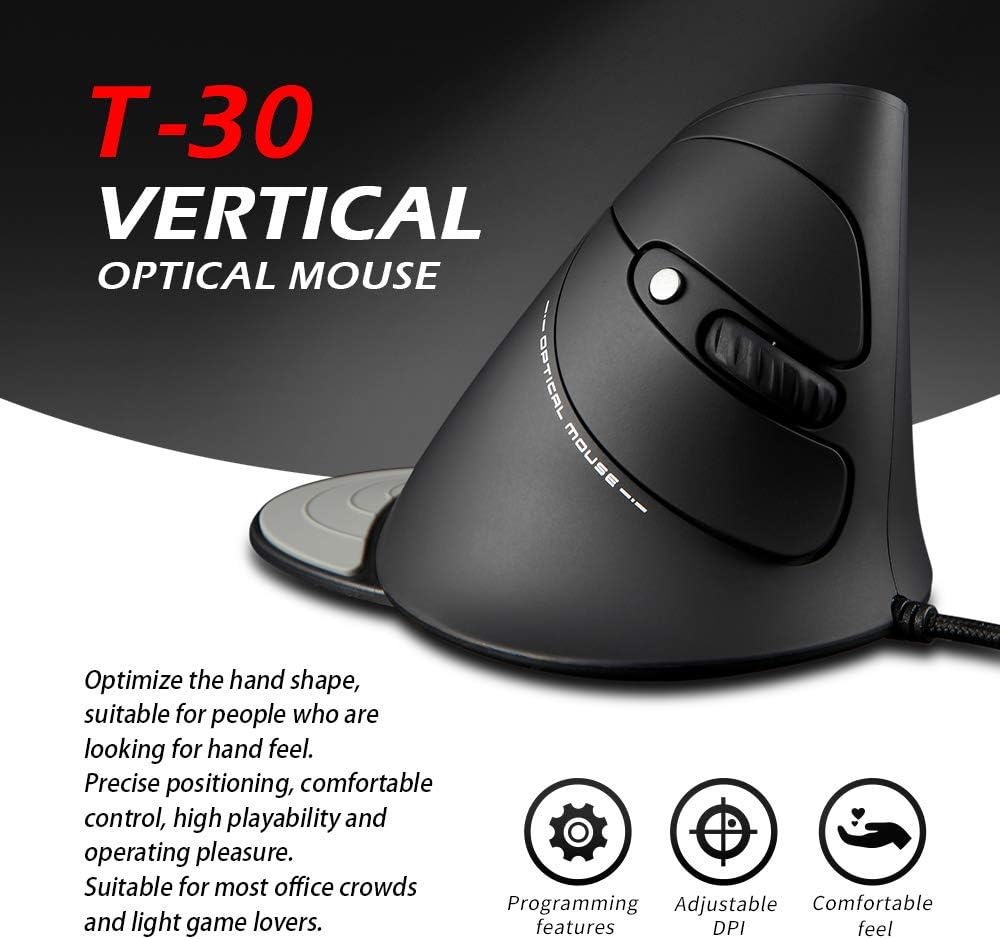
Figure 6: The T30 mouse with an emphasis on its adjustable DPI feature.
Funciones de los botones
The zelotes T30 mouse is equipped with 6 buttons for various functions:
- Botón de clic izquierdo: Función de clic principal estándar.
- Botón derecho del ratón: Función de clic secundario estándar.
- Rueda de desplazamiento: Para desplazamiento vertical. También se puede presionar para hacer clic con el botón central.
- Botón PPP: Ajusta la sensibilidad del mouse (DPI).
- Botón de avance: Navega hacia adelante en web navegadores o file exploradores.
- Botón Atrás: Navega hacia atrás en web navegadores o file exploradores.
Video 1: Demonstration of the zelotes T30 Ergonomic Vertical Mouse features and usage.
Mantenimiento
To ensure the longevity and optimal performance of your zelotes T30 mouse, follow these maintenance guidelines:
- Limpieza: Utilice un paño suave y seco para limpiar la superficie del ratón. Para la suciedad difícil, utilice un paño ligeramente seco.amp cloth can be used, but ensure no liquid enters the mouse. Avoid harsh chemicals or abrasive cleaners.
- Almacenamiento: Cuando no esté en uso, guarde el mouse en un entorno limpio y seco, alejado de temperaturas extremas y de la luz solar directa.
- Cuidado de cables: Evite doblar o torcer excesivamente el cable USB, ya que esto puede dañar los cables internos.
Solución de problemas
If you encounter issues with your zelotes T30 mouse, refer to the following common problems and solutions:
| Problema | Posible causa | Solución |
|---|---|---|
| El ratón no responde | Conexión USB suelta, puerto USB defectuoso, problema del sistema operativo. |
|
| El movimiento del cursor es errático o irregular | Sensor óptico sucio, superficie de alfombrilla de ratón inadecuada. |
|
| El ajuste de DPI no funciona | Button malfunction, temporary software glitch. |
|
Presupuesto
| Característica | Detalle |
|---|---|
| Marca | zelotes |
| Número de modelo | T-30 |
| Dimensiones del producto | 4.33 x 3.15 x 3.27 pulgadas |
| Peso del artículo | 4.2 onzas |
| Tecnología de conectividad | USB con cable |
| Tecnología de detección de movimiento | Óptico |
| Configuración de DPI | 1200 / 1600 / 2400 / 3200 DPI |
| Número de botones | 6 |
| Característica especial | Ergonomic Design, Detachable Wrist Rest, LED Illumination |
| Compatibilidad | Win11, Win10, Win8, Win7, Mac OS, Linux |

Figure 7: Detailed dimensions of the zelotes T30 Vertical Mouse.
Garantía y soporte
For warranty information and technical support, please refer to the official zelotes webSitio web o contacte directamente con el servicio de atención al cliente. Conserve el recibo de compra para reclamaciones de garantía.
Fabricante: zelotes