
1. Introducción
Thank you for choosing the AUSEK UltraHD 4K Action Camera. This manual provides essential information for setting up, operating, and maintaining your camera. Please read it thoroughly before use to ensure optimal performance and longevity of your device.

Image: The AUSEK UltraHD 4K Action Camera, shown with its transparent waterproof housing and a separate view of the camera itself, highlighting its compact design and 4K Ultra HD and Wi-Fi capabilities.
2. Características principales
- 4K 60FPS Video & 24MP Photos: Captura vídeos e imágenes fijas de alta resolución.
- Estabilización EIS: Advanced Electronic Image Stabilization for smooth footage.
- Lente gran angular de 170°: Amplio campo de view for immersive captures.
- Resistente al agua hasta 30 m: Durable waterproof case for underwater use up to 30 meters.
- Conectividad Wi-Fi: Connect to your smartphone or tablet for remote control and sharing.
- Control remoto inalámbrico 2.4G: Convenient control from a distance.
- Modos de disparo versátiles: Includes time-lapse, slow-motion, and burst photo modes.

Image: An illustration highlighting the key features of the AUSEK 4K Action Camera, including its 2-inch HD screen, 4K HD display, 30m diving depth, 1050mAh battery, remote controller, multi-language support, 170-degree wide angle, and built-in Wi-Fi.
3. Identificación de componentes y piezas del producto
3.1. ¿Qué hay en la caja?
El paquete estándar incluye los siguientes elementos:
- Cámara de acción AUSEK 4K
- Estuche impermeable
- Control remoto inalámbrico 2.4G
- Puesto de bicicletas
- Multi-functional Mount Clip
- Soportes para casco
- Vendajes
- Cable USB
- Cargador de CA
- pañuelo de lentes
- Quick Reference Guide (User Manual)

Image: A comprehensive display of all accessories included with the AUSEK 4K Action Camera, such as various mounts, straps, cables, and the waterproof case, alongside the camera itself and the user manual.
3.2. Camera Parts Identification
Familiarize yourself with the camera's buttons and ports:

Image: A detailed diagram of the AUSEK 4K Action Camera, labeling its various components including the Power/Mode Button, Shutter/Select Button, Status Indicator Light, Microphone, Lens, Charging Status Light, Micro SD Slot, Micro USB Port, and Micro HD OUT Port.
- Botón de encendido/modo: Presione para encender/apagar o cambiar entre modos.
- Shutter / Select Button: Pulsar para iniciar o detener la grabación o tomar una foto. También se utiliza para confirmar selecciones en los menús.
- Luz indicadora de estado: Indicates camera status (e.g., recording, charging).
- Micrófono: Micrófono incorporado para grabación de audio.
- Lente: The camera's optical lens.
- Luz de estado de carga: Indica el estado de carga.
- Ranura Micro SD: Inserte su tarjeta Micro SD aquí.
- Puerto micro USB: Para carga y transferencia de datos.
- Micro HD OUT Port: Para conectar a una pantalla externa.
4. Configuración
4.1. Carga de la batería
- Connect the camera to the AC charger using the provided USB cable.
- The Charging Status Light will indicate charging progress.
- Once fully charged, the light will change or turn off.
4.2. Inserción de una tarjeta Micro SD
A Micro SD card (not included) is required to store photos and videos. Use a Class 10 or higher Micro SD card, up to 64GB capacity.
- Locate the Micro SD Slot on the side of the camera.
- Inserte la tarjeta Micro SD con los contactos dorados hacia la parte posterior de la cámara hasta que encaje en su lugar.
- Para quitarla, empuje suavemente la tarjeta hasta que salga.
4.3. Uso de la funda impermeable
The waterproof case allows the camera to be used underwater up to 30 meters and protects it from dust, dirt, and scratches.
- Asegúrese de que la cámara esté seca antes de colocarla dentro de la funda impermeable.
- Close the case securely, ensuring the latch is fully engaged and the rubber seal is clean and free of debris.
- Antes del primer uso bajo el agua, realice una prueba de fugas con el estuche vacío.
4.4. Instalación de soportes y accesorios
Various mounts are included to attach your camera to helmets, bicycles, and other surfaces.
- Refer to the specific mount's instructions for proper attachment.
- Ensure all connections are secure before engaging in activities.
5. Instrucciones de funcionamiento
5.1. Encendido y apagado
- Para encender: Press and hold the Power / Mode Button for a few seconds.
- Para apagar: Press and hold the Power / Mode Button for a few seconds until the screen turns off.
5.2. Modos de cambio
Press the Power / Mode Button repeatedly to cycle through the different modes:
- Modo de grabación de vídeo: Indicado por un icono de cámara de vídeo.
- Modo foto: Indicado por un icono de cámara.
- Modo de reproducción: Indicated by a play icon, for reviewing medios capturados.
- Modo de configuración: Indicated by a gear icon, for adjusting camera settings.
5.3. Grabación de vídeo
- Cambiar al modo de grabación de vídeo.
- Press the Shutter / Select Button to start recording. A red dot or recording indicator will appear on the screen.
- Press the Shutter / Select Button again to stop recording.
5.4. Tomar fotografías
- Cambiar al modo fotografía.
- Encuadra tu toma.
- Press the Shutter / Select Button to take a photo.
5.5. Estabilización electrónica de imagen (EIS)
The camera features EIS technology to reduce blur and stabilize footage, especially during fast-action activities.

Image: A side-by-side comparison demonstrating the effect of Electronic Image Stabilization (EIS) on the AUSEK 4K Action Camera. The left side shows a clear, stable image with EIS ON, while the right side shows a blurred image with EIS OFF, both depicting a person riding a mountain bike.
EIS can be enabled or disabled in the camera's settings menu. For best results in high-vibration environments, ensure EIS is turned on.
5.6. Conectividad Wi-Fi y uso de aplicaciones
Conecte su cámara a un teléfono inteligente o tableta a través de Wi-Fi para control remoto, previsualización en vivoview, and easy sharing.
- Download the compatible app (check user manual for app name) from your device's app store.
- En la cámara, activa el Wi-Fi desde el menú de configuración. Se mostrarán el nombre y la contraseña del Wi-Fi de la cámara.
- On your smartphone/tablet, go to Wi-Fi settings and connect to the camera's Wi-Fi network.
- Abra la aplicación para controlar la cámara, view vivir footage, y descargar files.

Image: An illustration showing the AUSEK 4K Action Camera's Wi-Fi sharing capability, allowing users to instantly review and share videos and photos on social media via a mobile phone. Examples of shared content include underwater footage, skateboarding, and skydiving.
5.7. Uso del control remoto inalámbrico
The included 2.4G wireless remote control allows you to operate the camera from a distance of up to 10 meters.

Image: A depiction of the AUSEK 4K Action Camera being controlled by its 2.4GHz wireless wrist remote control, illustrating the convenience of starting photo taking or video recording even when the camera is mounted in hard-to-reach places.
- Botón rojo: Para tomar fotos.
- Gray Button: For starting/stopping video recording.
Ensure the remote control battery is charged and it is paired with the camera (refer to the quick reference guide for pairing instructions if needed).
5.8. Modos de disparo versátiles
Explore various creative shooting options:
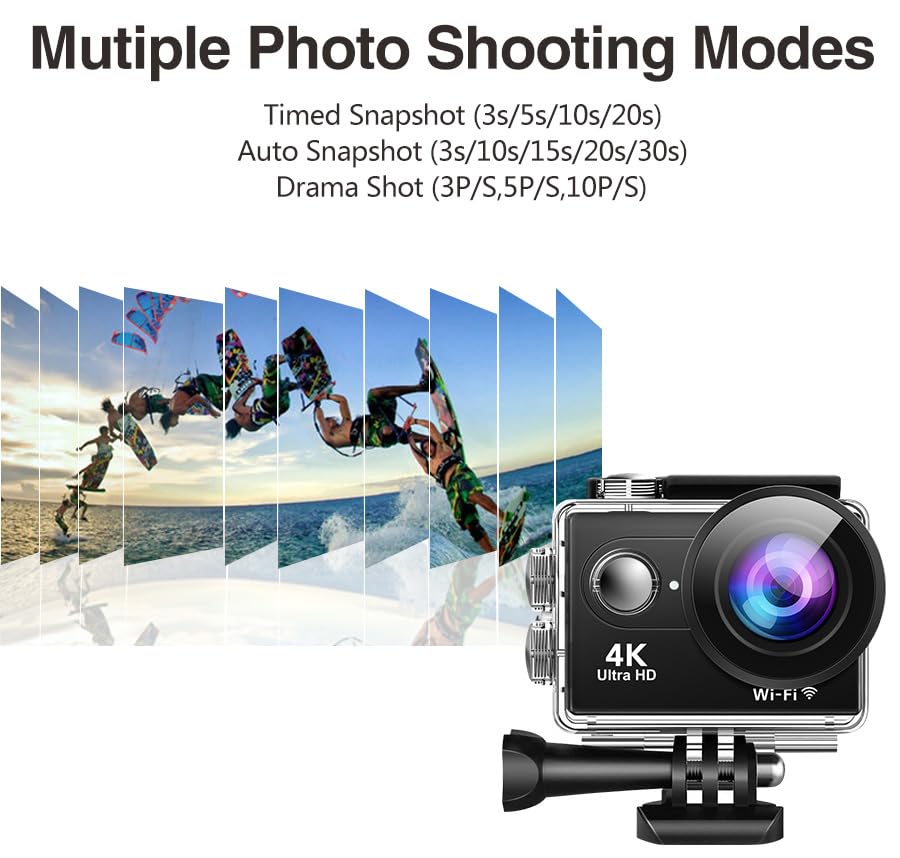
Imagen: Una ilustración que muestraasing the multiple photo shooting modes available on the AUSEK 4K Action Camera, including Timed Snapshot (3s/5s/10s/20s), Auto Snapshot (3s/10s/15s/20s/30s), and Drama Shot (3P/S, 5P/S, 10P/S), with a visual representation of burst photography.
- Video secuencial: Captura fotogramas a intervalos establecidos para crear un vídeo acelerado.
- Slow-Motion Recording: Records at a higher frame rate for smooth slow-motion playback.
- Fotos ráfaga: Toma múltiples fotografías en rápida sucesión.
- Grabación en bucle: Sobrescribe el foo más antiguotagy cuando la tarjeta de memoria está llena, ideal para usar como cámara de tablero.
These modes can be selected and configured within the camera's settings menu.
6. Mantenimiento
6.1. Limpieza de la cámara y el estuche
- Use the provided lens cloth or a soft, lint-free cloth to clean the camera lens and screen.
- For the waterproof case, rinse with fresh water after saltwater use and allow it to air dry. Ensure the rubber seal is clean and free of sand or debris.
- No utilice productos químicos agresivos ni limpiadores abrasivos.
6.2. Almacenamiento
- Guarde la cámara en un lugar fresco y seco, alejado de la luz solar directa y de temperaturas extremas.
- Remove the battery if storing for extended periods to prevent damage.
7. Solución de problemas
| Problema | Posible causa | Solución |
|---|---|---|
| La cámara no se enciende. | Batería baja; Batería no insertada correctamente. | Cargue la batería; vuelva a insertar la batería correctamente. |
| No se pueden grabar vídeos ni tomar fotografías. | No Micro SD card; SD card full; SD card error. | Insertar tarjeta SD; Eliminar files or use a new card; Format SD card (backup data first). |
| Footage está borrosa/temblorosa. | EIS is off; Lens is dirty; Insufficient lighting. | Enable EIS in settings; Clean the lens; Ensure adequate lighting. |
| Problemas de conexión Wi-Fi. | Contraseña incorrecta; Demasiado lejos de la cámara; Aplicación no actualizada. | Re-enter password; Move closer to camera; Update app. |
| Audio is muffled in waterproof case. | Waterproof case inherently reduces audio clarity. | This is normal. For clear audio, use the camera without the waterproof case in dry environments. |
8. Especificaciones
| Característica | Detalle |
|---|---|
| Modelo | Rider Moto Vlogging Camera |
| Resolución de vídeo | 4K/60FPS, 2.7K/30FPS, 1080P/120FPS, 720P/120FPS |
| Resolución de la fotografía | 24 MP |
| Ángulo de la lente | Gran angular de 170° |
| Estabilización de imagen | EIS (Estabilización electrónica de imagen) |
| Profundidad impermeable | Hasta 30 m (con carcasa impermeable) |
| Pantalla de visualización | 2.0 pulgadas |
| Almacenamiento | Micro SD (up to 64GB, Class 10 or higher recommended) |
| Conectividad | Wi-Fi, Micro USB, Micro HD OUT |
| Mando a distancia | Control remoto inalámbrico 2.4G |
| Formatos de audio compatibles | CAA |
| Formato de captura de video | MP4, AVI |
| Tecnología de fotosensor | CMOS |
9. Garantía y soporte
9.1. Información de garantía
This product comes with a 1-year warranty from the date of purchase. Please retain your purchase receipt as proof of warranty. The warranty covers manufacturing defects but does not cover damage caused by misuse, accidents, unauthorized repairs, or normal wear and tear.
9.2. Atención al cliente
For any questions, technical assistance, or warranty claims, please contact AUSEK customer support:
- Teléfono de atención al cliente: 08048977694
- Fabricante: AUSHA EXPORTS P LTD- 140, Sector 27, Gurugram-122009
You can also visit the official AUSEK webSitio para preguntas frecuentes y recursos adicionales.