
Eujgoov Eujgoovdhb9pgk2om
User Manual: Mobile Phone Battery Charging Activation Board
Model: Eujgoovdhb9pgk2om
1. Producto terminadoview
The Eujgoov Mobile Phone Battery Charging Activation Board is a universal tool designed for repairing and maintaining mobile phone batteries. It facilitates the activation of "sleeping" batteries and provides efficient charging capabilities for a wide range of smartphone models.

Figure 1: The Eujgoov Battery Charging Activation Board, designed for universal smartphone compatibility.
Características principales:
- Amplia compatibilidad: Supports a broad range of iPhone models (from 5G to 15 series) and most Android smartphones.
- Activación de la batería: Capable of activating deeply discharged or "sleeping" batteries, restoring them to a usable state.
- Multifuncional: Serves for both battery activation and charging maintenance.
- Pantalla digital: Features an LED digital display for real-time voltage and current monitoring, preventing overcharging or damage.
- Rendimiento eficiente: Provides fast charging and accurate short-circuit detection to protect batteries.
2. Contenido del paquete
Verifique que todos los artículos enumerados a continuación estén incluidos en su paquete:
- 1 x Phone Battery Activation Board
- 1 x cable USB
- 1 x cable de conexión

Figure 2: Included components: the activation board, a USB cable, and a connection cable.
3. Guía de configuración
Follow these steps to set up your Eujgoov Battery Charging Activation Board:
- Conecte la electricidad: Connect the provided USB cable to the USB port on the activation board. Plug the other end of the USB cable into a compatible USB power adapter (not included) or a computer's USB port. The LED display on the board should illuminate, indicating power.
- Identificar el tipo de batería: Locate the appropriate battery connector slot on the activation board for the specific phone battery you intend to work with. The board is clearly labeled with various phone models (e.g., "7G 7P", "11/SE2", "Android").
- Conecte la batería: Carefully align the phone battery's connector with the corresponding slot on the activation board and gently insert it. Ensure a secure connection.
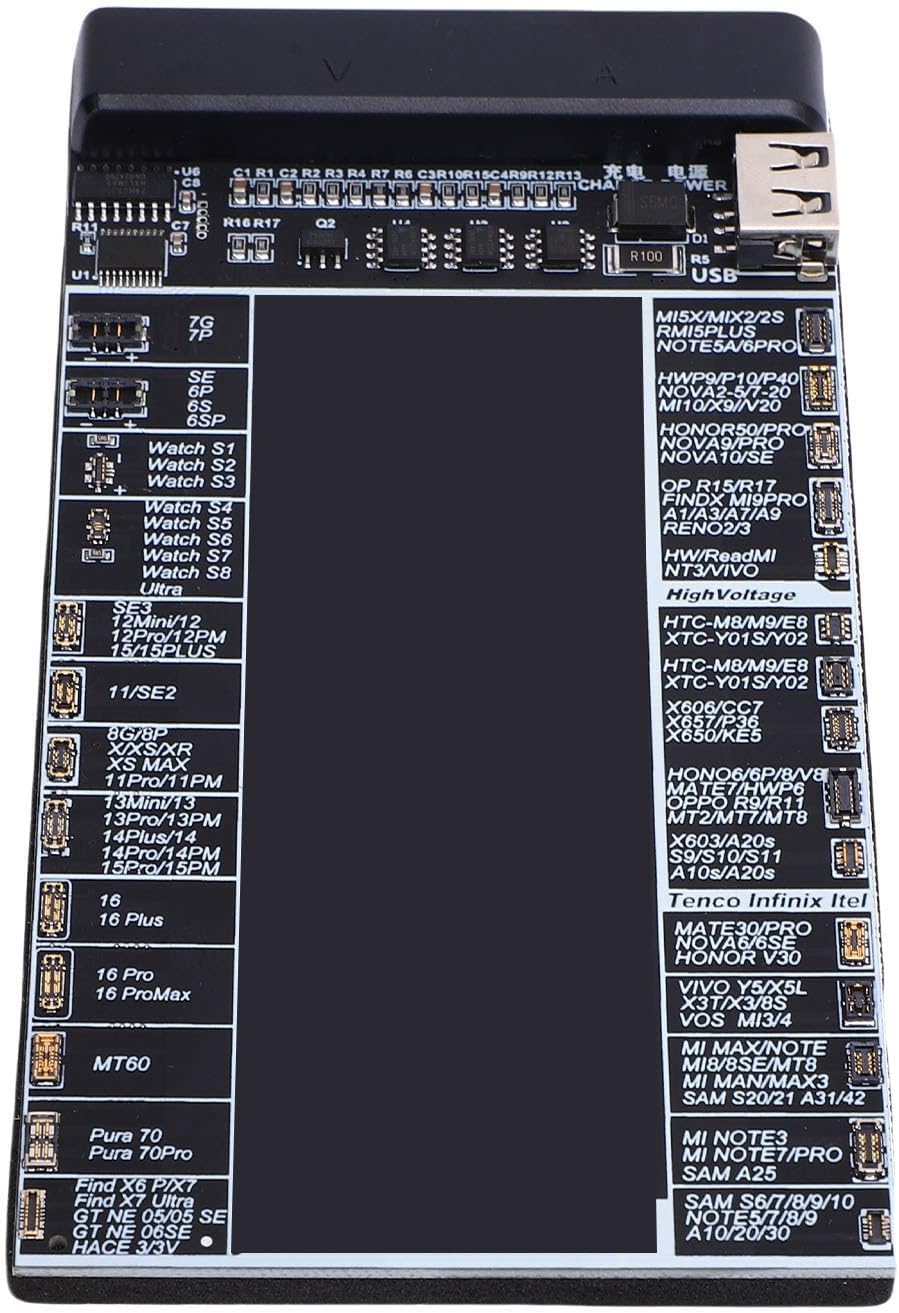
Figura 3: detallada view of the activation board's battery connector slots, labeled for various phone models.
4. Instrucciones de funcionamiento
This section details how to use the activation board for battery charging and activation.
4.1. Battery Activation (Waking a Sleeping Battery)
If a battery is completely discharged or has been unused for a long period, it may enter a "sleeping" state and not respond to normal charging. The activation board can revive such batteries:
- Conecte la batería: As described in the Setup Guide, connect the sleeping battery to the appropriate slot on the activation board.
- Press Activation Button: Locate the "Activation" button on the board (if present, or the board automatically attempts activation upon connection). The board will apply a small charge to wake up the battery.
- Pantalla del monitor: Observe the LED digital display. It will show the voltage and current. Once the battery is activated, it should begin to accept a charge.

Figure 4: The activation board in use, demonstrating its ability to wake up deeply discharged batteries.
4.2. Bateria cargando
The board also functions as an external battery charger:
- Conecte la batería: Place the battery into the correct slot on the activation board.
- Conecte la electricidad: Ensure the activation board is connected to a power source via the USB cable.
- Carga del monitor: The LED display will show the charging voltage and current. Charging will proceed automatically. Disconnect the battery once fully charged or when the desired charge level is reached.
Nota: Always monitor the charging process and disconnect the battery once fully charged to prevent overcharging, although the board has built-in short circuit protection.
5. Mantenimiento
To ensure the longevity and optimal performance of your Eujgoov Battery Charging Activation Board, follow these maintenance guidelines:
- Limpieza: Use a soft, dry cloth to wipe the surface of the board. Avoid using liquid cleaners or solvents, which can damage the electronic components.
- Almacenamiento: Store the board in a cool, dry place away from direct sunlight, extreme temperatures, and high humidity.
- Manejo: Handle the board with care. Avoid dropping it or subjecting it to strong impacts, as this can damage internal circuitry.
- Cuidado del conector: Keep the battery connector slots clean and free of dust or debris to ensure proper contact with batteries.
6. Solución de problemas
If you encounter issues while using the activation board, refer to the following common problems and their solutions:
| Problema | Posible causa | Solución |
|---|---|---|
| La placa no se enciende. | No hay fuente de alimentación o el cable/adaptador USB está defectuoso. | Asegúrese de que el cable USB esté bien conectado a una fuente de alimentación que funcione. Pruebe con otro cable USB o adaptador de corriente. |
| Battery not activating/charging. | Incorrect battery connection, severely damaged battery, or wrong slot used. | Verify the battery is correctly seated in the appropriate slot for its model. The battery might be beyond repair. |
| LED display shows unusual readings. | Poor battery contact or internal fault. | Re-seat the battery. If the issue persists, the battery or board may be faulty. |
| Board gets excessively hot. | Overload or internal short circuit. | Immediately disconnect power and the battery. Do not use the board if it overheats. Contact support. |
7. Especificaciones
Technical specifications for the Eujgoov Mobile Phone Battery Charging Activation Board:
| Número de modelo | Eujgoovdhb9pgk2om |
| Marca | Eujgoov |
| Dispositivos compatibles | Teléfonos celulares |
| Modelos de teléfonos compatibles | iPhone 5G, 5S, 5C, 5SE, 6, 6P, 6S, 6SP, 7, 7P, 8, 8P, X, XR, XS, XS Max, 11, 11Pro, 11Pro Max, 12 Pro, 12 Pro Max, 12 Mini, 13 Mini, 13 Pro, 13 Pro Max, 14, 14 plus, 14 Pro, 14 Pro Max, 15 series and most smartphones for Android |
| Tecnología de conectividad | USB |
| Tipo de conector | USB |
| Fuente de poder | Battery Powered (via USB input) |
| Características especiales | Fast Charging, Short Circuit Protection, LED Digital Display |
| Componentes incluidos | Phone Battery Activation Board, USB Cable, Connection Cable |
| Peso del artículo | 1.58 onzas (aprox. 45 gramos) |
| Dimensiones del paquete | 8.55 x 5.32 x 1.06 pulgadas (aprox. 21.7 x 13.5 x 2.7 cm) |
8. Garantía y soporte
For warranty information or technical support regarding your Eujgoov Mobile Phone Battery Charging Activation Board, please refer to the product packaging or contact the manufacturer directly through their official webSitio web o canales de atención al cliente. Conserve su recibo de compra como comprobante para cualquier reclamación de garantía.
Manufacturer: Eujgoov
no hay documentos relevantes
Ask a question about this manual
Ask about setup, troubleshooting, compatibility, parts, safety, or missing instructions. Manuals+ will review the question and use this page’s manual context to help answer it.