
Introducción
This manual provides detailed instructions for the installation, operation, and maintenance of your EBTOOLS 4.3-inch 1080P Mirror Dash Cam. This device is designed to record video footage from both the front and rear of your vehicle, offering features such as parking monitoring and loop recording for enhanced driving safety and evidence collection. Please read this manual thoroughly before using the product to ensure proper functionality and to avoid any damage.
Características del producto
- Construcción duradera: Manufactured from high-quality ABS material for robustness and extended durability.
- Lentes gran angular: Equipped with wide-angle lenses to minimize blind spots and capture comprehensive road details.
- Grabación en bucle: Ensures continuous recording by automatically overwriting the oldest video files cuando la tarjeta de memoria alcanza su capacidad.
- Rendimiento en todo clima: Capable of recording clear video footage even in adverse weather conditions such as rain or fog.
- Diseño fácil de usar: Features a straightforward installation process and intuitive controls for ease of use.
Contenido del paquete
Por favor verifique que todos los siguientes artículos estén incluidos en su paquete:
- EBTOOLS 4.3-inch Mirror Dash Cam Unit
- Traseroview Cámara
- Cargador de coche
- Cable de conexión de la cámara trasera
- Mounting Straps/Adhesive
- Manual de usuario (este documento)

Configuración
1. Montaje de la cámara del tablero
Fije la cámara del tablero del espejo sobre el soporte trasero existente de su vehículo.view mirror using the provided mounting straps. Ensure it is firmly attached and does not obstruct your view.
2. Conexión de la cámara trasera
Route the rear camera cable from the dash cam to the desired mounting location at the rear of your vehicle. Connect the rear camera to the AV IN port on the main dash cam unit. For optimal performance, ensure the cable is neatly tucked away and secured.


3. Conexión de alimentación
Connect the provided car charger to the dash cam's power input port and then plug the other end into your vehicle's 12V power outlet (cigarette lighter socket). The device will typically power on automatically with the vehicle's ignition.
4. Inserte la tarjeta de memoria
Insert a compatible Micro SD card (not included) into the TF CARD slot on the dash cam. Ensure the card is inserted correctly until it clicks into place. A high-speed Class 10 or higher card is recommended for reliable recording.

Instrucciones de funcionamiento
Encendido/apagado
- Automático: The dash cam will power on and begin recording automatically when your vehicle's ignition is turned on.
- Manual: Press and hold the Power button (usually marked with a power symbol) to manually turn the device on or off.
Navegación de menú
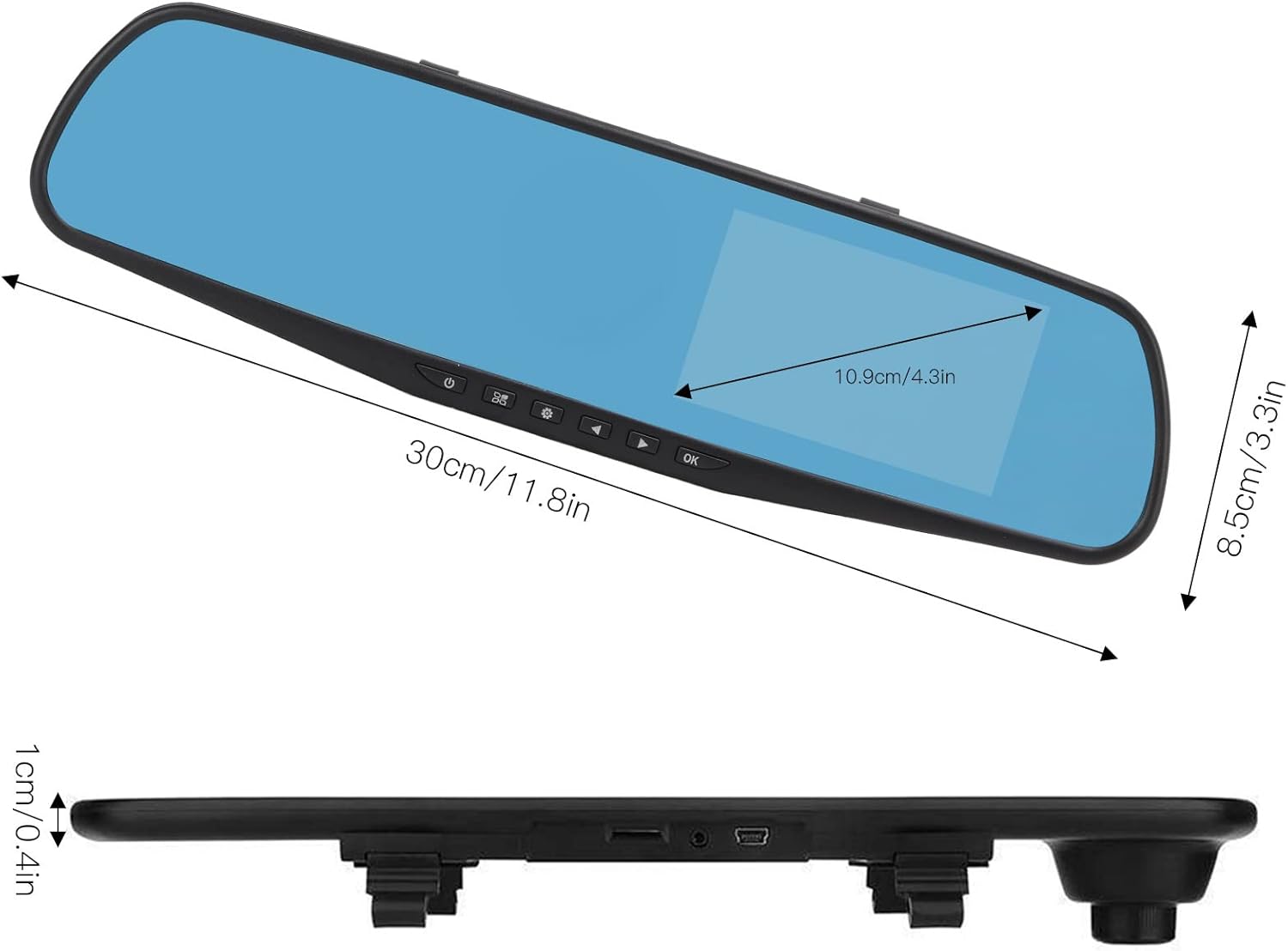
Use the physical buttons located on the bottom of the mirror unit to navigate through the menu options:
- Botón de menú: Presione para ingresar al menú de configuración.
- Botones arriba / abajo: Use to scroll through menu options.
- Botón OK: Press to confirm a selection or setting.
Modos de grabación
- Grabación en bucle: This feature records video in continuous segments (e.g., 1, 2, 3, or 5 minutes). When the memory card is full, the oldest fileLos s se sobrescriben automáticamente para hacer espacio para nuevas grabaciones.
- Detección de movimiento: When enabled, the dash cam will automatically start recording if it detects movement in front of the vehicle while parked. This feature is useful for parking surveillance.
Configuración de resolución de video
You can adjust the video resolution for both front and rear cameras in the settings menu:
- Cámara frontal: Select between 1080P (FHD 1400x1080) or 720P (HD 1280x720).
- Cámara trasera: Records at 720P resolution.
Configuración de idioma
The device supports multiple languages. Navigate to the language settings in the menu to select your preferred language, including English, German, French, Italian, Japanese, Korean, and Simplified Chinese.

Mantenimiento
- Limpieza: Use a soft, dry cloth to clean the dash cam screen and lenses. Avoid using abrasive cleaners or solvents.
- Tarjeta de memoria: Formatee regularmente su tarjeta Micro SD (al menos una vez al mes) para garantizar un rendimiento óptimo y evitar la corrupción de datos. Haga una copia de seguridad de toda la información importante.tage antes de formatear.
- Temperatura: Avoid exposing the device to extreme temperatures, both hot and cold, as this can affect battery life and component integrity.
Solución de problemas
- El dispositivo no enciende:
- Ensure the car charger is properly connected to both the dash cam and the vehicle's 12V power outlet. Check if the vehicle's ignition is on. Test the charger in another port or with another device if possible.
- Problemas de grabación (por ejemplo, deja de grabar, archivos dañados) files):
- Verify that a compatible, high-speed Micro SD card (Class 10 or higher) is inserted correctly. Format the memory card through the dash cam's settings menu. If issues persist, try a different memory card.
- Screen display problems (e.g., black screen, distorted image):
- Check all cable connections, especially for the rear camera. Try resetting the device to factory settings via the menu. If the problem continues, contact customer support.
- La cámara trasera no muestra:
- Ensure the rear camera cable is securely connected to both the rear camera and the AV IN port on the main unit. Check for any damage to the cable or connectors.
Presupuesto
| Tipo de artículo | 4.3-inch Mirror Dash Cam |
| Material | abdominales |
| Tamaño de pantalla | 4.3 pulgadas |
| Tipo de pantalla | Pantalla LCD TFT |
| Ángulo de la cámara frontal | 110 grados |
| Ángulo de la cámara trasera | 90-110 degrees (Adjustable) |
| Resolución de video frontal | 1080P (FHD 1400x1080), 720P (HD 1280x720) |
| Resolución de video trasera | 720P |
| Intervalos de grabación en bucle | 1 minuto, 2 minutos, 3 minutos, 5 minutos |
| Detección de movimiento | Apoyado |
| Resolución de la imagen | 12MP, 10MP, 5MP, 3MP, 2MP, 1.3MP |
| Formato de vídeo | Avión |
| Formato de imagen | JPEG |
| Tipo de lente | F2.78 glass resolution multi-layer filter wide-angle lens |
| Idiomas compatibles | English, German, French, Italian, Japanese, Korean, Simplified Chinese |
| Salida de vídeo | Lector de tarjetas USB |
| Método de montaje | Tipo de adhesivo |
| Dimensiones del producto | Approx. 30cm (11.8in) L x 8.5cm (3.3in) W x 1cm (0.4in) T |
| Dimensiones del paquete | 34 x 12 x 6 cm; 512 g |
Garantía y soporte
For warranty information or technical assistance, please refer to the warranty card included with your product or contact EBTOOLS customer support through the retailer's platform where the product was purchased. Our support team is available to help with any questions or issues you may encounter.