
1. Introducción
This manual provides detailed instructions for the installation, operation, and maintenance of your Binardat Outdoor Gigabit PoE Passthrough Switch (Model: 1000M Outdoor). This device is designed to extend Power over Ethernet (PoE) connectivity in outdoor environments, offering a reliable solution for powering and connecting multiple PoE-enabled devices such as IP cameras and wireless access points.
The switch features 1 PoE In port and 3 PoE Out Gigabit ports, supporting IEEE 802.3af/at standards. Its robust, waterproof design ensures performance in various outdoor conditions.
2. Información de seguridad
- Ensure the device is powered by a compatible IEEE 802.3af/at PoE source. Do not use 24V passive PoE.
- Avoid exposing the device to extreme temperatures outside its operating range.
- No abra el dispositivo casing. El mantenimiento sólo debe ser realizado por personal cualificado.
- Ensure all cable connections are secure and properly sealed, especially in outdoor installations, to maintain waterproof integrity.
- Mantenga el dispositivo alejado de materiales inflamables.
3. Contenido del paquete
Verifique que todos los artículos estén presentes en su paquete:
- Binardat Outdoor Gigabit PoE Passthrough Switch (1000M Outdoor)
- Accesorios de montaje (tornillos, tacos)
- Manual de usuario (este documento)
4. Producto terminadoview
The Binardat 1000M Outdoor PoE Passthrough Switch is a compact and durable device designed for extending PoE networks. It features one PoE input port and three PoE output ports, all supporting Gigabit Ethernet speeds.

Imagen 1: Frente view of the Binardat Outdoor Gigabit PoE Passthrough Switch, showing the 1 PoE In and 3 PoE Out Gigabit ports, along with the DIP switch for VLAN mode.

Image 2: Various angles of the PoE Extender, illustrating its compact size and the protective cover for the Ethernet ports.
4.1. Descripción del puerto
- PoE IN (Port 4): Connects to your main PoE switch or injector. This port receives both power and data.
- PoE OUT (Ports 1, 2, 3): Connects to your PoE-powered devices (PDs) such as IP cameras, VoIP phones, or wireless access points. These ports supply power and data to the connected devices.
- Dip switch: Located near Port 1, this switch controls the VLAN mode.
5. Configuración
5.1. Instalación Física
The device is designed for wall mounting. Use the provided mounting accessories to secure the switch in a desired location. Ensure the location is suitable for outdoor use, considering its IP55 waterproof rating.

Image 3: The Binardat PoE Extender shown mounted on an exterior wall, demonstrating its outdoor suitability and waterproof design.
5.2. Conexión de red
- Conectar fuente PoE: Connect an Ethernet cable from your main PoE switch or PoE injector to the PoE IN (Port 4) of the Binardat switch. Ensure your PoE source is IEEE 802.3af/at compliant (44-57 Vdc).
- Conectar dispositivos PoE: Conecte los cables Ethernet desde el PoE OUT (Ports 1, 2, 3) to your PoE-powered devices (e.g., IP cameras).
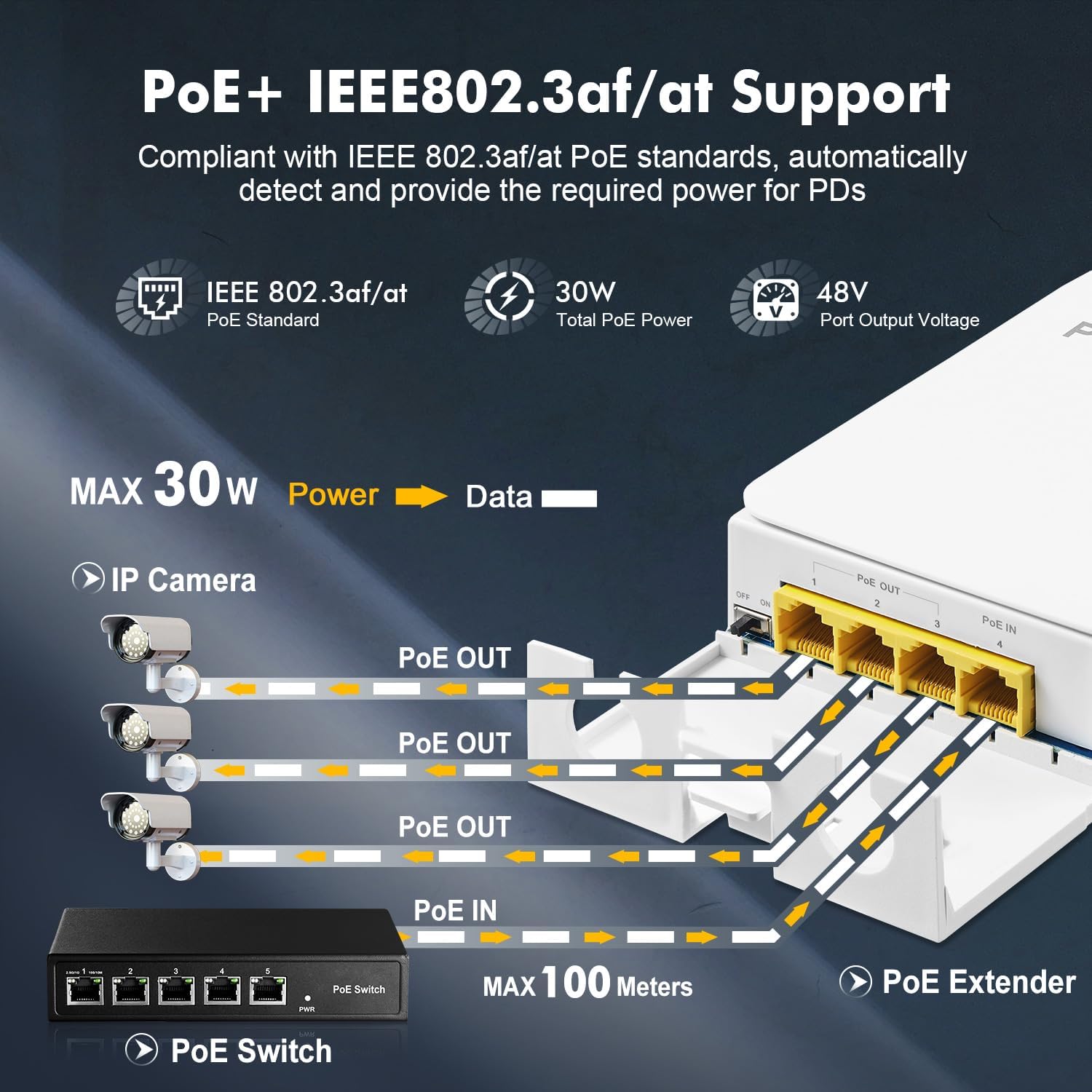
Image 4: Connection diagram illustrating a PoE switch providing power and data to the PoE Extender, which then powers and connects three IP cameras.
5.3. VLAN Configuration (DIP Switch)
The Binardat switch supports port-based VLAN mode, controlled by a DIP switch. When VLAN mode is enabled, ports 1-3 are isolated from each other, preventing broadcast storms between connected devices. This can be useful in scenarios where you want to segment traffic for security or performance reasons.
- OFF (Default): All ports operate as a standard switch, allowing communication between all connected devices.
- EN: Ports 1, 2, and 3 are isolated from each other. Each port can only communicate with the PoE IN port (Port 4).

Image 5: Illustration of the port-based VLAN function, showing how the DIP switch can isolate ports 1-3 to prevent interference between connected IP cameras.
6. Operando
6.1. Encendido
Once the PoE IN port is connected to a compliant PoE source, the switch will automatically power on. No additional power adapter is required.
6.2. Indicadores LED
The switch features LED indicators for each port, displaying the connection status and activity. Refer to the device for specific LED behavior (e.g., solid green for link, flashing for activity).
6.3. Conexión en cascada de varias unidades
The Binardat PoE Passthrough Switch supports cascading up to 3 levels, extending PoE coverage over longer distances (up to 300m or 1000ft total). To cascade, connect a PoE OUT port of one extender to the PoE IN port of the next extender.

Image 6: Illustration of daisy-chaining three PoE Extenders to extend the network and power distance from a main PoE switch to IP cameras.
7. Mantenimiento
- Limpieza: Utilice un paño suave y seco para limpiar el exterior del dispositivo. No utilice limpiadores líquidos ni aerosoles.
- Inspección: Periodically inspect cable connections for wear or damage, especially in outdoor environments. Ensure the protective cover for the ports is securely closed.
- Ambiental: While designed for outdoor use, avoid direct exposure to prolonged heavy rain or snow if possible, to maximize device lifespan.
8. Solución de problemas
- No hay energía para los dispositivos:
- Ensure the PoE source connected to the PoE IN port is active and providing power.
- Verify the PoE source is IEEE 802.3af/at compliant (44-57 Vdc). This device does not support 24V passive PoE.
- Check all Ethernet cable connections for proper seating and integrity.
- Ensure the total power draw of connected PoE devices does not exceed the switch's output capacity (Max 24W total, average 8W per port).
- Sin conexión de datos:
- Check the Ethernet cables for damage.
- Verify the connected devices are functioning correctly.
- If VLAN mode is enabled, ensure your network configuration accounts for port isolation.
- Conexión intermitente:
- Inspect outdoor cable runs for environmental damage or loose connections.
- Ensure the protective cover is fully closed to prevent moisture ingress.
9. Especificaciones

Imagen 7: Detallada view of the PoE Extender with its dimensions and a summary of its technical specifications.
| Característica | Especificación |
|---|---|
| Modelo | 1000M Outdoor |
| Puertos | 1 PoE In, 3 PoE Out Gigabit Ports |
| Velocidad de transferencia de datos | 10/100/1000 Mbps |
| PoE estándar | IEEE 802.3af / at |
| Potencia de entrada | Max 30W (IEEE 802.3af/at) |
| Potencia de salida | Max 24W total, Average 8W per port |
| Volumen PoEtage | 44-57 Vdc |
| PoE Pin Assignment (Input) | 1/2 (+), 3/6 (-), 4/5(+), 7/8(-) |
| PoE Pin Assignment (Output) | 1/2 (+), 3/6 (-) |
| Clasificación de impermeabilidad | IP55 |
| en cascada | Supports 3-level cascading (up to 300m/1000ft total) |
| Dimensiones | Aproximadamente 6.85 x 3.98 x 1.46 pulgadas (17.4 x 10.1 x 3.7 cm) |
| Peso | Aproximadamente 6.4 onzas (0.18 kg) |
| Material | Industrial grade ABS polymer |
10. Garantía y soporte
10.1. Información de garantía
Binardat products are covered by a limited warranty against defects in materials and workmanship. Please refer to the warranty card included with your product or visit the official Binardat webSitio para conocer los términos y condiciones específicos de la garantía.
10.2. Soporte técnico
For technical assistance, troubleshooting, or product inquiries, please contact Binardat customer support through the contact information provided on the official Binardat website or your purchase platform. When contacting support, please have your product model and purchase details ready.