
1. Introducción y másview
The VIZIUUY 3MP Solar Security Camera offers advanced outdoor surveillance with its wireless design, solar power capabilities, and comprehensive features. This manual provides essential information for setting up, operating, and maintaining your camera to ensure optimal performance and security.

Image: VIZIUUY 3MP Solar Security Camera with its solar panel.
2. ¿Qué hay en la caja?
Desembale con cuidado todos los componentes y verifique que haya recibido los siguientes artículos:
- 1 cámaras PTZ solares de 3 MP
- 1 x Panel solar
- 1 x Manual de usuario
- 1 x cable de alimentación
- Pegatina 1 x Advertencia
- 2 soportes (1 para cámara, 1 para panel)
- 2 x Screw bags

Imagen: Todos los componentes incluidos en el embalaje del producto.
3. Guía de configuración
3.1 Initial Setup (App & Pairing)
- Cargue la cámara: Before installation, fully charge the camera indoors using the provided power cable. This ensures the built-in battery has sufficient power for initial setup and operation.
- Descargar la aplicación: Download the free "Cloudedge" app from your smartphone's app store (Google Play for Android or Apple App Store for iOS).
- Crear una cuenta: Open the Cloudedge app and follow the on-screen instructions to sign up and create a new user account.
- Agregar dispositivo: In the app, select 'Add Device' and choose 'Battery Camera'. Follow the prompts to power on the camera and reset it if necessary.
- Conectarse a Wi-Fi: Select your 2.4GHz Wi-Fi network and enter the password. The camera does not support 5GHz Wi-Fi.
- Escanear código QR: The app will display a QR code. Hold your smartphone with the QR code 5-8 inches in front of the camera lens. The camera will emit a sound indicating successful pairing.
- Configuración completa: Once connected, follow the remaining app prompts to name your camera and finalize the setup process.
Video: A customer's unboxing and setup guide for the VIZIUUY Solar Security Camera, demonstrating the initial pairing process with the Cloudedge app.
3.2 Instalación física
The VIZIUUY camera and solar panel can be mounted using the provided stands and screws. Choose a location that provides optimal sunlight exposure for the solar panel and a clear view para la cámara.
- Ubicación de montaje: Identify a suitable outdoor location for both the camera and the solar panel. Ensure the solar panel receives direct sunlight for several hours daily.
- Instale el soporte de la cámara: Use the provided mounting template to mark drill holes for the camera bracket. Secure the bracket to the wall or ceiling using the screws and wall anchors. The camera slides onto this bracket for easy attachment and removal.
- Install Solar Panel Bracket: Similarly, install the solar panel bracket in a location with maximum sun exposure.
- Conecte el panel solar: Secure the solar panel to its bracket and adjust its angle to face the sun.
- Conectar el panel solar: Connect the solar panel's power cable to the camera's charging port. Ensure the connection is secure and waterproof.

Image: Installation diagram for the camera and solar panel.

Image: Solar panel connected to the camera for continuous power.
4. Instrucciones de funcionamiento
4.1 Pan, Tilt & Digital Zoom
Controlar la cámara viewing angle remotely through the Cloudedge app. The camera offers 355° horizontal pan and 90° vertical tilt, providing a 360° field of view. Utilize the 4x digital zoom to inspect details within the live feed.

Image: Pan, Tilt, and 4X Digital Zoom functionality.
4.2 Visión nocturna
The camera features upgraded 4pcs bright spotlights for enhanced night vision. It supports both color night vision (up to 50ft/15m) and infrared (IR) night vision for clear video in total darkness.
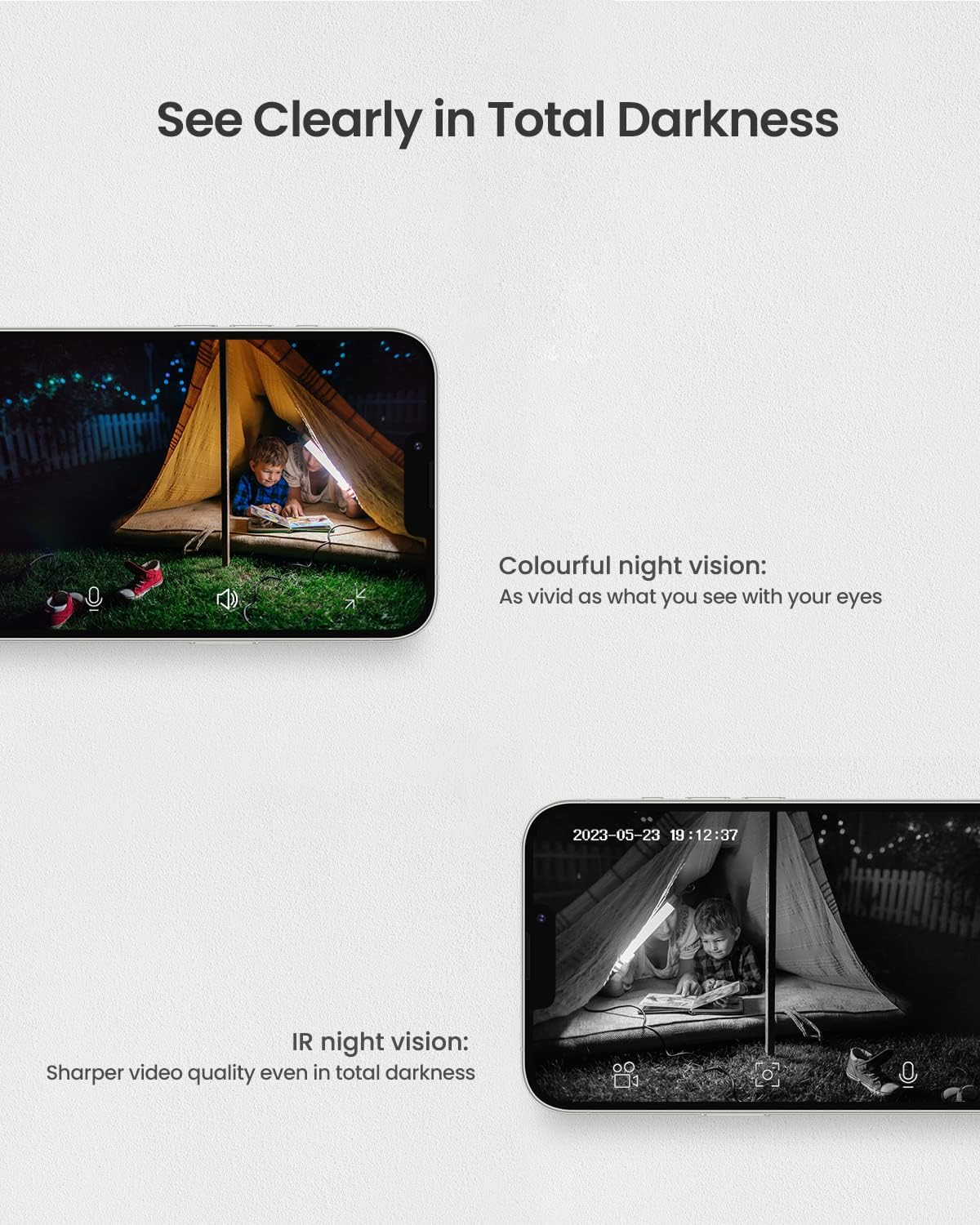
Image: Night vision capabilities, including color and IR modes.

Image: Visual comparison of camera view during day and night with color night vision.
4.3 Intelligent Motion Detection & Multi-Alarms
Equipped with upgraded PIR technology, the camera significantly enhances human-like recognition, reducing false alarms. Upon motion detection, the camera can automatically activate its floodlight and siren to deter intruders. Notifications are pushed to your smartphone. You can also customize motion detection areas and sensitivity levels (1-10) within the app.

Image: Intelligent motion detection features.

Image: Motion detection triggering spotlight and app alerts.

Image: Setting customized activity zones for motion detection.
4.4 Audio bidireccional
The built-in microphone and speaker enable two-way communication. You can hear what's happening and speak to anyone in view of the camera directly from your smartphone.

Image: Two-way audio communication via the app.
4.5 Opciones de almacenamiento
The camera supports two storage methods: local storage via a Micro SD card (up to 128GB, not included) and optional cloud storage with a free 7-day trial.

Image: Cloud and Micro SD card storage options.
4.6 Compatibilidad con Alexa
The VIZIUUY camera is compatible with Alexa, allowing for voice control and integration with smart home systems. You can ask Alexa to show you the camera feed on compatible devices.

Image: Alexa voice control integration.
5. Mantenimiento
- Limpiar la lente y el panel solar: Limpie periódicamente la lente de la cámara y el panel solar con un paño suave.amp Paño para eliminar el polvo, la suciedad o los residuos. Esto garantiza una calidad de imagen nítida y una carga solar eficiente.
- Verificar montaje: Periodically inspect the camera and solar panel mounting brackets to ensure they are secure and have not loosened due to weather conditions.
- Actualizaciones de software: Keep the Cloudedge app updated to the latest version to benefit from new features, bug fixes, and security enhancements.
6. Solución de problemas
- Cámara sin conexión: Ensure the camera is fully charged and the solar panel is receiving adequate sunlight. Check your Wi-Fi connection and ensure the camera is within range of your 2.4GHz router. Try restarting the camera and your router.
- Mala calidad de imagen: Limpie la lente de la cámara. Asegúrese de que no haya obstrucciones en el campo de visión de la cámara. view. Check your Wi-Fi signal strength in the app; a weak signal can affect video quality.
- Alertas de movimiento falso: Adjust the motion detection sensitivity settings in the app. Define specific activity zones to exclude areas with frequent non-threatening movement (e.g., trees swaying).
- La batería no se carga: Verify the solar panel is clean and positioned to receive direct sunlight. Ensure the solar panel cable is securely connected to the camera. If issues persist, try charging the camera directly with the power cable indoors.
- Problemas de audio bidireccional: Check the volume settings on your smartphone and within the app. Ensure there is no obstruction blocking the camera's microphone or speaker.
7. Especificaciones
| Característica | Detalle |
|---|---|
| Nombre del modelo | VZ-3PT2-A |
| Resolución de captura de video | 3 megapíxeles (2560*1920) |
| Uso en interiores y exteriores | Exterior |
| Fuente de poder | Solar Powered / Power Adapter |
| Protocolo de conectividad | Wi-Fi (SOLO 2.4 GHz) |
| Tipo de controlador | Aplicación CloudEdge |
| Viewángulo de ing | 355° Pan, 90° Tilt (360° Field of View) |
| Rango de visión nocturna | Up to 50ft/15m (Color Night Vision) |
| Zoom digital | 4X |
| Energía de la batería | 9600 miliamp Horas |
| Almacenamiento | Tarjeta Micro SD (hasta 128 GB), almacenamiento en la nube |
| Calificación de protección internacional | IP66 |
| Dimensiones del artículo L x W x H | 7 x 5 x 8 pulgadas |
8. Garantía y soporte
VIZIUUY is committed to providing high-quality products and customer satisfaction. Your VIZIUUY Solar Security Camera comes with:
- Garantía de 1 años: Cubre defectos de fabricación y mal funcionamiento en condiciones normales de uso.
- Soporte técnico de por vida: Access to dedicated technical assistance for the lifespan of your product.
- Servicio telefónico local: Support available via local phone service for convenient assistance.
- Devolución gratuita durante 90 días: Para devoluciones dentro de los 90 días posteriores a la compra.
For any inquiries or support needs, please refer to the contact information provided in your Quick Start Guide or on the VIZIUUY official websitio.