Introducción
This manual provides detailed instructions for the operation and maintenance of your Intempo EE4296BLKSTKUK Fabric Stereo Speaker. Please read this manual thoroughly before using the product to ensure proper function and to extend its lifespan.
The Intempo Core Wireless Fabric Stereo Speaker offers immersive stereo sound with Bluetooth technology, a 25-meter wireless range, and up to 26 hours of playtime. It features an easy-to-use control panel and hands-free calling capabilities.
Producto terminadoview
Familiarícese con los componentes y controles de su altavoz.
Componentes del altavoz
- Fabric Stereo Speaker Unit
- Integrated Carry Hook
- Botones del panel de control
- Puerto de carga (Micro USB)
- Puerto USB
- Ranura para tarjeta Micro SD
- Interruptor de encendido y apagado
Panel de control
The top of the speaker features an intuitive control panel for easy operation.

Imagen: Arriba view of the speaker highlighting the control buttons for mode, volume, and track navigation.
- Botón M (modo): Press to switch between Bluetooth, USB, and Micro SD card modes.
- - Botón (Bajar volumen / Pista anterior): Presiona para bajar el volumen. Mantén presionado para ir a la pista anterior.
- Botón + (Subir volumen / Pista siguiente): Press to increase volume. Hold to go to the next track.
- > (Play/Pause / Call) Button: Press to play or pause music. Press to answer or end a call. Hold to reject a call.
Puertos y conmutadores
The rear of the speaker houses the charging port, USB port, Micro SD card slot, and power switch.

Imagen: Detallada view of the speaker's rear panel showing the various input ports and the power switch.
Configuración
Carga del altavoz
- Locate the Micro USB charging port on the rear of the speaker.
- Conecte el cable de carga Micro USB provisto al puerto de carga del altavoz.
- Connect the other end of the charging cable to a compatible USB power source (e.g., USB wall adapter, computer USB port).
- La luz indicadora de carga se iluminará durante la carga y se apagará cuando esté completamente cargada.
- Una carga completa proporciona hasta 26 horas de tiempo de reproducción.
Encendido/apagado
- To power on, slide the On/Off switch located on the rear of the speaker to the 'On' position.
- To power off, slide the On/Off switch to the 'Off' position.
Instrucciones de funcionamiento
Emparejamiento Bluetooth
The speaker uses Bluetooth technology for wireless audio streaming.

Image: The speaker positioned near a smartphone, demonstrating its wireless connectivity.
- Asegúrese de que el altavoz esté encendido y en modo Bluetooth (indicado por un LED azul parpadeante). De lo contrario, pulse el botón "M" para cambiar de modo.
- Habilite Bluetooth en su teléfono inteligente, tableta u otro dispositivo habilitado para Bluetooth.
- Buscar available Bluetooth devices. The speaker will appear as "EE4296BLKSTKUK" or similar.
- Select the speaker from the list to pair. A confirmation tone will sound when successfully paired.
- Once paired, you can play audio from your device through the speaker. The wireless range is up to 25 meters.
Reproducción de música
- Reproducir/Pausa: Presione el botón ">".
- Pista siguiente: Mantenga pulsado el botón '+'.
- Pista anterior: Mantenga pulsado el botón '-'.
- Sube el volumen: Presione el botón '+'
- Bajar volumen: Presione el botón '-'.
Llamadas manos libres
The speaker supports hands-free calling when connected via Bluetooth.
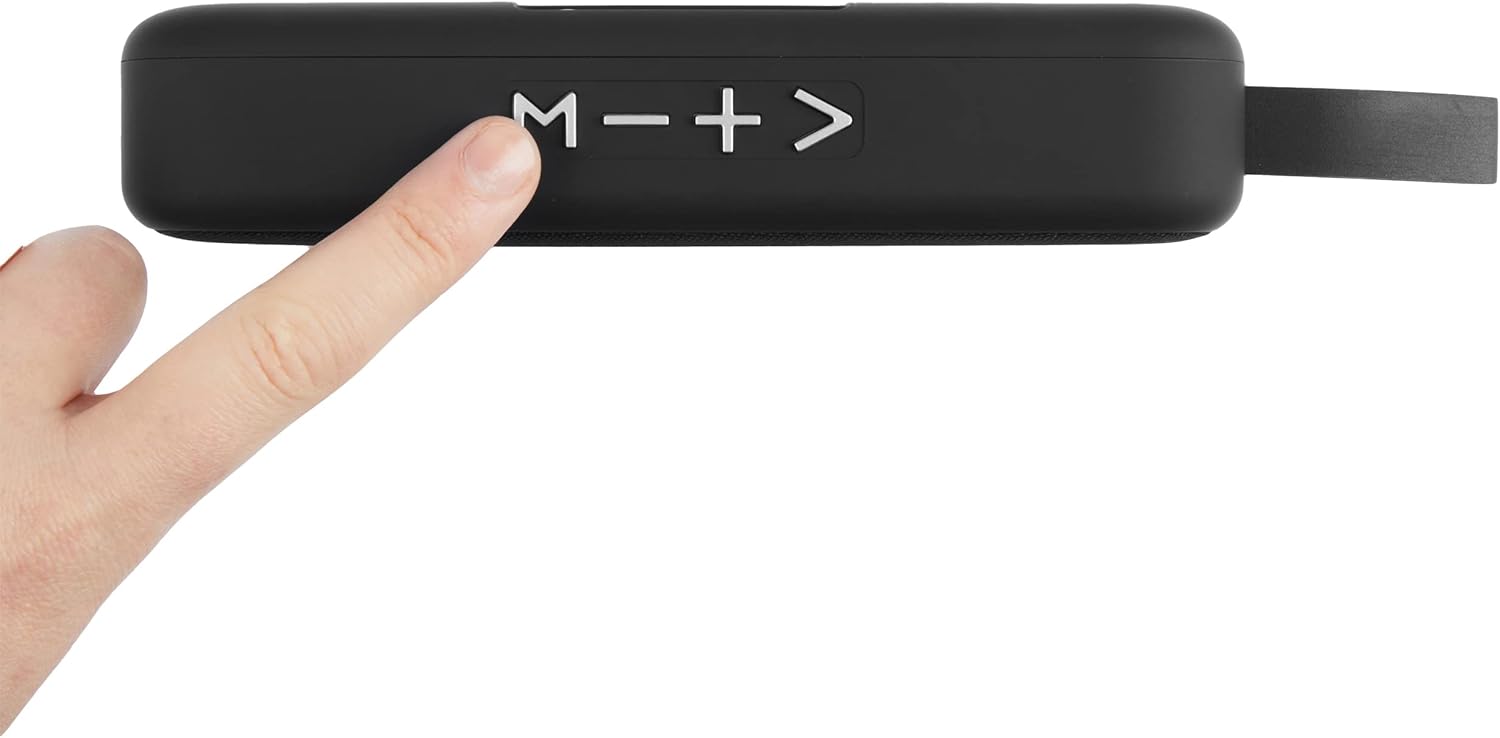
Image: The speaker shown with an icon representing its hands-free calling capability.
- Responder llamada: Press the '>' button when a call comes in.
- Finalizar llamada: Press the '>' button during a call.
- Rechazar llamada: Hold the '>' button when a call comes in.
Using USB Drive / Micro SD Card
The speaker can play audio directly from a USB drive or Micro SD card.
- Insert a USB drive into the USB port or a Micro SD card into the Micro SD card slot on the rear of the speaker.
- Press the 'M' button to switch to USB or Micro SD card mode. The speaker will automatically detect and begin playing compatible audio files.
- Use the '+', '-', and '>' buttons for playback control as described in the "Music Playback" section.
Mantenimiento
- Limpie el altavoz con un paño suave y seco. No utilice limpiadores abrasivos ni disolventes.
- Keep the speaker away from water and moisture, despite being listed as waterproof, excessive exposure can cause damage.
- Guarde el altavoz en un lugar fresco y seco cuando no lo utilice durante períodos prolongados.
- Evite dejar caer el altavoz o someterlo a impactos fuertes.
Solución de problemas
| Problema | Posible causa | Solución |
|---|---|---|
| El altavoz no se enciende. | La batería está baja o agotada. | Cargue el altavoz completamente. |
| No se puede emparejar a través de Bluetooth. | El altavoz no está en modo de emparejamiento o el Bluetooth del dispositivo está desactivado. | Ensure speaker is in Bluetooth mode (flashing LED). Turn Bluetooth on your device and re-scan. Ensure devices are within 25m range. |
| No hay sonido desde el altavoz. | El volumen está demasiado bajo o silenciado. Se seleccionó el modo incorrecto. | Increase volume on both speaker and connected device. Press 'M' button to select correct input mode (Bluetooth, USB, SD). |
| Mala calidad de sonido. | Device is too far from speaker or interference. | Acerque el dispositivo conectado al altavoz. Evite obstáculos entre los dispositivos. |
Presupuesto
| Característica | Detalle |
|---|---|
| Número de modelo | EE4296BLKSTKUK |
| Marca | Intempo |
| Tecnología de conectividad | Bluetooth |
| alcance inalámbrico | Hasta 25 metros |
| Modo de salida de audio | Estéreo |
| Fuente de poder | Batería (recargable) |
| Recreo | Hasta 26 horas |
| Método de control | Tocar (botones) |
| Dimensiones del producto | 8.8 profundidad x 23 ancho x 9.7 alto centímetros |
| Impermeable | Sí |
| Dispositivos compatibles | Teléfono inteligente, tableta |
Garantía y soporte
For warranty information and customer support, please refer to the documentation included with your purchase or visit the official Intempo webSitio. Conserve su comprobante de compra para cualquier reclamación de garantía.
If you encounter issues not covered in the troubleshooting section, please contact Intempo customer service for assistance.