
1. Introducción
This manual provides essential information for the proper installation, operation, and maintenance of the Novastar A5S Plus LED Display Receiving Card. Please read this manual thoroughly before using the product to ensure optimal performance and longevity. The Novastar A5S Plus is an advanced receiving card designed to enhance the display effects of LED screens.
2. Producto terminadoview y características
The Novastar A5S Plus Receiving Card offers significant improvements in display quality and control capabilities for LED screens. Key features include:
- Manejo del color: Supports standard color gamuts (Rec.709 / DCI-P3 / Rec.2020) and custom color profiles for precise color reproduction.
- 18bit+ Grayscale Enhancement: Improves LED display grayscale by up to 4 times, preventing grayscale loss at low brightness levels and ensuring smoother image transitions.
- Pixel-Level Brightness and Chroma Calibration: Integrates with NovaStar's calibration system to adjust brightness and chroma for each pixel, achieving high consistency across the display.
- Ajuste rápido de líneas oscuras o brillantes: Corrects brightness discrepancies at module or cabinet seams for a uniform visual experience.
- Ajuste de múltiples lotes: Allows brightness adjustment of cabinets or modules to minimize display variations caused by different production batches.
- Baja latencia: Reduces video source latency to 1 frame for PWM driver ICs. Custom firmware may be required for DCLK continuous PWM driver ICs.
- Funcionalidad 3D: Compatible with controllers that support 3D output.
- Ajuste de gamma individual para RGB: Works with NovaLCT to allow separate adjustment of red, green, and blue gamma, improving image uniformity at low grayscale and correcting white balance offset.
- Rotación de imagen de 90°: Supports image rotation in multiples of 90° (0°/90°/180°/270°).
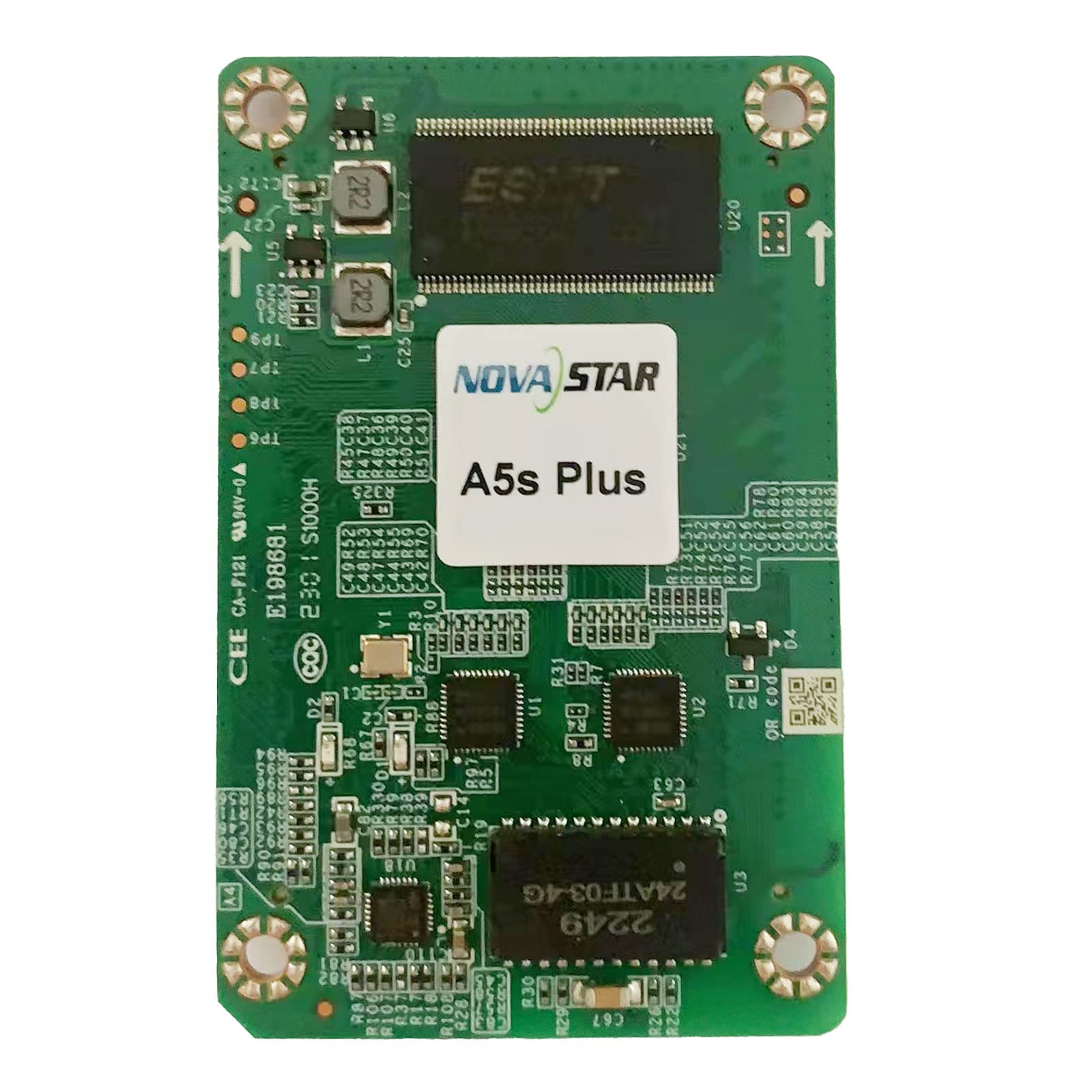
Una sobrecarga view of the Novastar A5S Plus LED Display Receiving Card, showcasing its green circuit board with various electronic components, connectors, and integrated circuits. Two prominent multi-pin connectors are visible on the left and right edges, designed for connecting to LED modules. Key components include resistors, capacitors, and a large integrated circuit labeled '2249 24ATF-03-4G' at the bottom.
3. Contenido del paquete
Al abrir el paquete, verifique que todos los artículos estén presentes y sin daños:
- Novastar A5S Plus Receiving Card
- Conector de alta densidad
- Assembly network transformer
- Manual de usuario (este documento)
4. Instrucciones de configuración
Follow these general steps for installing the Novastar A5S Plus Receiving Card into your LED display system:
- Apagado: Ensure all power to the LED display and control system is disconnected before installation.
- Localizar ranura: Identify the designated receiving card slot within your LED display module or cabinet.
- Insertar tarjeta: Carefully insert the Novastar A5S Plus card into the slot, ensuring it is seated firmly and correctly. Avoid applying excessive force.
- Conectar cables de datos: Connect the data cables from the LED modules to the multi-pin connectors on the receiving card (e.g., JH1, JH2).
- Conecte cables de red: Connect the network cables from the sending card or control system to the appropriate network ports on the receiving card.
- Encendido: Once all connections are secure, restore power to the LED display and control system.
- Configuración de software: Use Novastar's control software (e.g., NovaLCT) to configure the receiving card parameters, including screen resolution, module type, and display settings. Refer to the software's user guide for detailed configuration steps.
5. Instrucciones de funcionamiento
The Novastar A5S Plus operates in conjunction with a Novastar sending card and control software. Basic operation involves:
- Encendido del sistema: Power on the sending card, then the LED display modules.
- Control de software: Launch the Novastar control software (e.g., NovaLCT) on your computer.
- Configuración de pantalla: Load the saved configuration file for your LED screen. If necessary, perform initial setup or adjustments.
- Reproducción de contenido: Use the software to send video or image content to the LED display.
- Utilización de funciones: Access advanced features like color management, pixel-level calibration, and image rotation through the control software interface to optimize display quality.
- Apagado del sistema: Power off the LED display modules first, then the sending card.
6. Mantenimiento
Proper maintenance ensures the longevity and reliable performance of your Novastar A5S Plus Receiving Card:
- Limpieza regular: Keep the card and its connectors free from dust and debris. Use a soft, dry brush or compressed air for cleaning. Ensure power is off before cleaning.
- Control ambiental: Operate the card within recommended temperature and humidity ranges to prevent damage.
- Actualizaciones de firmware: Consulte periódicamente la información oficial de Novastar website for firmware updates. Apply updates as recommended to benefit from new features and bug fixes.
- Conexiones seguras: Regularly inspect all cable connections to ensure they are secure and free from wear or damage.
- Manejo adecuado: When handling the card, always use anti-static precautions to prevent electrostatic discharge (ESD) damage.
7. Solución de problemas
If you encounter issues with your Novastar A5S Plus Receiving Card, consider the following:
- Sin pantalla/Pantalla parcial:
- Check power supply to the LED modules and receiving card.
- Verify all data and network cables are securely connected.
- Ensure the receiving card configuration in the control software matches the physical display setup.
- Test with a known working receiving card if available.
- Pantalla parpadeante/inestable:
- Compruebe si hay conexiones de cables sueltas.
- Ensure the network cable quality is sufficient and within recommended lengths.
- Verify refresh rate settings in the control software.
- Incorrect Colors/Image Distortion:
- Perform color calibration using NovaStar's calibration system.
- Check gamma and color management settings in the control software.
- Ensure the correct module type is selected in the software configuration.
- Card Not Detected by Software:
- Verify network connectivity between the sending card and the receiving card.
- Ensure the control software is up-to-date.
- Check the status indicators (LEDs) on the receiving card for error codes.
For persistent issues, contact Novastar technical support.
8. Especificaciones
| Característica | Especificación |
|---|---|
| Nombre del modelo | A5S Plus |
| Capacidad de carga | 512 × 384 píxeles |
| Parallel RGB Data Groups | 32 |
| Serial Data Groups | 64 |
| Coprocesador gráfico | [Integrated] |
| Interfaz de salida de vídeo | HDMI, DVI (via sending card) |
| Dispositivos compatibles | Desktop (as part of LED display system) |
| Resolución máxima de pantalla | 320 x 256 (per card, typical) |
| Interfaz de tarjeta gráfica | PCI-Express x16 (for sending card connection) |
| Medios integrados | High-density connector, Assembly network transformer |
| Fabricante | Estrella nueva |
9. Garantía y soporte
Novastar products typically come with a limited warranty. Please refer to the warranty card included with your product or visit the official Novastar website for detailed warranty terms and conditions. For technical assistance, troubleshooting, or product inquiries, please contact Novastar customer support through their official channels.