
1. Introducción
Gracias por la compraasing the eppfun SK001 USB Speakerphone. This device is designed to provide clear and efficient audio conferencing for home offices, remote work, and small to medium-sized meeting rooms. It features 360° voice pickup, smart voice enhancement, and broad compatibility with popular conferencing platforms.
2. Contenido del paquete
Por favor verifique que todos los artículos estén presentes en su paquete:
- eppfun SK001 USB Speakerphone
- Cable USB-C a USB-C
- Cable USB-A a USB-C
- Manual de instrucciones (este documento)
3. Producto terminadoview
The eppfun SK001 features intuitive controls for managing your calls and audio settings.

Imagen: Arriba view of the eppfun SK001 speakerphone showing its control buttons. The buttons include microphone mute, microphone volume up/down, and speaker volume up/down.
Botones de control:
- Botón de silencio del micrófono: Press to mute or unmute the microphone. An indicator light will show the mute status.
- Microphone Volume Up/Down: Ajusta la sensibilidad de entrada del micrófono.
- Speaker Volume Up/Down: Adjusts the speaker output volume.
Puertos:
- Puerto USB-C: For connecting to your computer using the provided USB cables.
4. Configuración
The eppfun SK001 is a plug-and-play device, requiring no driver installation for most operating systems.
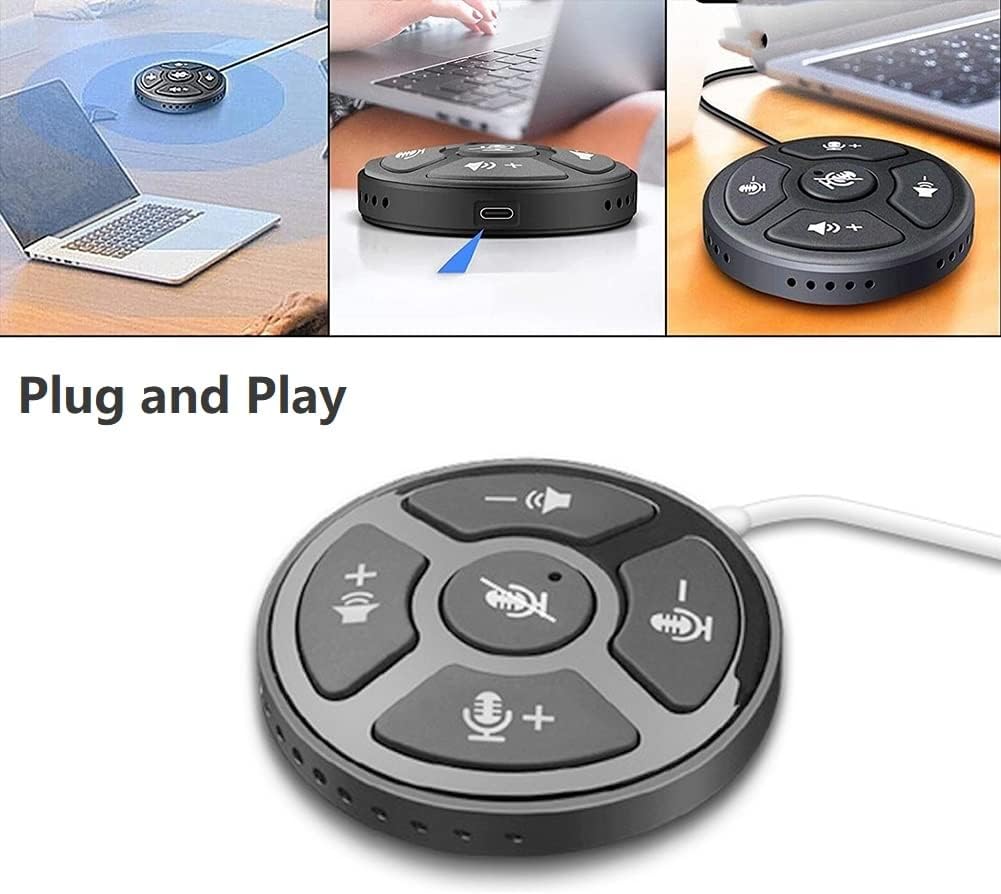
Image: A collage showing the eppfun SK001 speakerphone connected to a laptop via USB, highlighting its plug-and-play functionality.
- Conectar el altavoz:
- Use the provided USB-C to USB-C cable or USB-A to USB-C cable.
- Connect one end of the cable to the USB-C port on the SK001 speakerphone.
- Connect the other end of the cable to an available USB port (USB-A or USB-C) on your computer (PC, laptop, or Mac).
- Reconocimiento del sistema: Su computadora debería detectar e instalar automáticamente los controladores necesarios. Este proceso puede tardar unos instantes.
- Seleccionar como dispositivo de audio:
- Open your operating system's sound settings (e.g., Windows Sound Settings, macOS System Preferences > Sound).
- Select "eppfun SK001" as your default input (microphone) and output (speaker) device.
- In your conferencing software (e.g., Zoom, Microsoft Teams, Skype), navigate to its audio settings and select "eppfun SK001" for both microphone and speaker.
5. Instrucciones de funcionamiento
Basic Call Management:
- Ajuste de volumen: Use the speaker volume up (+) and down (-) buttons on the device to control the playback volume.
- Silencio del micrófono: Press the central microphone mute button to toggle the microphone on or off. A red indicator light typically signifies that the microphone is muted. This mute function is linked with Zoom Meeting certification.
- Sensibilidad del micrófono: Use the microphone volume up (+) and down (-) buttons to adjust the microphone's input sensitivity.
Características principales:
- Captación de voz omnidireccional de 360°: The SK001 is equipped with high-performance microphones capable of capturing voices from all directions within a 5-meter radius, ideal for small to medium-sized conference rooms.
- Mejora de voz inteligente: Features echo cancellation, reverberation suppression, and noise reduction to ensure clear audio during calls.
- Zoom Meeting Certified: Guarantees high-quality calls and seamless integration with Zoom, including synchronized mute status.
6. Mantenimiento
- Limpieza: Use a soft, dry cloth to clean the surface of the speakerphone. Do not use liquid cleaners or aerosols.
- Almacenamiento: Guarde el dispositivo en un lugar fresco y seco cuando no esté en uso.
- Manejo: Evite dejar caer el dispositivo o exponerlo a temperaturas o humedad extremas.
7. Solución de problemas
- No Sound / Microphone Not Working:
- Asegúrese de que el cable USB esté conectado de forma segura tanto al altavoz como a la computadora.
- Verify that "eppfun SK001" is selected as the default audio input and output device in your computer's sound settings and within your conferencing application.
- Check if the microphone is muted on the device (red indicator light) or within your software.
- Adjust the volume levels on both the speakerphone and your computer.
- Try connecting the speakerphone to a different USB port or a different computer to rule out port or system issues.
- Mala calidad de audio:
- Ensure the speakerphone is placed on a stable surface, away from obstructions.
- Confirm that the microphone sensitivity is appropriately set.
- Check for background noise in your environment. The device has noise reduction, but extreme noise can still affect quality.
- Verify your internet connection stability if experiencing issues during online calls.
- Dispositivo no reconocido:
- Desconecte y vuelva a conectar el cable USB.
- Reinicie su computadora.
- Pruebe con un puerto USB diferente en su computadora.
- Asegúrese de que su sistema operativo esté actualizado.
8. Especificaciones
| Característica | Detalle |
|---|---|
| Número de modelo | SK001 |
| Marca | diversión epp |
| Tecnología de conectividad | USB (USB-C, USB-A) |
| Factor de forma del micrófono | Mini |
| Patrón polar | Omnidireccional (360°) |
| Sensibilidad de audio | 30 decibelios |
| Sound Pickup Range | Hasta 5 metros |
| Plataforma de hardware | computadora portátil, computadora |
| Sistemas operativos compatibles | Windows XP/Vista/7/8/10/11, Mac OS |
| Peso del artículo | 80 gramos (2.82 onzas) |
| Dimensiones del paquete | 6.1 x 4.72 x 1.3 pulgadas |
9. Garantía y soporte
The eppfun SK001 comes with a Garantía de 12 meses Desde la fecha de compra. Esta garantía cubre defectos de fabricación y mal funcionamiento en condiciones normales de uso.
For technical support, warranty claims, or any questions regarding your eppfun SK001 speakerphone, please contact eppfun customer service. Refer to the contact information provided on the eppfun official websitio web o su documentación de compra.
Conserve su comprobante de compra para fines de garantía.