
Sharp RP-TT70
Sharp RP-TT70 Vinyl Record Player Turntable User Manual
Modelo: RP-TT70
1. Producto terminadoview
The Sharp RP-TT70 is a 12-inch vinyl record player turntable designed to deliver a rich audio experience with modern convenience. It features a classic wooden cabinet and comes with stereo bookshelf speakers. This belt-drive turntable supports multiple playback speeds and offers versatile connectivity options, including dual Bluetooth functionality.

Figure 1.1: Sharp RP-TT70 Turntable and Speakers. The turntable features a stylish wooden finish and a clear dust cover, flanked by two matching stereo bookshelf speakers.
2. Qué incluye
Verifique el contenido del paquete para asegurarse de que todos los artículos estén presentes:
- Sharp RP-TT70 Turntable Unit
- Stereo Bookshelf Speakers (2 units)
- Guardapolvo
- Adaptador de corriente
- Manual de usuario (este documento)
3. Instrucciones de configuración
Follow these steps to set up your Sharp RP-TT70 turntable:
- Colocación: Coloque el tocadiscos sobre una superficie estable y nivelada, alejado de la luz solar directa, fuentes de calor y polvo excesivo. Asegúrese de que haya una ventilación adecuada alrededor de la unidad.
- Conexión de altavoz: Connect the included stereo bookshelf speakers to the "SPEAKER OUT" terminals on the rear of the turntable. Ensure correct polarity (positive to positive, negative to negative).
- Conexión de energía: Connect the power adapter to the "POWER IN DC 12V" port on the rear of the turntable, then plug the adapter into a wall outlet.
- Guardapolvo: Coloque con cuidado la cubierta antipolvo en las bisagras de la parte posterior del plato giratorio.

Figure 3.1: Rear Panel Connections. This image highlights the AUX-IN Jack, RCL (R&L) Speaker Out, Pitch (+)(-) Speed Calibration, and Power In DC 12V ports, crucial for proper setup.
4. Instrucciones de funcionamiento
4.1 Reproducción de un disco de vinilo
- Encendido: Gire la perilla de encendido para activar el plato giratorio.
- Seleccionar velocidad: Adjust the speed selector to match the record's RPM (33 1/3, 45, or 78 RPM). For 45 RPM records, place the included 45 RPM adapter on the spindle.
- Registro de lugar: Coloque con cuidado el disco de vinilo sobre el plato giratorio.
- Brazo elevador: Levante suavemente el brazo utilizando la palanca de señalización.
- Posición del lápiz: Mueva el brazo sobre el surco inicial deseado del disco.
- Brazo inferior: Baje lentamente el brazo fonocaptor usando la palanca de apoyo. La aguja tocará el disco y comenzará la reproducción.
- Ajuste de volumen: Adjust the volume using the volume knob on the turntable.
- Función de parada automática: The turntable features an auto-stop function that will automatically stop the platter rotation when the record reaches its end.
4.2 Conectividad Bluetooth
The Sharp RP-TT70 supports dual Bluetooth connectivity, allowing you to stream music in two ways:
- Streaming Vinyl to External Bluetooth Device:
- Asegúrese de que el tocadiscos esté encendido.
- Activate Bluetooth pairing mode on your external Bluetooth speaker or headphones.
- The turntable will automatically search for and connect to nearby Bluetooth devices. The Bluetooth indicator light will illuminate when connected.
- Once connected, audio from your vinyl record will play through the external Bluetooth device.
- Streaming Music from Your Phone to Turntable Speakers:
- Asegúrese de que el tocadiscos esté encendido.
- On your smartphone or other Bluetooth-enabled device, search for "Sharp RP-TT70" in the Bluetooth settings.
- Select the turntable to pair. The Bluetooth indicator light will illuminate when connected.
- Once connected, audio from your phone will play through the turntable's included stereo speakers.
4.3 Entrada auxiliar (AUX-IN)
Connect external audio devices such as smartphones, tablets, or MP3 players using a 3.5mm audio cable (not included) to the AUX-IN jack on the rear of the turntable. Switch the input mode to AUX to play audio through the turntable's speakers.
Conector de auriculares 4.4
For private listening, connect headphones to the headphone jack located on the front panel of the turntable.
5. Mantenimiento
Proper maintenance ensures the longevity and optimal performance of your turntable:
- Guardapolvo: Mantenga siempre la cubierta antipolvo cerrada cuando el plato giratorio no esté en uso para evitar la acumulación de polvo en el plato y la aguja.
- Limpieza del lápiz óptico: Gently clean the stylus regularly using a soft brush designed for turntable styli. Brush from back to front.
- Limpieza del plato giratorio: Limpie el tocadiscos y los altavoces con un paño suave y seco. No utilice limpiadores abrasivos ni disolventes.
- Cartridge and Stylus Replacement: The RP-TT70 uses a changeable ceramic cartridge and stylus. If sound quality degrades or the stylus is damaged, replace it with a compatible Sharp replacement part.
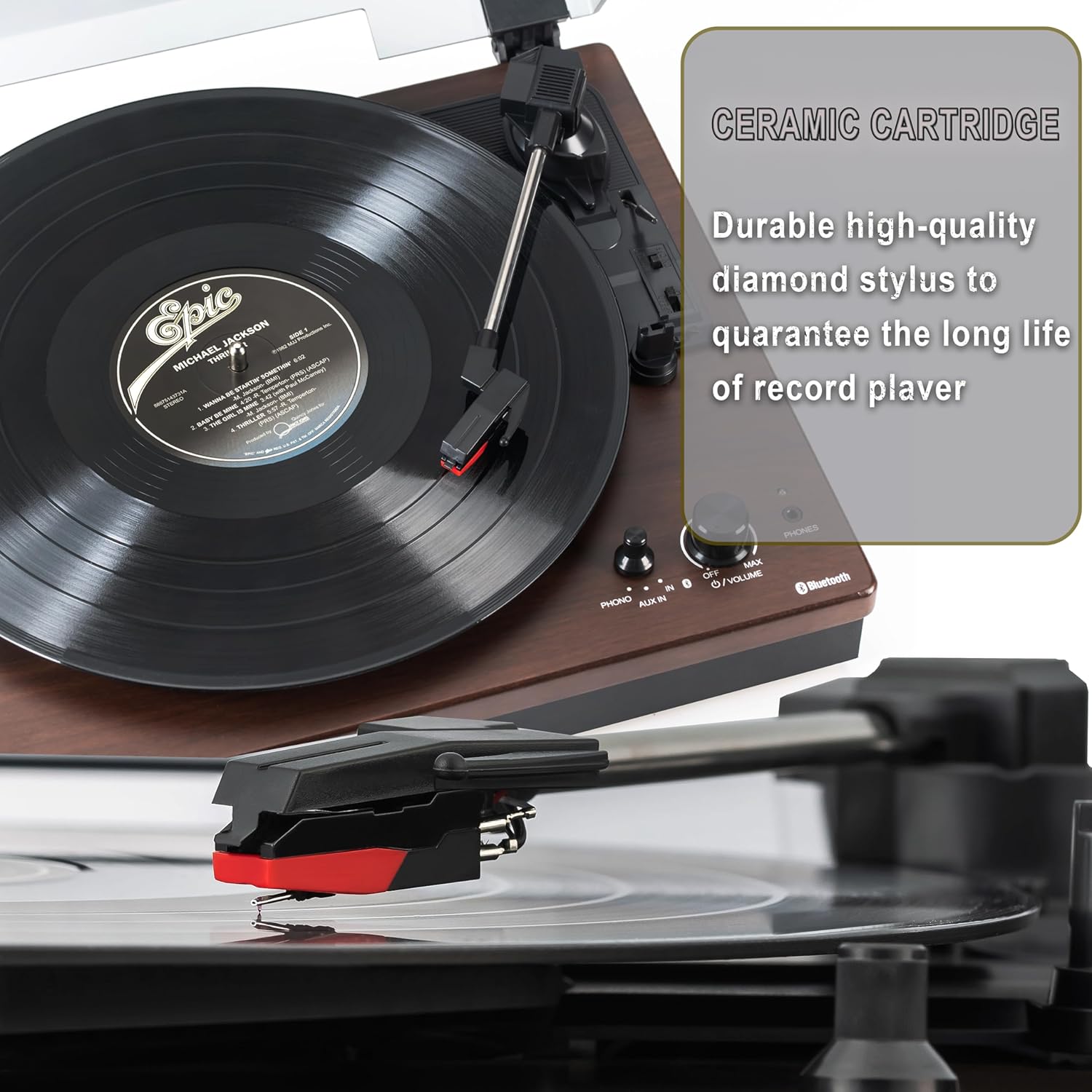
Figure 5.1: Ceramic Cartridge. The turntable is equipped with a durable high-quality diamond stylus designed for extended record playback life.
6. Solución de problemas
If you encounter issues with your Sharp RP-TT70, refer to the following common problems and solutions:
| Problema | Posible causa | Solución |
|---|---|---|
| Sin poder | Adaptador de corriente no conectado o toma de corriente no activa. | Ensure power adapter is securely plugged into the turntable and a working wall outlet. |
| No hay sonido de los altavoces | Speakers not connected correctly; Volume too low; Incorrect input mode. | Check speaker cable connections and polarity. Increase volume. Ensure turntable is in PHONO or AUX mode as appropriate. |
| Poor Sound Quality / Skipping | Dirty or worn stylus; Dirty record; Turntable not level. | Clean the stylus and record. Ensure the turntable is on a stable, level surface. Consider replacing the stylus if worn. |
| Problemas de emparejamiento de Bluetooth | Device too far; Bluetooth not enabled on external device; Interference. | Ensure devices are within range (approx. 30 ft). Confirm Bluetooth is enabled on the external device. Try restarting both devices. |
| El plato no gira | Belt dislodged; Auto-stop engaged prematurely. | Check if the drive belt is properly seated around the platter and motor pulley. If auto-stop is causing issues, ensure the record is placed correctly. |
7. Especificaciones
| Característica | Detalle |
|---|---|
| Número de modelo | RP-TT70 |
| Marca | Afilado |
| Dimensiones del producto | 16.8 x 13.5 x 2.8 pulgadas |
| Peso del artículo | 18.6 libras |
| Tecnología de conectividad | Bluetooth (Bi-directional) |
| Velocidades admitidas | 33 1/3, 45, 78 RPM |
| Componentes incluidos | Turntable, Stereo Bookshelf Speakers |
| Material | Plástico, madera |
| Color | Black (with wooden finish) |
| Tipo de cartucho | Changeable Ceramic Cartridge and Stylus |
| Características | Belt-drive, Auto-return, Pitch control, Dust cover |
8. Garantía y soporte
Para obtener información sobre la garantía y soporte técnico, consulte el sitio web oficial de Sharp. webSitio web o contacte directamente con el servicio de atención al cliente. Conserve su recibo de compra como comprobante para reclamaciones de garantía.