
1. Introducción
Gracias por la compraasing the AKAI Audio TS-90 2.0 Wireless Bluetooth Tower Speaker. This manual provides essential information for the safe and efficient operation of your new audio system. Please read it thoroughly before use and retain it for future reference.
The AKAI TS-90 is a powerful 90W tower speaker system designed to deliver high-quality audio with versatile connectivity options, including Bluetooth, USB, and Aux. It also features an FM radio, equalizer modes, and a wireless microphone for karaoke.
2. Información de seguridad
Para garantizar un funcionamiento seguro y evitar daños, tenga en cuenta las siguientes precauciones:
- No exponga la unidad a la lluvia, la humedad o temperaturas extremas.
- Asegúrese de que haya una ventilación adecuada; no bloquee ninguna abertura de ventilación.
- Utilice únicamente el adaptador de corriente suministrado con la unidad.
- No abra el gabinete del altavoz; deje cualquier reparación a personal calificado.
- Mantenga la unidad alejada de la luz solar directa, fuentes de calor y campos magnéticos fuertes.
- Limpie la unidad únicamente con un paño seco.
3. Contenido del paquete
Por favor, compruebe que todos los artículos estén presentes en el paquete:
- AKAI Audio TS-90 Tower Speaker (2 units)
- Micrófono inalámbrico
- Mando a distancia
- Cable de audio
- Manual de usuario (este documento)

This image displays the two tower speakers and the remote control, which are standard components of the AKAI TS-90 package.
4. Producto terminadoview
The AKAI TS-90 features a robust design with multiple input options and controls for an enhanced audio experience.
4.1 Panel frontal y pantalla
The front panel of the main speaker unit includes the display and primary controls. The display shows the current mode (e.g., "BLUE" for Bluetooth), volume level, and track information.

This image highlights the sleek finish and the digital display on the top part of the speaker, which indicates the active input mode.
4.2 Conexiones del panel posterior
The rear panel of the main speaker unit houses all input and output ports.

This image details the rear connections, including the SPK OUT for connecting the secondary speaker, MIC INPUT for the wireless microphone, and the main POWER ON/OFF switch.
- HABLA: Connects to the secondary speaker unit.
- ENTRADA DE MICRÓFONO: For connecting the wireless microphone receiver.
- ENCENDIDO / APAGADO: Main power switch for the system.
- ENTRADA AUX: Para conectar dispositivos de audio externos mediante un cable de 3.5 mm o RCA.
- Puerto USB: Para reproducir audio files desde una unidad USB.
4.3 Componentes del altavoz
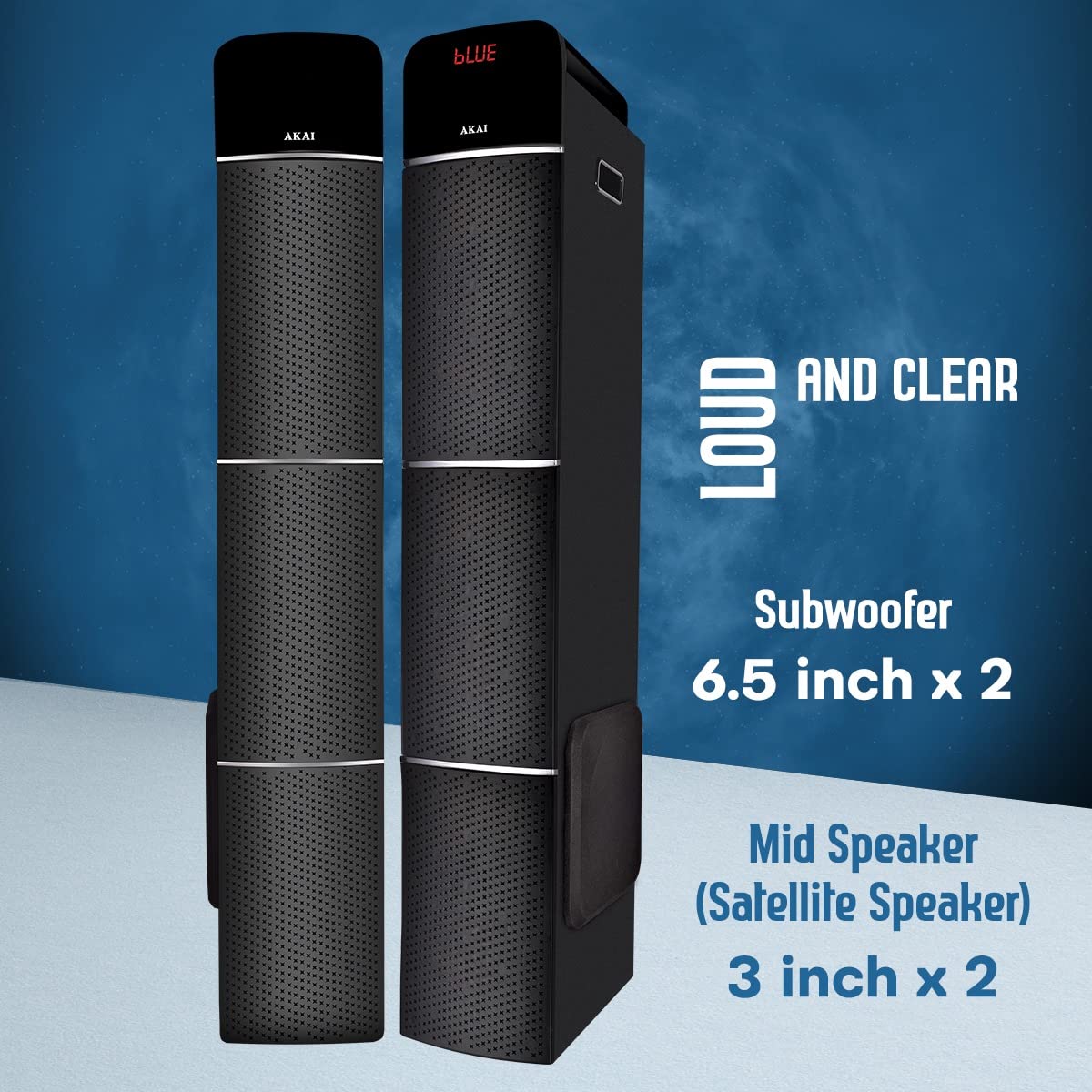
This image illustrates the speaker configuration, featuring two 6.5-inch subwoofers and two 3-inch mid-range (satellite) speakers for balanced audio output.
5. Configuración
Follow these steps for the initial setup of your AKAI TS-90 Tower Speaker system.
- Colocación: Position the two tower speakers on a flat, stable surface. Ensure adequate space around them for optimal sound dispersion and ventilation.
- Conectar altavoz secundario: Using the provided speaker cable, connect the "SPK OUT" port on the main speaker unit to the input port on the secondary speaker unit.
- Conexión de energía: Connect the power cord to the main speaker unit and then plug it into a standard AC power outlet.
- Encendido: Flip the "POWER ON/OFF" switch on the rear panel to the "ON" position. The display on the front panel should light up.
- Volumen inicial: Before playing audio, set the volume to a low level using the remote control or the control knob on the speaker.
6. Instrucciones de funcionamiento
The AKAI TS-90 offers various modes for audio playback.
Selección de 6.1 modos
Press the "MODE" button on the remote control or the main unit to cycle through available input sources: Bluetooth, USB, AUX, and FM Radio.

This image visually represents the primary connectivity methods: Bluetooth for wireless streaming, USB for media playback from flash drives, and Aux for wired connections.
6.2 Modo Bluetooth
- Select "Bluetooth" mode using the MODE button. The display will show "BLUE" and a pairing indicator.
- En su dispositivo móvil, habilite Bluetooth y busque dispositivos disponibles.
- Select "AKAI TS-90" from the list. Once paired, the speaker will emit a confirmation sound.
- You can now play audio from your device wirelessly through the speakers.
Reproducción USB 6.3
- Inserte una unidad flash USB que contenga audio MP3 files en el puerto USB de la unidad principal.
- Select "USB" mode. The speaker will automatically detect and begin playing audio files.
- Use the remote control to navigate tracks (Previous/Next), play/pause, and adjust volume.
6.4 entrada auxiliar
- Connect your external audio device (e.g., smartphone, tablet, TV) to the "AUX IN" port using an appropriate audio cable.
- Select "AUX" mode. Audio from your connected device will now play through the speakers.
6.5 Radio FM
- Seleccione el modo "FM".
- Press the "SCAN" button on the remote control to automatically scan and save available FM stations.
- Use the Previous/Next buttons to cycle through saved stations.
6.6 Wireless Microphone and Karaoke
The AKAI TS-90 includes a wireless microphone for karaoke functionality.

This image demonstrates the use of the included wireless microphone, enabling users to engage in karaoke activities with the speaker system.
- Ensure the wireless microphone is powered on and its receiver is connected to the "MIC INPUT" port on the speaker's rear panel.
- Adjust the microphone volume using the dedicated control on the speaker or remote, if available.
- Play your desired karaoke track from any input source (Bluetooth, USB, AUX).
6.7 Modos del ecualizador (EQ)
The speaker features various equalizer modes to optimize sound for different music genres.

This image shows the speakers alongside a television, emphasizing their role in a home audio system and the availability of EQ modes for sound customization.
Press the "EQ" button on the remote control to cycle through preset equalizer settings (e.g., Pop, Rock, Jazz, Classic, Flat).
7. Mantenimiento
Proper care will ensure the longevity and performance of your AKAI TS-90 speakers.
- Limpieza: Use a soft, dry cloth to clean the exterior surfaces of the speakers. Do not use liquid cleaners or abrasive materials.
- Ventilación: Asegúrese de que las aberturas de ventilación no estén bloqueadas por polvo o residuos.
- Almacenamiento: Si va a almacenar los altavoces durante un período prolongado, desconéctelos de la alimentación y guárdelos en un lugar fresco y seco.
8. Solución de problemas
If you encounter issues with your AKAI TS-90, refer to the following common problems and solutions.
| Problema | Posible causa | Solución |
|---|---|---|
| Sin poder | Cable de alimentación no conectado; Interruptor de encendido apagado; Toma de corriente defectuosa. | Check power cord connection; Ensure power switch is ON; Try a different power outlet. |
| Sin sonido | Volume too low; Incorrect input mode selected; Audio cable loose/faulty; Bluetooth not paired. | Increase volume; Select correct input mode; Reconnect audio cable; Re-pair Bluetooth device. |
| Error de emparejamiento de Bluetooth | Device too far; Bluetooth not enabled on source device; Speaker already paired to another device. | Acerque el dispositivo; habilite Bluetooth en el dispositivo de origen; desconéctese de otros dispositivos y vuelva a intentarlo. |
| El micrófono inalámbrico no funciona | Microphone batteries low/dead; Microphone not powered on; Receiver not connected to MIC INPUT. | Replace microphone batteries; Ensure microphone is ON; Connect receiver to MIC INPUT. |
| El control remoto no funciona | Batteries low/dead; Obstruction between remote and speaker; Remote not pointed at sensor. | Replace remote batteries; Remove obstructions; Point remote directly at the speaker's IR sensor. |
9. Especificaciones
Detailed technical specifications for the AKAI Audio TS-90 Tower Speaker.
| Característica | Detalle |
|---|---|
| Nombre del modelo | TS-90 |
| Marca | Akai |
| Tipo de altavoz | Tower, Floor Standing |
| Tecnología de conectividad | Bluetooth, inalámbrico |
| Tecnología de comunicación inalámbrica | Bluetooth |
| Potencia máxima de salida del altavoz | 90 vatios (RMS) |
| Modo de salida de audio | Estéreo |
| Configuración de canales de sonido envolvente | 2.1 |
| Características especiales | Display, Equalizer, Remote Control, USB Port, Wireless Microphone |
| Dispositivos compatibles | Teléfono inteligente, tableta |
| Método de control | Toque, control remoto |
| Fuente de poder | AC |
| Material | Madera |
| Peso del artículo | 19.9 kg (aprox.) |
| Dimensiones del paquete | 103.8 x 47.2 x 32.6 cm |
| Tamaño del subwoofer | 6.5 pulgadas x 2 |
| Mid Speaker (Satellite Speaker) Size | 3 pulgadas x 2 |
10. Garantía y soporte
For warranty information and customer support, please refer to the warranty card included with your product or visit the official AKAI webSitio. Conserve su recibo de compra como comprobante de compra para cualquier reclamación de garantía.
For technical assistance or service inquiries, please contact AKAI customer support through their official channels. Contact details are typically provided in the product packaging or on the brand's websitio.
Nota: El cliente reviews indicate varying experiences with customer service. It is recommended to register your product upon purchase and retain all documentation.