
TENVIS IP602W
Manual del usuario de la cámara IP para exteriores TENVIS IP602W
Model: IP602W
Marca: TENVIS
Introducción
The TENVIS IP602W is a robust outdoor IP camera designed for reliable surveillance. It offers broad compatibility, supporting not only Windows OS but also Mac OS and other platforms accessible via an internet browser. Its design facilitates easy installation, allowing for wall mounting and wireless connectivity.
Equipped with a 1/4 CMOS image sensor and a 6mm lens, the IP602W delivers video at a maximum frame rate of 30 frames per second, with a resolution of up to 640 x 480 pixels. For low-light and nighttime environments, the camera features 30 infrared LEDs, providing high levels of invisible light for clear visibility. Mobile viewing is supported across multiple platforms via 3G networks, including iPhone, Android, Windows Mobile, and Java phones, enabling remote monitoring from any location with internet access.
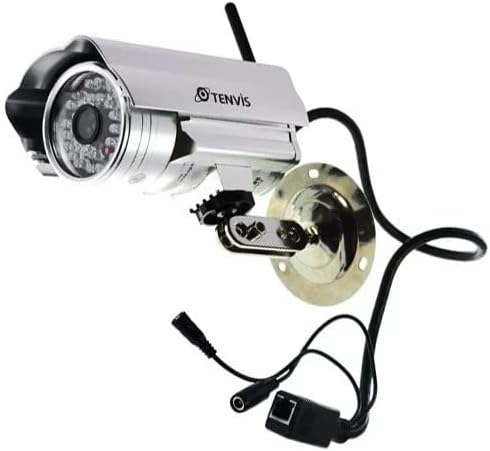
Image: The TENVIS IP602W Outdoor IP Camera, showcasing its durable build, integrated mounting bracket, and connectivity cables.
¿Qué hay en la caja?
Al abrir el paquete, verifique que estén incluidos todos los siguientes componentes:
- 1 x IP602W WiFi IP Camera
- 1 x Power Adaptor (AU Plug)
- 1 x Antena WiFi
- 1 x Soporte de montaje
- 1 x CD (containing software/drivers)
- 1 x Juego de tornillos para montaje
- 1 x Manual de usuario

Image: All components included in the TENVIS IP602W package, laid out for verification.
Características del producto
The TENVIS IP602W camera is equipped with several key features to enhance its performance and usability:
- Versión nocturna: Integrated infrared LEDs provide clear visibility in low-light and complete darkness.
- Soporte inalámbrico: Connects to your network via Wi-Fi for flexible placement.
- Metal and Waterproof Shell: Designed for outdoor use with a durable, weather-resistant casing.
- Detección de movimiento: Configurable motion detection alerts for security monitoring.
- Compatibilidad entre plataformas: Soportes viewing and control from various operating systems and browsers, including Windows, Mac OS, Firefox, Chrome, and Safari.
- Móvil View: Access live feeds and controls from mobile devices via 3G network, supporting iPhone, Android, Windows Mobile, and Java phones.

Image: Visual representation of the TENVIS IP602W camera, emphasizing its key features such as night vision and wireless capabilities.
Configuración e instalación
Identificación de componentes
Familiarize yourself with the camera's ports and components before installation:
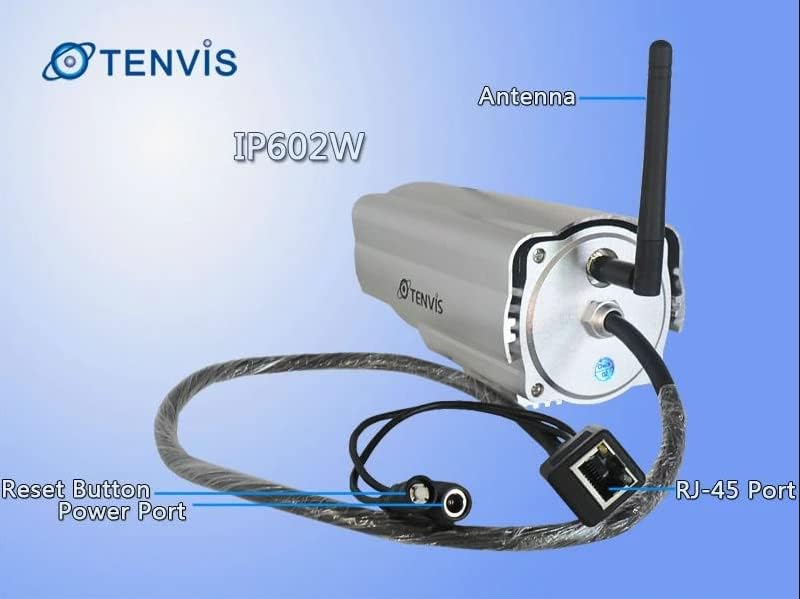
Imagen: Detallada view of the TENVIS IP602W camera's rear, showing the antenna, RJ-45 Ethernet port, power input, and reset button.
- Antena: Para conectividad de red inalámbrica.
- Puerto RJ-45: For wired Ethernet connection to your router.
- Puerto de alimentación: Conecte aquí el adaptador de corriente incluido.
- Botón de reinicio: Se utiliza para restaurar la configuración predeterminada de fábrica.
Conexión de red
The IP602W can connect to your network wirelessly or via an Ethernet cable. For initial setup, a wired connection is often recommended for stability.

Image: Network diagram showing how the IP602W camera connects to a router, allowing access from a LAN PC, Internet PC, and 3G phone.
- Connect the camera to your router using an Ethernet cable (if using wired setup).
- Conecte el adaptador de corriente a la cámara y enchúfelo a una toma eléctrica.
- Allow the camera a few minutes to power on and initialize.
- Refer to the included CD or the TENVIS website for software installation and detailed network configuration instructions, especially for wireless setup.
Montaje
The camera comes with a mounting bracket for easy installation on a wall or other suitable surface. Ensure the mounting location provides a clear view and is within range of your Wi-Fi signal or Ethernet cable.
- Choose a suitable outdoor location for mounting.
- Utilice el soporte de montaje como plantilla para marcar los orificios de perforación.
- Drill the necessary holes and insert wall anchors if required.
- Fije el soporte de montaje a la superficie utilizando los tornillos proporcionados.
- Coloque la cámara en el soporte de montaje y ajuste su ángulo para una posición óptima. viewEn.
Operación
Once the camera is set up and connected to your network, you can begin monitoring. The IP602W supports various viewing methods:
- PC/Mac Access: Use the provided software or a compatible web browser (Firefox, Chrome, Safari) to access the camera's live feed and settings from your computer.
- Mobile Device Access: Download the TENVIS mobile application (if available) or use a compatible mobile browser on your iPhone, Android, Windows Mobile, or Java phone to view the camera remotely via a 3G network connection.
- Calidad del vídeo: The camera streams video at up to 640x480 resolution with a frame rate of 30fps, providing clear and smooth surveillance footage.
- Detección de movimiento: Configure motion detection settings through the camera's interface to receive alerts when movement is detected in the monitored area.
Mantenimiento
Regular maintenance helps ensure the longevity and optimal performance of your TENVIS IP602W camera:
- Limpieza: Limpie periódicamente la lente y la carcasa de la cámara con un paño suave.amp Paño. Evite limpiadores abrasivos o disolventes.
- Inspección de cables: Check all cables (power, Ethernet) for any signs of wear, damage, or loose connections.
- Actualizaciones de firmware: Check the TENVIS official webRevise el sitio periódicamente para ver si hay actualizaciones de firmware disponibles. Mantener el firmware actualizado puede mejorar el rendimiento y la seguridad.
- Controles ambientales: Ensure the camera's mounting remains secure and that no obstructions are blocking its field of view.
Solución de problemas
If you encounter issues with your IP602W camera, try the following steps:
- Sin energía: Asegúrese de que el adaptador de corriente esté conectado de forma segura tanto a la cámara como a una toma de corriente que funcione.
- Sin conexión de red:
- Para la conexión por cable, verifique el estado del cable Ethernet y del enrutador.
- For wireless connection, ensure the Wi-Fi antenna is properly attached and the camera is within range of your router. Verify Wi-Fi settings in the camera's configuration.
- No se puede acceder a la cámara: Verify the camera's IP address. Ensure your computer or mobile device is on the same network or has proper internet access for remote viewing. Check firewall settings on your computer.
- Mala calidad de vídeo: Ensure the lens is clean. Check network bandwidth and signal strength.
- Restablecimiento de la cámara: If issues persist, use the reset button (refer to Component Identification) to restore factory default settings. You will need to reconfigure the camera after a reset.
Presupuesto
| Característica | Detalle |
|---|---|
| Nombre del modelo | IP602W |
| Marca | Tenvis |
| Uso en interiores y exteriores | Exterior |
| Tecnología de conectividad | Inalámbrico (Wi-Fi) |
| Tipo de controlador | Android (and other platforms) |
| Tipo de montaje | Montaje en pared |
| Resolución de captura de video | 480p (640x480) |
| Velocidad de cuadros | 30 fps |
| Tecnología de fotosensor | CMOS (1/4 inch) |
| Lente | 6 mm |
| Tecnología con poca luz | Color nocturno (LED infrarrojos) |
| Tipo de alerta | Solo movimiento |
| Dimensiones del producto | 10 x 9.5 x 4 pulgadas |
| GTIN | 06928446299816 |
Garantía y soporte
For warranty information, technical support, or further inquiries regarding your TENVIS IP602W camera, please refer to the official TENVIS website or contact their customer service directly. The included CD may also contain support contact details.
You can visit the official TENVIS store for more information: TENVIS Store on Amazon
Ask a question about this manual
Ask about setup, troubleshooting, compatibility, parts, safety, or missing instructions. Manuals+ will review the question and use this page’s manual context to help answer it.