
1. Introducción
This manual provides essential information for the safe and efficient use of your Konka 32 Inch HD Standard TV, model KE32MS314. Please read these instructions thoroughly before operating the television and retain them for future reference.
2. Información de seguridad
- Fuente de alimentación: Asegúrese de que el televisor esté conectado a una fuente de alimentación de CA de 100-240 V, 50/60 Hz.
- Ventilación: No bloquee las aberturas de ventilación. Deje suficiente espacio alrededor del televisor para una ventilación adecuada.
- Agua y humedad: No exponga el televisor a la lluvia ni a la humedad. No coloque objetos con líquidos, como jarrones, sobre él.
- Fuentes de calor: Mantenga el televisor alejado de fuentes de calor como radiadores, rejillas de ventilación, estufas u otros aparatos (incluidos ampificadores) que producen calor.
- Limpieza: Desconecte el televisor del tomacorriente antes de limpiarlo. Use un paño suave y seco. No utilice limpiadores líquidos ni en aerosol.
- Iluminación: Desenchufe el televisor durante tormentas eléctricas o cuando no lo utilice durante períodos prolongados.
- Servicio: No intente reparar este producto usted mismo. Refiera todo el servicio a personal de servicio calificado.
3. Contenido del paquete
Verifique que todos los artículos estén presentes en el paquete:
- Konka KE32MS314 32-Inch HD LED TV
- Mando a distancia
- Cable de alimentación
- Manual de usuario (este documento)
- Desktop Stand (if included)
4. Configuración
4.1 Desembalaje
Carefully remove the TV and all accessories from the packaging. Keep the packaging materials for future transport or storage.
4.2 Instalación del soporte (opcional)
If you are using the desktop stand, attach it securely to the bottom of the TV using the provided screws. Ensure the stand is stable before placing the TV on a flat surface.
4.3 Montaje en pared (opcional)
If you plan to wall-mount the TV, refer to the instructions provided with your wall-mount bracket. Ensure the bracket is compatible with the TV's VESA mounting pattern and is installed by qualified personnel.
4.4 Conexión de dispositivos
The TV offers various connection ports for external devices. Refer to the image below for port identification and connect your devices accordingly.
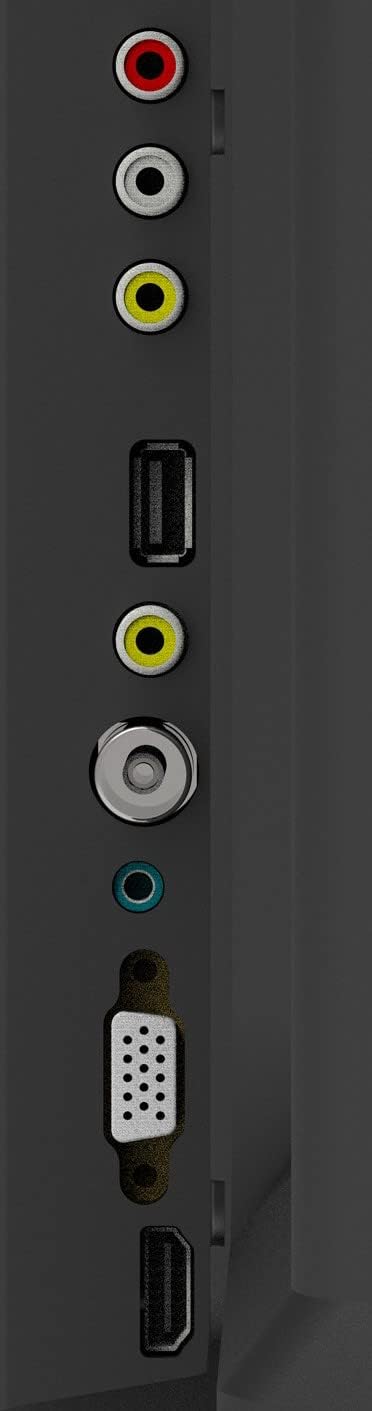
Figura 1: Puertos de conexión de TV
- Entrada de antena: Connect your aerial or cable TV signal to this port.
- Entradas HDMI (2): Connect devices such as Blu-ray players, game consoles, or set-top boxes. One HDMI input supports Audio Return Channel (ARC).
- Entrada VGA: Conecte una computadora para usarla como monitor.
- Mini Component / AV Input: Connect older devices using component (YPbPr) or composite (AV) cables.
- USB Inputs (2): Conecte dispositivos de almacenamiento USB para reproducción multimedia.
- Toma de auriculares: Conecte auriculares para escuchar en privado.
5. Operando
5.1 control remoto
The included remote control allows you to operate all functions of your TV. Insert two AAA batteries (not included) into the battery compartment, ensuring correct polarity.

Figura 2: Disposición del control remoto
- FUERZA: Enciende o apaga el televisor.
- ENTRADA: Selecciona la fuente de entrada (HDMI, AV, VGA, etc.).
- Botones numéricos (0-9): Seleccionar canales directamente.
- VOLUMEN +/-: Ajusta el nivel de volumen.
- PROG +/-: Cambia de canal.
- MENÚ: Accede al menú principal.
- Botones de navegación (arriba/abajo/izquierda/derecha): Navegar por las opciones del menú.
- ENTRAR: Confirma selecciones.
- SALIDA: Sale del menú o función actual.
- INFORMACIÓN: Muestra información del canal.
- MUDO: Silencia o reactiva el sonido.
5.2 Configuración inicial
Upon first power-on, the TV will guide you through an initial setup process. This typically includes selecting your language, country, and performing an automatic channel scan for available broadcasts.
5.3 Funciones básicas
- Encendido/apagado: Press the POWER button on the remote or the TV's control panel.
- Selección de fuente de entrada: Press the INPUT button repeatedly to cycle through available input sources, or use the menu to select.
- Ajuste de volumen: Utilice los botones VOL +/-.
- Selección de canal: Use the PROG +/- buttons or the number buttons.
5.4 Navegación por menús
Press the MENU button to access the main menu. Use the navigation buttons to move between options and ENTER to select. Adjust settings such as picture mode, sound mode, and channel settings. Press EXIT to close the menu.
5.5 modos de audio
The TV features 5 audio modes to optimize sound for different content types:
- Estándar
- Música
- Película
- Deporte
- User (customizable settings)
6. Mantenimiento
6.1 Limpieza de la pantalla
Limpie suavemente la pantalla con un paño suave que no deje pelusa. Para manchas difíciles, limpie ligeramenteampen the cloth with water or a specialized screen cleaner (ensure it's safe for LED screens) and wipe gently. Do not apply pressure or use abrasive materials.
6.2 Limpieza del gabinete
Wipe the TV cabinet with a soft, dry cloth. Avoid using strong detergents or solvents, as they may damage the finish.
7. Solución de problemas
Si tiene problemas con su televisor, consulte los siguientes problemas y soluciones comunes:
| Problema | Posible solución |
|---|---|
| Sin poder | Compruebe que el cable de alimentación esté bien enchufado al televisor y a la toma de corriente. Asegúrese de que la toma funcione. |
| No hay imagen, pero hay sonido | Verifique que la fuente de entrada seleccionada sea correcta. Revise las conexiones de los cables a los dispositivos externos. |
| No hay sonido, pero hay imagen | Check the volume level and ensure the TV is not muted. Verify audio settings in the menu. |
| El control remoto no funciona | Reemplace las pilas. Asegúrese de que no haya obstrucciones entre el control remoto y el sensor infrarrojo del televisor. |
| Mala calidad de imagen | Check antenna connection or source device cables. Adjust picture settings in the TV menu. |
8. Especificaciones
Detailed specifications for the Konka KE32MS314 TV:
| Característica | Detalle |
|---|---|
| Número de modelo | KE32MS314 |
| Tamaño de pantalla | 32 pulgadas |
| Tecnología de visualización | CONDUJO |
| Resolución | 720p (HD) |
| Frecuencia de actualización | 60 Hz |
| Viewángulo de ing | 178 grados |
| Sistema de audio | 2 x 8W Stereophonic |
| Modos de audio | Standard, Music, Movie, Sport, User |
| Conectividad | 2 HDMI (including ARC), 2 USB, VGA, Mini Component/AV, Antenna Input, Headphone Jack, Ethernet |
| Características especiales | Flat Display, D3 Image Noise Reduction, Automatic Volume Level Maintenance |
| Servicios de Internet compatibles | YouTube |
| Dimensiones del producto (con soporte) | 73.2W x 20.7D x 47.9H cm (approx.) |
| Peso del producto | 4.5 kilogramos |
9. Garantía y soporte
For warranty information and technical support, please refer to the warranty card included with your product or contact Konka customer service. Keep your purchase receipt as proof of purchase for warranty claims.