
1. Introducción
Thank you for choosing the Toshiba Smart 3-in-1 Portable Electric Air Conditioner. This versatile unit is designed to provide efficient cooling, dehumidification, and fan-only operation for your indoor spaces. Its portable design allows for flexible placement, and smart features offer convenient control. This manual provides essential information for safe and effective operation, setup, maintenance, and troubleshooting.
2. Configuración e instalación
2.1 Desembalaje
Carefully remove all packaging materials. Ensure all components are present: the portable AC unit, exhaust hose, window slider kit, remote control, and user manual. Inspect the unit for any shipping damage.
2.2 Colocación
Place the air conditioner on a flat, stable surface. For optimal performance, ensure there is at least 20 inches (50 cm) of space around the unit to allow for proper airflow. This unit is designed to cool areas up to 300 square feet.

Figura 2.1: Frente view of the Toshiba portable air conditioner.
2.3 Instalación del kit de ventana
The window slider kit is essential for exhausting hot air outside.
- Ensamble el kit deslizante de ventana para que se ajuste a la abertura de su ventana.
- Conecte un extremo de la manguera de escape a la salida de aire en la parte posterior de la unidad.
- Conecte el otro extremo de la manguera de escape al adaptador en el kit deslizante de ventana.
- Secure the window slider kit in the window opening, ensuring a tight seal to prevent hot air from re-entering the room.

Figura 2.2: Atrás view with exhaust port and power cord.
2.4 Conexión de alimentación
Plug the unit into a standard 115 Volt AC outlet. Ensure the power cord is not pinched or damaged.
3. Instrucciones de funcionamiento
3.1 Panel de control terminadoview
El panel de control en la parte superior de la unidad le permite administrar todas las funciones.

Figure 3.1: Control Panel with various buttons and digital display.
- Botón de encendido: Enciende/apaga la unidad.
- Botón de modo: Recorre los modos Frío, Ventilador y Seco (Deshumidificador).
- Botón de velocidad del ventilador: Ajusta la velocidad del ventilador (Alta, Media, Baja).
- Flechas hacia arriba/abajo de temperatura: Establece la temperatura deseada.
- Botón del temporizador: Establece el temporizador de encendido y apagado automático.
- Vent Angle Button: Adjusts the angle of the air vent.
- Modo de sueño: Optimizes settings for quiet night operation.
3.2 control remoto
The included remote control provides convenient access to all functions from a distance. Ensure batteries are correctly inserted.
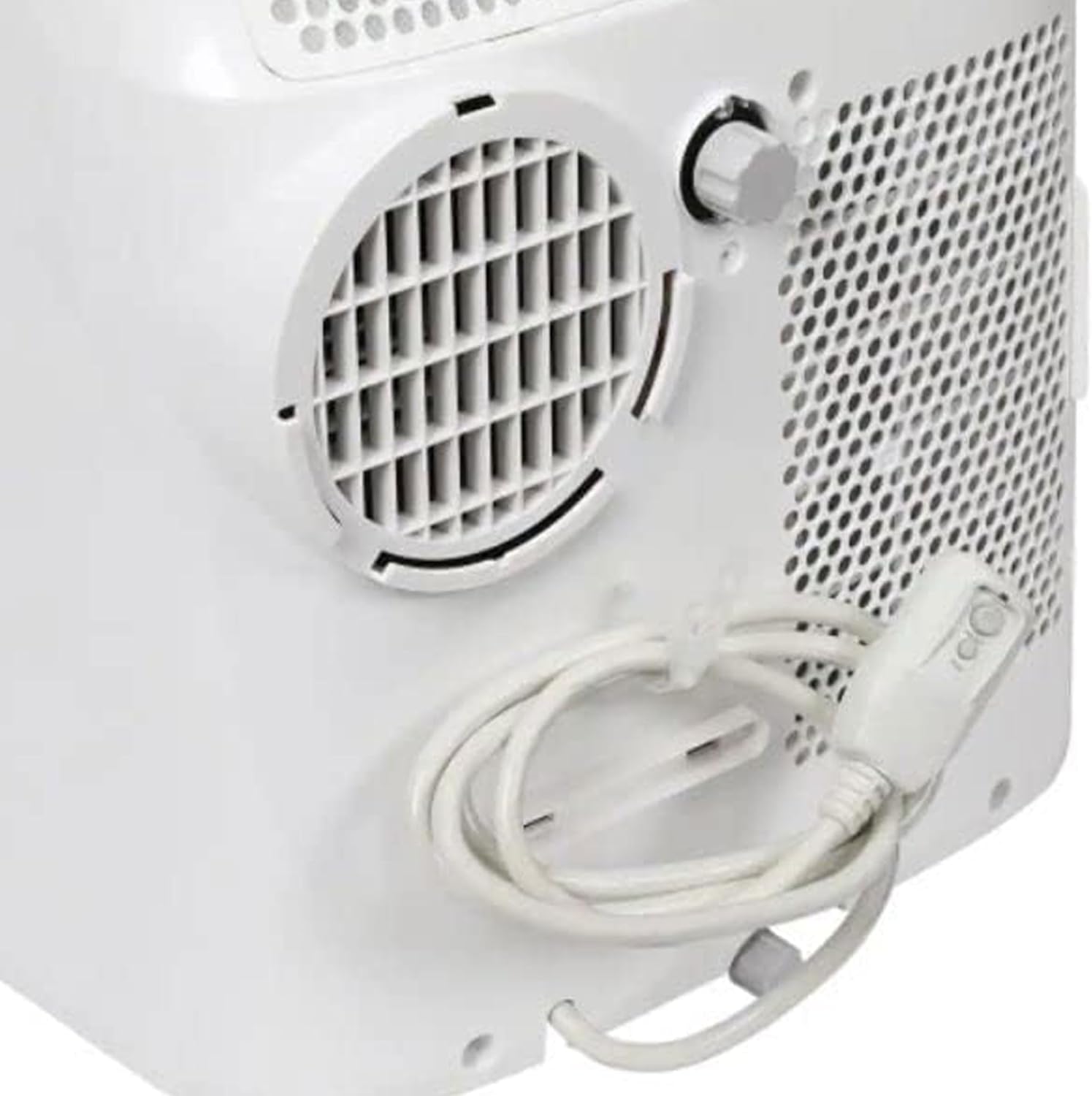
Figura 3.2: Control remoto para una operación conveniente.
3.3 Smart Features (Smartphone Compatibility)
This unit is compatible with smartphones, allowing for remote control and scheduling via a dedicated app. Refer to the separate smart features guide or app instructions for pairing and usage.
4. Mantenimiento
El mantenimiento regular garantiza un rendimiento óptimo y la longevidad de su aire acondicionado.
4.1 Limpieza del filtro de aire
The unit features a reusable air filter. Clean the filter every two weeks or more frequently if used in dusty environments.
- Apague y desenchufe la unidad.
- Localice el panel de acceso al filtro de aire (generalmente en la parte posterior o lateral).
- Remove the filter and clean it with warm, soapy water.
- Enjuague bien y deje secar al aire por completo antes de volver a insertarlo.

Figura 4.1: Lado view indicating air filter location.
4.2 Drenaje de agua
In dehumidifier mode or high humidity conditions, the unit will collect condensed water. The unit may have an internal reservoir that requires periodic draining or a continuous drainage option.
- When the internal reservoir is full, the unit may stop operating and display an indicator.
- Place a shallow pan or bucket under the drainage port (usually at the bottom rear of the unit).
- Retire el tapón de drenaje para permitir que salga el agua.
- For continuous drainage, attach a suitable drain hose (not included) to the drainage port and direct it to a floor drain.
4.3 Almacenamiento
Before long-term storage, ensure the unit is completely drained of water and the filter is clean and dry. Store in a cool, dry place, preferably covered to protect from dust.
5. Solución de problemas
Si encuentra problemas, consulte los siguientes problemas y soluciones comunes.
| Problema | Posible causa | Solución |
|---|---|---|
| La unidad no se enciende. | Sin energía, disyuntor disparado, tanque de agua lleno. | Verifique el cable de alimentación, reinicie el disyuntor y drene el tanque de agua. |
| La unidad no enfría eficazmente. | Filtro de aire sucio, entrada/salida de aire bloqueada, habitación demasiado grande, puertas/ventanas abiertas. | Limpie el filtro, elimine las obstrucciones, asegúrese de que el tamaño de la habitación esté dentro de la capacidad y cierre las aberturas. |
| Ruido excesivo. | La unidad no está sobre una superficie nivelada, obstrucción del ventilador. | Colóquelo sobre una superficie plana y verifique que no haya objetos extraños en el ventilador. |
| Fuga de agua. | Drain plug not secured, continuous drainage hose kinked/blocked. | Secure drain plug, check and clear drainage hose. |
Para problemas no contemplados aquí, comuníquese con atención al cliente.
6. Especificaciones
| Característica | Detalle |
|---|---|
| Marca | TOSHIBA |
| Número de modelo | RAC-PD1013CWRU |
| Peso del artículo | 66 libras |
| Dimensiones del producto | 27.6 x 17.9 x 27.6 pulgadas |
| Tipo de instalación | Portátil |
| Características especiales | Portable, Remote control, Smartphone Compatible |
| Color | Blanco |
| Volumentage | 115 voltios |
| Cobertura del área del piso | Hasta 300 pies cuadrados |
| Refrigerante | R410A |
| Tipo de filtro | Filtro reutilizable |
| Fuente de poder | Eléctrico con cable |
7. Garantía y soporte
For warranty information and customer support, please refer to the documentation included with your product or visit the official Toshiba support websitio.
This product is part of the Amazon Renewed program, indicating it has been professionally inspected and tested to work and look like new. Renewed products are eligible for replacement or refund under the Amazon Renewed Guarantee if not satisfied with the purchase.
8. Vídeos oficiales del producto
No official seller-created product videos were found for this model in the provided data. Please refer to the written instructions and diagrams for guidance.