
Introducción
Thank you for choosing the Chuboor P03-Grey Handheld Vacuum Cleaner. This manual provides essential information for the safe and efficient operation, maintenance, and troubleshooting of your new device. Please read it thoroughly before first use and keep it for future reference.
Instrucciones de seguridad
- Ensure the vacuum is fully charged before initial use.
- Do not use the vacuum to pick up water or other liquids.
- Mantenga el cabello, la ropa suelta, los dedos y todas las partes del cuerpo lejos de las aberturas y las partes móviles.
- No recoja materiales encendidos o humeantes, como cigarrillos, fósforos o cenizas calientes.
- No lo use sin el recipiente para polvo y el filtro en su lugar.
- Guarde la aspiradora en un lugar seco cuando no esté en uso.
- Este aparato no está diseñado para ser utilizado por personas (incluidos niños) con capacidades físicas, sensoriales o mentales reducidas, o con falta de experiencia y conocimientos, a menos que hayan recibido supervisión o instrucciones sobre el uso del aparato por parte de una persona responsable de su seguridad.
Contenido del paquete
Verifique que todos los artículos enumerados a continuación estén incluidos en su paquete:
- Chuboor P03-Grey Handheld Vacuum Cleaner
- Boquilla de cepillo
- Boquilla para grietas
- Blowing Hose
- Cable de carga USB-C
- Filtro adicional
- Bolsa de almacenamiento
- Manual de usuario (este documento)

Image: The Chuboor P03-Grey Handheld Vacuum Cleaner shown with its various accessories, including nozzles, charging cable, and storage bag.
Producto terminadoview
Familiarize yourself with the components of your Chuboor P03-Grey Handheld Vacuum Cleaner.

Image: A detailed diagram highlighting the main parts of the vacuum cleaner, including the dustbin, filter assembly, power indicator, and one-touch key.
- Basura: Transparent container for collecting dust and debris. Capacity: 150ml.
- Conjunto de filtro: Consists of metal filter, HEPA filter, and sponge filter for triple filtration.
- Indicador de encendido: Muestra el nivel de la batería y el estado de carga.
- One-Touch Key: Activates and deactivates the vacuum, and switches between suction modes.
- Puerto de carga: USB-C port located at the bottom for charging.
Configuración
1. Carga inicial
- Antes del primer uso, cargue completamente la aspiradora.
- Connect the USB-C charging cable to the charging port at the bottom of the vacuum.
- Conecte el otro extremo del cable USB-C a un adaptador de corriente USB compatible (no incluido).
- The power indicator lights will illuminate during charging and turn off when fully charged (approximately 3-4 hours).

Image: The vacuum cleaner connected to a USB-C cable for charging, demonstrating the charging process.
2. Colocación de accesorios
Seleccione la boquilla adecuada para su tarea de limpieza y conéctela firmemente a la entrada de succión de la aspiradora.
- Boquilla de cepillo: Ideal for cleaning carpets, upholstery, and pet hair.
- Boquilla para rincones: Perfect for reaching narrow gaps, corners, and tight spaces in cars or furniture.
- Blowing Hose: Can be used for blowing dust out of hard-to-reach areas or inflating small items.
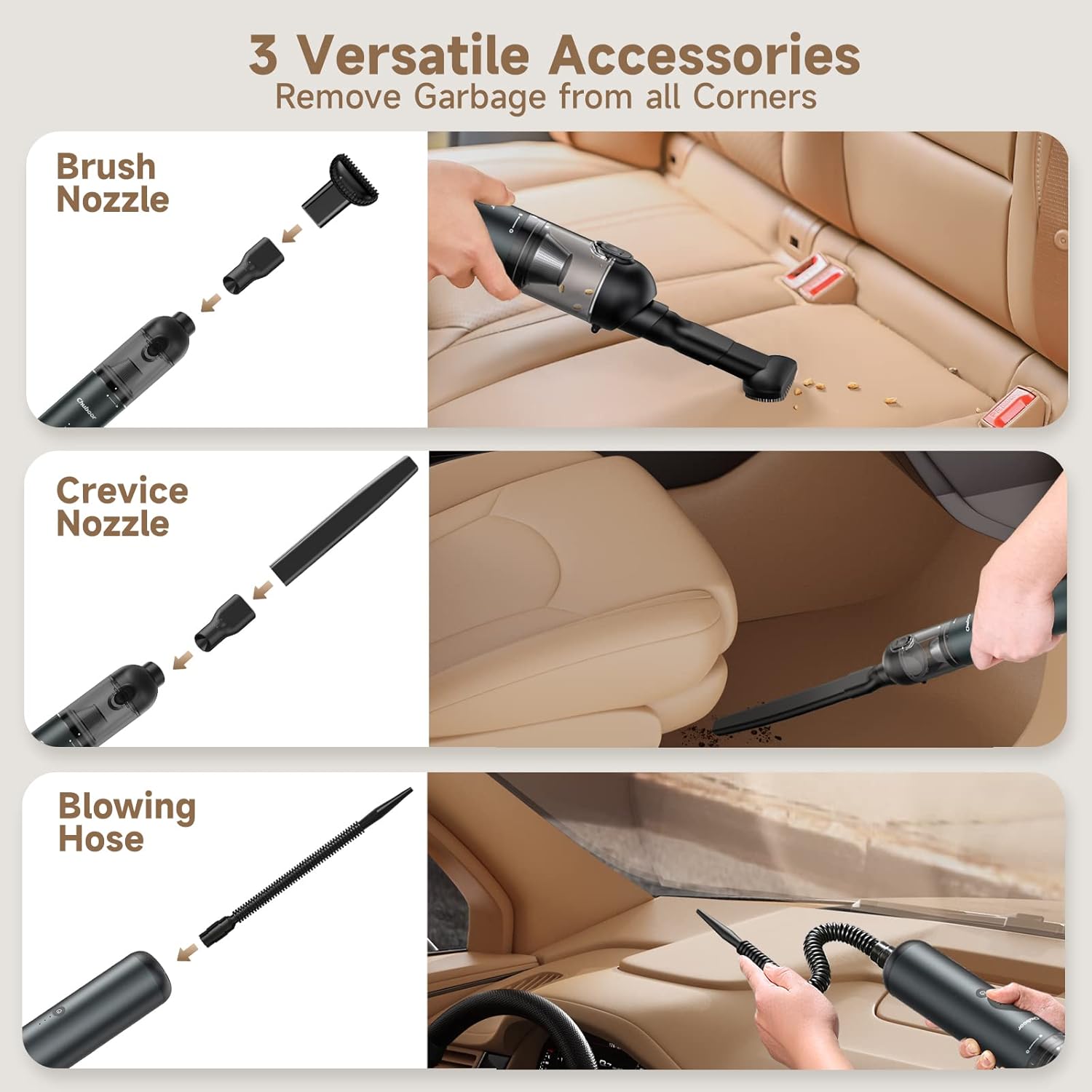
Image: The handheld vacuum shown with its three versatile accessories: brush nozzle, crevice nozzle, and blowing hose, demonstrating their application in different cleaning scenarios.
Instrucciones de funcionamiento
1. Modos de encendido/apagado y succión
- Encendido: Press the power button once to turn on the vacuum in Standard Mode (10,000Pa suction). The power indicator lights will show the current battery level.
- Strongest Suction Mode: Press the power button a second time to activate Powerful Mode (16,000Pa suction).
- Apagado: Presione el botón de encendido por tercera vez para apagar la aspiradora.
Video: An official product video demonstrating the Chuboor 16000Pa Handheld Vacuum in action, showcasing its powerful suction and ease of use for various cleaning tasks.
2. Consejos de limpieza
- For general dust and light debris, use Standard Mode to conserve battery life.
- For stubborn dirt, pet hair, or larger particles, switch to Powerful Mode.
- Use the appropriate attachment for the surface and type of debris.
- Regularly check the dustbin and empty it when full to maintain optimal suction.

Image: A visual representation of the vacuum's high power suction, showing it effectively picking up various types of debris like dust, cat litter, hair, leaves, sand, food residue, and confetti.
Mantenimiento
Regular maintenance ensures the longevity and performance of your vacuum cleaner.
1. Vaciado del cubo de basura
- Asegúrese de que el vacío esté apagado.
- Slide the button down on the dustbin to release and open it.
- Vacíe los residuos recogidos en un contenedor de basura.
- Close the dustbin securely until it clicks into place.

Image: A close-up of the vacuum's one-touch empty design, showing how to slide the button to release the dustbin for easy disposal of contents.
2. Limpieza de los filtros
The triple filtration system (metal, HEPA, sponge) is washable and reusable.
- Twist the dustbin counter-clockwise to detach it from the main body.
- Carefully remove the metal filter, followed by the HEPA and sponge filters.
- Enjuague todos los componentes del filtro con agua corriente hasta que estén limpios. No utilice detergentes agresivos.
- Allow all filters to air dry completely for at least 24 hours before reassembling. Ensure they are completamente seco para evitar daños al motor.
- Reassemble the filters in reverse order and reattach the dustbin to the vacuum.

Image: The washable filter components, including the metal mesh and pleated HEPA filter, shown being rinsed under water.
Solución de problemas
Si encuentra algún problema, consulte los siguientes problemas y soluciones comunes:
| Problema | Posible causa | Solución |
|---|---|---|
| El vacío no se enciende. | Batería baja; botón de encendido no presionado correctamente. | Charge the vacuum fully. Press and hold the power button for 1 second. |
| Succión débil. | Depósito de basura lleno; filtro obstruido; boquilla/manguera bloqueada. | Empty the dustbin. Clean or replace the filters. Check and clear any blockages in the nozzle or hose. |
| La batería no se carga. | Faulty charging cable/adapter; Loose connection. | Ensure the USB-C cable is securely connected. Try a different USB power adapter. |
| Ruido inusual durante el funcionamiento. | Debris stuck in the fan/motor; Loose parts. | Turn off the vacuum and check for any foreign objects. If the issue persists, contact customer support. |
Presupuesto
| Característica | Detalle |
|---|---|
| Marca | Chuboor |
| Número de modelo | P03 |
| Poder de succión | Max 16,000 Pa |
| Potencia del motor | 135 vatios |
| Quétage | 120 vatios |
| Duración de la batería | Hasta 30 minutos |
| Tiempo de carga | 3-4 horas |
| Capacidad del cubo de basura | 150 mililitros |
| Tipo de filtro | Foam (Triple Filtration: Metal, HEPA, Sponge) |
| Nivel de ruido | 75 decibelios |
| Peso del artículo | 1.3 libras |
| Fuente de poder | Funciona con pilas |
| Tecnología de conectividad | USB-C |
| Características especiales | Compacto, ligero, portátil, inalámbrico |
Garantía y soporte
Chuboor products are designed and manufactured to the highest quality standards. For specific warranty information, please refer to the warranty card included in your product packaging or visit the official Chuboor website. If you have any questions, concerns, or require technical assistance, please contact Chuboor customer support through the retailer where you purchased the product or via the contact information provided on the official Chuboor websitio.
Para obtener más información, visite el Chuboor Store on Amazon.