
1. Introducción
Thank you for choosing the Awei TC-7 Wired Earphones. These in-ear earphones are designed for clear audio and convenient communication, featuring a Type-C connector for modern devices and an inline microphone with control buttons. Please read this manual carefully to ensure proper use and maintenance of your earphones.
2. Contenido del paquete
- Awei TC-7 Wired Earphones
- Multiple sizes of Ear Cushions (Small, Medium, Large)

Figura 2.1: The Awei TC-7 earphones include ear caps in various sizes to ensure a comfortable and secure fit for different users.
3. Producto terminadoview
The Awei TC-7 earphones feature a durable design with a Type-C plug for direct connection to compatible devices. The inline remote control allows for easy management of audio playback and calls.

Figura 3.1: A close view of the Awei TC-7 earphones, showcasing their in-ear design for optimal sound delivery.

Figura 3.2: The inline remote control features multi-function buttons for managing audio and calls.

Figura 3.3: The integrated HD microphone is designed to pick up clear audio, even in noisy environments.
4. Configuración
- Seleccione almohadillas para los oídos: Choose the ear cushion size (Small, Medium, or Large) that provides the most comfortable and secure fit for your ears. A proper fit enhances sound quality and noise isolation.
- Conectar al dispositivo: Insert the USB-C plug of the earphones into the Type-C port of your smartphone, tablet, laptop, or other compatible device.
- Salida de audio: Ensure your device's audio output is set to the connected earphones. This is usually automatic upon connection.
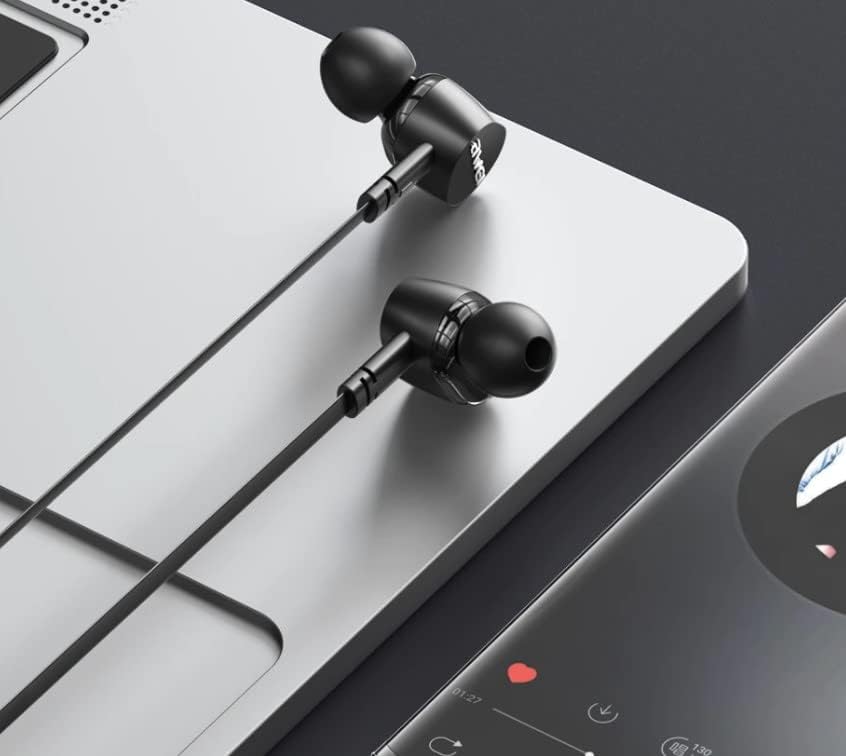
Figura 4.1: The earphones are compatible with various devices featuring a USB-C port, such as laptops and smartphones.
5. Instrucciones de funcionamiento
The Awei TC-7 earphones feature an inline remote with buttons for convenient control of your audio and calls.
5.1. Control de reproducción de música
- Reproducir/Pausa: Presione el botón central una vez.
- Pista siguiente: Presione el botón central dos veces rápidamente.
- Pista anterior: Presione el botón central tres veces rápidamente.
- Sube el volumen: Presione el botón '+'
- Bajar volumen: Presione el botón '-'.
5.2. Gestión de llamadas
- Responder/Finalizar llamada: Presione el botón central una vez durante una llamada entrante o una llamada activa.
- Rechazar llamada: Mantenga presionado el botón central durante aproximadamente 2 segundos durante una llamada entrante.
6. Mantenimiento
Proper care will extend the lifespan of your Awei TC-7 earphones.
- Limpieza de las almohadillas para los oídos: Regularly remove the ear cushions and clean them with a soft, damp paño. Asegúrese de que estén completamente secos antes de volver a colocarlos.
- Cuidado de cables: The cable is designed to be tangle-free. Avoid excessive pulling or sharp bending to prevent internal damage.
- Almacenamiento: When not in use, store the earphones in a clean, dry place, away from extreme temperatures.
- Resistencia al agua: The earphones are rated as waterproof. However, avoid prolonged submersion and ensure the USB-C port is dry before connecting to a device after exposure to water.
7. Solución de problemas
If you encounter issues with your Awei TC-7 earphones, please refer to the following common solutions:
| Problema | Posible causa | Solución |
|---|---|---|
| No hay sonido de los auriculares | Earphones not properly connected; device volume too low; incorrect audio output setting on device. | Ensure the USB-C plug is fully inserted. Increase device volume. Check device audio settings to confirm output is set to earphones. |
| El micrófono no funciona | Microphone port blocked; incorrect input setting on device; application permissions. | Ensure the microphone area is clear. Check device sound settings for microphone input. Verify application permissions for microphone access. |
| Los botones no responden | Loose connection; device incompatibility; software glitch. | Reconnect the earphones. Test with another compatible device if possible. Restart your device. |
8. Especificaciones
| Característica | Detalle |
|---|---|
| Nombre del modelo | TC-7 |
| Tecnología de conectividad | Cableado |
| Toma de auriculares | USB-C |
| Colocación de orejas | En el oído |
| Rango de frecuencia | 20 Hz - 20 kHz |
| Características adicionales | Microphone Included, Inline Control |
| Material | Plástico |
| Nivel de resistencia al agua | Impermeable |
| Características del cable | Sin enredos |
| Dispositivos compatibles | Smartphones, Laptops, Tablets, Desktops with USB-C |
9. Garantía y soporte
Para obtener información sobre la garantía y atención al cliente, consulte la documentación proporcionada al momento de la compra o contacte a su vendedor. Conserve su comprobante de compra para cualquier reclamación de garantía.