
Transmisión de sonido VR-720B
Manual del usuario del estéreo para automóvil SoundStream VR-720B de un solo DIN
Modelo: VR-720B | Marca: Soundstream
Introducción
This manual provides comprehensive instructions for the installation, operation, and maintenance of your SoundStream VR-720B Single DIN Car Stereo. Please read this manual thoroughly before using the product to ensure proper functionality and to prevent damage.
The SoundStream VR-720B is a versatile multimedia player featuring a motorized 7-inch flip-up touchscreen, DVD/CD playback, and Bluetooth connectivity, designed for in-dash vehicle installation.
Producto terminadoview

Figura 1: Frente view of the VR-720B with the 7-inch motorized screen extended, alongside the included remote control and an optional rear-view cámara.
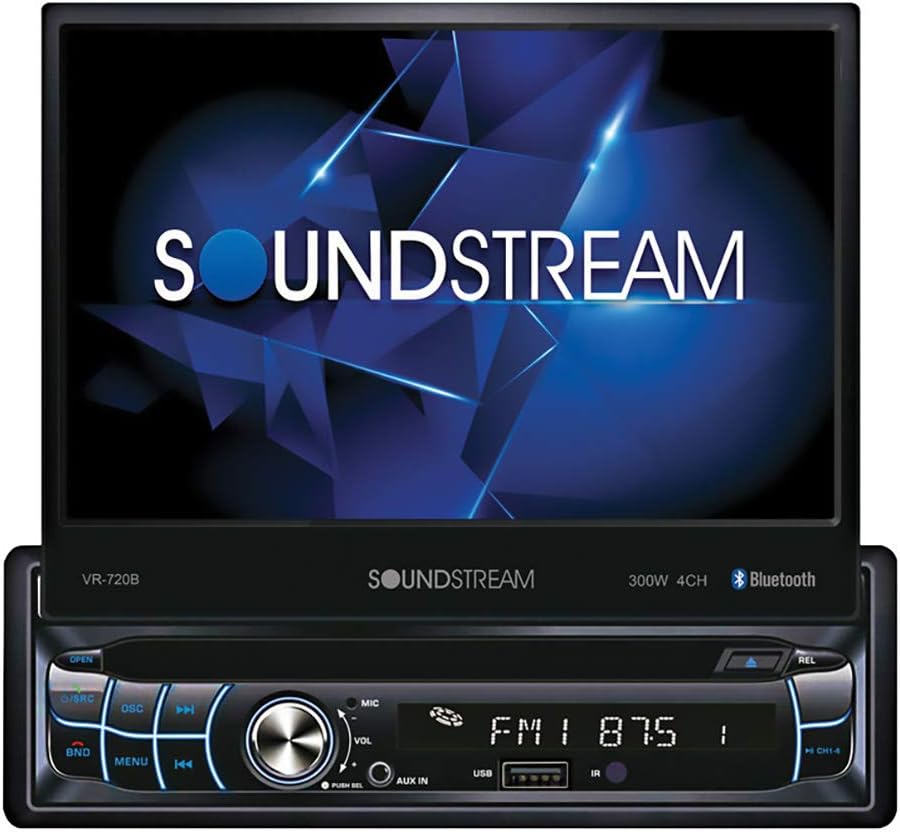
Figura 2: Primer plano view of the VR-720B with the motorized screen fully extended, displaying the SoundStream logo. The main unit features control buttons, a volume knob, and a USB port.
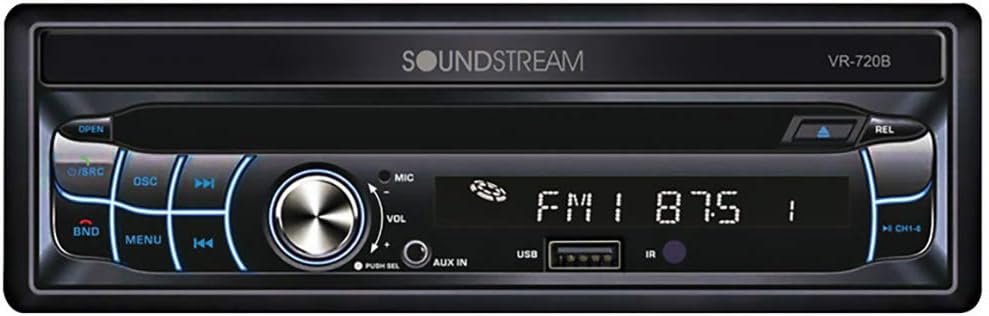
Figure 3: The VR-720B in its retracted single DIN configuration, showing the front panel with controls, display, and media slots when the screen is folded away.

Figure 4: The remote control unit for the VR-720B, featuring various buttons for media playback, volume, source selection, and menu navigation. A small, circular camera is also shown, which may be an accessory.
Configuración e instalación
Proper installation is crucial for the performance and longevity of your VR-720B unit. It is highly recommended that installation be performed by a qualified professional.
Precauciones de seguridad
- Desconecte el terminal negativo de la batería del vehículo antes de comenzar la instalación para evitar cortocircuitos eléctricos.
- Asegúrese de que todo el cableado esté adecuadamente aislado para evitar cortocircuitos.
- No instale la unidad en un lugar que obstruya la vista del conductor. view o interferir con la operación del vehículo.
- Refer to your vehicle's service manual for specific wiring diagrams and dashboard disassembly instructions.
Diagrama de cableado (general)
While a detailed wiring diagram is typically provided with the physical product, a general overview Las conexiones comunes incluyen:
- Cables de alimentación: Constante 12 V (amarillo), accesorio 12 V (rojo), tierra (negro).
- Cables de altavoz: Typically color-coded for front left, front right, rear left, and rear right speakers (e.g., White/White-Black, Gray/Gray-Black, Green/Green-Black, Purple/Purple-Black).
- Cable de antena: Para recepción de radio.
- Cable de encendido remoto: Para exterior amplifiers (Blue/White).
- Cable del freno de estacionamiento: For video playback safety (Light Green).
- Cable de marcha atrás: For automatic rear camera display (Brown/Orange).
Montaje de la unidad
- Retire el estéreo del automóvil existente y la moldura del tablero.
- Slide the supplied mounting sleeve into the dashboard opening. Bend the tabs outward to secure it.
- Make all necessary electrical connections according to the wiring diagram.
- Carefully slide the VR-720B unit into the mounting sleeve until it clicks into place.
- Vuelva a montar el revestimiento del tablero.
- Vuelva a conectar el terminal negativo de la batería del vehículo.
Instrucciones de funcionamiento
Operación básica
- Encendido/apagado: Presione el PWR button (or equivalent) to turn the unit on or off.
- Control de volumen: Girar el VOL perilla o utilice el VOL +/- botones en el control remoto.
- Selección de fuente: Presione el Fuente de origen or MODO button to cycle through available sources (Radio, DVD, CD, USB, AUX, Bluetooth).
- Pantalla motorizada: Utilice el ABRIR/CERRAR button to extend or retract the 7-inch touchscreen.
Operación de radio
- Seleccionar RADIO fuente.
- Prensa BANDA to switch between FM1, FM2, FM3, AM1, AM2.
- Usar SINTONIZAR+/- or seek buttons to find stations.
- Mantenga presionado un botón preestablecido (1-6) para guardar la estación actual.
Reproducción de DVD/CD
- Inserte un DVD o CD en la ranura. La unidad cambiará automáticamente al modo DVD/CD.
- Utilice el REPRODUCIR/PAUSA, DETENER, SALTAR, y AVANCE / REBOBINADO RÁPIDO Botones para el control de reproducción.
- Access the DVD menu using the MENÚ button on the remote or touchscreen.
Conectividad Bluetooth
- Seleccionar BLUETOOTH fuente.
- On your mobile device, search for Bluetooth devices and select "VR-720B" (or similar name).
- Ingrese el código de emparejamiento (generalmente "0000" o "1234") si se le solicita.
- Una vez emparejado, puede transmitir audio o hacer llamadas con manos libres.
- Use the touchscreen or remote to answer/end calls, dial numbers, or control music playback.
Entrada USB/AUX
- Insert a USB drive into the USB port or connect an audio device to the AUX input.
- Seleccione el correspondiente USB or Auxiliar fuente.
- Navegar por files on the USB drive using the touchscreen or control buttons.
Mantenimiento
- Limpieza de la pantalla: Utilice un paño suave y sin pelusa para limpiar suavemente la pantalla táctil. Para manchas difíciles, limpie ligeramenteampEnjuague el paño con agua o un limpiador de pantallas. No utilice limpiadores abrasivos ni disolventes.
- Limpieza de la unidad: Wipe the exterior of the unit with a dry, soft cloth.
- Cuidado del disco: Sujete los discos por los bordes. Manténgalos limpios y sin rayones. Guarde los discos en sus estuches cuando no los use.
- Ventilación: Asegúrese de que las aberturas de ventilación de la unidad no estén bloqueadas para evitar el sobrecalentamiento.
Solución de problemas
| Problema | Posible causa | Solución |
|---|---|---|
| Sin poder | Fusible quemado; Cableado incorrecto; Conexión suelta. | Check vehicle's fuse box and unit's fuse; Verify wiring connections (Yellow, Red, Black wires); Ensure all connections are secure. |
| Sin sonido | Volumen demasiado bajo; Silencio activado; Cableado incorrecto del altavoz; AmpProblema del salvavidas. | Increase volume; Deactivate mute; Check speaker wire connections; Consult an audio specialist if using an external ampmás duradero. |
| Disc Error / Disc Not Playing | Dirty or scratched disc; Incorrect disc format; Unit lens dirty. | Clean disc or try a different disc; Ensure disc format is supported (CD-R, CD-RW, DVD-R, DVD-RW, VCD); Do not attempt to clean the lens yourself, consult service. |
| Fallo de emparejamiento de Bluetooth | Dispositivo no en modo de emparejamiento; Código de emparejamiento incorrecto; Interferencia. | Ensure VR-720B is in Bluetooth pairing mode; Re-enter pairing code; Move device closer to unit; Restart both devices. |
| Motorized Screen Not Responding | Obstruction; Power issue. | Check for any physical obstructions; Verify power supply to the unit. |
If the problem persists after attempting these solutions, please contact Soundstream customer support or a qualified service technician.
Presupuesto
- Modelo: VR-720B
- Marca: Flujo de sonido
- Tipo de pantalla: Pantalla LCD
- Tamaño de pantalla: 7 Inches (Motorized Flip-Up Touchscreen)
- Compatibilidad con medios: CD-R, CD-RW, DVD-R, DVD-RW, VCD
- Conectividad: Bluetooth, USB, AUX Input
- Factor de forma: DIN simple
- Color: Negro
- Primera fecha disponible: 3 de marzo de 2022
- ASIN: B09TSZ7XCD
Garantía y soporte
Specific warranty information for the SoundStream VR-720B is typically provided with the product packaging or on the manufacturer's official website. As this product may be a renewed item, warranty terms might differ from new products. Please refer to the documentation included with your purchase or contact the vendor for details regarding warranty coverage.
For technical support, troubleshooting assistance beyond this manual, or service inquiries, please contact Soundstream customer service directly. Contact information can usually be found on the manufacturer's websitio o en la documentación original del producto.