1. Introducción
The VOCOO Magnetic Kitchen Timer is a user-friendly digital timer designed to simplify time management in various environments. Its large, bright display and intuitive controls make it ideal for cooking, studying, exercising, and more. This manual provides comprehensive instructions for setup, operation, and maintenance to ensure optimal performance of your new timer.

2. Qué incluye
Upon unboxing your VOCOO Digital Timer, please ensure all the following items are present:
- One (1) VOCOO Digital Timer
- Three (3) AAA batteries
- Un (1) Manual de usuario (este documento)
3. Configuración
3.1. Instalación de la batería
Your VOCOO Digital Timer requires three AAA batteries for operation. These are included in the package.
- Localice el compartimento de la batería en la parte posterior del temporizador.
- Open the battery cover by sliding it off.
- Inserte tres pilas AAA, asegurándose de la polaridad correcta (+ y -) como se indica dentro del compartimento.
- Vuelva a colocar la tapa de la batería de forma segura.
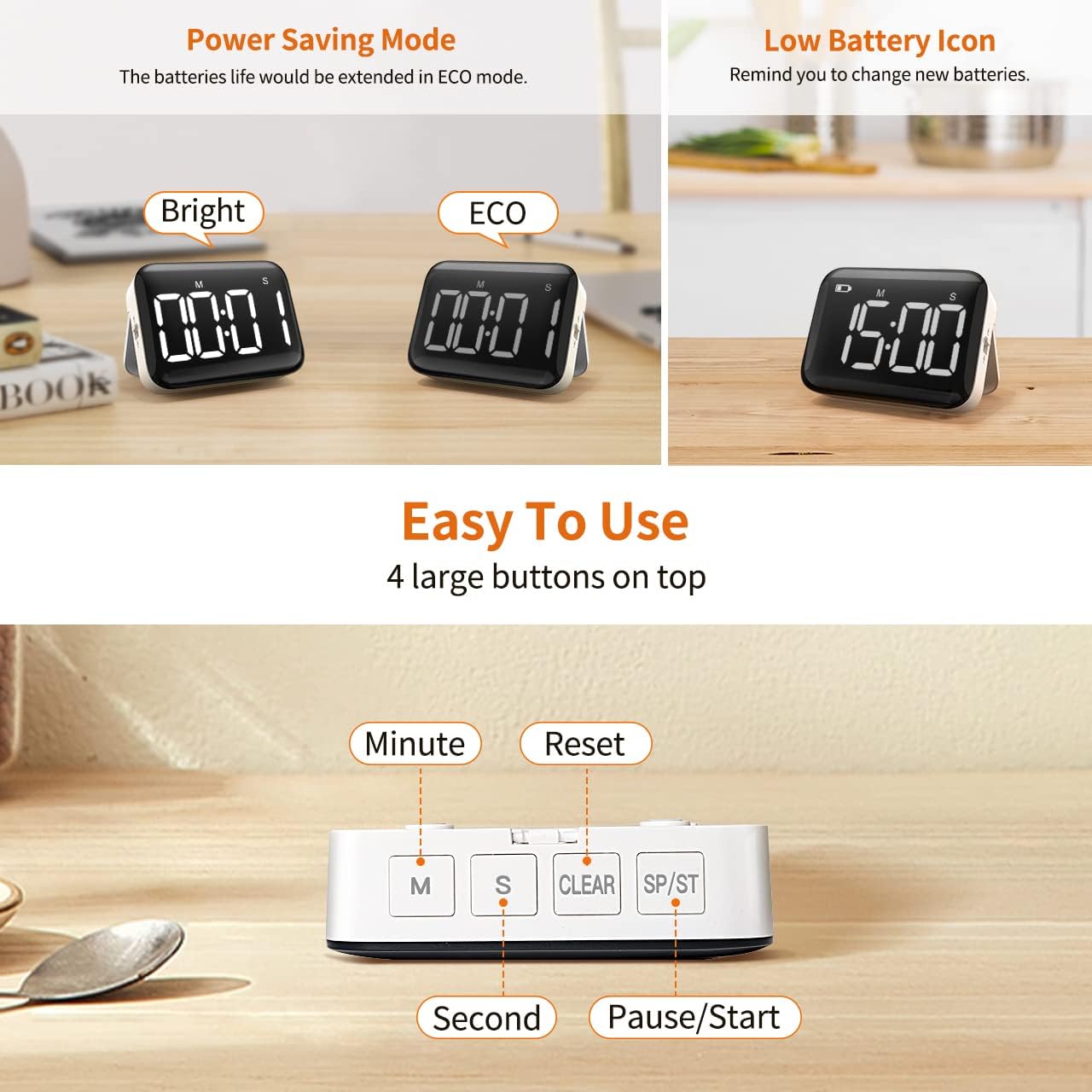
NOTE: A low power icon will appear on the display when batteries are consumed. It is strongly suggested to set the timer to ECO brightness mode for extended battery life.
3.2. Encendido inicial
Once batteries are installed, the timer should automatically power on and display '00:00'. If not, press any button on the top to activate the display.
4. Instrucciones de funcionamiento
4.1. Setting a Countdown Timer
- Press the 'M' button to set minutes (up to 99 minutes).
- Press the 'S' button to set seconds (up to 59 seconds).
- Press the 'SP/ST' button to start the countdown.
- To pause the countdown, press 'SP/ST' again. Press 'SP/ST' to resume.
- When the timer reaches zero, it will alarm.
4.2. Using as a Stopwatch (Count Up)
- Ensure the display shows '00:00'. If not, press the 'CLEAR' button.
- Press the 'SP/ST' button to start counting up.
- To pause the stopwatch, press 'SP/ST' again. Press 'SP/ST' to resume.
- El cronómetro puede contar hasta 99 minutos y 59 segundos.
4.3. Función de memoria
The timer has a memory function. The last time set for a countdown will be saved as the starting point for the next use, eliminating the need to re-enter the same duration repeatedly.

4.4. Ajuste de brillo
On the side of the timer, there is a slide switch to adjust the display brightness:
- Brillante: Brillo total para máxima visibilidad.
- Ecológico: Brillo reducido para conservar la vida útil de la batería.

4.5. Ajuste del volumen
Otro interruptor deslizante en el lateral controla el volumen de la alarma:
- Alto: 80-90dB, adecuado para entornos ruidosos.
- Suave: 60-75dB, para configuraciones más silenciosas.
- Silenciar: The display will blink when the timer reaches zero, with no audible alarm.
NOTE: When set to Loud or Soft, the timer will also beep when setting time. Slide to Mute if this is not desired.

5. Multiple Placement Options
The VOCOO Digital Timer offers flexible placement options to fit your needs:
- Soporte de escritorio: Utilize the sturdy pull-out stand on the back to place the timer on any flat surface, such as a kitchen counter, desk, or table.
- Parte trasera magnética: La fuerte parte posterior magnética le permite fijar el temporizador de forma segura a superficies metálicas como refrigeradores, hornos o pizarrones.
- Agujero para colgar: A built-in hanging hole provides an option to hang the timer on a hook or nail.

6. Amplias aplicaciones
This versatile timer is suitable for a wide range of activities and environments:
- Cocina: Perfect for cooking, baking, and grilling.
- Aula: Ideal for managing activities, tests, or quiet time for students.
- Oficina/Estudio: Helps with focus during work or study sessions, like the Pomodoro Technique.
- Aptitud física: Track workout intervals or rest periods.
- Tareas de la casa: Keep track of chores or laundry cycles.
- Juegos: Use for board games or other timed activities.

7. Mantenimiento
7.1. Reemplazo de la batería
When the low power icon appears on the display, it's time to replace the batteries. Follow the steps in Section 3.1 to replace the three AAA batteries.
7.2. Limpieza
To clean your timer, gently wipe the display and body with a soft, dry cloth. Avoid using abrasive cleaners or submerging the device in water.
8. Solución de problemas
| Problema | Posible causa | Solución |
|---|---|---|
| La pantalla está tenue o en blanco. | Low batteries or ECO mode. | Replace batteries. Check brightness switch on the side and set to 'Bright'. |
| Alarm is too quiet or silent. | Volume switch set to 'Soft' or 'Mute'. | Adjust the volume switch on the side to 'Loud' or 'Soft'. |
| El temporizador no responde al presionar los botones. | Las baterías están completamente agotadas. | Reemplace las baterías. |
| Timer does not reset to '00:00'. | Botón incorrecto presionado. | Press the 'CLEAR' button on the top. |
9. Especificaciones
| Característica | Detalle |
|---|---|
| Número de modelo | VC5268 |
| Marca | VOCOO |
| Color | Blanco frío |
| Material | Acrilonitrilo butadieno estireno |
| Dimensiones del producto | 0.94" de profundidad x 3.54" de ancho x 2.64" de alto |
| Peso del artículo | 4.6 onzas |
| Ajuste de tiempo máximo | 99 minutos 59 segundos |
| Fuente de poder | 3 pilas AAA (incluidas) |
| Niveles de brillo | Bright / ECO |
| Niveles de volumen | Loud (80-90dB) / Soft (60-75dB) / Mute |
| Opciones de ubicación | Magnetic, Desktop Stand, Hanging Hole |
10. Garantía y soporte
VOCOO stands behind the quality of its products. For any questions, concerns, or technical support regarding your digital timer, please contact our customer service team.
Correo electrónico: support@vocoohelp.com
Please retain your purchase receipt for warranty purposes. Specific warranty details may vary by region and retailer.