Introducción
The T-Dagger Arena T-TGK321 is a compact 60% mechanical gaming keyboard designed for performance and versatility. Featuring T-Dagger Brown mechanical switches, this keyboard offers a tactile and quiet typing experience with a durability of 50 million clicks. Its 61-key layout provides maximum desk space while retaining full functionality through FN key combinations. This manual will guide you through the setup, operation, maintenance, and troubleshooting of your T-Dagger Arena keyboard.
Contenido del paquete
Por favor, marque la casilla correspondiente a los siguientes artículos:
- T-Dagger Arena T-TGK321 Mechanical Gaming Keyboard
- USB-C to USB-A Cable (1.5 meters, detachable)
- Extractor de teclas
- Extractor de interruptores
- Manual de usuario (este documento)
Configuración
- Desembalaje del teclado: Retire con cuidado el teclado y todos los accesorios del embalaje.
- Conecte el cable: Inserte el extremo USB-C del cable incluido en el puerto del teclado. Conecte el extremo USB-A del cable a un puerto USB disponible en su computadora.
- Reconocimiento del sistema: Your computer should automatically detect and install the necessary drivers for the keyboard. This process may take a few moments. The keyboard is compatible with Windows 10 and later operating systems.
- Funcionalidad de prueba: Once recognized, the keyboard's rainbow backlighting should illuminate. Test a few keys to ensure proper operation.
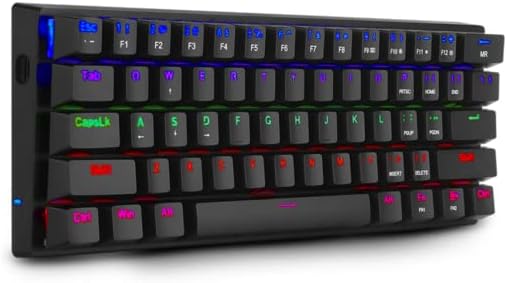
Image: The T-Dagger Arena T-TGK321 keyboard connected and illuminated with rainbow backlighting.
Instrucciones de funcionamiento
The T-Dagger Arena T-TGK321 features a 60% layout, meaning some functions are accessed via the Function (FN) key. The keyboard supports full N-key rollover, ensuring every keypress is registered accurately during intense gaming sessions.
Combinaciones de teclas FN
Para acceder a funciones secundarias, mantenga presionada la tecla FN key, then press the desired key. The keyboard features a double FN key for enhanced accessibility.
- FN + Number Keys (1-0): Acceda a las funciones F1-F10.
- FN + - (minus) / = (equals): Access F11 / F12 functions.
- FN + P / [ / ] / ; / ' / , / . / /: Access various special characters or functions depending on the specific keycap legends.
- FN + Teclas de flecha: Typically used for navigation (Home, End, Page Up, Page Down) or media controls. Refer to keycap legends for exact functions.
- FN + tecla de Windows: Bloquea o desbloquea la tecla de Windows para evitar pulsaciones accidentales durante el juego.
Control de retroiluminación
The keyboard features vibrant rainbow backlighting. Specific key combinations, often involving the FN key and other designated keys (e.g., P, [), are used to cycle through lighting modes, adjust brightness, or change speed. Consult the keycap legends for specific lighting control functions.
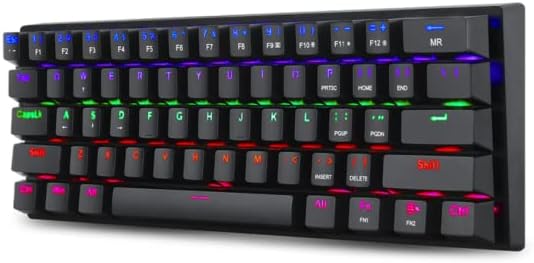
Image: A different perspective of the T-Dagger Arena T-TGK321 keyboard, highlighting the keycap legends for secondary FN functions.

Imagen: Un detalle view of the T-Dagger Brown mechanical switches and the durable double-shot injection keycaps.
Mantenimiento
Un mantenimiento adecuado garantiza la longevidad y el rendimiento óptimo de su teclado.
- Limpieza: Regularly clean the keyboard with a soft, dry cloth. For deeper cleaning, use the provided keycap puller to remove keycaps and clean dust and debris from the switch area using compressed air or a small brush.
- Resistencia a derrames: The keyboard features a spill-resistant design. While it can withstand minor splashes, it is not waterproof. In case of a spill, immediately disconnect the keyboard from your computer, wipe off any liquid, and allow it to dry completely before reconnecting.
- Cuidado de cables: Handle the detachable USB-C cable with care. Avoid bending or twisting it excessively to prevent damage.
Solución de problemas
If you encounter issues with your T-Dagger Arena T-TGK321 keyboard, try the following troubleshooting steps:
- El teclado no responde:
- Asegúrese de que el cable USB esté conectado de forma segura tanto al teclado como a la computadora.
- Intente conectar el teclado a un puerto USB diferente en su computadora.
- Pruebe el teclado en otra computadora para descartar un problema específico del sistema.
- Reinicie su computadora.
- La retroiluminación no funciona:
- Check if the backlighting has been turned off using an FN key combination.
- Asegúrese de que el teclado esté conectado correctamente y recibiendo energía.
- Claves que no se registran:
- Remove the keycap using the keycap puller and inspect the switch for any obstructions.
- Gently re-seat the keycap.
Presupuesto
| Tipo | Teclado de juegos mecánicos |
| Interruptores | T-Dagger Brown (táctil, silencioso) |
| Fuerza de actuación | 45 gramos |
| Durabilidad | 50 millones de clics |
| Disposición de teclas | 60% compacto, 61 teclas |
| Teclas | Double-shot Injection, Laser-Engraved |
| Contraluz | Arco iris RGB |
| Cable | Detachable USB-C to USB-A, PVC, 1.5 meters |
| Cambio de teclas N | Lleno |
| Construcción | Plástico ABS reforzado |
| Resistente a derrames | Sí |
| Disposición del teclado | Inglés |
| Peso | 390 gramos |
| Dimensiones (L x An x Al) | 293 x 104 x 35 mm |
| Compatibilidad del sistema operativo | Ventanas 10 |

Image: The T-Dagger Arena T-TGK321 keyboard positioned on a gaming desk alongside a gaming mouse.
Garantía y soporte
For warranty information or technical support, please refer to the official T-Dagger webSitio web o contacte a su distribuidor local. Conserve el recibo de compra como comprobante para cualquier reclamación de garantía.