
Introducción
Thank you for choosing the NORTH EDGE APACHE Digital Sport Watch. This manual provides comprehensive instructions for the proper setup, operation, and maintenance of your watch. Please read this manual carefully to ensure optimal performance and longevity of your device.
The NORTH EDGE APACHE is a multi-functional outdoor watch designed for various activities, featuring an altimeter, barometer, compass, stopwatch, countdown timer, dual time, and 50-meter water resistance.

Image: NORTH EDGE APACHE Multi-Function Outdoor Watch. This image displays the watch face with icons indicating its various functions: altitude monitoring, temperature display, compass, 5ATM waterproof rating, time/date, stopwatch, countdown timer, auto calendar, alarm function, and EL backlight.
Configuración
Encendido inicial y ajuste de la hora
- Encendido: The watch is typically powered on from the factory. If the display is blank, press and hold the MODO button (usually bottom left) for a few seconds.
- Time Zone and Time Setting:
- En el modo Hora, mantenga presionada la tecla COLOCAR button (usually top left) until the seconds start flashing.
- Presione el MODO button to cycle through settings: Seconds → Hours → Minutes → Year → Month → Day → 12/24 Hour Format.
- Utilice el AJUSTAR button (usually top right) to change the flashing value.
- Prensa COLOCAR nuevamente para confirmar y salir del modo de configuración.
- Configuración de hora dual: The watch supports dual time. Refer to the "Operating" section for detailed instructions on setting the second time zone.
Calibración de brújula
For accurate compass readings, calibration is essential, especially after significant travel or magnetic interference.
- Ingrese al modo brújula.
- Mantenga pulsado el COLOCAR Botón para ingresar al modo de calibración.
- Follow the on-screen prompts, usually involving rotating the watch horizontally in a full circle (360 degrees) slowly and steadily.
- Once calibration is complete, the watch will return to normal compass display.

Image: Compass Function Display. This image shows the watch displaying a compass reading, indicating direction (NW) and degrees (316°). It highlights the watch's ability to provide precise directional information.
Instrucciones de funcionamiento
Your NORTH EDGE APACHE watch features multiple modes accessible via the MODO button. The primary buttons are typically:
- SET/LIGHT: Top Left button. Used to enter/exit setting modes and activate backlight.
- AJUSTAR: Top Right button. Used to adjust values in setting modes or start/stop functions.
- MODO: Bottom Left button. Used to switch between different watch modes.
- VIEW/RESET: Bottom Right button. Used to view different data or reset functions.
Modo de navegación
Presione el MODO Botón repetidamente para recorrer los siguientes modos:
- Modo de hora (pantalla principal)
- Modo altímetro
- Modo de barómetro
- Modo brújula
- Modo de cronómetro
- Modo de temporizador de cuenta regresiva
- Modo de alarma
- Modo de podómetro
- Modo de hora dual
Función del altímetro
The altimeter measures current altitude, displays altitude trend, and can provide sea level altitude reference.
- Enter Altimeter Mode. The watch will display current altitude and temperature.
- To set a reference altitude (e.g., known altitude of your current location), press and hold COLOCAR. Usar AJUSTAR para cambiar el valor y MODO to move between digits. Press COLOCAR Para confirmar.
- The watch will track altitude changes relative to this reference or based on absolute barometric pressure.

Image: Altimeter Function Display. This image shows the watch displaying altitude (186m) and temperature (25.7°C), along with an altitude trend chart. It illustrates the watch's capability to monitor real-time elevation and track changes.
Función de barómetro
The barometer measures atmospheric pressure and can help predict weather changes.
- Enter Barometer Mode. The watch will display current atmospheric pressure (hPa) and temperature.
- The watch may display a pressure trend graph, indicating rising or falling pressure, which can suggest improving or worsening weather.
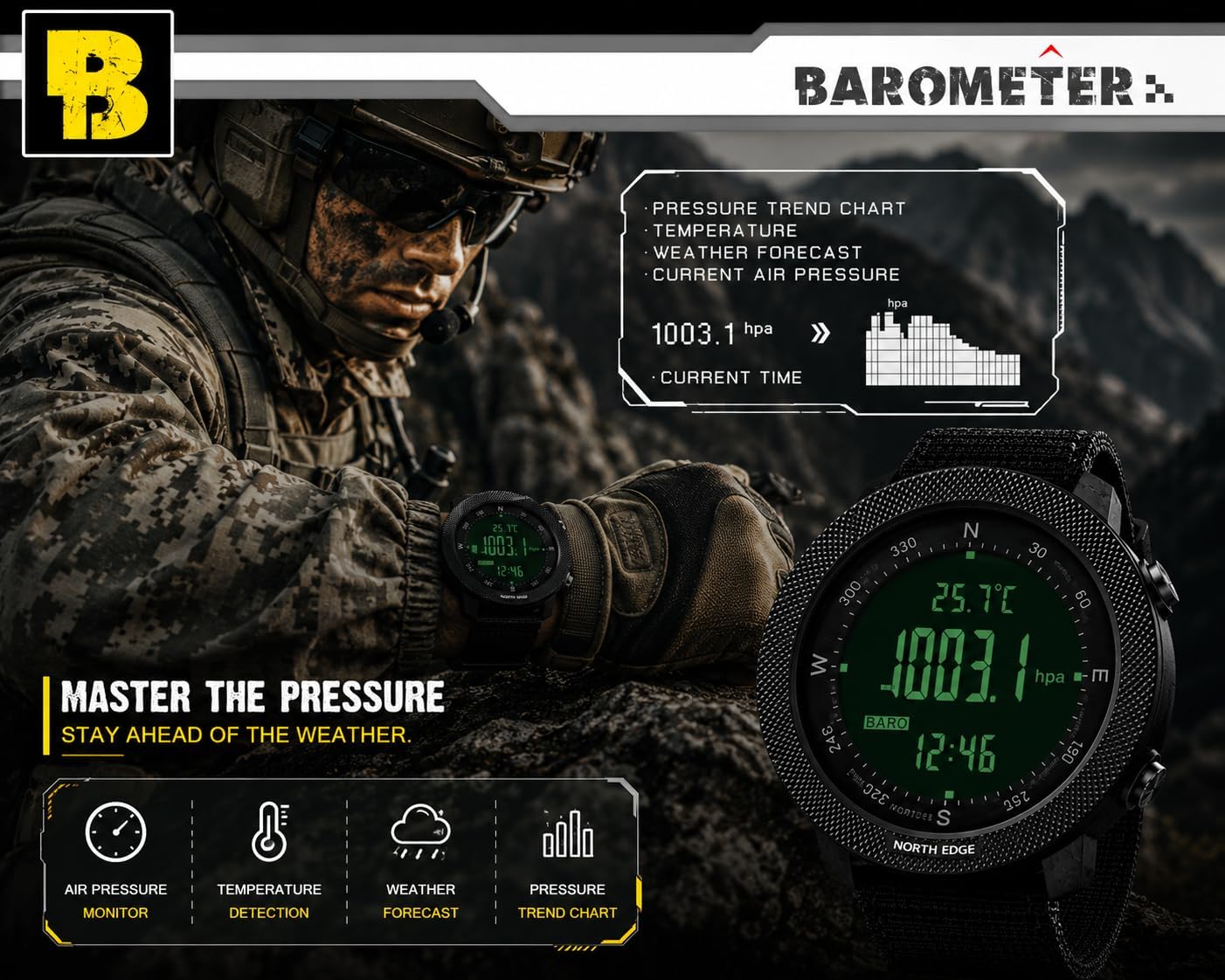
Image: Barometer Function Display. This image shows the watch displaying current atmospheric pressure (1003.1 hPa) and temperature (25.7°C), along with a pressure trend chart. It demonstrates the watch's ability to monitor air pressure and assist in weather forecasting.
Función de brújula
Provides directional information. Ensure proper calibration as described in the "Setup" section.
- Ingrese al modo brújula.
- Hold the watch horizontally and steady. The display will show the current direction (e.g., N, NE, SW) and degrees.
- Magnetic declination can be adjusted if needed for your specific location. Refer to the watch's detailed menu for this advanced setting.
Cronómetro y temporizador de cuenta regresiva
- Cronógrafo:
- Ingrese al modo cronómetro.
- Prensa AJUSTAR para iniciar/detener el cronómetro.
- Prensa VIEW/ REINICIAR para restablecer a cero.
- Contador regresivo:
- Ingrese al modo de temporizador de cuenta regresiva.
- Mantenga pulsado COLOCAR to set the desired countdown time (up to 23 hours, 59 minutes, 59 seconds). Use AJUSTAR para cambiar valores y MODO para moverse entre unidades.
- Prensa COLOCAR Para confirmar.
- Prensa AJUSTAR para iniciar/pausar la cuenta regresiva.
- Sonará una alarma cuando la cuenta regresiva llegue a cero.
Función de alarma
The watch supports daily alarms and an hourly timbre.
- Ingrese al modo de alarma.
- Mantenga pulsado COLOCAR Para configurar la hora de la alarma. Utilice AJUSTAR para cambiar valores y MODO para moverse entre horas y minutos.
- Prensa COLOCAR Para confirmar.
- Usar AJUSTAR to toggle the alarm ON/OFF or to activate/deactivate the hourly timbre.
Podómetro y seguimiento de calorías
The watch can track your steps and estimate calories burned.
- Enter Pedometer Mode.
- Ensure your personal data (stride length, weight) is set correctly in the watch's settings for accurate readings. Refer to the full manual for detailed personal data input.
- The watch will display your step count and estimated calories.
Iluminar desde el fondo
Presione el SET/LUZ button (top left) to activate the EL backlight for visibility in low-light conditions.
Image: Watch Display Clear at Night with Backlight. This image demonstrates the watch's EL backlight feature, making the digital display clearly visible in dark environments.
Detailed Mode Analysis Diagram
The following diagram illustrates the button functions for Altimeter, Barometer, and Compass modes.

Image: Altimeter, Barometer, and Compass Mode Analysis Diagram. This diagram provides a visual guide to the watch's various modes, including Altimeter, Barometer, and Compass, detailing the information displayed and button interactions for each. It also lists general specifications like dimensions, weight, display type, strap material, water resistance, and supported functions.
Mantenimiento
Limpieza
- Limpie la caja y la correa del reloj con un paño suave.amp paño.
- Para la suciedad difícil, utilice una solución de jabón suave y enjuague bien con agua limpia.
- Asegúrese de que el reloj esté completamente seco antes de usarlo o guardarlo.
- Evite utilizar limpiadores químicos, solventes o materiales abrasivos, ya que pueden dañar el acabado o los sellos del reloj.
Resistencia al agua
The NORTH EDGE APACHE watch is water-resistant to 50 meters (164 feet). This rating means it is suitable for:
- Uso diario y salpicaduras.
- Nadar en aguas poco profundas.
- Cold showers.
Precauciones importantes:
- No presione ningún botón bajo el agua.
- Avoid exposure to hot water, steam, or saunas, as this can compromise the watch's seals.
- Not suitable for prolonged underwater activities such as diving or snorkeling.
Reemplazo de batería
The watch uses a 1 C battery (CR2032, as seen on the watch back image). When the low power indicator appears, it is recommended to replace the battery promptly.
- Battery replacement should ideally be performed by a qualified watch technician to ensure the water resistance seal is properly maintained.
- If replacing yourself, carefully open the back case, replace the CR2032 battery, and ensure the gasket is correctly seated before securely closing the case.
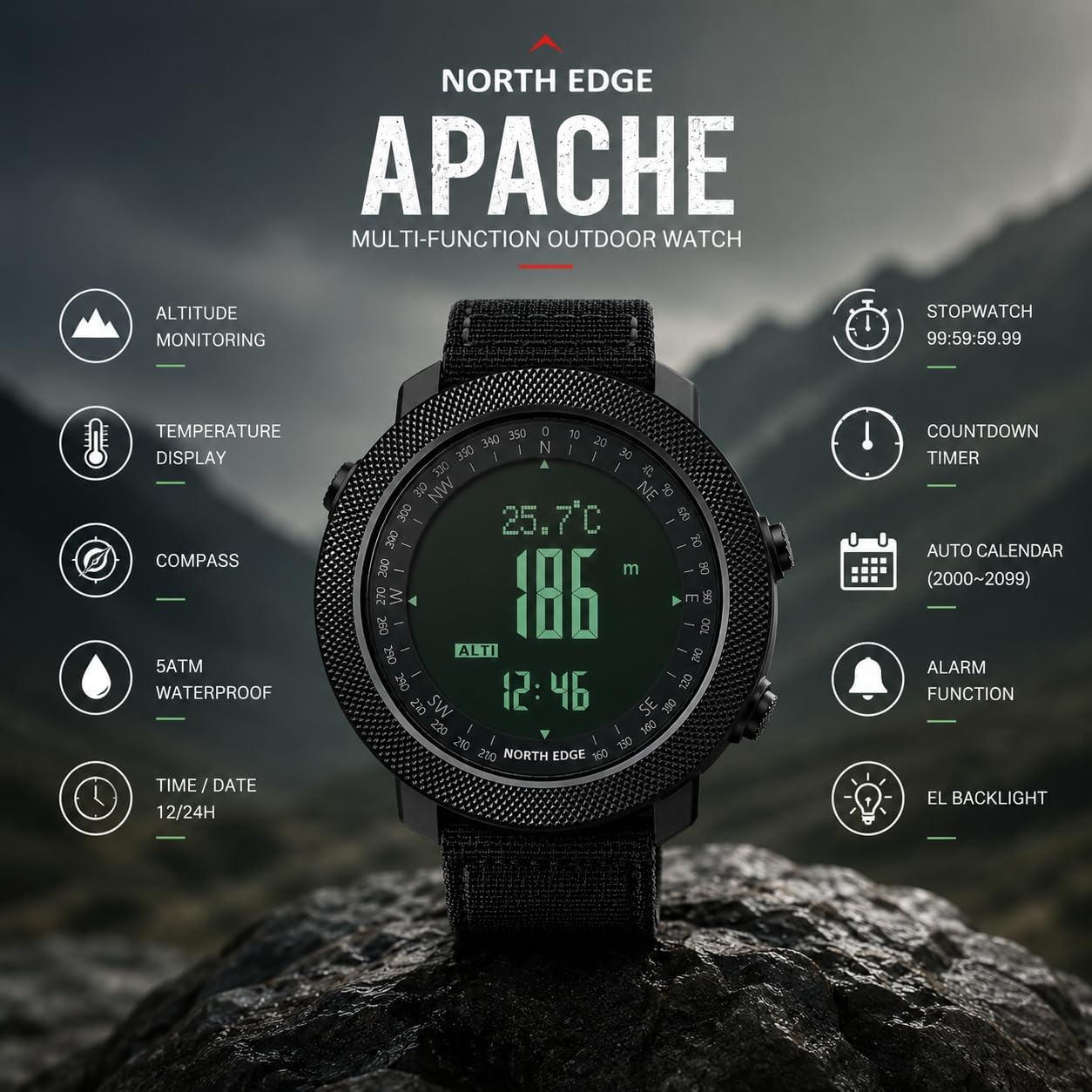
Image: NORTH EDGE Apache Watch Back with Engravings. This image shows the stainless steel back of the watch, engraved with the brand "NORTH EDGE", model "Apache", water resistance rating "WR 50m/164ft", and battery type "CR2032". It also displays the serial number T163500717.
Solución de problemas
| Problema | Posible causa | Solución |
|---|---|---|
| La pantalla del reloj está en blanco. | Batería baja o el reloj está apagado. | Mantenga pulsado el MODO button to power on. If still blank, replace the battery. |
| Inaccurate time. | La hora no está configurada correctamente o la batería está baja. | Reset the time as per "Initial Power On and Time Setting". Replace battery if necessary. |
| Inaccurate compass reading. | Not calibrated or magnetic interference. | Perform compass calibration away from strong magnetic fields (e.g., electronics, metal structures). |
| Altimeter/Barometer readings are inconsistent. | Sensor obstruction or rapid weather changes. | Ensure the sensor port (if visible) is clean. Calibrate altimeter with a known reference altitude. Note that barometric altimeters are affected by weather changes. |
| Los botones no responden. | Watch might be frozen or low battery. | Try a soft reset (refer to full manual if available). Replace battery if low. Avoid pressing buttons underwater. |
Presupuesto
| Nombre del modelo: | APACHE |
| Marca: | BORDE NORTE |
| Tipo de pantalla: | Digital |
| Movimiento: | Cuarzo (con pilas) |
| Material de la caja: | Acero aleado |
| Material de la ventana del dial: | Cristal mineral |
| Diámetro de la caja: | 50 milímetros |
| Grosor de la caja: | 16 milímetros |
| Material de la banda: | Goma |
| Ancho de banda: | 24 milímetros |
| Tipo de cierre: | Hebilla |
| Peso del artículo: | 112.04 gramos |
| Resistencia al agua: | Medidores 50 (Pies 164) |
| Tipo de batería: | CR2032 (1 C battery) |
| Características especiales: | Altimeter, Barometer, Compass, Thermometer, Pedometer, Stopwatch, Countdown Timer, Dual Time, Alarm, EL Backlight, Automatic Calendar. |

Image: Wrist Size Guide and Watch Dimensions. This image provides detailed dimensions of the watch, including a diameter of 50mm, thickness of 16mm, and band width of 24mm. It also includes a wrist size range guide, recommending wrist sizes between 170mm and 220mm for optimal comfort.
Garantía y soporte
Información de garantía
Your NORTH EDGE APACHE Digital Sport Watch comes with a Garantía limitada de 12 meses A partir de la fecha de compra. Esta garantía cubre defectos de fabricación en materiales y mano de obra en condiciones normales de uso.
La garantía no cubre:
- Damage caused by improper use, abuse, or neglect.
- Normal wear and tear, including scratches on the case or crystal, or degradation of the strap.
- Daños causados por reparaciones o modificaciones no autorizadas.
- Reemplazo de batería.
- Water damage if the watch was exposed to conditions beyond its 50m water resistance rating (e.g., hot water, pressing buttons underwater).
To claim warranty service, please retain your proof of purchase and contact NORTH EDGE customer support.
Atención al cliente
For any questions, technical assistance, or warranty claims, please contact NORTH EDGE customer support. You can typically find contact information on the official NORTH EDGE websitio o a través de su minorista.
NORTH EDGE aims to provide a satisfactory solution within 24 hours for any issues you may encounter.