
Introducción
This manual provides essential information for setting up, operating, maintaining, and troubleshooting your Xiaomi Redmi Note 11S smartphone. Please read this guide thoroughly to ensure optimal performance and longevity of your device.
Un sobreview of the Redmi Note 11S, highlighting its 108MP pro-grade main camera, 90Hz FHD+ AMOLED DotDisplay, and 33W Pro fast charging capabilities.
Configuración
1. Desembalaje e inspección inicial
Carefully unpack your Redmi Note 11S. Ensure all items are present:
- Smartphone Xiaomi Redmi Note 11S
- Cargador de coche rápido
- Expulsor de bandeja SIM
- de Carga Rápida
2. Instalación de la tarjeta SIM
The Redmi Note 11S supports dual nano SIM cards. To install:
- Localice la bandeja de la tarjeta SIM en el costado del dispositivo.
- Inserte la herramienta de expulsión de la bandeja SIM en el pequeño orificio al lado de la bandeja y presione suavemente hasta que la bandeja salga.
- Coloque su(s) tarjeta(s) nano SIM en las ranuras designadas de la bandeja. Asegúrese de que los contactos dorados estén hacia abajo.
- Vuelva a insertar con cuidado la bandeja en el teléfono.
3. Carga inicial y encendido
Before first use, it is recommended to fully charge your device. Connect the wall charger to the phone and a power outlet. The Redmi Note 11S supports 33W Pro fast charging for quick recharging of its 5000mAh battery.

Illustration of the 33W Pro fast charging feature for the 5000mAh battery, showing charging efficiency and estimated usage times for video, calling, and music.
To power on, press and hold the power button located on the side of the device until the Xiaomi logo appears.
Instrucciones de funcionamiento
1. Navegación básica
The Redmi Note 11S features a responsive touchscreen. Use gestures such as tap, swipe, pinch, and spread to navigate the MIUI 12 operating system. The power button controls screen on/off and device power, while the volume buttons adjust audio levels.
2. Características de la pantalla
Your device is equipped with a 6.43-inch FHD+ AMOLED DotDisplay with a 90Hz high refresh rate for smooth visuals. It also includes Sunlight Display for readability in bright conditions and Reading Mode 3.0 to reduce eye strain.

The 6.43-inch FHD+ AMOLED DotDisplay of the Redmi Note 11S, emphasizing its 90Hz high refresh rate for a responsive touchscreen experience.
3. Sistema de cámara
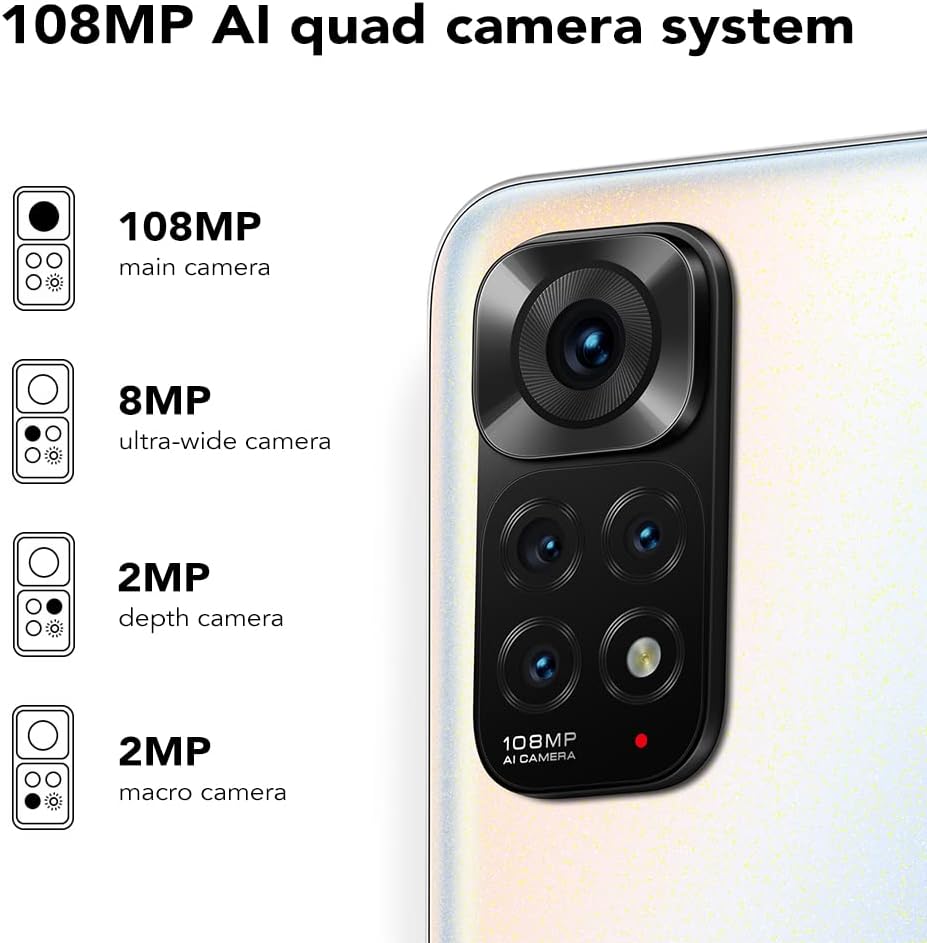
The Redmi Note 11S features a 108MP AI quad camera system on the rear and a 16MP selfie camera. The rear camera setup includes:
- 108MP Cámara principal
- 8MP Cámara ultra ancha
- 2MP Cámara macro
- 2MP Cámara de profundidad
Open the Camera application to access various modes such as Photo, Video, Portrait, Night Mode, and more.

Detallado view of the 108MP AI quad camera system on the Redmi Note 11S, featuring a 108MP main camera, 8MP ultra-wide camera, 2MP depth camera, and 2MP macro camera.
4. Almacenamiento y rendimiento
The device comes with 128GB of internal storage, expandable up to 1TB via a microSD card (sold separately). It is powered by the MediaTek Helio G96 processor, ensuring smooth performance for daily tasks and gaming.
5. Conectividad
The Redmi Note 11S supports 4G cellular networks, Wi-Fi, and GPS for navigation and location services.
Mantenimiento
1. Limpieza del dispositivo
Utilice un paño suave y sin pelusa para limpiar la pantalla y el cuerpo del teléfono. Evite usar productos químicos agresivos o materiales abrasivos. No exponga el dispositivo a humedad excesiva.
2. Actualizaciones de software
Revise e instale periódicamente las actualizaciones de software para asegurarse de que su dispositivo cuente con las últimas funciones, parches de seguridad y mejoras de rendimiento. Vaya a Ajustes > Acerca del teléfono > Versión de MIUI para comprobar si hay actualizaciones.
3. Cuidado de la batería
Para prolongar la vida útil de la batería:
- Evite temperaturas extremas.
- No deje que la batería se descargue por completo con frecuencia.
- Use the original charger provided with the device.
4. Disipación de calor
The Redmi Note 11S incorporates LiquidCool technology with multiple layers of graphite and copper foil for efficient heat dissipation. Ensure proper airflow around the device during heavy usage to prevent overheating.

Un interno view illustrating the multi-dimensional heat dissipation system using LiquidCool technology, which incorporates multiple layers of graphite and copper foil for efficient cooling.
Solución de problemas
This section addresses common issues you might encounter with your Redmi Note 11S.
El dispositivo no se enciende
- Asegúrese de que la batería esté cargada. Conecte el dispositivo al cargador durante al menos 30 minutos.
- Mantenga presionado el botón de encendido durante 10 a 15 segundos para realizar un reinicio forzado.
Apps Freezing or Crashing
- Cierre la aplicación problemática y vuelva a abrirla.
- Borre el caché y los datos de la aplicación a través de Configuración > Aplicaciones > Administrar aplicaciones > [Nombre de la aplicación] > Borrar datos.
- Ensure your apps and operating system are up to date.
Pobre vida de la batería
- Adjust screen brightness and reduce screen timeout.
- Deshabilite funciones no utilizadas como Wi-Fi, Bluetooth o GPS cuando no sean necesarias.
- Identifique y cierre las aplicaciones que consumen mucha energía y se ejecutan en segundo plano.
Problemas de conectividad de red
- Reinicie su dispositivo.
- Compruebe si su tarjeta SIM está insertada correctamente.
- Restablecer la configuración de red a través de Ajustes > Conexión y uso compartido > Restablecer Wi-Fi, redes móviles y Bluetooth.
Presupuesto
The following table outlines the key specifications for the Xiaomi Redmi Note 11S (Model: 2201117SY).
| Característica | Especificación |
|---|---|
| Nombre del modelo | NOTE 11s |
| Número de modelo del artículo | 2201117SY |
| Marca | Xiaomi |
| Sistema operativo | MIUI 12 |
| Tamaño de pantalla | 6.43 pulgadas |
| Tipo de pantalla | FHD+ AMOLED DotDisplay, 90Hz Refresh Rate |
| Cámara trasera | 108MP Main, 8MP Ultra-wide, 2MP Macro, 2MP Depth |
| Cámara frontal | 16MP |
| RAM | 6 GB |
| Capacidad de almacenamiento de memoria | 128 GB (Ampliable hasta 1 TB) |
| Capacidad de la batería | 5000 miliampAntes de la hora (mAh) |
| Cargando | 33W Pro Fast Charging (58 minutes for full charge) |
| Tecnología celular | 4G |
| Operador inalámbrico | Desbloqueado para todos los operadores |
| Tecnologías de conectividad | Wi-Fi, Celular |
| Características especiales | Dual SIM, GPS, Smartphone |
| Dimensiones del producto | 2.9 x 0.32 x 6.29 pulgadas |
| Peso del artículo | 6.3 onzas (179 gramos) |
| Color | Blanco perla |

The aesthetic flat-frame design of the Redmi Note 11S, highlighting its slim profile (8.09mm thickness) and light weight (179g) for a comfortable grip.
Información de garantía
Specific warranty terms and conditions for the Xiaomi Redmi Note 11S may vary by region and retailer. Please refer to the warranty card included with your product packaging or visit the official Xiaomi website for detailed warranty information applicable to your purchase. Retain your proof of purchase for warranty claims.
Apoyo
For further assistance, technical support, or service inquiries regarding your Xiaomi Redmi Note 11S, please visit the official Xiaomi support website or contact their customer service. You can typically find contact information and FAQs on the manufacturer's official websitio.