
Senicare ZH027
Manual de usuario del reloj despertador digital
Brand: Senicare | Model: ZH027
Introducción
Gracias por la compraasing the Senicare Digital Alarm Clock. This alarm clock is designed to provide clear time display, customizable night lighting, and convenient charging options for your devices. Its large LED display ensures readability from a distance, making it suitable for all ages. This manual provides detailed instructions for setup, operation, and maintenance to ensure optimal performance and longevity of your device.

Figure 1: Senicare Digital Alarm Clock Overview
Contenido del paquete
Verifique el contenido del paquete al desembalarlo para asegurarse de que todos los elementos estén presentes:
- 1 x Senicare Digital Alarm Clock (Model: ZH027)
- 1 x adaptador de corriente
- 1 x USB Power Cable (approx. 59.06 inches / 1.5 meters)
- 1 x Manual de usuario (este documento)

Figura 2: Contenido del paquete incluido
Configuración
Follow these steps to set up your Senicare Digital Alarm Clock:
- Conexión de energía: Connect the provided USB power cable to the "INPUT 5V===2A" port on the back of the alarm clock. Plug the other end into the power adapter, and then plug the adapter into a standard electrical outlet (100-240V AC). The display will light up.
- Batería de respaldo (opcional): For power failure memory, insert 2 x AAA batteries (not included) into the battery compartment on the bottom of the clock. This feature ensures that time and alarm settings are retained during a power outage, though the screen will go blank.
- Configuración de hora inicial:
- Presione el TIEMPO ESTABLECIDO Botón en la parte posterior del reloj. Los dígitos de la hora comenzarán a parpadear.
- Utilice el HORA y MÍNIMO buttons on the top of the clock to adjust the hour and minute respectively.
- Prensa TIEMPO ESTABLECIDO de nuevo para confirmar la hora.
- Formato de 12/24 horas: Presione el 12/24 horas button on the back to switch between 12-hour (with AM/PM indicator) and 24-hour time formats.

Figura 3: Función de memoria en caso de fallo de alimentación

Figura 4: Características claveview
Instrucciones de funcionamiento
Configuración de la alarma
- Presione el AL CONJUNTO button on the back of the clock. The alarm hour digits will flash.
- Utilice el HORA y MÍNIMO buttons on the top to set your desired alarm time.
- Prensa AL CONJUNTO nuevamente para confirmar la hora de la alarma.
- Para activar o desactivar la alarma, utilice el ALARMA ENCENDIDA / APAGADA slider switch on the back of the clock. When the alarm is active, an alarm icon will appear on the display.
Función de repetición
Cuando suene la alarma, presione el botón grande LUZ DE SNOOZE Botón en la parte superior del reloj para activar la función de repetición. La alarma se pausará durante 9 minutos y luego volverá a sonar. Puedes repetir este proceso varias veces.

Figura 5: Función de repetición
Ajustar el volumen de la alarma
The alarm volume can be adjusted to High (HI), Medium (MI), or Low (LO) using the VOLUMEN slider switch located on the back of the clock.

Figure 6: Volume and Alarm Controls
Función de luz nocturna
The clock features a 7-color soft night light. Tap the large LUZ DE SNOOZE button on the top of the clock to cycle through the different colors or turn the night light off. This provides a gentle illumination for your room.

Figure 7: 7-Color Soft Night Light

Figura 8: Opciones de color de la luz nocturna
Atenuador automático
The clock is equipped with a photosensitive sensor that automatically adjusts the display brightness (0-100%) to a comfortable level based on ambient light conditions, ensuring clear visibility day and night without being too bright in the dark.

Figure 9: Auto Dimmer Display Brightness

Figura 10: Ajuste automático del brillo
Dos puertos de carga USB
The back of the alarm clock features two 5V 1A USB charging ports (USB1, USB2) and one Type-C output port (5V 1A). These ports allow you to conveniently charge your smartphone, tablet, or other USB-powered devices directly from the alarm clock, eliminating the need for extra wall adapters.
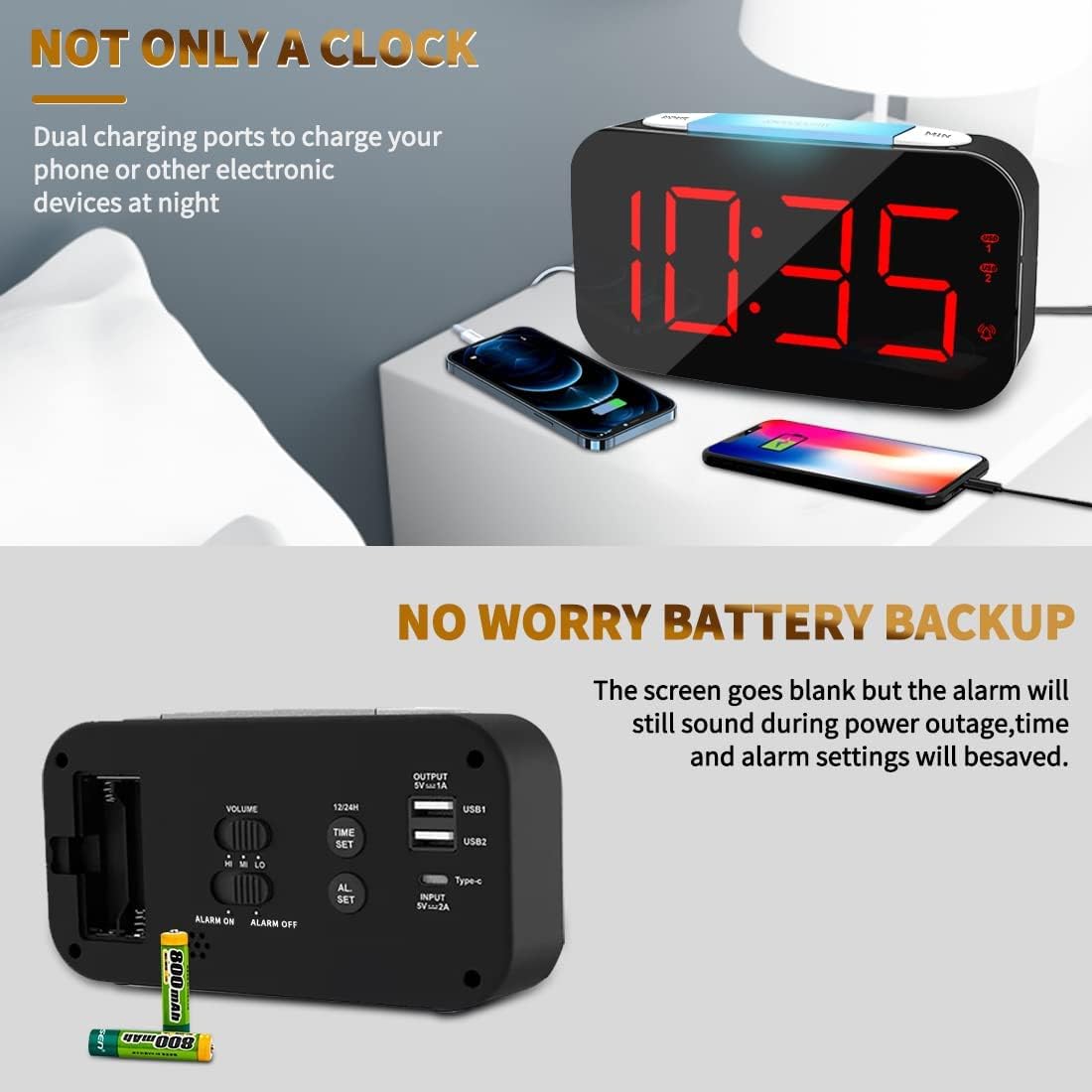
Figura 11: Puertos de carga USB duales en uso

Figure 12: USB and Type-C Output Ports
Mantenimiento
To ensure the longevity and proper functioning of your Senicare Digital Alarm Clock, please follow these simple maintenance guidelines:
- Limpieza: Use a soft, dry cloth to wipe the surface of the clock. Do not use abrasive cleaners, waxes, or solvents as they may damage the finish.
- Colocación: Coloque el reloj sobre una superficie estable y plana, lejos de la luz solar directa, fuentes de calor y humedad excesiva.
- Fuerza: Always use the original power adapter and cable provided with the device.
- Reemplazo de batería: If using the battery backup feature, replace the AAA batteries annually or when the power failure memory function becomes unreliable.
Solución de problemas
Si tiene algún problema con su despertador, consulte los siguientes problemas y soluciones comunes:
| Problema | Posible causa | Solución |
|---|---|---|
| La pantalla está en blanco o no se ilumina. | Sin conexión eléctrica ni corte de energíatage. | Ensure the power adapter is securely plugged into both the clock and a working electrical outlet. Check if there's a power outage in your area. If using battery backup, the display will be blank during an outage, but settings are saved. |
| La alarma no suena. | Alarma no activada, volumen demasiado bajo o hora de alarma configurada incorrectamente. | Comprueba el ALARMA ENCENDIDA / APAGADA switch on the back to ensure it's in the "ON" position. Adjust the VOLUMEN slider to a higher setting. Verify that the alarm time is set correctly. |
| Display digits flicker or go blank partially. | Internal component issue or power fluctuation. | Try unplugging the clock for a few minutes and then plugging it back in. If the issue persists, contact customer support for assistance. |
| Los puertos de carga USB no funcionan. | Device not properly connected or power issue. | Ensure your device's USB cable is fully inserted into the clock's USB port. Verify the clock is powered on. Try a different USB port or cable. |
Presupuesto
| Característica | Detalle |
|---|---|
| Marca | Senicare |
| Número de modelo | ZH027 |
| Color | Negro |
| Tipo de pantalla | LED digitales |
| Características especiales | Adjustable Brightness, Charging Station, Large Display, Snooze, 7-Color Night Light |
| Dimensiones del producto | 6.65" de ancho x 3.35" de alto (aprox. 16.9 cm de ancho x 8.5 cm de alto) |
| Fuente de poder | Eléctrico con cable (100-240 V CA) |
| Batería de respaldo | 2 x AAA Batteries (Not Included) for settings memory |
| Salida USB | Dual USB-A (5V 1A), One Type-C (5V 1A) |
| Material | Plástico |
| Peso del artículo | 0.63 Pounds / 10.1 ounces (approx. 286g) |
Garantía y soporte
Senicare offers a hassle-free Garantía de 18 meses for this Digital Alarm Clock. We are committed to providing high-quality products and excellent customer service.
For any questions, concerns, or warranty claims, please contact our friendly customer service team through the platform where you purchased the product. Please have your order number and product model (ZH027) ready for faster assistance.
We also offer an easy return policy. Refer to the retailer's return guidelines for more details.
Ask a question about this manual
Ask about setup, troubleshooting, compatibility, parts, safety, or missing instructions. Manuals+ will review the question and use this page’s manual context to help answer it.