
1. Introducción
This manual provides essential information for the safe and efficient operation of your Mitsubishi WD720U-G DLP Projector. Please read this manual thoroughly before using the projector and retain it for future reference. This document covers setup, operation, maintenance, troubleshooting, and detailed specifications.
2. Información de seguridad
Tenga en cuenta las siguientes precauciones de seguridad para evitar daños al proyector y garantizar la seguridad del usuario:
- No obstruya las aberturas de ventilación. Asegúrese de que haya suficiente espacio alrededor del proyector para una ventilación adecuada.
- Evite mirar directamente a la lente del proyector cuando lamp está encendido, ya que puede causar daño ocular.
- No coloque el proyector sobre un carro, soporte o mesa inestable.
- Desconecte el cable de alimentación del tomacorriente de pared si el proyector no se utilizará durante un período prolongado.
- Deje todo servicio a personal de servicio calificado.
3. Contenido del paquete
Verifique que todos los siguientes elementos estén incluidos en su paquete:
- Mitsubishi WD720U-G DLP Projector
- Cable de alimentación de CA
- Tapa del objetivo
- VGA (D-sub) Cable
- Manual de usuario en CD
4. Producto terminadoview
The Mitsubishi WD720U-G is a high-brightness DLP projector designed for various applications, featuring 3D readiness and multiple connectivity options.
4.1 Superior View
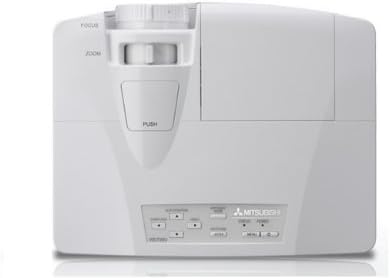
This image displays the top of the Mitsubishi WD720U-G projector. Visible features include the focus and zoom adjustment rings located near the lens, and a control panel with various buttons for menu navigation and settings adjustments.
4.2 Trasero View (Input/Output Terminals)
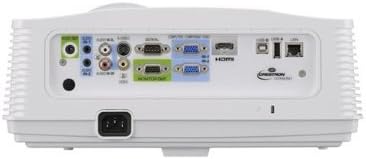
This image illustrates the rear panel of the Mitsubishi WD720U-G projector, highlighting its comprehensive array of input and output terminals. These include multiple RGB (VGA) ports, audio input/output jacks, RCA video and S-Video inputs, an HDMI port, and a network port, among others.
5. Configuración
5.1 Colocación
Position the projector on a stable, flat surface or mount it securely. Ensure the projector is within the optimal projection distance for your screen size (viewable size: 40"- 300"). Avoid placing it in direct sunlight or near heat sources.
5.2 Conexión de dispositivos
Connect your source devices (e.g., computer, Blu-ray player) to the appropriate input terminals on the projector's rear panel:
- Color: Mini D-sub 15pin x2 (for computer connections)
- Audio: Stereo mini jack (φ3.5mm) x 2 (one for PC1, another for PC2)
- Video: RCA x 1 + S-VIDEO x 1 (for standard video sources)
- Digital: HDMI x 1 (for high-definition digital sources)
- Vídeo Audio: RCA jack (L/R) x 1
5.3 Encendido y apagado
Connect the AC power cable to the projector and a power outlet. Press the power button on the projector or remote control to turn the unit on. To turn off, press the power button again and confirm the shutdown when prompted.
6. Funcionamiento del proyector
6.1 Funcionamiento básico
After powering on, adjust the focus and zoom using the rings on the projector lens until the image is clear and fills your screen. Use the control panel buttons or remote control to navigate the on-screen menu.
6.2 Ajuste de la configuración
Access the projector's menu to adjust various settings:
- Brillo: The projector offers 4300 ANSI Lumens. Adjust as needed for ambient light conditions.
- Contraste: The contrast ratio is 3000:1 (On/Off). Fine-tune for optimal image depth.
- Resolución: Native resolution is 1280 x 800. The projector supports a maximum resolution of 1600 x 1200.
- Color: The 5-Segment (R,G,B,W,Y) color wheel provides vibrant colors. Adjust color settings in the menu if necessary.
6.3 Video Compatibility
The projector supports a wide range of video formats:
- NTSC/NTSC 4.43/PAL (including PAL-M, N)/SECAM/PAL-60
- Component Video: 480i/p(525i/p), 576i/p(625i/p), 720p(750p), 1080i/p(1125i/p 60Hz), 1080i/p(1125i/p 50Hz)
6.4 3D Ready Feature
This projector is 3D-Ready. To utilize 3D functionality, compatible 3D content, 3D glasses, and a 3D-compatible source device are required.
7. Mantenimiento
7.1 Limpieza
Regularly clean the projector lens with a soft, lint-free cloth specifically designed for optical surfaces. Use a soft brush or compressed air to remove dust from the ventilation grilles. Do not use abrasive cleaners or solvents.
7.2 litrosamp Reemplazo
El proyector lamp tiene una vida útil finita. Cuando el lamp indicator lights up or the image brightness significantly decreases, the lamp may need replacement. Refer to the detailed instructions in the User Manual CD for safe lamp procedimientos de reemplazo.
8. Solución de problemas
Si tiene problemas con su proyector, consulte los siguientes problemas y soluciones comunes:
- Sin imágen: Ensure all cables are securely connected, the correct input source is selected, and the projector is powered on.
- Imagen borrosa: Adjust the focus and zoom rings on the lens. Ensure the projection surface is flat and the projector is stable.
- Imagen distorsionada: Check the projector's keystone correction settings in the menu. Ensure the projector is perpendicular to the screen.
- Sin sonido: Verify audio cables are connected correctly and the volume is not muted on both the projector and the source device.
- Advertencia de sobrecalentamiento: Ensure ventilation openings are clear and the projector is in a well-ventilated area. Turn off the projector and allow it to cool down.
9. Especificaciones
| Característica | Especificación |
|---|---|
| Marca | Mitsubishi |
| Modelo | WD720U-G |
| Tecnología de imágenes | DLP 0.65" |
| Brillo | Lúmenes 4300 ANSI |
| Resolución nativa | 1280 x 800 |
| Resolución máxima | 1600 x 1200 |
| Viewtamaño capaz | 40" - 300" |
| Relación de contraste | 3000:1 (On/Off) |
| Rueda de color | 5-Segment (R,G,B,W,Y) |
| Característica especial | Listo para 3D |
| Tipo de altavoz | Estéreo |
| Tecnología de conectividad | HDMI, VGA |
| Terminales de entrada | RGB (Mini D-sub 15pin x2), Audio (Stereo mini jack φ3.5mm x2), Video (RCA x1, S-VIDEO x1), Digital (HDMI x1), Video Audio (RCA L/R x1) |
| Compatibilidad de video | NTSC/NTSC 4.43/PAL/SECAM/PAL-60, Component Video (480i/p, 576i/p, 720p, 1080i/p) |
| Peso del artículo | 9 libras |
| Dimensiones del producto | 13.6 x 10.6 x 5.3 pulgadas |
| Usos recomendados | Cine en casa |
10. Garantía y soporte
This product is offered as an Amazon Renewed item. It has been professionally inspected and tested to work and look like new. Renewed products are eligible for replacement or refund under the Garantía renovada de Amazon if you are not satisfied with your purchase. For further support or inquiries, please refer to the documentation provided with your renewed product or contact Amazon Renewed customer service.