
1. Introducción
The DOBE TY-1793 Wireless Controller is a versatile gaming accessory designed for multi-platform compatibility. It offers seamless connectivity with Nintendo Switch, Android phones, Android TV boxes, and personal computers (PC). This controller integrates advanced features such as Bluetooth wireless technology, a wired USB connection option, Turbo function keys, a dedicated camera button, 6-axis motion sensing, and immersive motor vibration feedback. Its ergonomic design ensures a comfortable and responsive gaming experience.
2. Información de seguridad
- Mantenga el controlador alejado del agua, la humedad y temperaturas extremas.
- Evite dejar caer o someter el controlador a impactos fuertes.
- No intente desmontar ni modificar el controlador. Esto podría anular la garantía y causar daños.
- Utilice únicamente el cable de carga proporcionado o recomendado.
- Guarde el controlador en un lugar limpio y seco cuando no esté en uso.
3. Contenido del paquete
Por favor, revise el contenido del paquete al abrirlo. Si falta algún artículo o está dañado, contacte con su vendedor.
- DOBE TY-1793 Wireless Controller
- Cable de carga USB
- Manual de usuario
4. Disposición del controlador
Familiarize yourself with the buttons and features of your DOBE TY-1793 Wireless Controller.
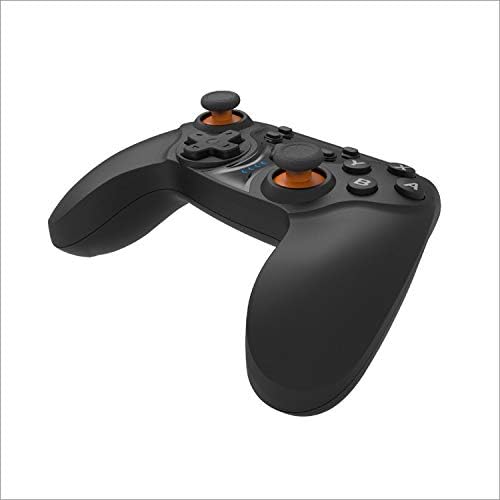
Figura 4.1: Frente view of the DOBE TY-1793 Wireless Controller, showing the dual analog sticks, D-pad, action buttons (A, B, X, Y), and central function buttons.

Figura 4.2: Lado view of the DOBE TY-1793 Wireless Controller, highlighting the USB charging/connection port located at the front edge.

Figura 4.3: Atrás view of the DOBE TY-1793 Wireless Controller, showing the ergonomic grips and battery compartment area.
Descripciones de botones:
- Joysticks analógicos izquierdo/derecho: Para un movimiento preciso de 360 grados.
- D-Pad (Pad direccional): Para entrada direccional.
- Botones de acción (A, B, X, Y): Primary game interaction buttons.
- L1/R1 (botones de hombro): Top trigger buttons.
- L2/R2 (botones de disparo): Bottom trigger buttons.
- Botón de inicio: Regresa a la pantalla de inicio del sistema.
- SELECT/MINUS Button: Generalmente se utiliza para la navegación del menú o para funciones específicas del juego.
- START/PLUS Button: Typically used for pausing or menu access.
- Botón TURBO: Activa/desactiva la función turbo para los botones asignados.
- Botón CAMERA: Captura capturas de pantalla o videoclips (la funcionalidad puede variar según la plataforma).
- Puerto USB-C: Para cargar y conexión por cable.
5. Configuración
5.1 Carga del controlador
- Connect the small end of the USB charging cable to the USB-C port on the controller.
- Connect the large end of the USB charging cable to a USB power source (e.g., PC, USB wall adapter, game console).
- The LED indicator on the controller will show charging status. It will typically turn off or change color once fully charged.
- Una carga completa tarda aproximadamente de 2 a 3 horas.
5.2 Connecting to Nintendo Switch (Bluetooth)
- En tu Nintendo Switch, ve al menú HOME.
- Seleccione ‘Controladores’ > ‘Cambiar agarre/orden’.
- Press and hold the HOME button on the DOBE TY-1793 controller for 3-5 seconds until the LED indicators start flashing rapidly.
- The Switch will detect the controller. Once connected, the corresponding player LED on the controller will light up solid.
5.3 Conexión a dispositivos Android (Bluetooth)
- Ensure Bluetooth is enabled on your Android phone or TV box.
- Vaya a la configuración de Bluetooth y busque nuevos dispositivos.
- Press and hold the HOME button on the DOBE TY-1793 controller for 3-5 seconds until the LED indicators start flashing rapidly.
- Select 'TY-1793' or a similar name from the list of available devices to pair.
- Una vez emparejado, el indicador LED se volverá fijo.
5.4 Connecting to PC (Wired USB & Bluetooth)
Conexión por cable:
- Connect the USB charging cable to the controller's USB-C port.
- Conecte el otro extremo del cable USB a un puerto USB disponible en su PC.
- The PC should automatically detect and install the necessary drivers. The controller will be ready for use.
Conexión Bluetooth:
- Asegúrese de que su PC tenga Bluetooth habilitado.
- Go to 'Settings' > 'Devices' > 'Bluetooth & other devices' and click 'Add Bluetooth or other device'.
- Seleccione 'Bluetooth'.
- Press and hold the HOME button on the DOBE TY-1793 controller for 3-5 seconds until the LED indicators start flashing rapidly.
- Select 'TY-1793' or a similar name from the list of available devices to pair.
- Una vez emparejado, el indicador LED se volverá fijo.
6. Instrucciones de funcionamiento
6.1 Encendido y apagado
- Encendido: Press the HOME button once. The controller will attempt to connect to the last paired device.
- Apagado: Press and hold the HOME button for approximately 5 seconds until the LED indicators turn off. The controller will also power off automatically after a period of inactivity.
6.2 Función Turbo
La función Turbo permite presionar un botón repetidamente mientras se mantenga presionado, lo que puede ser útil en ciertos juegos.
- Para configurar Turbo: Press and hold the button you wish to assign Turbo to (e.g., A button), then press the TURBO button once. Release both buttons. The assigned button will now have Turbo functionality.
- To Clear Turbo: Press and hold the button with Turbo assigned, then press the TURBO button once. Release both buttons. The Turbo function will be removed from that button.
- To Clear All Turbo: Press and hold the TURBO button for 3 seconds. All Turbo settings will be cleared.
6.3 Retroalimentación de vibración
The controller features built-in motor vibrators to provide immersive haptic feedback during gameplay. Vibration intensity is typically controlled by the game or system settings.
6.4 Giroscopio de 6 ejes
The integrated 6-axis gyroscope provides precise motion control, enhancing gameplay in titles that support motion sensing. This feature is automatically active when connected to compatible platforms like the Nintendo Switch.
6.5 Botón de cámara
The dedicated camera button allows for quick capture of screenshots or video clips during gameplay on supported platforms. Functionality may vary depending on the connected device and game.
7. Mantenimiento
- Limpieza: Utilice un paño suave y seco para limpiar el mando. No utilice productos químicos agresivos ni materiales abrasivos.
- Almacenamiento: Guarde el controlador en un lugar fresco y seco, alejado de la luz solar directa y de temperaturas extremas.
- Cuidado de la batería: Para prolongar la vida útil de la batería, evite descargar completamente el mando con frecuencia. Cárguelo regularmente, incluso si no lo usa constantemente.
8. Solución de problemas
8.1 Controller Will Not Power On
- Ensure the controller is charged. Connect it to a power source using the USB cable and allow it to charge for at least 30 minutes.
- Try pressing the HOME button firmly.
8.2 Controller Will Not Connect/Pair
- Asegúrese de que el controlador esté completamente cargado.
- Verify that Bluetooth is enabled on your device (Switch, Android, PC).
- Asegúrese de que el controlador esté en modo de emparejamiento (los LED parpadean rápidamente).
- Acerque el controlador al dispositivo.
- Elimine cualquier emparejamiento anterior del controlador de la configuración de Bluetooth de su dispositivo e intente emparejarlo nuevamente.
- Reinicie tanto el controlador como el dispositivo al que intenta conectarse.
- For PC, try a wired USB connection to confirm functionality.
8.3 Buttons or Joysticks Are Unresponsive
- Ensure the controller is properly connected and paired.
- Pruebe el controlador con otro juego o aplicación para determinar si el problema es específico de un título.
- Reinicie el controlador y el dispositivo conectado.
- Si utiliza una conexión por cable, pruebe con un puerto USB o cable diferente.
9. Especificaciones
| Modelo: | TY-1793 |
| Conectividad: | Bluetooth, USB con cable |
| Compatibilidad: | Nintendo Switch, Android (Phones, TV Boxes), PC |
| Tipo de batería: | Batería recargable de polímero de litio |
| Capacidad de la batería: | 400 mAh, 3.7 V |
| Características especiales: | Turbo Function, Camera Button, 6-Axis Gyroscope, Motor Vibration |
10. Garantía y soporte
This product comes with a standard manufacturer's warranty. Please refer to the warranty card included in your package or contact your retailer for specific warranty terms and conditions. For technical support or further assistance, please reach out to the customer service provided by your point of purchase.