
1. Introducción y másview
Thank you for choosing the KOORUI 22 Inch Computer Monitor. This Full HD (1920x1080) display features a high 100Hz refresh rate and 5ms response time, powered by a VA panel with an impressive 3000:1 contrast ratio. Designed for both productivity and gaming, it includes AdaptiveSync technology for smooth visuals and eye-friendly features like Blue Light Filter, Flicker-Free, and Anti-Glare. This manual provides essential information for setting up, operating, and maintaining your new monitor.
2. ¿Qué hay en la caja?
Por favor, revise el contenido de su paquete para asegurarse de que todos los artículos están presentes:
- KOORUI 22 Inch Monitor x1
- Monitor Column x1
- Monitor Bottom Base x1
- Cable de alimentación x1
- 1.4 cable HDMI 1.
- Adaptador de corriente x1
- Manual de usuario x1
- Screws (for assembly) x4

3. Configuración e instalación
3.1. Montaje del soporte del monitor
- Coloque con cuidado el monitor boca abajo sobre una superficie suave y limpia para evitar rayones.
- Push the monitor column into the main body of the monitor until it clicks securely into place. Ensure the bracket is firmly connected.
- Insert the column into the bottom base.
- Check that the base and the column are firmly connected. Place the assembled monitor on a stable, flat surface.
3.2. VESA Mounting (100x100mm Compatible)
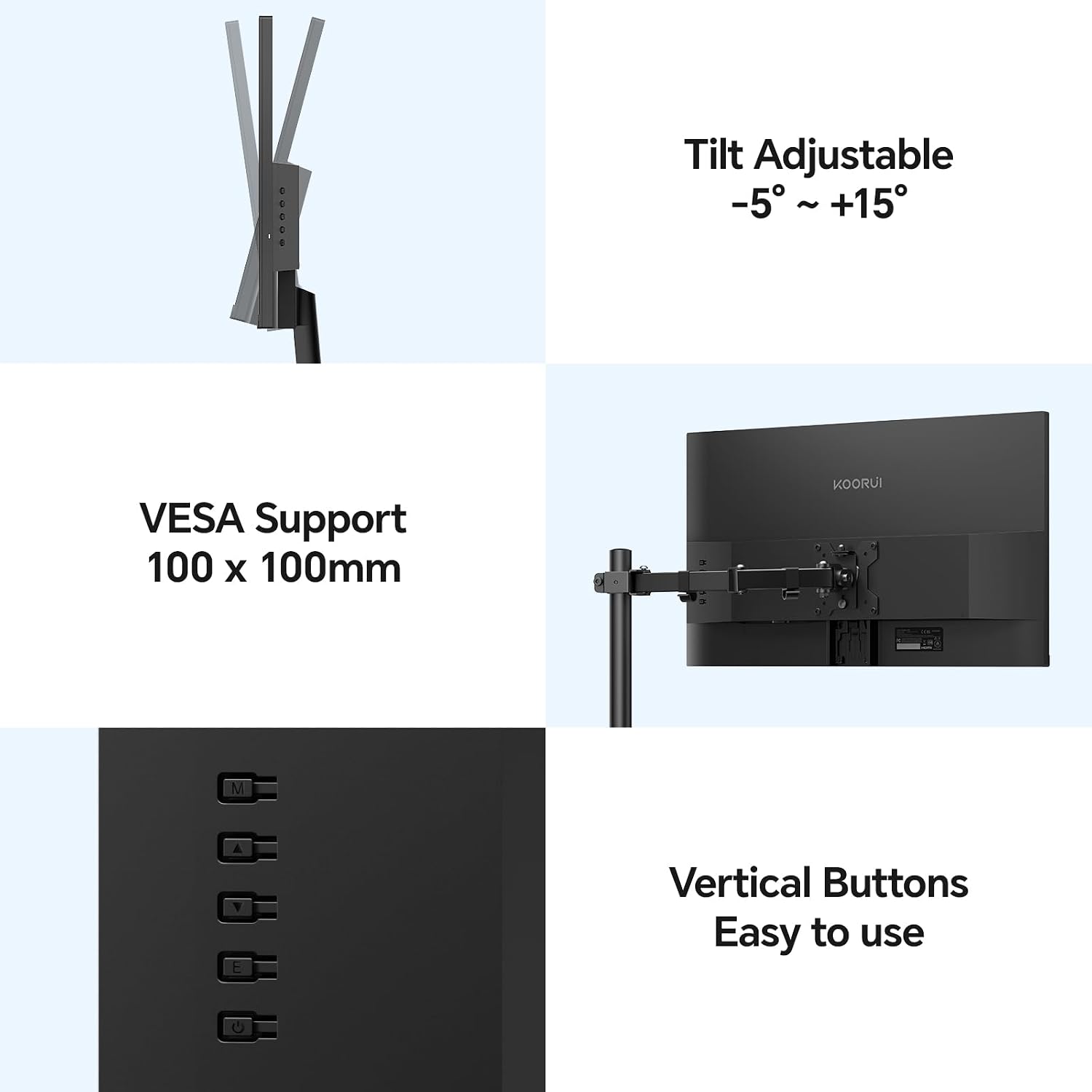
The KOORUI E2212F monitor supports VESA 100x100mm mounting standards, allowing you to attach it to compatible wall mounts or desk arms (sold separately) for enhanced flexibility and space-saving. Ensure your VESA mount is rated for the monitor's weight (2.3kg / 6.6 lbs).

3.3. Conexión a un dispositivo
Connect your computer or other device to the monitor using the provided HDMI cable or a VGA cable (not included). The monitor also features an audio output terminal for external speakers or headphones.
- HDMI (1.4): Para vídeo y audio digital de alta definición.
- VGA: Para señales de vídeo analógicas.
- Salida de audio: Conecte dispositivos de audio externos.
- DC en: Conecte el adaptador de corriente.
4. Características y uso
4.1. Rendimiento de la pantalla
- Resolución Full HD (1920x1080): Ofrece imágenes nítidas y claras.
- Panel de VA: Offers superior contrast (3000:1) and deeper blacks compared to TN and IPS panels, enhancing visual depth.
- Frecuencia de actualización de 100 Hz y tiempo de respuesta de 5 ms: Provides smoother motion and reduced input lag, ideal for gaming and fast-paced content.
- Tecnología AdaptiveSync: Sincroniza la frecuencia de actualización del monitor con la frecuencia de cuadros de su GPU, eliminando el desgarro y el tartamudeo de la pantalla para una experiencia de juego fluida.
- Gama de colores sRGB del 99 %: Garantiza una reproducción de colores precisa y vibrante.
- Brillo de 250 nits: Ofrece una visibilidad clara en diversas condiciones de iluminación.


4.2. Ergonomía y diseño
- Diseño ultradelgado: Features an 8mm profile and three-sided slim bezels, maximizing screen space and providing an immersive viewExperiencia de aprendizaje.
- Ajuste de inclinación: The monitor stand allows for tilt adjustment from -5° to +20° for optimal viewing comodidad.
- Ancho Viewángulo de inclinación: Un ángulo de 178° viewing angle ensures consistent image quality and vibrant colors from various perspectives.
- Eye-Friendly Features: Includes a Blue Light Filter, Flicker-Free technology, and Anti-Glare coating to reduce eye strain during prolonged use.


5. Especificaciones
| Característica | Descripción |
|---|---|
| Tamaño de pantalla | 22 pulgadas |
| Tipo de panel | VA |
| Resolución máxima | FHD (1920x1080) |
| Relación de aspecto | 16:9 |
| Relación de contraste | 3000:1 |
| Brillo | 250nit |
| Gama de colores | 99 % sRGB |
| Frecuencia de actualización | 100 Hz |
| Velocidad de respuesta | 5 ms |
| Sincronización adaptativa | Sí |
| Ajuste del ángulo de inclinación | -5° a 20° |
| Interfaces de datos | 1x HDMI (1.4), 1x VGA, Audio Out |
| Compatibilidad VESA | 100x100 mm |
| Peso del artículo | 2.3 kg (6.6 libras) |
| Dimensiones del producto (WxHxD) | 495 x 388 x 185 mm (19.5 x 15.35 x 7.09 pulgadas) |
| Consumo de energía | 12 V 2 A |
6. Solución de problemas
If you encounter any issues with your KOORUI monitor, please refer to the common solutions below:
- Sin pantalla/pantalla negra:
- Asegúrese de que el adaptador de corriente esté conectado de forma segura tanto al monitor como a una toma de corriente que funcione.
- Verify that the video cable (HDMI or VGA) is properly connected to both the monitor and your computer/device.
- Check the input source on the monitor using the control buttons on the back. Make sure it matches the cable you are using (e.g., HDMI if using an HDMI cable).
- Reinicie su computadora/dispositivo.
- Try a different video cable or port on your computer/device if available.
- Imagen parpadeante o distorsionada:
- Asegúrese de que el cable de vídeo esté conectado de forma segura.
- Check your computer's display settings to ensure the resolution and refresh rate are compatible with the monitor's specifications (1920x1080 at 100Hz).
- Disable or enable AdaptiveSync in your computer's graphics settings to see if it resolves the issue.
- No Audio from Monitor (if using HDMI):
- Ensure your computer's audio output is set to the monitor (e.g.,
Ask a question about this manual
Ask about setup, troubleshooting, compatibility, parts, safety, or missing instructions. Manuals+ will review the question and use this page’s manual context to help answer it.
- Ensure your computer's audio output is set to the monitor (e.g.,