
TECH PAD SW Sport Pro
Manual de usuario del reloj inteligente TECHPAD SW Sport Pro
Model: SW Sport Pro
1. Introducción
This manual provides essential instructions for setting up, operating, and maintaining your TECHPAD Smartwatch SW Sport Pro. Please read this guide thoroughly to ensure proper use and to maximize the features of your device. The smartwatch is designed to integrate with both iOS and Android smartphones, offering multisport tracking, notification alerts, and health monitoring capabilities.

Imagen 1.1: Frente view of the TECHPAD Smartwatch SW Sport Pro displaying various metrics.
2. Contenido del paquete
Por favor verifique que todos los artículos estén presentes en el paquete:
- TECHPAD Smartwatch SW Sport Pro (with pre-installed strap)
- Cable de carga
- Manual de usuario (este documento)
3. Guía de configuración
3.1. Carga del reloj inteligente
Before first use, fully charge your smartwatch. Connect the charging cable to the charging port on the back of the smartwatch and plug the USB end into a standard USB power adapter (not included) or a computer's USB port. The watch display will indicate charging status.
3.2. Encendido / apagado
- Encendido: Mantenga presionado el botón lateral hasta que la pantalla se ilumine.
- Apagado: Navigate to the 'Settings' menu on the smartwatch, then select 'Power Off' or press and hold the side button, then confirm power off.
3.3. Instalación y emparejamiento de la aplicación
To unlock the full functionality of your smartwatch, you must pair it with your smartphone via a companion application. The specific app name is not provided, please refer to the packaging or product information for the correct app to download from the App Store (iOS) or Google Play Store (Android).
- Download and install the companion app on your iOS or Android smartphone.
- Asegúrese de que Bluetooth esté habilitado en su teléfono inteligente.
- Abra la aplicación y siga las instrucciones en pantalla para crear una cuenta y configurar su cuenta profesional.file.
- Within the app, select 'Add Device' or 'Pair Smartwatch' and choose 'SW Sport Pro' from the list of available devices.
- Confirme la solicitud de emparejamiento tanto en su teléfono inteligente como en su reloj inteligente si se le solicita.
Una vez emparejado, el reloj inteligente sincronizará los datos con tu teléfono y podrás personalizar la configuración a través de la aplicación.
4. Instrucciones de funcionamiento
4.1. Navegación básica
The TECHPAD Smartwatch SW Sport Pro features a responsive touch screen and a side button for navigation:
- Deslizar hacia arriba/abajo: Desplácese por los menús y las notificaciones.
- Deslizar hacia la izquierda/derecha: Accede a diferentes widgets o funciones rápidas (por ejemplo, frecuencia cardíaca, datos de actividad).
- Grifo: Seleccione un elemento o confirme una acción.
- Botón lateral: Press to return to the home screen or wake the device. A long press may access power options.
4.2. Características principales
Your smartwatch offers a range of features to enhance your daily life and fitness:
- Multisport Mode: Track various activities such as running, walking, cycling, and more. Select your desired sport from the activity menu to begin tracking.
- Monitor de sueño: Realiza un seguimiento automático de tus patrones de sueño, incluidos el sueño profundo, el sueño ligero y los tiempos de vigilia. View Análisis detallado en la aplicación complementaria.
- Notificaciones push: Receive alerts for incoming calls, text messages, and app notifications directly on your wrist. The smartwatch will vibrate to alert you.
- Alertas de llamadas: See who is calling and choose to accept or reject calls from your smartwatch (call answering functionality may vary).
- Alarmas: Set silent vibrating alarms through the companion app to wake you up or remind you of important events.
- GPS a través de Smartphone: When connected to your smartphone, the smartwatch can utilize your phone's GPS for more accurate distance and route tracking during outdoor activities.

Image 4.1: Smartwatch display showing real-time health and activity data.
4.3. Personalización de las esferas del reloj
You can change the watch face to personalize your device. This is typically done through the companion app, where you can browse and download various watch face designs. Some watch faces may allow for customization of displayed information.
5. Mantenimiento y cuidado
To ensure the longevity and optimal performance of your TECHPAD Smartwatch SW Sport Pro, follow these care guidelines:
- Limpieza: Regularly clean the smartwatch and strap with a soft, damp Paño. Evite usar productos químicos agresivos o materiales abrasivos. Asegúrese de que los contactos de carga estén limpios y secos.
- Resistencia al agua: Refer to the product specifications for the exact water resistance rating. Avoid exposing the device to hot water, steam, or high-pressure water jets.
- Temperatura: Do not expose the smartwatch to extreme temperatures (very hot or very cold) as this can damage the battery and internal components.
- Cargando: Utilice únicamente el cable de carga incluido. No intente forzar el cargador para insertarlo en el puerto.
- Cuidado de la correa: Si la correa es extraíble, límpiela por separado. Asegúrese de volver a colocarla correctamente antes de usarla.
6. Solución de problemas
Si tiene problemas con su reloj inteligente, pruebe las siguientes soluciones:
- El reloj inteligente no se enciende: Asegúrese de que el dispositivo esté completamente cargado. Conéctelo al cable de carga y déjelo cargar durante al menos 30 minutos antes de volver a intentar encenderlo.
- No se puede emparejar con el teléfono inteligente:
- Asegúrese de que Bluetooth esté habilitado en su teléfono inteligente.
- Asegúrese de que el reloj inteligente esté dentro del alcance Bluetooth de su teléfono.
- Reinicie tanto su reloj inteligente como su teléfono inteligente.
- Borre la memoria caché de Bluetooth de su teléfono (si corresponde) e intente emparejarlo nuevamente.
- Asegúrese de que la aplicación complementaria correcta esté instalada y actualizada.
- Las notificaciones no aparecen:
- Check notification settings within the companion app to ensure they are enabled for desired applications.
- Verify that your smartphone's notification settings allow the companion app to display alerts.
- Ensure the smartwatch is connected via Bluetooth to your phone.
- Seguimiento de actividad inexacto:
- Ensure the smartwatch is worn snugly on your wrist, about one finger's width above your wrist bone.
- Update your personal information (height, weight, age) in the companion app for better accuracy.
- For GPS-dependent activities, ensure your phone's GPS is active and the smartwatch is connected to the phone.
- Duración de la batería corta:
- Reducir el brillo de la pantalla.
- Deshabilite la monitorización continua de la frecuencia cardíaca si no es necesaria.
- Limit the number of apps sending notifications to the smartwatch.
- Asegúrese de que el reloj inteligente esté completamente cargado antes de usarlo.
Si los problemas persisten, comuníquese con el servicio de atención al cliente para obtener más ayuda.
7. Especificaciones
| Característica | Descripción |
|---|---|
| Modelo | TECHPAD Smartwatch SW Sport Pro |
| Tipo de pantalla | AMOLED |
| Tamaño de pantalla | 1 pulgadas |
| Sistema operativo | Android Wear (as specified) |
| Conectividad | Bluetooth |
| Dispositivos compatibles | Teléfonos inteligentes (iOS, Android) |
| Características especiales | Sleep Monitor, Multisport Mode, Push Notifications, Call Alerts, Alarms, Touch Screen, GPS via smartphone |
| Duración de la batería (en espera) | Hasta 15 días |
| Battery Life (Training) | 4 a 6 días |
| Forma | Redondo |
| Accesorios incluidos | Strap, Charging Cable |
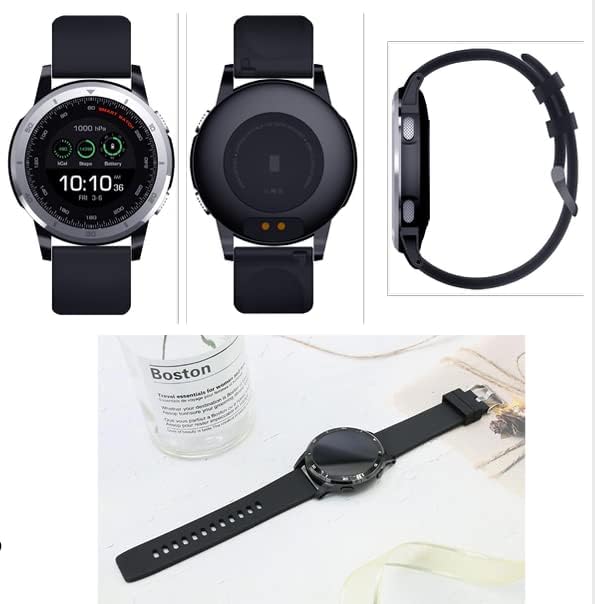
Image 7.1: Various angles of the smartwatch, including its charging contacts and side profile.
8. Garantía y soporte
For warranty information, please refer to the warranty card included with your product or visit the official TECH PAD webSitio. Conserve su comprobante de compra para reclamaciones de garantía.
If you require technical support or have questions not covered in this manual, please contact TECH PAD customer service. Contact details can typically be found on the product packaging or the official brand websitio.