
Browning BTC-8E-HP4
Manual del usuario de la cámara de seguimiento Browning Spec Ops Elite HP4
Model: BTC-8E-HP4
1. Producto terminadoview
The Browning Spec Ops Elite HP4 is an advanced trail camera designed for capturing high-quality images and videos of wildlife, particularly in low-light conditions. It features an invisible infrared flash for discreet nighttime recording and a high-resolution sensor for detailed captures. This manual provides essential information for setting up, operating, and maintaining your trail camera.
This bundle includes two Browning BTC-8E-HP4 Spec Ops Elite HP4 Trail Cameras, Blucoil 32GB SDHC Memory Cards, Blucoil AA Batteries, a Blucoil 6.5-FT Combination Cable Lock, and a VidPro USB 2.0 Card Reader.
2. ¿Qué hay en la caja?
- 2 x Browning BTC-8E-HP4 Spec Ops Elite HP4 Trail Cameras
- 2 x 6-FT Tree Mount Straps
- 1 x Blucoil 6.5-Foot Multi-Functional Combination Cable Lock with 4-Digit Password Code
- 6 x Blucoil AA Batteries
- 2 x Blucoil 32GB Class 10 SDHC SD Cards
- 1 x VidPro USB 2.0 Card Reader
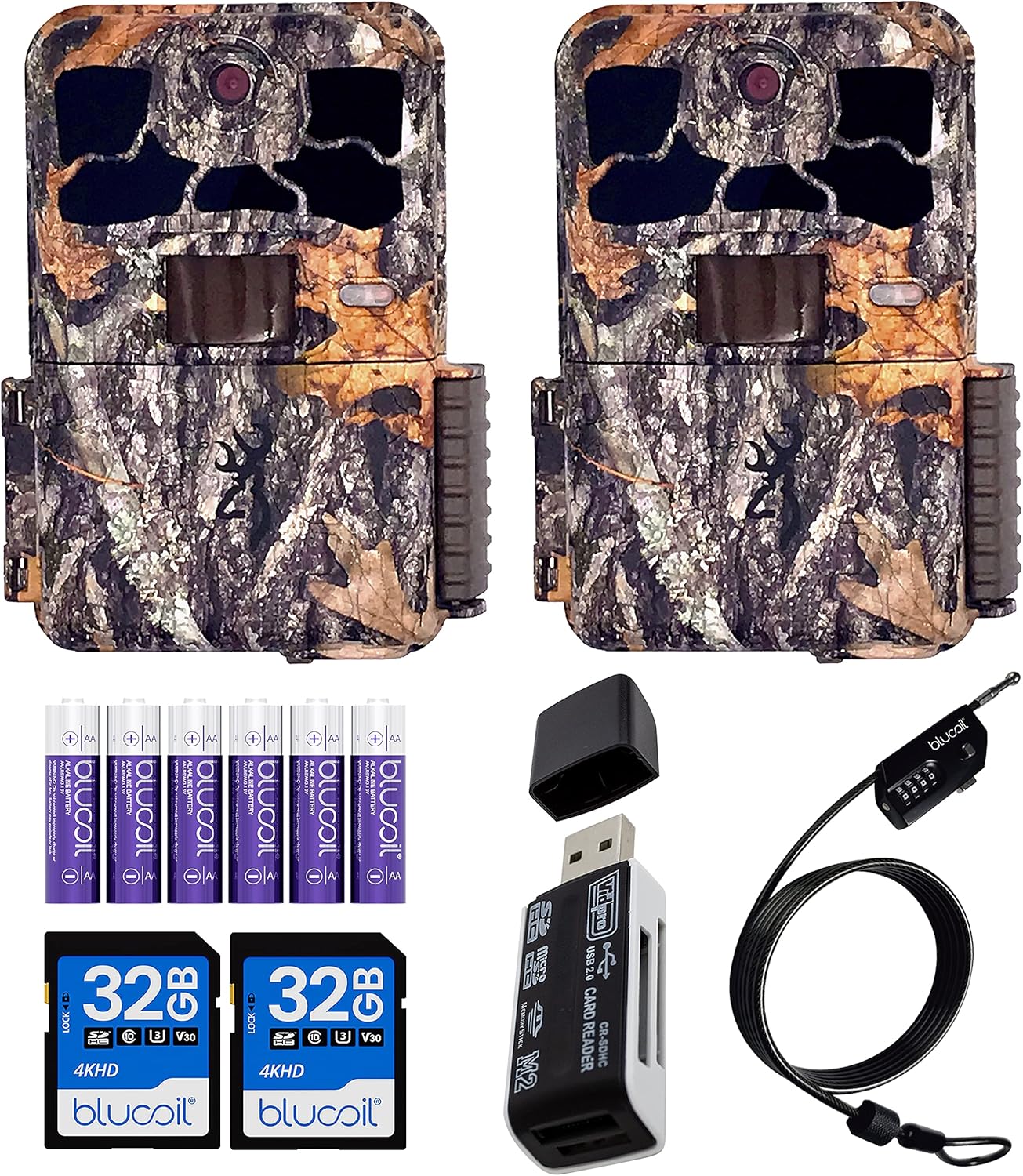
Image: Contents of the Browning Spec Ops Elite HP4 Trail Camera bundle.
3. Guía de configuración
3.1. Instalación de la batería
The Spec Ops Elite HP4 camera requires 8 AA batteries for operation. Ensure you use fresh, high-quality alkaline or lithium batteries for optimal performance and battery life.
- Abra el pestillo de la carcasa de la cámara.
- Ubique el compartimiento de la batería.
- Insert 8 AA batteries, paying close attention to the polarity indicators (+/-) inside the compartment.
- Cierre bien el compartimento de la batería.

Image: Proper battery installation in the trail camera.

Image: Blucoil AA Alkaline Batteries included in the bundle.
3.2. Inserción de la tarjeta SD
The camera supports SDXC cards up to 512GB. For best results, use Class 10 or higher SDHC/SDXC cards.
- Con la carcasa de la cámara abierta, localice la ranura para tarjeta SD.
- Insert the Blucoil 32GB SDHC card into the slot until it clicks into place. Ensure the card is inserted in the correct orientation.
- Para retirar la tarjeta, empújela suavemente hasta que salga.

Image: SD card slot visible on the camera's internal panel.
3.3. Montaje de la cámara
Use the provided tree mount strap to secure the camera to a tree or post. Position the camera at an appropriate height and angle to capture the desired area.
- Thread the strap through the mounting slots on the back of the camera.
- Wrap the strap around the tree and secure it tightly.
- Ajuste el ángulo de la cámara según sea necesario.

Imagen: Lateral view of the camera showing the mounting strap attachment point.
3.4. Securing with Cable Lock
The Blucoil 6.5-FT Multi-Functional Combination Cable Lock can be used to deter theft. The preset password is 0000, and it can be reset using the included Key Pin.
- Locate the security cable slot on the camera.
- Thread the cable lock through the slot and around the mounting surface (e.g., tree).
- Set your desired 4-digit combination.
- Secure the lock.

Image: Trail camera secured with the Blucoil combination cable lock.
4. Instrucciones de funcionamiento
4.1. Encendido / apagado
To power on the camera, slide the ON/OFF switch to the "ON" position. To power off, slide it to "OFF".
4.2. Navegando por el menú
The camera features a 2-inch colored LCD screen for menu navigation and previewing footage. Use the directional buttons and "E" (Enter) button to navigate through settings.
Image: Camera's internal LCD screen and control layout.
4.3. Modos de grabación
The Spec Ops Elite HP4 offers various recording modes:
- Modo foto: Captures still images up to 22MP resolution.
- Modo de vídeo: Records Full HD (1920 x 1080p) videos at 30 or 60 frames per second.
- Modo Timelapse Plus: Captures images at set intervals, allowing you to create timelapse videos. These can be viewed on your computer using the Buck Watch Timelapse Viewer (downloadable from Browning's websitio). Note: The Timelapse Viewer is not compatible with Mac. You may need to change the file extension from TLS to AVI for compatibility.
4.4. Capture Timer
The built-in Capture Timer allows you to control when the camera is active. You can set it to record only during specific hours, such as daytime or nighttime, to conserve battery life and focus on relevant activity.
4.5. Viewing Footage
Puedes preview captured photos and videos directly on the camera's 2-inch color LCD screen. The screen displays information such as time, date, temperature, barometric pressure, and moon phase.
Para detallado viewing and management, remove the SD card and insert it into the VidPro USB 2.0 Card Reader. Connect the card reader to your computer to access the files.

Image: VidPro USB 2.0 Card Reader for accessing footage en una computadora.
5. Mantenimiento
- Limpieza: Regularly wipe the camera lens and IR flash window with a soft, lint-free cloth to ensure clear images. Keep the housing free of dirt and debris.
- Cuidado de la batería: Reemplace las pilas cuando aparezca el indicador de batería baja. Retire las pilas si no va a utilizar la cámara durante un período prolongado para evitar fugas.
- Gestión de tarjetas SD: Format your SD card periodically to maintain optimal performance and prevent data corruption. Back up important footage antes de formatear.
- Almacenamiento: Cuando no esté en uso, guarde la cámara en un lugar fresco y seco, alejado de la luz solar directa y de temperaturas extremas.
6. Solución de problemas
| Problema | Posible causa / solución |
|---|---|
| La cámara no enciende |
|
| Mala calidad de imagen/vídeo por la noche |
|
| La cámara no detecta movimiento |
|
| SD card error / Cannot save files |
|
| Timelapse videos not playing on Mac |
|
7. Especificaciones
| Característica | Detalle |
|---|---|
| Modelo | BTC-8E-HP4 |
| Resolución de la imagen | Hasta 22MP |
| Resolución de vídeo | 1920 x 1080p FHD at 30/60FPS |
| Rango de detección | 80 pies |
| Rango de flash IR | 90-FT (Invisible "Night Vision") |
| Velocidad de disparo | 0.1 s-0.7 s |
| Tiempo de recuperación | 0.5 segundos |
| Pantalla LCD | 2" Colored |
| Fuente de poder | 8 pilas AA |
| Soporte de tarjeta SD | Up to 512GB SDXC card (Class 10 or higher recommended) |
| Sistema operativo compatible | Windows (Buck Watch Timelapse Viewer not compatible with Mac) |
| Material | Zinc |
| Dimensiones | 1 x 1 x 1 pulgadas |
| Peso | 1 libra |
| Resistencia al agua | Impermeable (IP54) |
8. Garantía y soporte
For detailed warranty information and technical support, please refer to the official Browning Trail Cameras webSitio web o contacte directamente con el servicio de atención al cliente. Conserve su recibo de compra como comprobante para cualquier reclamación de garantía.
Puedes visitar el Tienda Browning en Amazon para obtener más información sobre el producto.
Ask a question about this manual
Ask about setup, troubleshooting, compatibility, parts, safety, or missing instructions. Manuals+ will review the question and use this page’s manual context to help answer it.