
1. Introducción
The Pymeter Thermostat Controller PY-21TS is a dual-relay temperature control device designed for precise temperature management. It allows for simultaneous control of heating and cooling equipment, making it suitable for a wide range of applications including seedling germination, greenhouse temperature regulation, reptile terrariums, fermentation, and more. This manual provides essential information for the safe and effective operation of your device.
2. Información de seguridad
- Lea todas las instrucciones detenidamente antes de utilizar el dispositivo.
- Do not immerse the controller unit or the temperature probe in water or other liquids.
- Asegúrese de que la fuente de alimentación voltage coincide con los requisitos del dispositivo (120 V CA).
- Do not exceed the maximum output load of 1200W (10A) for the combined outlets.
- Mantenga el dispositivo fuera del alcance de los niños y las mascotas.
- Desconecte la alimentación antes de limpiar o realizar cualquier mantenimiento.
3. Características del producto
- Control de temperatura: Allows presetting of temperatures to automatically activate heating and cooling equipment.
- Dual Relay System: Supports simultaneous connection and control of both heating and cooling devices.
- Ventana de visualización doble: Shows both the measured (PV) and set (SV) temperatures concurrently. Supports both Celsius (°C) and Fahrenheit (°F) display.
- Alarm Device: Features a beeping alarm for high temperature conditions or sensor failure, enhancing safety.
- Conectar y usar: Designed for easy setup and operation across various settings and devices.
- Higher Power Output: Maximum output load of 1200W (10A).
- Funciones avanzadas: Includes temperature calibration and a power-on delay function to prevent frequent compressor cycling.
- Aplicaciones versátiles: Ideal for heat mats, heat lamps, heating pads for reptile terrariums, aquarium heaters/chillers, greenhouses, grow tents, breeding, seedling, and fermentation processes.
4. Contenido del paquete
- 1 x Pymeter Thermostat Controller PY-21TS
- Sonda de temperatura 1 x
- 1 x Manual de usuario (este documento)

Image: Pymeter Thermostat Controller PY-21TS with its temperature probe and power cord.
5. Configuración
- Connect the Temperature Probe: Insert the metal tip of the temperature probe into the designated port on the side of the controller. Ensure it is securely connected.
- Encienda el controlador: Plug the controller's power cord into a standard 120V AC electrical outlet. The display will illuminate, showing the current temperature (PV) and the set temperature (SV).
- Conectar electrodomésticos: Plug your heating device into one of the outlets (OUT 1 or OUT 2) and your cooling device (if applicable) into the other. The controller can manage both simultaneously.
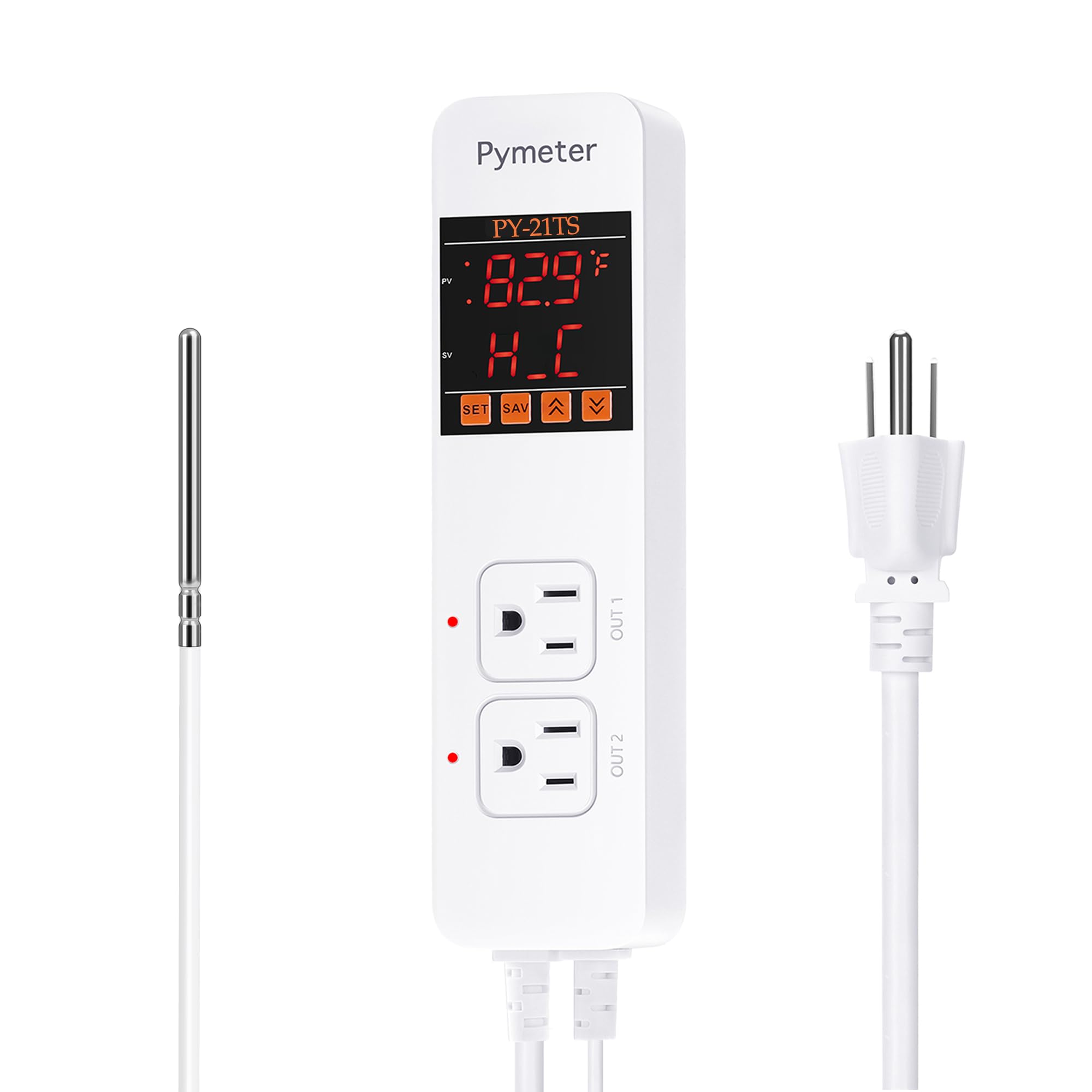
Image: The Pymeter controller connected to a heat mat for seedling germination, illustrating a typical setup.
6. Instrucciones de funcionamiento
6.1 Comprender la pantalla
El controlador cuenta con una pantalla dual:
- PV (valor del proceso): Displays the current measured temperature from the probe.
- SV (Valor establecido): Displays the target temperature or the ON/OFF temperature settings.
6.2 Setting Temperature (Heating Mode)
In heating mode, the device turns ON when the temperature drops below the ON-Temperature and turns OFF when it reaches the OFF-Temperature. For heating, the ON-Temperature must be set MÁS BAJO than the OFF-Temperature.
- Presione el COLOCAR button once. The ON-Temperature (e.g., '1oN' for Outlet 1) will flash.
- Utilice el UP or ABAJO arrows to adjust the desired ON-Temperature.
- Prensa COLOCAR again. The OFF-Temperature (e.g., '1oF' for Outlet 1) will flash.
- Utilice el UP or ABAJO arrows to adjust the desired OFF-Temperature.
- Presione el AHORRAR button to confirm and save your settings.
Example: For heating, if you set ON-Temp to 70°F and OFF-Temp to 75°F, the heater will turn on at 70°F and turn off at 75°F.
6.3 Setting Temperature (Cooling Mode)
In cooling mode, the device turns ON when the temperature rises above the ON-Temperature and turns OFF when it reaches the OFF-Temperature. For cooling, the ON-Temperature must be set MÁS ALTO than the OFF-Temperature.
- Follow steps 1-4 from the Heating Mode instructions to adjust ON-Temperature and OFF-Temperature.
- Ensure the ON-Temperature is set MÁS ALTO than the OFF-Temperature for cooling operation.
- Presione el AHORRAR button to confirm and save your settings.
Example: For cooling, if you set ON-Temp to 80°F and OFF-Temp to 75°F, the cooler will turn on at 80°F and turn off at 75°F.
6.4 Selección de la unidad de temperatura (°C/°F)
Para cambiar entre Celsius y Fahrenheit, mantenga presionada la tecla UP arrow button for approximately 3 seconds. The display will change units accordingly.
6.5 Calibración de temperatura
The Pymeter controller is factory-calibrated for accuracy. If you suspect an inaccurate reading, you can perform a calibration using an ice-water mixture. An ice-water mixture (melting ice) should read 32°F (0°C).
- Place the temperature probe into a mixture of ice and water, ensuring the ice is melting.
- Allow a few minutes for the probe to stabilize. The reading should be 32°F or 0°C.
- If the reading is off, consult the full manual for specific calibration steps, which typically involve an offset adjustment in the settings menu.
6.6 Power-On Delay Function
This function prevents rapid cycling of compressors (e.g., in chillers) by introducing a delay before restarting after a power interruption or temperature change. This protects the equipment and extends its lifespan. The delay time can usually be adjusted in the advanced settings.
6.7 Configuración de alarma
The controller can be configured to sound an alarm if the temperature exceeds or falls below a set range, or if the sensor malfunctions. Refer to the detailed manual for specific steps to set high/low temperature alarm thresholds and enable/disable the sensor fault alarm.

Image: The Pymeter controller regulating temperature in a greenhouse, connected to both a space heater and an exhaust fan.

Image: The Pymeter controller providing temperature regulation for a reptile terrarium, connected to a heat lamp and a heating mat.
7. Mantenimiento
- Limpieza: Wipe the controller's exterior with a soft, dry cloth. Do not use abrasive cleaners or immerse in water.
- Cuidado de la sonda: Mantenga la sonda de temperatura limpia y libre de residuos. Evite doblar o dañar el cable de la sonda.
- Almacenamiento: Guarde el dispositivo en un lugar fresco y seco cuando no esté en uso, lejos de la luz solar directa y de temperaturas extremas.
- Verificación de conexión: Periodically inspect all electrical connections for wear or damage.
8. Solución de problemas
| Problema | Posible causa | Solución |
|---|---|---|
| El dispositivo no se enciende. | No power to the outlet; loose power cord. | Check the power outlet with another device. Ensure the controller's power cord is fully inserted. |
| Appliance (heater/cooler) not activating. | Incorrect ON/OFF temperature settings; appliance not plugged in or faulty. | Verify ON-Temp and OFF-Temp settings are correct for heating/cooling mode. Ensure appliance is properly plugged into the controller and is functional. |
| Lectura de temperatura inexacta. | Sensor dirty or damaged; need for calibration. | Clean the sensor. Perform temperature calibration using an ice-water mixture (refer to section 6.5). |
| Alarm beeping continuously. | Temperature outside set alarm limits; sensor fault. | Check the current temperature and compare it to your alarm settings. Inspect the sensor connection and cable for damage. |
9. Especificaciones
- Modelo: PY-21TS
- Volumentage: 120 Voltios AC
- Carga máxima de salida: 1200 W (10 A)
- Operating Temperature (Device): Hasta 210 ° F (99 ° C)
- Dimensiones del producto: 8.26" de largo x 2.16" de ancho x 1.57" de alto (210 mm x 55 mm x 40 mm)
- Peso del artículo: 16 onzas (1 libra)
- Tipo de pantalla: LCD o LED
- Color: Blanco
10. Garantía y soporte
Pymeter products are designed for reliability and performance. For specific warranty details, technical support, or service inquiries, please refer to the warranty card included with your purchase or visit the official Pymeter website. Please have your model number (PY-21TS) and purchase information ready when contacting support.