
1. Producto terminadoview
The DALY Smart BMS (Battery Management System) is designed for Li-ion 17S 60V 60A battery packs. It features a programmable Bluetooth module and a common port for both charging and discharging. This BMS provides essential protection functions and allows for real-time monitoring and parameter adjustments via a mobile application.

Figure 1: DALY Smart BMS with Bluetooth module and smartphone app interface.
Características principales:
- Supports up to 60A continuous discharge and 30A charge current. Suitable for high current applications.
- Programmable temperature protection: Stops current if battery temperature limits are exceeded.
- Programmable over-charge and over-discharge protection: Stops charging/discharging when voltage limits are reached.
- Programmable over-current protection: Stops charging/discharging if current exceeds limits.
- Integrated Bluetooth module for mobile app (iOS & Android) connectivity.
- UART cable for PC monitoring and parameter setting.
- SOC (State of Charge) calculation with automatic learning function.
- Automatic battery charge function or static balance function.

Figure 2: The DALY Smart BMS offers 12 protection functions including Bluetooth, programmable settings, over-charging, over-discharging, over-current, short-circuit, over-voltage, balance, NTC temperature, waterproof, moistureproof, fireproof, and dustproof features.
2. Información de seguridad
Adherence to safety guidelines is crucial for the proper and safe operation of the DALY Smart BMS. Failure to follow these instructions may result in damage to the product, battery, or personal injury.
- Do not charge the battery pack at temperatures below -1°C.
- Always follow battery management guidelines to prevent over-charge, over-discharge, and voltage desequilibrio.
- Keep the BMS and battery pack away from extreme temperatures and humidity.
- Ensure all wiring connections are secure and correct before operation. Incorrect wiring can cause damage.
- Only use the specified balance wires and cables provided with the BMS.
- Consult a qualified professional if you are unsure about any installation or operation steps.
3. Configuración e instalación
Careful installation is essential for the correct functioning of your DALY Smart BMS. Please follow these steps precisely.
3.1 Conexión del cableado
- Preparación: Ensure all power sources are disconnected. Tools needed include a soldering machine (suggested 662°F/350°C), scissors, double-sided tape, tin wire, and a multimeter.
- Cables de equilibrio: Disconnect balance wires from the BMS connection port. Connect the balance wires to your battery pack, ensuring correct polarity and sequence.
- Conexión BMS: Connect the main negative (B-) and positive (P+) wires from the battery pack to the BMS.
- Balance Wire Reconnection: After confirming all balance wires are correctly welded and installed, connect them to the BMS connection port.
- Módulo NTC y Bluetooth: Plug in the NTC (temperature sensor) and Bluetooth module into their respective ports on the BMS.
- Activación: Presione el botón en el módulo Bluetooth para activar el BMS inteligente.

Figure 3: Wiring diagram showing connections for the DALY Smart BMS, battery pack, charger, and motor/load. Ensure balance wires are connected correctly from the last series to the first series of the battery cells.
3.2 Configuración de la aplicación móvil
- Descargar aplicación: Buscar "Smart BMS" in the Huawei App Store or Apple App Store and download the application.
- Conectar a través de Bluetooth: Open the Smart BMS app and connect to the corresponding Bluetooth device listed.
- Configuración de parámetros inicial: Para el primer encendido, la capacidad de la batería debe ajustarse a la capacidad real de su paquete de baterías. La contraseña inicial para cambiar los parámetros es 123456.
Video 1: Official DALY Smart BMS setup and app connection guide. This video demonstrates the wiring process, activating the BMS, connecting to the mobile app, viewing battery parameters, and setting initial battery capacity.
4. Instrucciones de funcionamiento
The DALY Smart BMS allows for comprehensive monitoring and control of your battery pack.
4.1 Monitoreo en tiempo real
Use the "Smart BMS" mobile application to monitor battery status in real-time. This includes:
- Estado de carga (SOC)
- Corriente (carga/descarga)
- Volumentage (volumen celular total e individual)tagél)
- Temperatura
- Warning and fault messages
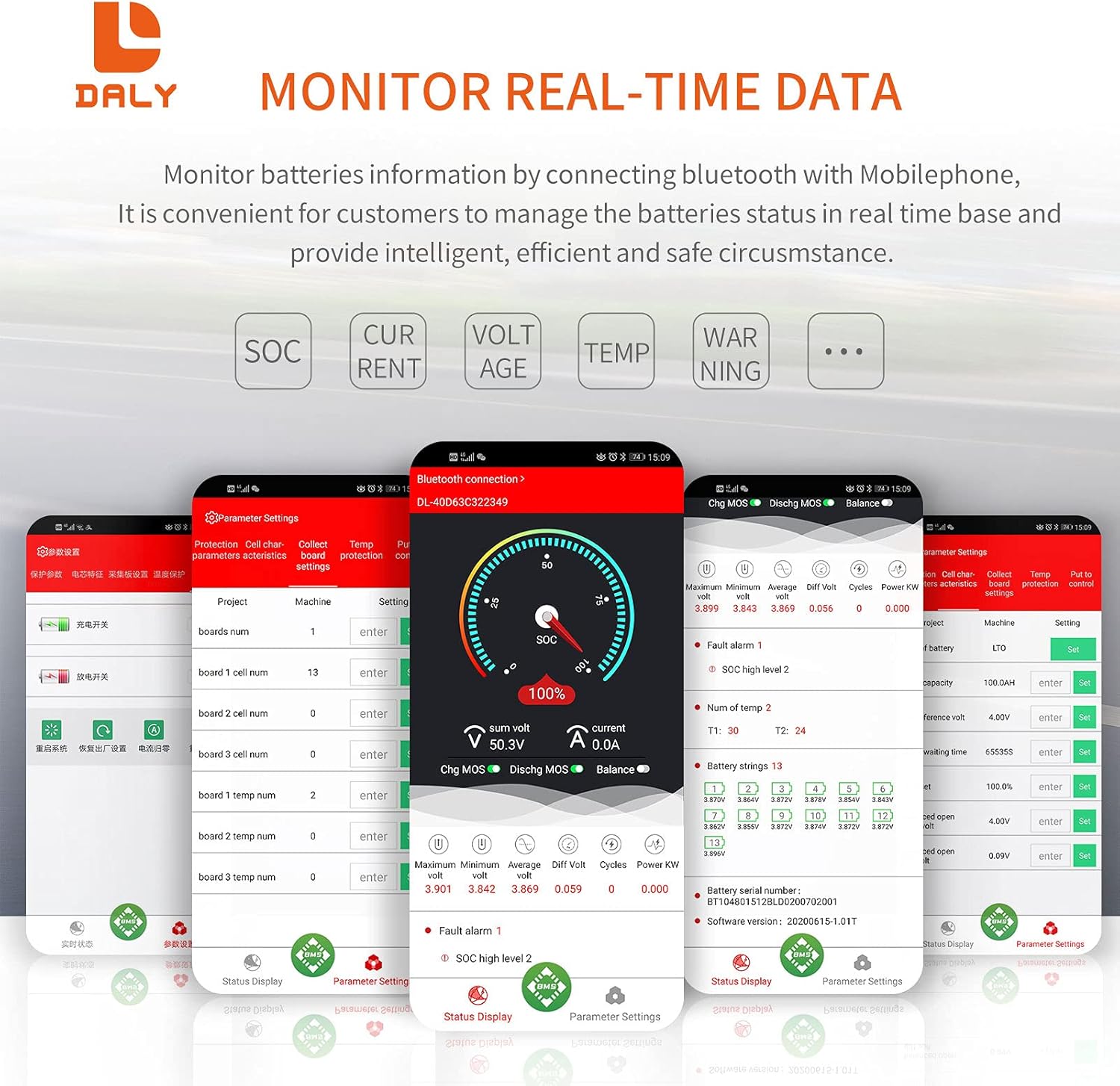
Figure 4: Real-time data monitoring via the DALY Smart BMS mobile application, showing SOC, current, voltage, y temperatura.
4.2 Configuración de parámetros
The app allows you to adjust various protection parameters to suit your battery type and application. Always ensure you understand the implications of changing these settings.
- Vol de celdatage high/low protection limits.
- Vol. Totaltage high/low protection limits.
- Charge/discharge over-current protection limits.
- High/low temperature protection limits for charging and discharging.
- Vol. inicial del saldotage y vol diferencialtage.
The BMS also supports PC monitoring via the UART cable, providing a detailed interface for advanced users to view y ajustar los parámetros.
5. Mantenimiento
Regular maintenance ensures the longevity and optimal performance of your DALY Smart BMS and battery pack.
- Comprobaciones de conexión: Inspeccione periódicamente todas las conexiones del cableado para comprobar su firmeza y evitar la corrosión. Las conexiones sueltas pueden provocar un rendimiento deficiente o riesgos de seguridad.
- Actualizaciones de firmware: Consulte el AVAD website or app for any available firmware updates for your BMS model. Updates can improve performance and add new features.
- Condiciones ambientales: Ensure the BMS is operated within its specified temperature and humidity ranges. Avoid exposure to direct sunlight, water, or excessive dust.
- Limpieza: Mantenga el BMS limpio y libre de polvo y residuos. Utilice un paño suave y seco para limpiarlo. No utilice limpiadores líquidos.
- Calibración de batería: The BMS features automatic SOC calibration. For accurate readings, ensure the battery is fully charged periodically until the voltage reaches the high protection limit, allowing the BMS to recalibrate.
6. Solución de problemas
Esta sección aborda problemas comunes que puede encontrar con su DALY Smart BMS.
| Problema | Posible causa | Solución |
|---|---|---|
| BMS not activating / no power output |
|
|
| La aplicación Bluetooth no se conecta |
|
|
| BMS shuts down unexpectedly |
|
|
| Inaccurate SOC or cell voltaglecturas electrónicas |
|
|
7. Especificaciones
Detailed technical specifications for the DALY Smart BMS Li-ion 17S 60V 60A.
| Característica | Detalle |
|---|---|
| Tipo de producto | Puerto común de iones de litio 17S 60A con equilibrio |
| Comunicaciones | UART, Bluetooth (opcional: CAN/RS485) |
| Corriente de descarga | 60A (Continuo) |
| Corriente de sobredescarga | 90A ± 9A (Programmable) |
| Corriente de carga | 30A (Continuo) |
| Corriente de sobrecarga | 90A ± 9A (Programmable) |
| Volumen de sobrecargatage | 4.25V ± 0.05V (per string, Programmable) |
| Vol. De descarga excesivatage | 2.7V ± 0.1V (per string, Programmable) |
| Vol de cargatage | 71.4V (Programmable) |
| Modelo | R25T |
| Dimensiones | 128 x 66 x 18 mm (5.04 x 2.6 x 0.71 pulgadas) |
| Calibre del cable de salida | 16 AWG |
| Cables de equilibrio | 24AWG/350 mm |
| Peso | ~333g (12.8 ounces) |
| Material | Policarbonato (PC) |
| Tecnología de conectividad | Bluetooth |
| Fuente de poder | Funciona con pilas |
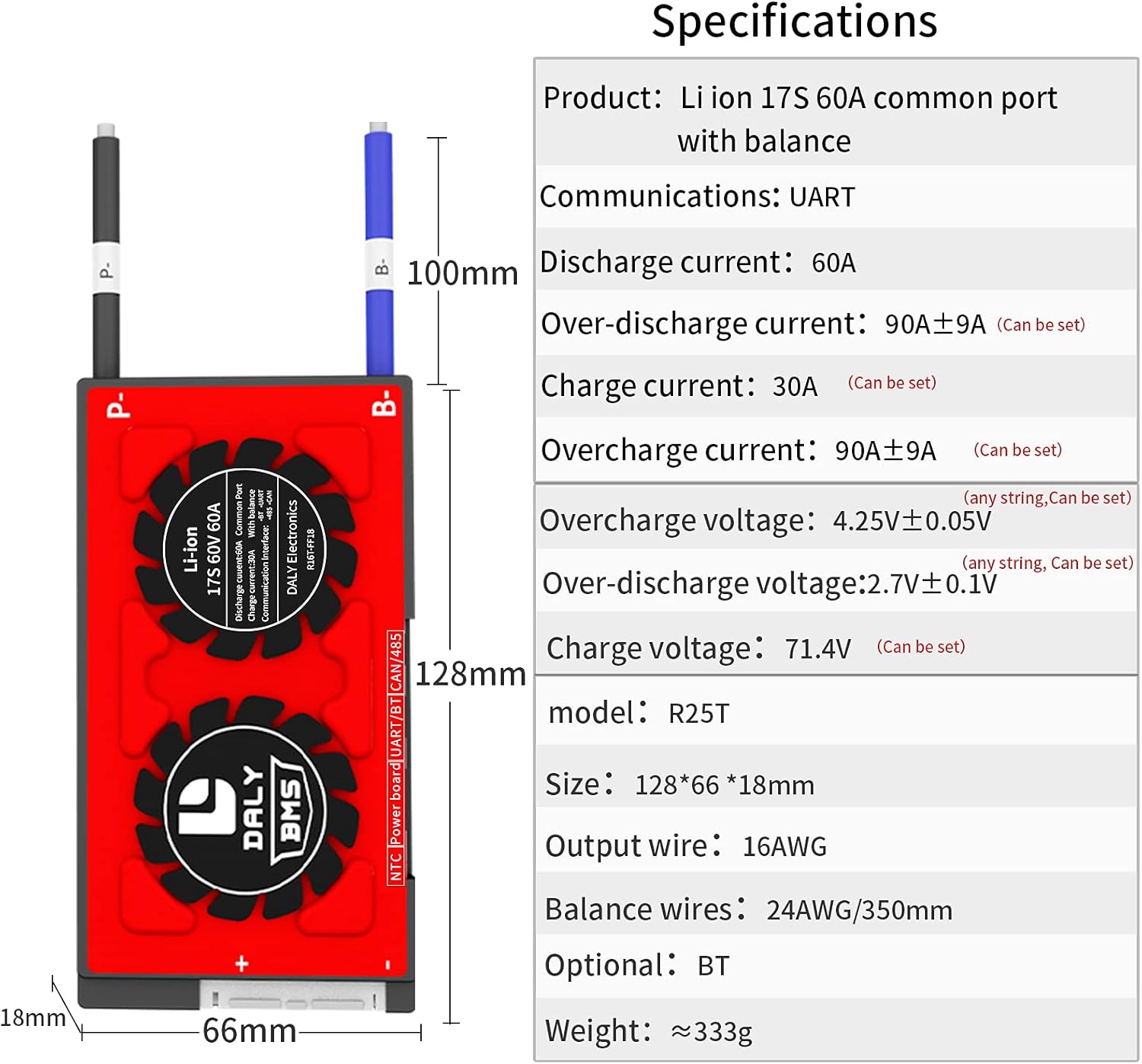
Figure 5: Physical dimensions and key electrical specifications of the DALY Smart BMS.
8. Garantía y soporte
For warranty information, technical support, or service inquiries, please refer to the official DALY websitio o póngase en contacto con su distribuidor.
- Planes de protección: Optional 2-Year and 3-Year protection plans may be available for purchase. Refer to your purchase documentation for details.
- Política de devoluciones: A 30-day refund/replacement return policy typically applies. Consult your seller for specific terms.
- Fabricante: AVISO DE CALIDAD
- Contacto: Para obtener más ayuda, visite el DalyBMS Store on Amazon or the official DALY websitio.