
Saooer BLUE 20A
Saooer 20A Solar Charge Controller User Manual
Model: BLUE 20A
Introducción
This manual provides essential information for the safe and efficient operation of your Saooer 20A Solar Charge Controller. This intelligent regulator is designed to manage the working of solar panels and batteries in a solar system, featuring dual USB ports for mobile device charging. It is compatible with 12V and 24V systems and includes multiple protection functions to ensure system efficiency and prolong battery lifespan.

Figura 1: Frente view of the Saooer 20A Solar Charge Controller.
Instrucciones de seguridad
- Ensure all connections are correct before powering on the controller. Incorrect wiring can damage the device or connected components.
- The controller is designed for indoor use or in a protected environment. Avoid exposure to direct sunlight, high temperatures, or moisture.
- No intente desmontar ni reparar el controlador usted mismo. Para obtener servicio técnico, contacte con personal cualificado.
- Mantener fuera del alcance de los niños.
- This controller is only suitable for lead-acid batteries: OPEN, AGM, GEL. Do not use with other battery types like Lithium-ion or LiFePO4, as this may cause damage or safety hazards.
- Always connect the battery first, then the solar panel, and finally the load. When disconnecting, reverse the order: disconnect the load, then the solar panel, and finally the battery.
Características del producto
- Sistema automático Voltage Identificación: Detecta automáticamente el volumen del sistema de 12 V/24 Vtage.
- Carga PWM: Efficient Pulse Width Modulation charging mode.
- Puertos USB duales: Provides 5V/2A output for charging mobile devices.
- Pantalla LCD: Clear display of status and data, allowing for convenient mode switching and parameter configuration.
- Funciones de protección múltiples: Incluye protección contra cortocircuitos, protección contra circuitos abiertos, protección inversa y protección contra sobrecargas.
- Parámetros ajustables: User-adjustable charge and discharge parameters.
- Compensación de temperatura: Compensación automática de temperatura para una carga óptima.
Configuración e instalación
Follow these steps carefully to install your solar charge controller. Incorrect installation can lead to damage or malfunction.
- Preparar el cableado: Ensure all wires are properly stripped and have appropriate connectors if necessary. Use wires of sufficient gauge for your system's current.
- Conecte la batería: Connect the battery to the charge regulator first. Observe correct polarity (+ to + and - to -). The controller will automatically recognize the battery voltage (12 V o 24 V).
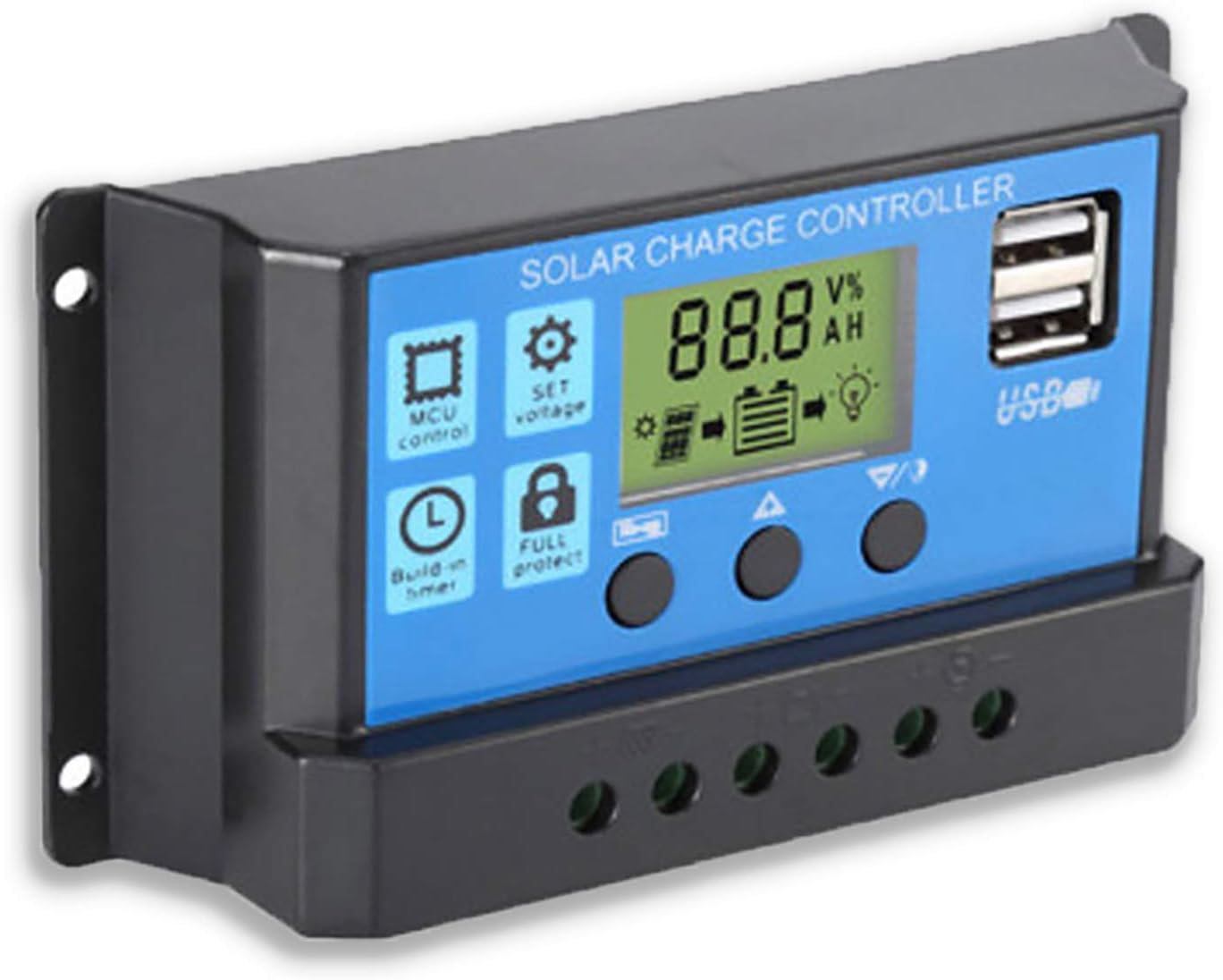
Figura 2: Lado view showing the connection terminals for battery, solar panel, and load.
- Conecte el panel solar: Connect the solar panel to the solar charge controller. Ensure correct polarity.
- Conectar la carga: Connect the consumer or load to the charge controller regulator. Ensure correct polarity.
Nota importante: Always connect the battery first, then the solar panel, and finally the load. When disconnecting the controller, please remove the solar panel, then the load, and finally the battery. This sequence helps the controller recognize the battery voltage correctly and prevents damage.
Instrucciones de funcionamiento
Pantalla LCD y botones

Figura 3: Angulado view mostrando la pantalla LCD y los botones de control.
El controlador cuenta con una pantalla LCD y tres botones para su funcionamiento:
- Botón de menú: Used to cycle through display modes and enter parameter setting mode.
- Botón de arriba: Se utiliza para aumentar valores o navegar hacia arriba en los menús.
- Botón Abajo: Se utiliza para disminuir valores o navegar hacia abajo en los menús.
Modos de visualización
Press the Menu button to cycle through the following display modes:
- Volumen de la bateríatagmi (V)
- Vol. Del panel solartagmi (V)
- Corriente de carga (A)
- Battery Temperature (°C)
- Corriente de carga (A)
- Corriente de descarga (A)
- Load Working Mode (24H, 0-23H, 0H)
Configuración de parámetros
To enter parameter setting mode, press and hold the Menu button for 5 seconds. Use the Up and Down buttons to adjust values, and the Menu button to confirm and move to the next parameter. Press and hold Menu again to exit setting mode.
| Parámetro | Descripción | Default (12V) | Range (12V) |
|---|---|---|---|
| B01/B02/B03 | Battery Type Selection (B01=Lead-acid, B02=Lithium Ion, B03=LiFePO4) | B01 | N / A |
| Charge Off Voltage | Volumentage at which charging stops | 14.4 V | 13.0 V - 15.0 V |
| Descarga Reconexión Voltage | Volumentage at which load reconnects after low voltage desconectar | 12.6 V | 11.0 V - 13.5 V |
| Volumen de parada de descargatage | Volumentage at which load disconnects to protect battery | 10.7 V | 9.0 V - 11.5 V |
| Load Working Time | Timer for load output (24H, 0-23H, 0H) | 24H | N / A |
Note: For 24V systems, multiply the 12V values by two.
Mantenimiento
- Inspección regular: Revise periódicamente todas las conexiones del cableado para verificar que estén bien apretadas y no presenten corrosión.
- Limpieza: Mantenga el controlador limpio y sin polvo. Utilice un paño seco para limpiarlo.
- Ventilación: Asegúrese de que haya una ventilación adecuada alrededor del controlador para evitar el sobrecalentamiento.
- Estado de la batería: Supervisar el volumen de la bateríatage and health regularly. Replace batteries as needed.
Solución de problemas
| Problema | Posible causa | Solución |
|---|---|---|
| El controlador no se enciende / La pantalla LCD está en blanco | Batería no conectada o polaridad invertida; Volumen de la bateríatagy demasiado bajo. | Check battery connections and polarity. Ensure battery has sufficient charge. |
| El panel solar no carga la batería | Solar panel not connected or reverse polarity; Insufficient sunlight; Damaged solar panel. | Check solar panel connections and polarity. Ensure panel is in direct sunlight. Test solar panel output. |
| La carga no funciona | Carga no conectada o polaridad invertida; Volumen de la bateríatage demasiado bajo (bajo volumen)tage disconnect); Overload protection activated. | Check load connections and polarity. Charge battery. Reduce load or check for short circuit. |
| Los puertos USB no cargan | Vol de la bateríatage too low; Device not compatible; Faulty USB cable. | Ensure battery is charged. Try a different device or cable. |
| El controlador se calienta | Sobrecarga; Mala ventilación. | Reduce load. Ensure controller has adequate airflow and is not in an enclosed space. |
Presupuesto
| Característica | Detalle |
|---|---|
| Modelo | AZUL 20A |
| Vol del sistematage | 12V / 24V Auto |
| Corriente máxima de carga/descarga | 20A |
| Salida USB | Dual USB, 5V/2A (Max) |
| Compatibilidad del tipo de batería | Lead-acid (OPEN, AGM, GEL) |
| Dimensiones del producto | 5.12 x 2.76 x 1.5 pulgadas (133 mm x 70 mm x 38 mm aprox.) |
| Peso del artículo | 5 onzas |
| Mostrar | Pantalla LCD |
| Temperatura de funcionamiento | -35°C a +60°C |

Figure 4: Product dimensions of the solar charge controller.
Garantía y soporte
For warranty information or technical support, please contact the manufacturer, Saooer, through their official channels. Refer to your purchase documentation for specific warranty terms and contact details.
Fabricante: Saooer
ASIN: B095764VB7
Código postal: 605832982977
Puedes visitar el Saooer Store on Amazon para obtener más información o ponerse en contacto con el soporte.
Ask a question about this manual
Ask about setup, troubleshooting, compatibility, parts, safety, or missing instructions. Manuals+ will review the question and use this page’s manual context to help answer it.