
Vinckolor Pro Digital Pocket Colorimeter
Vinckolor Pro Digital Pocket Colorimeter User Manual
Model: Pro Digital Pocket Colorimeter
Brand: Vinckolor
1. Introducción
The Vinckolor Pro Digital Pocket Colorimeter is an advanced tool designed for precise color difference detection in various materials like paint and plastic. It offers a magnetic calibration cover for convenience and supports both standalone operation and mobile app connectivity for enhanced functionality. This manual provides comprehensive instructions for setting up, operating, and maintaining your colorimeter to ensure optimal performance.

Image: Vinckolor Pro Digital Pocket Colorimeter in use with its companion mobile application.
2. Información de seguridad
- Mantenga el dispositivo seco. No lo exponga a la humedad ni a temperaturas extremas.
- Evite dejar caer el dispositivo o someterlo a fuertes impactos.
- No intente desmontar ni reparar el dispositivo usted mismo. Consulte a personal de servicio técnico cualificado.
- Utilice únicamente el cable de carga y el adaptador de corriente especificados para evitar daños.
- Mantener fuera del alcance de los niños.
3. Contenido del paquete
Por favor, compruebe el contenido del paquete al desembalarlo:
- Vinckolor Pro Digital Pocket Colorimeter
- Magnetic Calibration Cover
- Cable de carga USB-C
- Manual de usuario (este documento)

Image: The colorimeter with its magnetic calibration cover detached, showing the measurement port.
4. Configuración
4.1 Carga del dispositivo
Before first use, fully charge the colorimeter using the provided USB Type-C cable. Connect the cable to the Type-C interface on the device and a suitable USB power source. The battery indicator on the IPS screen will show charging status.

Image: Key features of the colorimeter, including the Type-C charging port.
4.2 Descarga y registro de la aplicación
For extended functionality and data management, download the "ColorMeter" app. You can scan the QR code below or visit the provided link to download the application. Follow the in-app instructions for registration, which typically involves entering an email (Gmail or Outlook recommended) and a verification code sent to your email, followed by setting a password.

Scan this QR code to download the "ColorMeter" app.
Alternativamente, descargue desde: ColorMeter App Download Link
4.3 Connecting to the App (Bluetooth)
Ensure Bluetooth is enabled on your mobile device. Open the "ColorMeter" app and follow the prompts to connect to your Vinckolor Pro. The device's serial number (SN) can be found on the calibration cover.

Image: App interface showing the 'Connect' button for Bluetooth pairing.
5. Instrucciones de funcionamiento
5.1 Calibración automática
The Vinckolor Pro features automatic calibration. Simply place the magnetic calibration cover onto the device. The device will perform a self-calibration, ensuring accurate measurements. This eliminates the need for cumbersome manual calibration.
Video: Demonstrates the automatic calibration process by placing the magnetic cover on the device. This video highlights the ease of use and self-calibration feature of the Vinckolor Pro colorimeter.

Image: Diagram illustrating the simple one-press operation for taking a measurement.
5.2 Stand-alone Measurement
The device can be used independently without the app. Simply place the measurement aperture firmly against the surface of the object you wish to measure and press the top button. The color values (e.g., L*a*b*) will be displayed directly on the 1.14-inch full-color IPS screen.

Image: Taking a direct color measurement using the device's screen.

Image: The colorimeter being used to capture color from a wall surface.
5.3 Using with the ColorMeter App
The ColorMeter app unlocks the full potential of your Vinckolor Pro, offering advanced features for color analysis, management, and inspiration.
- More Measurement Systems: The app provides access to over 30 color parameters and 26 light sources, allowing for comprehensive color analysis beyond the basic L*a*b* values. You can switch between various color spaces like CIE Lab, LCh, RGB, Hex, and more.

Image: The ColorMeter app displaying various measurement systems and settings.
- Combinación de colores: Use the app to compare measured colors against target colors. The app will display the color difference (ΔE00) and indicate whether the match passes or fails based on set tolerances.

Image: Color matching functionality within the app, showing target and sampla comparación.
- Color Saving and Management: Save your measured colors to a personal library within the app. This allows you to organize and revisit your color data anytime.
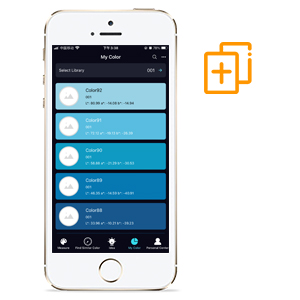
Image: The app's 'My Color' section for saving and managing measured colors.
- Color Sharing: Easily share your color data with others. The app supports sharing color files, QTX files, and CSV files, facilitating collaboration in design and production workflows.
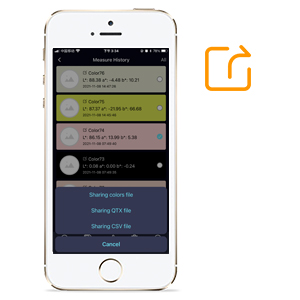
Image: Options for sharing color data from the app.
- Color Inspiring: Utilize the app's "System Scene" feature to visualize how a measured color would look in different environments or apply it to design software like Photoshop (PS), Illustrator (AI), etc.
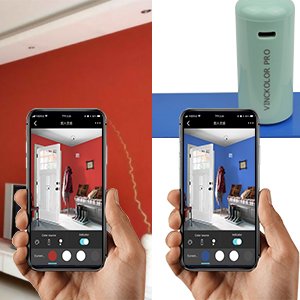
Image: The app's color inspiring feature, allowing users to apply colors to virtual scenes.
6. Mantenimiento
- Limpieza: Use a soft, dry cloth to clean the exterior of the device. Do not use abrasive cleaners or solvents. Ensure the measurement aperture and IPS screen are free from dust and debris.
- Almacenamiento: Store the colorimeter in a cool, dry place, away from direct sunlight and extreme temperatures. Always keep the magnetic calibration cover on the device when not in use to protect the measurement optics and ensure proper auto-calibration.
- Cuidado de la batería: Para una duración óptima de la batería, evite descargar completamente el dispositivo con frecuencia. Cárguelo regularmente, incluso si no lo usa constantemente.
7. Solución de problemas
| Problema | Posible causa | Solución |
|---|---|---|
| El dispositivo no enciende. | Batería baja. | Cargue el dispositivo por completo. |
| Medidas inexactas. | Device not calibrated; dirty measurement aperture; unstable surface. | Ensure auto-calibration is complete; clean the aperture; measure on a flat, stable surface. |
| No se puede conectar a la aplicación a través de Bluetooth. | Bluetooth off; device not in pairing mode; app issues. | Ensure Bluetooth is on; restart both device and app; check app permissions. |
| App registration issues (e.g., no verification code). | Email server delay; incorrect email; spam folder. | Check spam/junk folder; try again later; ensure correct email address; try a different email provider (Gmail/Outlook recommended). |
8. Especificaciones
| Característica | Detalle |
|---|---|
| Modelo | ColorMeter-Exact (CM190013S) |
| Repetibilidad (a corto plazo) | ΔE00 ≤ 0.05 |
| Acuerdo entre instrumentos | ΔE00 < 0.3 (Avg) |
| Geometría óptica | 45/0 |
| Tamaño de la medida | 4 mm de diámetro |
| Tamaño de pantalla IPS | 1.14 pulgadas a todo color |
| Conectividad | USB, Bluetooth |
| Fuente de luz | LED de espectro completo |
| Dimensiones | 37 mm x 102 mm (aprox. 1.3 x 3.3 pulgadas) |
| Compatibilidad | Android, iOS, Windows |
| Capacidad de la batería | 12,000 scans (760 mAh) per charge |
| Rango de longitud de onda | 400-700 nm |
| Tiempo de medicion | 1s |

Image: Detailed technical specifications of the colorimeter.

Image: Physical dimensions of the colorimeter.
9. Garantía y soporte
The Vinckolor Pro Digital Pocket Colorimeter comes with a standard manufacturer's warranty. For specific warranty terms, technical support, or service inquiries, please refer to the contact information provided with your purchase or visit the official Vinckolor webSitio. Conserve su comprobante de compra para reclamaciones de garantía.
Ask a question about this manual
Ask about setup, troubleshooting, compatibility, parts, safety, or missing instructions. Manuals+ will review the question and use this page’s manual context to help answer it.