
1. Introducción
This manual provides essential information for the safe and efficient operation, maintenance, and troubleshooting of your SAMSUNG Jet 90 + Clean Station Bundle Cordless Stick Vacuum. Please read this manual thoroughly before using the appliance and retain it for future reference.
2. Información de seguridad
Siga siempre las precauciones básicas de seguridad al utilizar aparatos eléctricos para reducir el riesgo de incendio, descarga eléctrica o lesiones. Este aparato es solo para uso doméstico.
- No utilice la aspiradora con un cable o enchufe dañado.
- No utilice la aspiradora sobre superficies mojadas ni para recoger líquidos.
- Mantenga el cabello, la ropa suelta, los dedos y todas las partes del cuerpo lejos de las aberturas y las partes móviles.
- No recoja nada que esté ardiendo o humeando, como cigarrillos, fósforos o cenizas calientes.
- Úselo únicamente como se describe en este manual. Utilice únicamente los accesorios recomendados por el fabricante.
- Apague todos los controles antes de desenchufar.
3. Contenido del paquete
Verifique que todos los componentes estén presentes en su paquete:
- SAMSUNG Jet 90 Cordless Stick Vacuum Main Unit
- Estación limpia
- Cepillo de acción suave
- Mini herramienta motorizada
- Herramienta para hendiduras largas
- Herramienta combinada
- Herramienta flexible
- Batería recargable
- Soporte de carga

Image: All components included in the SAMSUNG Jet 90 + Clean Station Bundle.
4. Configuración
4.1 Montaje del aspirador
Attach the desired cleaning tool or pipe to the main vacuum unit. Ensure it clicks securely into place.
4.2 Carga de la batería
The removable/reusable battery can be charged directly on the vacuum when docked on the charging stand, or separately on the dual charging station. A full charge takes approximately 3 hours.
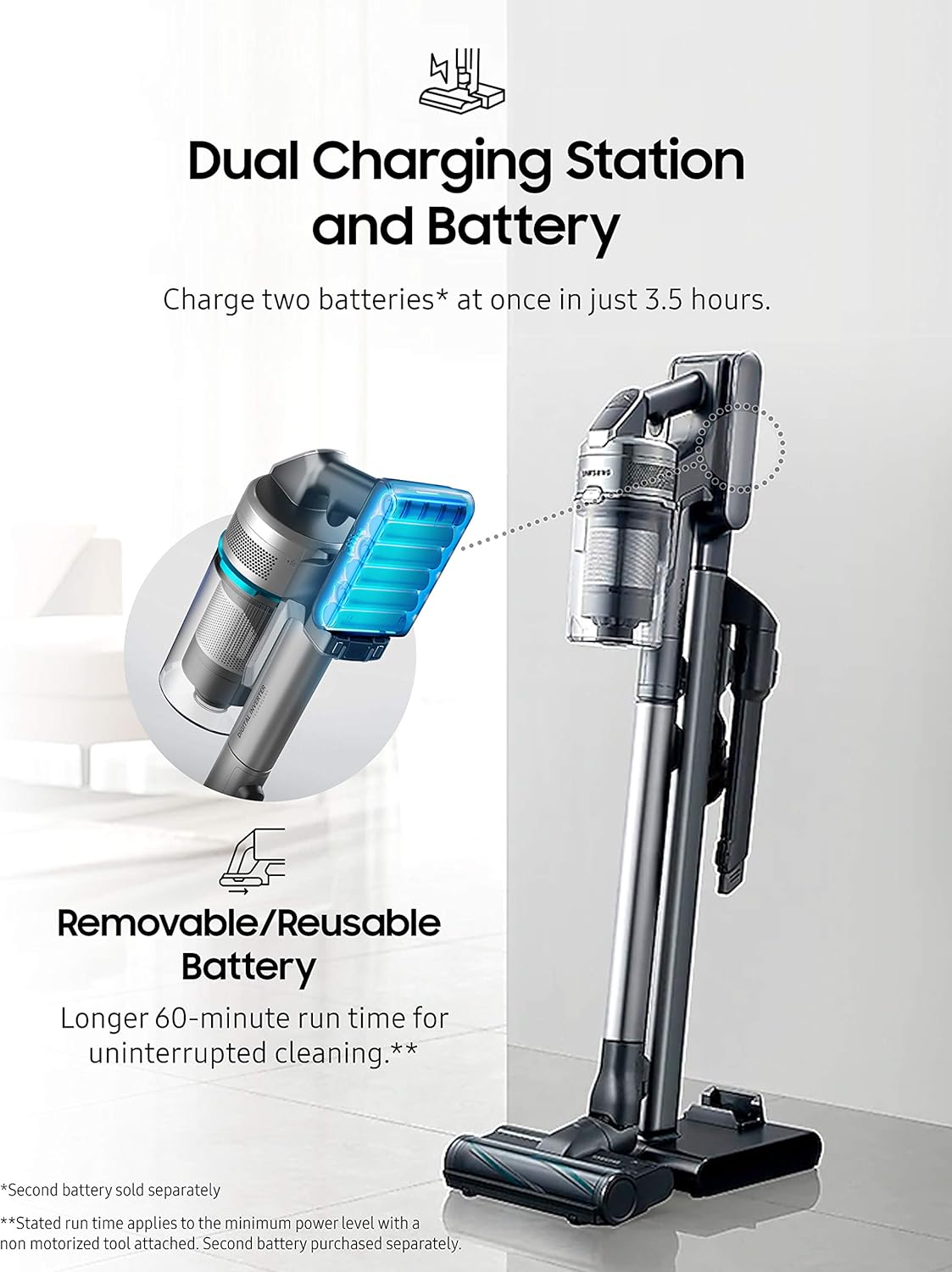
Image: The dual charging station allows for charging two batteries simultaneously.
4.3 Setting up the Clean Station
Place the Clean Station in a convenient location near a power outlet. It is designed to automatically empty the vacuum's dustbin.

Image: The Clean Station automatically empties the dust from your Jet Cordless Vacuum.
5. Operando
5.1 Encendido y ajuste de la succión
Press the power button to turn on the vacuum. Use the control buttons to adjust the suction power according to your cleaning needs. The vacuum offers up to 200 Air Watts of cleaning performance.

Image: The vacuum provides powerful suction for various floor types.
5.2 Adjusting Telescopic Pipe Length
The telescopic pipe features four available length adjustments for comfortable use, allowing you to reach high or low areas with ease.

Image: The telescopic pipe can be adjusted to four different lengths for ergonomic cleaning.
5.3 Using the Soft Action Brush
The Soft Action Brush is ideal for delicate hard floors like parquet, effectively picking up dust and debris without scratching surfaces.

Image: The lightweight design allows for easy maneuverability under furniture and on stairs.
5.4 Using the Spinning Sweeper Mop Attachment (Optional)
If you have the Spinning Sweeper mop attachment, attach it to the main vacuum unit. Ensure the reusable wet pads or disposable wet pads are securely attached to the spinning discs. Fill the water tank on the attachment with water or a suitable cleaning solution. The spinning action of the pads will clean hard floors. Remember to remove and clean the pads after use.
6. Mantenimiento
6.1 Emptying the Dustbin with Clean Station
Place the vacuum's dustbin into the Clean Station. The Clean Station will automatically extract dust and debris into a disposable bag, ensuring a hygienic emptying process.
6.2 Cleaning the 5-Layer Filtration System
The vacuum features a 5-layer filtration system designed to capture pet dander, pollen, and other non-living allergens, trapping 99.999% of microdust. Regularly clean or replace the filters as recommended to maintain optimal performance and air quality.

Image: Diagram illustrating the 5-layer filtration system for enhanced air purification.
6.3 Cleaning Brush Heads and Mop Pads
Periodically inspect and clean the brush heads to remove tangled hair or debris. For the Spinning Sweeper mop attachment, remove and wash the reusable mop pads after each use. Replace disposable pads as needed.
7. Solución de problemas
If you encounter issues with your SAMSUNG Jet 90 + Clean Station Bundle, refer to the following common solutions:
- Sin energía: Ensure the battery is fully charged and correctly inserted. Check if the charging stand is properly connected to a power outlet.
- Succión reducida: Check the dustbin for fullness and empty it if necessary. Inspect the filters for clogs and clean them. Ensure there are no blockages in the brush head, pipe, or hose.
- Ruido inusual: Turn off the vacuum immediately. Check for any foreign objects caught in the brush head or air pathways.
- La estación de limpieza no se vacía: Ensure the vacuum's dustbin is correctly seated in the Clean Station. Check if the Clean Station's disposable bag is full and needs replacement.
For persistent issues, please contact SAMSUNG customer support.
8. Especificaciones
| Característica | Detalle |
|---|---|
| Marca | SAMSUNG |
| Nombre del modelo | Jet 90 + CS |
| Número de modelo del artículo | VS20R9046P3 |
| Código Postal | 887276523088 |
| Color | Gris |
| Característica especial | Sin bolsa |
| Tipo de filtro | Disk (5-Layer Filtration System) |
| Componentes incluidos | Estación limpia |
| ¿Es inalámbrico? | Sí |
| Quétage | 500 vatios |
| Tiempo de carga | 3 horas |
| Factor de forma | Palo |
| Dimensiones del producto | 8.5" de largo x 9.8" de ancho x 44.7" de alto |
| Descripción de la batería | Iones de litio |
| Nivel de ruido | 78 dB |
| Peso del artículo | 40.2 libras |
| Uso en interiores y exteriores | Interior |
9. Garantía y soporte
For warranty information, product registration, or technical support, please refer to the official SAMSUNG webSitio web o contacte directamente con el servicio de atención al cliente. Conserve su comprobante de compra para reclamaciones de garantía.