
1. Introducción
The Lefant M210 Robot Vacuum Cleaner is designed to provide efficient and convenient floor cleaning for your home. Featuring advanced FreeMove technology, multiple cleaning modes, and smart app control, it effectively handles dust, pet hair, and debris on various floor types, including hard floors and low-pile carpets. Its slim design allows it to navigate under furniture, ensuring comprehensive coverage.

Figure 1.1: Lefant M210 Robot Vacuum Cleaner and its companion app.
2. Información de seguridad
Lea atentamente todas las instrucciones de seguridad antes de utilizar el aparato. Conserve este manual para futuras consultas.
- Este aparato es solo para uso en interiores.
- No utilice el robot en entornos húmedos ni sobre superficies mojadas.
- Keep the robot away from open flames or fragile objects.
- Asegúrese de que todos los cables, cortinas y objetos pequeños estén fuera del camino de limpieza para evitar enredos.
- No permita que los niños o las mascotas operen el robot.
- Use only the original charging base and power adapter provided.
- Do not block the robot's suction port or brushes.
3. Contenido del paquete
Verifique que todos los artículos estén presentes en el paquete:
- Robot Aspirador Lefant M210
- Base de carga
- Adaptador de corriente
- Cubo de basura de 500 ml
- 2 filtros HEPA
- 4 cepillos laterales
- Cepillo de limpieza
- Manual de usuario
4. Producto terminadoview
4.1 Componentes
The Lefant M210 features a compact design with essential components for effective cleaning.
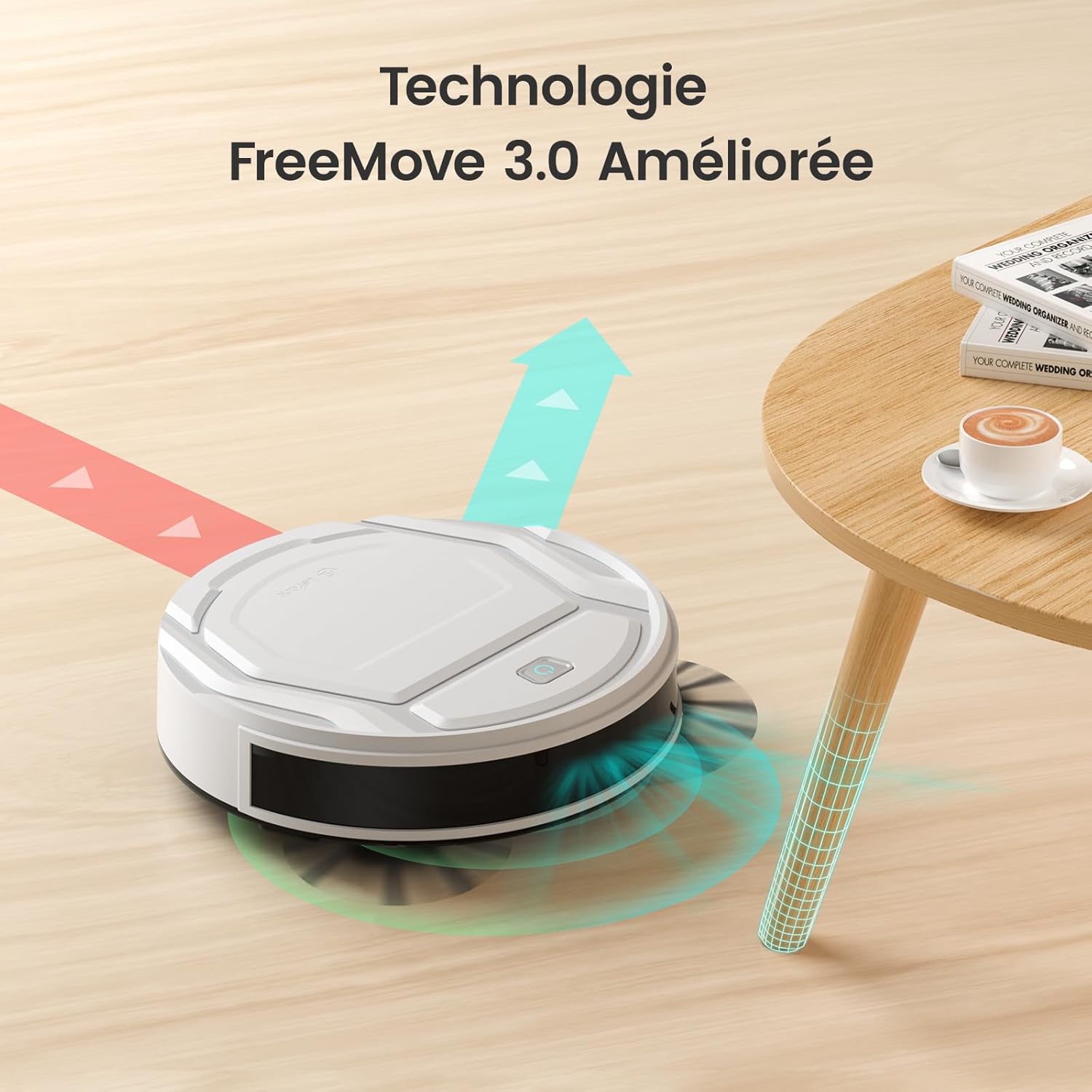
Figure 4.1: The M210's integrated infrared anti-collision sensors with FreeMove 3.0 technology.
The robot is equipped with an upgraded integrated infrared anti-collision sensor, allowing it to effectively detect its environment in 720 degrees, preventing it from getting stuck or falling from heights. Its slim body, only 28 cm wide, enables it to easily navigate small spaces and under furniture.

Figure 4.2: The M210's slim profile (7.8cm height) and quiet operation (55dB).
The M210 features a brushless suction port, which provides powerful suction without entanglement, making it ideal for picking up pet hair and dust. The 500ml dustbin reduces the frequency of emptying.

Figure 4.3: Tangle-free suction port of Lefant M210 compared to traditional roller brushes.
5. Configuración
5.1 Carga inicial
Before first use, fully charge the robot vacuum. Place the charging base against a wall in an open area, ensuring there are no obstacles within 1 meter to the sides and 2 meters in front. Connect the power adapter to the charging base and a power outlet. Place the robot on the charging base, ensuring the charging contacts align. The indicator light will show charging status.

Figure 5.1: The robot automatically returns to its charging base when battery is low.
5.2 Conexión de la aplicación (APLICACIÓN Lefant)
Control your Lefant M210 from anywhere using the Lefant App. Follow these steps to connect:
- Download the "Lefant" application from your app store.
- Open the app and click "Add Device". Ensure Bluetooth is enabled on your phone.
- Turn the blue power button on the robot to "I" (ON).
- Mantenga presionado el botón de inicio del robot durante 6 segundos hasta que ingrese al modo de emparejamiento.
- The app will automatically detect the M210. Select it and connect to your 2.4GHz Wi-Fi network. (Note: Only 2.4GHz Wi-Fi is supported).
- Wait for the robot to successfully pair.

Figure 5.2: Step-by-step guide for connecting the M210 to the Lefant App.
5.3 Voice Assistant Setup (Alexa/Google Assistant)
Integrate your Lefant M210 with Alexa or Google Assistant for convenient voice control:
- Open the Lefant App, navigate to "Mine" -> "Third-party access service".
- Registre su cuenta de voz y contraseña.
- Open the Alexa App, go to "More" -> "Skills & Games".
- Buscar "Vida inteligente".
- Haga clic en "HABILITAR PARA USAR".
- Seleccione su región e ingrese la contraseña de la cuenta de voz del paso 2.
- Espere a que Alexa se conecte correctamente.
For Google Assistant, the process is similar: link the "Smart Life" service through the Google Home app and use your Lefant account credentials.

Figure 5.3: Voice control compatibility with Alexa and Google Assistant.
6. Funcionamiento del robot aspirador
6.1 Modos de limpieza
The Lefant M210 offers 6 cleaning modes to suit different needs:
- Limpieza automática: El robot navega inteligentemente para limpiar toda el área.
- Limpieza de bordes: Limpia a lo largo de paredes y bordes de muebles.
- Limpieza de manchas: Concentra la limpieza en una zona específica para la suciedad localizada.
- Limpieza en zigzag: Follows an efficient S-shaped path for thorough coverage.
- Limpieza programada: Establezca horarios específicos para que el robot limpie automáticamente.
- Control manual: Controla el movimiento del robot directamente a través de la aplicación.
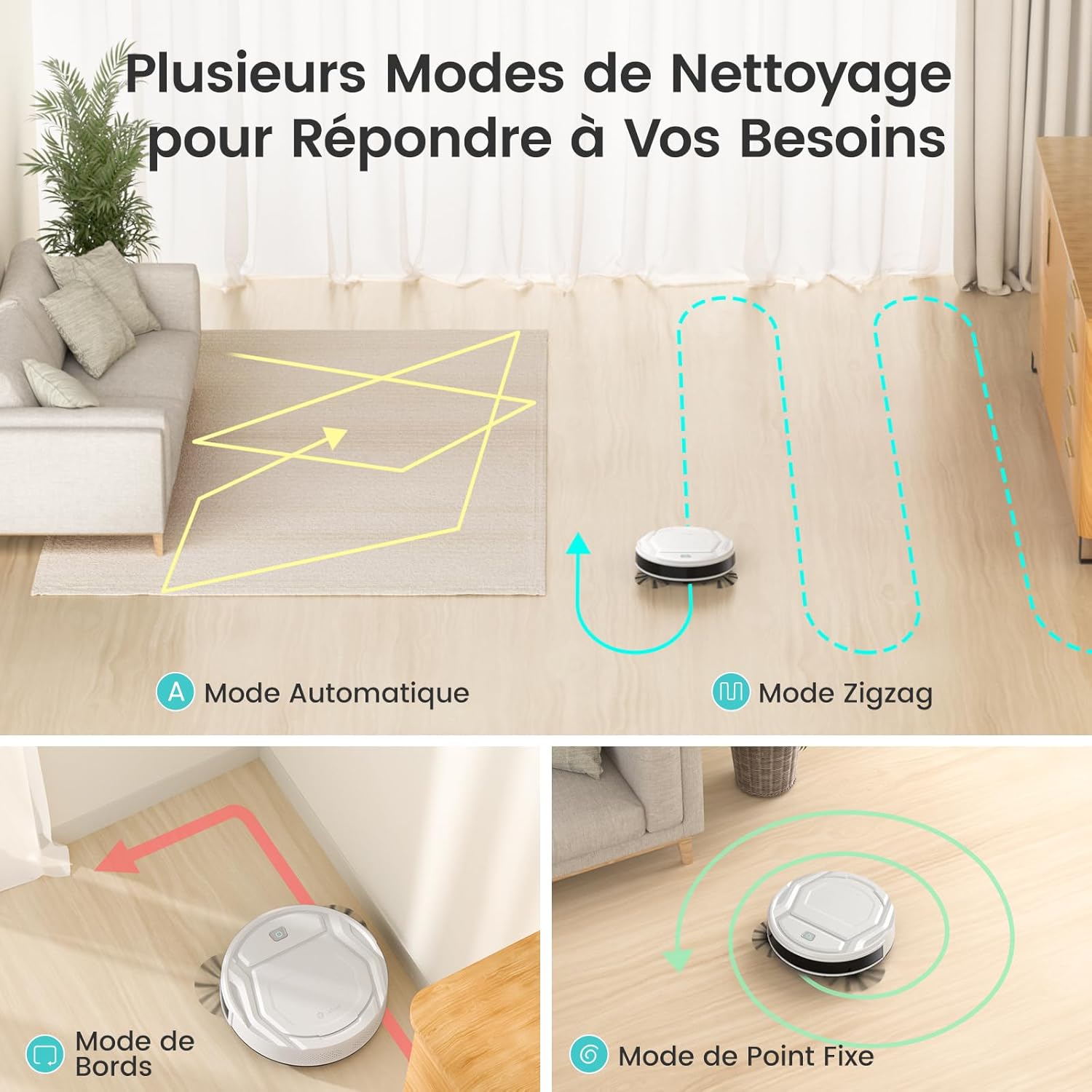
Figure 6.1: Various cleaning modes of the M210.
The M210 utilizes an original three-stage intelligent planning cleaning mode: 1. Zigzag cleaning, 2. Edge cleaning, 3. Finding missed areas and performing secondary zigzag cleaning.

Figure 6.2: Efficient zigzag cleaning path for thorough coverage.
6.2 Potencia de succión y potencia para alfombras
The M210 offers three suction power levels: Silent (1000Pa, 56dB), Standard (1800Pa, 58dB), and Powerful (2200Pa, 60dB). It also features automatic carpet detection, increasing suction power when on low-pile carpets to effectively remove dust and pet hair embedded in fibers.

Figure 6.3: Suction power levels and corresponding noise levels.

Figure 6.4: Automatic carpet detection and suction boost.
6.3 Battery Life and Auto-Recharge
Equipped with a lithium iron phosphate battery, the M210 provides up to 120 minutes of cleaning time on a full charge. When the battery is low, the robot will automatically return to its charging base. The battery supports up to 5000 charge/discharge cycles, ensuring a long lifespan.

Figure 6.5: Extended runtime of 120 minutes for large area coverage.
7. Mantenimiento
El mantenimiento regular garantiza un rendimiento óptimo y prolonga la vida útil de su Lefant M210.
7.1 Limpieza del depósito de basura y del filtro
It is recommended to clean the 500ml dustbin 1 to 2 times per week, depending on usage. The dual-layer filtration system helps prevent secondary pollution.
- Presione el botón de liberación del depósito de basura y extraiga el depósito de basura.
- Abra la tapa del depósito de basura y vacíe su contenido.
- Remove the HEPA filter and foam filter. Tap them gently to remove dust. Do not wash HEPA filters with water.
- Enjuague el depósito de basura con agua si es necesario, asegurándose de que esté completamente seco antes de volver a insertarlo.
- Vuelva a montar los filtros y el depósito de polvo y luego vuelva a insertarlos en el robot.

Figure 7.1: The 500ml dustbin for easy cleaning.
7.2 Mantenimiento del cepillo lateral
Check the side brushes regularly for tangled hair or debris. Use the provided cleaning brush to remove any obstructions. If brushes are worn, replace them with new ones (4 side brushes are included in the package).
7.3 Limpieza del sensor
Wipe the anti-drop sensors (located on the bottom of the robot) and anti-collision sensors (on the front bumper) with a clean, dry cloth to ensure proper functionality.
8. Solución de problemas
Si tiene problemas con su Lefant M210, consulte los siguientes problemas y soluciones comunes:
| Problema | Posible causa | Solución |
|---|---|---|
| El robot no enciende. | Batería baja; interruptor de encendido apagado. | Charge the robot; Ensure power switch is in "I" (ON) position. |
| El robot se atasca con frecuencia. | Cables, rugs with long fringes, or small objects on the floor. | Clear the cleaning area of obstacles. Lift thin cables and secure rug edges. |
| No se puede conectar a Wi-Fi/Aplicación. | Banda de Wi-Fi incorrecta (5 GHz); Contraseña incorrecta; Robot no en modo de emparejamiento. | Ensure your Wi-Fi is 2.4GHz. Re-enter password. Follow app connection steps to put robot in pairing mode. |
| Bajo rendimiento de limpieza. | Depósito de basura lleno; filtro obstruido; cepillos laterales desgastados. | Vacíe el depósito de polvo. Limpie o cambie el filtro. Limpie o cambie los cepillos laterales. |
| El robot no regresa a la base de carga. | Base de carga obstruida; Robot demasiado lejos de la base; Base sin alimentación. | Ensure clear path to charging base. Place robot closer to base. Check power connection to base. |
9. Especificaciones
| Característica | Detalle |
|---|---|
| Número de modelo | M210 |
| Dimensiones (L x An x Al) | 27.94 x 27.94 x 7.59 cm |
| Peso | 2 kilogramos |
| Volumen del cubo de basura | 500 mililitros |
| Duración de la batería | Hasta 120 minutos |
| Tipo de filtro | Filtro HEPA |
| Características especiales | 6 Cleaning Modes, 3 Suction Modes, Auto-recharge, Silent Operation, App/Alexa/Google Assistant Control |
| Conectividad | Wi-Fi de 2.4 GHz |
10. Garantía y soporte
Lefant offers a 2-year quality warranty and professional after-sales technical support for its products. For any inquiries or assistance, please do not hesitate to contact Lefant customer service.
Para obtener más información, visita la tienda oficial de Lefant: Tienda Lefant