
iClever GK03
Combo de teclado y mouse inalámbricos iClever GK03
Manual de usuario
Introducción
Thank you for choosing the iClever GK03 2.4G Wireless Keyboard and Mouse Combo. This manual provides detailed instructions for setting up, operating, and maintaining your new device. Please read this manual thoroughly before use to ensure optimal performance and longevity of your product.
Contenido del paquete
- 1 x iClever GK03 Wireless Keyboard
- Ratón inalámbrico 1 x
- Receptor USB 1 x 2.4G
- 1 x USB-C Charging Cable (for keyboard)
- 1 x Manual de usuario
Producto terminadoview
The iClever GK03 combo features a slim, full-size QWERTZ keyboard and a comfortable wireless mouse, designed for efficiency and quiet operation. The keyboard is made from aluminum and high-quality ABS, offering a premium feel and portability. The mouse features adjustable DPI settings for precise control.

Image: The iClever GK03 wireless keyboard and mouse, along with the compact USB receiver.

Image: The iClever GK03 keyboard and mouse combo in a typical desktop setup, demonstrating its compact and sleek design.
Configuración
1. Carga del teclado
Before first use, ensure the keyboard is fully charged. Connect the provided USB-C charging cable to the keyboard's charging port and the other end to a USB power source (e.g., computer USB port, USB wall adapter).
- Capacidad de la batería: 280 mAh
- Tiempo de carga: Aproximadamente 2 horas
- Tiempo en espera: Hasta 90 días

Image: The iClever GK03 keyboard being charged via its USB-C port.
2. Installing Mouse Batteries
The mouse requires 2 AAA batteries (not included). Open the battery compartment on the underside of the mouse, insert the batteries according to the polarity indicators, and close the compartment.
3. Connecting the 2.4G USB Receiver
Locate the 2.4G USB receiver. Plug the receiver into an available USB-A port on your computer (desktop, laptop, etc.). The system should automatically detect and install the necessary drivers.

Image: The compact 2.4G USB receiver, which connects both the keyboard and mouse to your device.

Image: Compatibility diagram showing various devices (Windows laptops, MacBooks, iMacs, Windows PCs) that support the USB-A connection.
4. Encendido
Turn on the keyboard and mouse using their respective power switches. The devices should automatically connect to the receiver. No pairing is required.
Instrucciones de funcionamiento
Funciones del teclado
The keyboard features a full 99-key QWERTZ layout, including a numeric keypad for efficient data entry. It is designed for quiet typing with its unique scissor-switch mechanism.
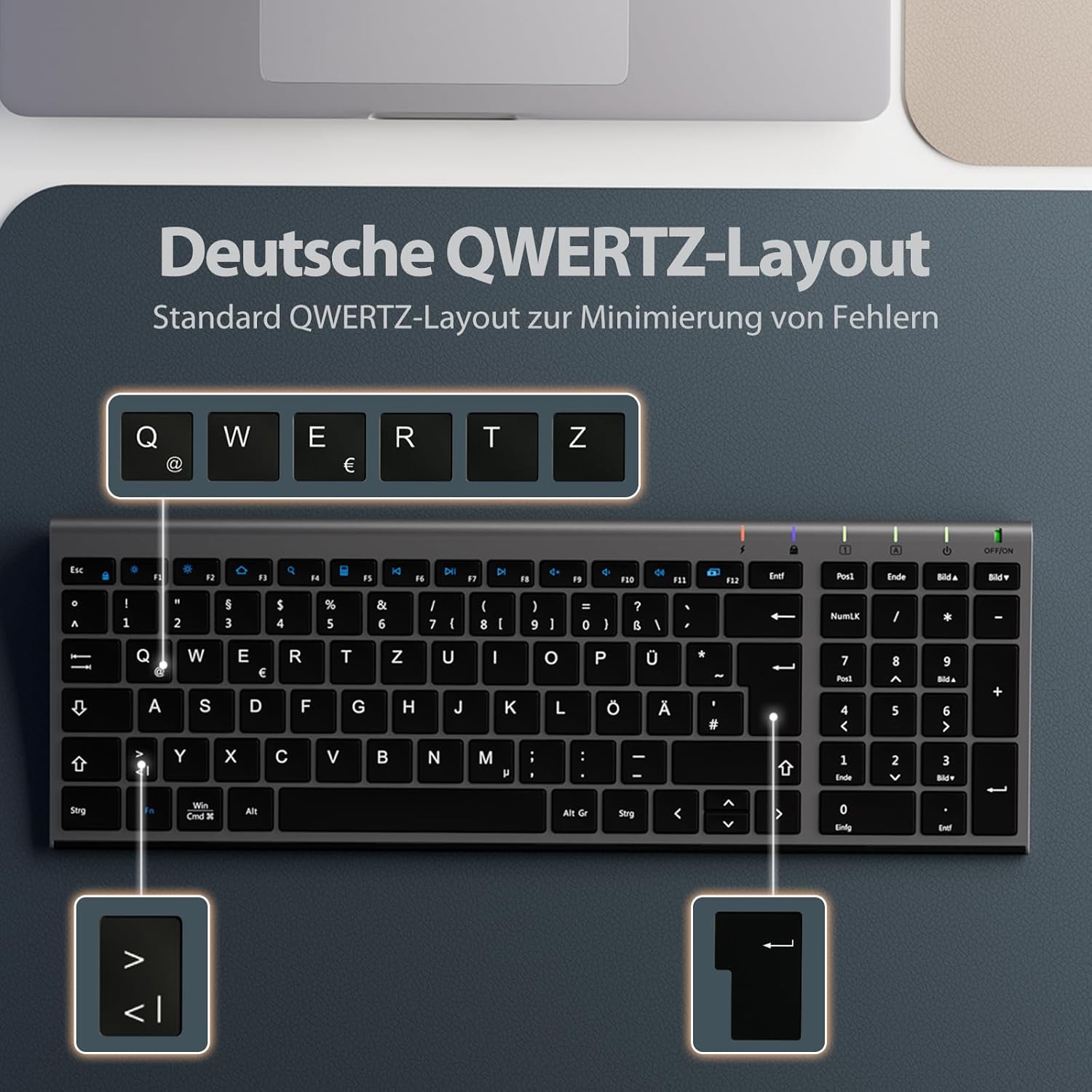
Image: The keyboard features a standard German QWERTZ layout for familiar and efficient typing.
Compatibilidad del sistema operativo: The keyboard supports both Windows and macOS. Use the dedicated "Win | Cmd" and "Alt | Option" keys to switch between operating system layouts as needed.

Image: The keyboard's "Win | Cmd" and "Alt | Option" keys allow seamless switching between Windows and macOS functions.
Ajuste de DPI del ratón
The mouse offers 3 adjustable DPI levels (1000-1200-1600) to suit your preference for cursor sensitivity and precision. Press the DPI button on the mouse to cycle through the settings.

Image: The mouse features quiet clicks and adjustable DPI settings for customized sensitivity.
Función de ahorro de energía
To conserve battery life, the wireless keyboard and mouse will enter sleep mode after 10 minutes of inactivity. To wake them up, simply press any key on the keyboard or click a mouse button and wait for approximately 3 seconds for reconnection.
Mantenimiento
- Limpieza: Utilice un paño suave y seco para limpiar las superficies del teclado y el ratón. Para la suciedad difícil, utilice un paño ligeramente seco.amp Se puede utilizar un paño con jabón suave, asegurándose de que no entre líquido en el dispositivo.
- Almacenamiento: Guarde los dispositivos en un lugar fresco y seco, alejado de la luz solar directa y de temperaturas extremas.
- Cuidado de la batería: For the mouse, remove batteries if the device will not be used for an extended period. For the keyboard, recharge regularly to maintain battery health.
Solución de problemas
| Problema | Solución |
|---|---|
| El teclado/ratón no responde |
|
| Conexión intermitente o con retraso |
|
| El cursor del mouse es errático o no se mueve con fluidez |
|
Presupuesto
| Característica | Detalle |
|---|---|
| Marca | IClever |
| Número de modelo | GK03 |
| Tecnología de conectividad | 2.4 GHz inalámbrico (receptor USB) |
| Disposición del teclado | QWERTZ (alemán) |
| Número de teclas (Teclado) | 99 |
| Batería del teclado | 280 mAh Rechargeable (USB-C) |
| Batería del ratón | 2 x AAA (no incluido) |
| Niveles de DPI del ratón | 1000-1200-1600 |
| Compatibilidad del sistema operativo | Android, Windows (8/10/11), macOS, Chrome OS |
| Dispositivos compatibles | Computadora personal, computadora portátil, teléfono inteligente, tableta |
| alcance inalámbrico | Hasta 10 metros (33 pies) |
| Color | Gris |
| Características especiales | Programmable Button (mouse), Ergonomic, Lightweight, Rechargeable (keyboard) |

Image: Dimensions of the iClever GK03 keyboard and mouse for reference.
Garantía y soporte
iClever products come with a standard manufacturer's warranty. For specific warranty details, technical support, or any inquiries regarding your iClever GK03 Wireless Keyboard and Mouse Combo, please refer to the warranty card included in your package or visit the official iClever website. Contact information for customer support is typically available on the product packaging or the brand's official online channels.