
1. Introducción
Thank you for choosing the WIFI SMART CAMERA IP Camera. This manual provides detailed instructions for the installation, operation, maintenance, and troubleshooting of your new outdoor dome HD WiFi camera. This camera is designed for reliable surveillance, featuring infrared night vision, two-way audio, and robust weather resistance.

Figure 1.1: WIFI SMART CAMERA IP Camera with its mobile application interface.
2. Producto terminadoview
2.1 Características principales
- Vídeo de alta definición: Captura videos nítidos de 1080P.
- Funcionalidad panorámica e inclinación: Ofrece una rotación horizontal de 355° y vertical de 100° para una amplia cobertura.
- Conectividad dual: Supports both wireless (Wi-Fi) and wired (RJ45 cable) network connections.
- Visión nocturna infrarroja: Provides clear monitoring in total darkness.
- Audio bidireccional: Micrófono y altavoz incorporados para comunicación.
- Detección de movimiento y alertas: Notifies your mobile device upon detecting movement.
- Seguimiento de humanos: Automatically tracks human movement.
- Resistencia a la intemperie: Designed to withstand outdoor conditions (waterproof, anti-lightning, heat and cold resistant).
- Opciones de almacenamiento: Supports Micro SD card up to 128GB and cloud storage.
Diagrama de 2.2 componentes

Figura 2.1: detallada view de componentes y dimensiones de la cámara.
- 1. Dual Antennas: For enhanced Wi-Fi signal reception.
- 2. Ponente: Para comunicación de audio bidireccional.
- 3. Infrared Sensor: Detecta la luz ambiental para la activación automática de la visión nocturna.
- 4. Micrófono: For capturing audio during surveillance and two-way communication.
- 5. Lenses: Lente de la cámara principal para captura de vídeo.
- 6. LED: Infrared LEDs for night vision and white LEDs for color night vision (if applicable).
- 7. Ranura para tarjeta Micro SD: Para almacenamiento de vídeo local.
3. Configuración
3.1 Instalación física
- Elija una ubicación: Select a suitable outdoor or indoor location that provides the desired viewing angle and is within range of your Wi-Fi network or wired connection point. Ensure the location is protected from direct, extreme weather conditions if possible, despite its weather resistance.
- Montaje: Use the provided mounting bracket and screws to securely attach the camera to a wall or ceiling. Ensure the camera is stable and cannot be easily dislodged.
- Conexión de energía: Connect the camera to a 12V power source using the provided power adapter. Ensure the power cable is routed safely and protected from damage.
3.2 Conexión de red
The camera supports two connection methods: wireless (Wi-Fi) and wired (RJ45 Ethernet cable).
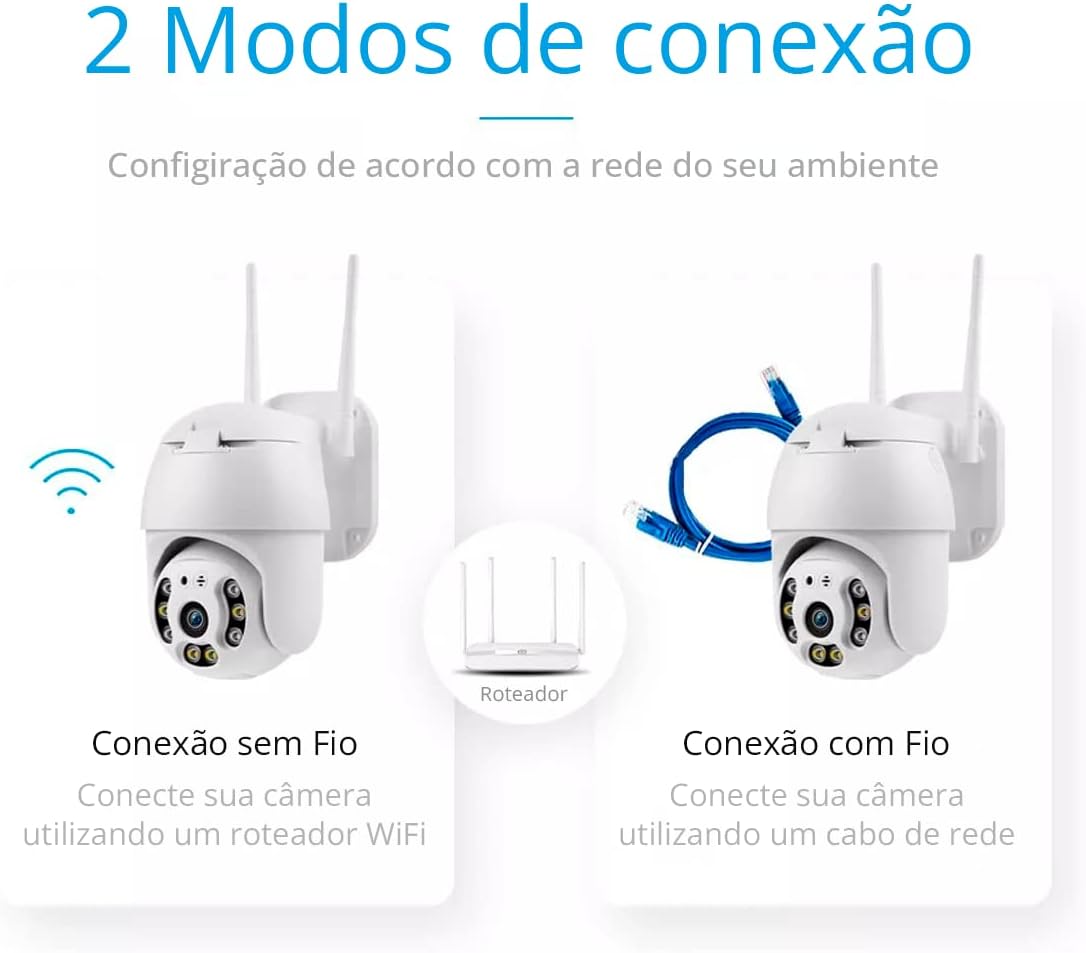
Figure 3.1: Wireless and Wired Connection Options.
3.2.1 Conexión inalámbrica (Wi-Fi)
- Ensure your Wi-Fi router is powered on and broadcasting a 2.4GHz network. This camera does not support 5GHz Wi-Fi.
- Proceed to App Installation and Pairing (Section 3.3) to connect the camera to your Wi-Fi network via the app.
3.2.2 Wired Connection (RJ45)
- Connect one end of an RJ45 Ethernet cable to the camera's Ethernet port.
- Conecte el otro extremo del cable Ethernet a un puerto LAN disponible en su enrutador o conmutador de red.
- The camera will automatically attempt to establish a wired connection.
3.3 Instalación y emparejamiento de la aplicación
- Descargar la aplicación: Buscar "ICsee" in your mobile device's app store (Google Play Store for Android or Apple App Store for iOS) and download the official application.
- Registrarse/Iniciar sesión: Open the ICsee app and follow the prompts to register a new account or log in if you already have one.
- Agregar dispositivo: Tap the "+" icon or "Add new device" option within the app.
- Seleccionar tipo de dispositivo: Choose the appropriate camera type (e.g., "Wi-Fi Camera" or "Wired Camera" depending on your connection method).
- Siga las instrucciones en pantalla: The app will guide you through the pairing process, which may involve scanning a QR code on the camera, connecting to a temporary Wi-Fi hotspot created by the camera, or entering your Wi-Fi credentials.
- Configurar la clave: Cree una contraseña segura para su cámara para garantizar la seguridad.
- Nombre de la cámara: Assign a recognizable name to your camera (e.g., "Front Door Camera", "Backyard").
4. Instrucciones de funcionamiento

Figura 4.1: Sobreview of Camera Features.
4.1 en vivo View y control de panorámica/inclinación
- Open the ICsee app and select your camera from the device list to access the live video feed.
- Use the directional controls within the app to remotely pan the camera horizontally (up to 355°) and tilt it vertically (up to 100°) to adjust the viewángulo de ing.
4.2 Audio bidireccional
- mientras esta en vivo view, toque el ícono del micrófono en la aplicación para hablar a través del altavoz de la cámara.
- The camera's built-in microphone will capture audio from the camera's surroundings, which you can hear through your phone.
4.3 Detección de movimiento y alertas
- Navigate to the camera settings in the ICsee app to enable and configure motion detection.
- Adjust sensitivity levels and set up notification preferences to receive alerts on your mobile device when motion is detected.
- The camera also supports automatic humanoid tracking, which can be enabled in settings to follow detected human figures.
4.4 Grabación y reproducción

Figure 4.2: Micro SD Card Storage Capacity and Recording Days.
- Almacenamiento de tarjeta Micro SD: Insert a Micro SD card (up to 128GB, Class 10 or higher recommended) into the designated slot on the camera. The camera will automatically begin recording based on your settings (e.g., continuous, motion-triggered).
- Almacenamiento en la nube: The ICsee app may offer optional cloud storage services for a subscription fee. Refer to the app for details on activating and managing cloud storage.
- Reproducción: Acceder a foo grabadotage through the playback feature in the ICsee app. You can filter by date and time to review eventos específicos.
4.5 Visión nocturna
- The camera is equipped with infrared LEDs for automatic night vision. In low-light conditions, the camera will automatically switch to infrared mode, providing clear black-and-white video.
- Some models may also feature white LEDs for color night vision when motion is detected. Check your camera's specific capabilities in the app settings.
5. Mantenimiento
- Limpieza: Limpie periódicamente la lente y la carcasa de la cámara con un paño suave.amp Paño para eliminar el polvo y la suciedad. No utilice productos químicos agresivos ni materiales abrasivos.
- Actualizaciones de firmware: Check the ICsee app regularly for firmware updates. Keeping your camera's firmware up-to-date ensures optimal performance, security, and access to new features.
- Fuente de alimentación: Asegúrese de que el adaptador de corriente y el cable estén en buenas condiciones y libres de daños.
- Estabilidad de la red: Maintain a stable Wi-Fi or wired network connection for uninterrupted camera operation.
6. Solución de problemas
| Problema | Posible causa | Solución |
|---|---|---|
| Cámara fuera de línea/No se puede conectar | No power, Wi-Fi signal too weak, incorrect Wi-Fi password, router issue, camera too far from router. | Check power supply. Move camera closer to router. Verify Wi-Fi password. Restart router and camera. Ensure 2.4GHz Wi-Fi is used. |
| Mala calidad de imagen | Lente sucia, iluminación insuficiente, problemas de ancho de banda de red. | Clean the camera lens. Ensure adequate lighting or check night vision settings. Check network speed. |
| Alertas de movimiento no recibidas | Detección de movimiento deshabilitada, notificaciones de aplicaciones desactivadas, configuración de sensibilidad incorrecta. | Enable motion detection in app settings. Check phone's notification settings for the ICsee app. Adjust motion detection sensitivity. |
| La tarjeta SD no graba | SD card full, faulty SD card, incorrect recording settings, SD card not inserted correctly. | Format or replace SD card. Ensure recording mode is enabled in app. Reinsert SD card. Use a Class 10 or higher SD card. |
| El audio bidireccional no funciona | Micrófono/altavoz silenciado en la aplicación, retraso en la red. | Check audio settings in the app. Ensure microphone and speaker icons are not muted. Check network stability. |
7. Especificaciones
| Característica | Especificación |
|---|---|
| Modelo | B08HLPC8DG |
| Marca | CÁMARA INTELIGENTE WIFI |
| Conectividad | Wi-Fi (2.4GHz), RJ45 Ethernet |
| Resolución | 1080P (2 MP) |
| Rango de Pan | 355 ° horizontal |
| Rango de inclinación | 100 ° vertical |
| Visión nocturna | Infrarrojos (Automático) |
| Audio | Audio bidireccional (micrófono y altavoz integrados) |
| Almacenamiento | Micro SD Card (up to 128GB), Cloud Storage (subscription may apply) |
| Fuente de poder | Wired Electric (12 Volts) |
| Material | Plástico |
| Aplicación operativa | ICsee (Android/iOS) |
| Resistencia a la intemperie | Waterproof, Anti-lightning, Heat/Cold Resistant |
8. Garantía y soporte
This product comes with a standard manufacturer's warranty. For specific warranty terms and conditions, please refer to the documentation included with your purchase or contact the seller directly. For technical support, troubleshooting assistance, or any inquiries regarding your WIFI SMART CAMERA IP Camera, please reach out to the customer support channels provided by your retailer or the manufacturer.


